

Desertcart purchases this item on your behalf and handles shipping, customs, and support to Greece.
๐ Elevate your signal, elevate your hustle โ never miss a beat!
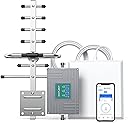
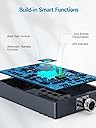
The ANNTLENT Cell Phone Signal Booster delivers a powerful 65dB tri-band amplification for LTE and 5G across major US carriers on bands 5, 12, 13, and 17. Designed for up to 4,500 sq ft coverage, it features a high-gain directional antenna and smart auto-level control to maintain stable, uninterrupted connectivity. Easy to install with app-assisted tower location, this FCC-approved booster is backed by a 3-year warranty, making it the ultimate upgrade for professionals craving reliable mobile signal in any workspace or home.


| ASIN | B07ML28SWS |
| Best Sellers Rank | #12,796 in Cell Phones & Accessories ( See Top 100 in Cell Phones & Accessories ) #11 in Cell Phone Signal Boosters |
| Brand | ANNTLENT |
| Built-In Media | N30 Booster, Outside Directional Antenna, Inside Panel Antenna, Window Entry Cable, 3 Loger Cables (2 x 16', 1 x 33'), Power Supply, Waterproof Tape, Cable Management Tape |
| Color | Grey |
| Compatible Devices | Smartphone |
| Connector Type | N-type |
| Customer Reviews | 3.8 out of 5 stars 2,031 Reviews |
| Frequency Band Class | Tri-Band |
| Frequency Bands Supported | 5,12,13 and 17 |
| Included Components | N30 Booster, Outside Directional Antenna, Inside Panel Antenna, Window Entry Cable, 3 Loger Cables (2 x 16', 1 x 33'), Power Supply, Waterproof Tape, Cable Management Tape Included Components N30 Booster, Outside Directional Antenna, Inside Panel Antenna, Window Entry Cable, 3 Loger Cables (2 x 16', 1 x 33'), Power Supply, Waterproof Tape, Cable Management Tape See more |
| Item Highlight | Up to 4,500 Sq Ft, Boost 4G LTE 5G Signal on Band 5/12/13/17, 65dB Tri-band Cellular Repeater, High Gain Antennas |
| Manufacturer | ANNTLENT Ltd. |
| Mfr Part Number | AN-CL70VA-01 |
| Model Number | N30-PY |
| Number of Items | 1 |
| Range | 3500 square_feet |
| Special Features | APP Help Install, LED Indicator |
| Unit Count | 1 Count |
| Warranty Description | 3 Year Manufacturer |
S**E
Fast and easy setup except for the outdoor antenna
Our verizon signal has been really bad for the 5 years that we have been out here in East Texas at our farm. We bought a $30/month satellite phone with HughesNet to get good service. Then, we bought this booster, and we now have 3 and 4 bars on our iPhones. The product specs say up to 4500 sq. ft. of coverage, but then they specify according to outside signal strength. We only get the minimal of about 800 sq. ft. coverage inside. But, we are happy with that. We have good coverage in our den, which is where our computer is and our TV and where we spend most of our time. I started calling relatives 300 miles away, and we talked for 30 minutes without the disruptions that we had previously experienced with our Verizon cell phones. The hardest part is installing the outside antenna. I put it outside my door and placed it on a tree to face the cell phone tower, and it worked fine. All 3 LEDs lit up green with total 65 dB boost. Now I have to wire it through the wall and mount the antenna onto the roof. My temporary setup has the outside antenna about 35 feet from the inside antenna. They say to keep them about 50 feet apart, but it is working fine at 35 feet. I looked up other products that could cover more sq. ft., but they are all based on the outside signal. My wife wanted me to return this product and get one that would cover more sq. ft. in the home. When I looked them up, I found the same signal boost from a product twice the price. So, I don't know. We decided to stay with this product. It works great. We have twice the signal strength now, and that was what we wanted in the first place. Update 3-21-2021 I finished the project the next day, threading the antenna wire through a hole in our brick wall that I had drilled years ago for our home security camera system. Luckily, one end of the antenna wire has a small connector, about 3/8 inch diameter. The other end is about 3/4 to 1 inch diameter, which would not fit through our cluttered 2-inch hole, which has 8 coax cables in it already. The included 50-foot extension wire worked fine. It went around a corner and up to the high point of the roof. I couldn't flush mount it to point upwards because of the shingles, so I mounted it pointing downwards. I wasn't sure if that side of our house was pointing exactly westward to the cell phone tower 8 miles away. When we plugged it all in, it seemed to work even better than the temporary setup, which was 4 feet off the ground. The antenna is now 20 feet high and about 35 feet away from the inside antenna. One other thing that worried me was which way to point the antenna. This side or that side. Apparently it does not matter. I had it point both ways, and each way worked fine. I just pulled my iPhone out of my holster and checked the bars. I'm at my computer about 4 feet from the inside antenna. It shows 3 bars. Then, I walked to the inside antenna and held my phone up to it, and it showed 4 bars. Not bad considering my previous number of bars was zero.
J**D
Good functionality, setup easy, app is terrible
Purchased for my new house that gets 1 bar or less of cellular coverage (Verizon) and lots of dropped calls. Setup of the antenna itself and indoor hardware is pretty easy - just plug and go. My only complaint is that I spent about an hour or two trying to get their app to work to calibrate/point the antenna in the right direction. As far as I can tell it is entirely broken and I gave up. I did find an iPhone app that could tell me the general location of the nearest towers on a map, plugged their coordinates into google maps, and then used that to get a general bearing. I get about 40-60 mbps down (plenty for streaming movies, browsing the web, etc.) and 1-2 mbps up (Iโd like more but again, plenty for general purpose web use) The latency is pretty good as well, around 50-60 ms. If I wanted better upload speeds I would need to purchase a more powerful and directional antenna like the Bolton long ranger, but for a single channel cheap antenna I think this would will be fine for now.
W**W
The device works great in our rural location.
The device works great in our rural location. Prior to this, we had an old 3G booster that I had installed about 12 or so years ago. Back then, it helped a little. However, in recent years I noticed it was not really helping, which is likely due to Verizon's changeover to 4G and then 5G. I researched all of this, with respect to boosters and also talked with a Verizon store rep who gave me other pointers. It is very important to find out which cellular bands are being used in the area and where the cell towers are so that you can (1) know if a booster will even help, (2) know which booster to buy, based on the bands it works with, and (3) know how to aim the antenna. While the "bars" indicator will help, you may learn that in the "settings" menu, your phone has another signal strength meter that measures the signal in "dB". Additionally, by downloading one of the Cell tower locator apps (just check online), you can determine tower location and which bands they use. For the installation, I used the provided cables. I installed the outside antenna at a height that is probably about 8 to 10 ft higher than the inside antenna, and probably about 30 to 35 ft horizontally. I think the manual recommends 25ft higher or, alternatively, 50 ft horizontally. Neither of these was practical for me. When I checked the signal strength (in dB), using the recommended App from the instructions, it was within tolerance. Before getting this new booster, we had only 1 out of 5 bars (sometimes 2 bars), which basically only allowed for phone calls. (In the early years, when the old booster worked, we could get 2 or 3 bars.) Now, with the new booster, we have 3 to 4 bars (out of 5) of strength inside the home. Even out in the yard we have about 2 to 3 bars of strength versus only 1. This is with Verizon. However, the booster even improved AT&T cell service a little. Before, we had 0 to 1 bars, which basically was "no service". Now, we have about 2 bars. (I ordered the specific device that worked more so for Verizon bands, since that is what we subscribe to. Visitors may have AT&T or other carriers though.) On Verizon service, I can now even use my laptop with VPN, using my phone as a hotspot, whereas before, the VPN would not work. The data transfer is a little slow since this is a cellular network (vs. FIOS or cable). My VPN and certain web services detects this and simply indicates that it is adapting for the "metered" service. Regardless, it is great just to be able to have the connectivity that 3 or 4 bars allows. We have had the booster for about a month now and it is great. Younger family members who rely more on their smartphones have even indicated that the service is great, even though the data transfer is a little slow.
D**A
DId not work
After reading most of the positive reviews we thought we would give it a try. Its pretty straight forward on installing and using. We usually read a lot of the reviews both good and bad before making a purchase. So before drilling holes in my fascia boards, in my ceilings and crawling around the attic on insulation. We decided to do a trial run to see if we received a better signal. First we assembled and downloaded everything per instructions. We located the inside antenna in our kitchen / living room (thats where that antenna would have been mounted) then run the cable to the outside antenna out the back door up onto the roof (this is roughly 35 foot ish). We then opened the app to locate the cell tower, and powered up the amplifier. I was on the roof pointing the antenna towards the tower, my daughter was at the back door asking my wife if the signal improved. We know where the tower is located about 2 nautical miles from our house. With that being said we do not have a eye view of the tower, there are a few tree lines and a couple hills blocking a direct view. At no time did the cell signal improve inside our home. We usually have 1 or 2 bars inside our home and 2 or 3 bars outside. I double and triple checked my hookup to make sure all the coax was properly hooked to the correct sides of the amplifier, I also verified all the green lights were on. I even drove to the cell tower to make sure there was no maintenance work or something that might explain why no signal improvement. A lot of the positive reviews people are saying they are as far as 12 miles from a tower in the desert or even in the mountains without a direct view of a cell tower and had an improvement in cell signal. However there are also many reviews with the results we had no signal improvement. In my opinion I really can not recommend this product simply for the fact too many people are having the same problem receiving a dead unit or defective unit, and that is what I believe we received. Good luck if you decide to give this a try maybe you will have better luck.
L**D
You will more than likely need to purchase extra coax cable
Works as advertised, "but be warned". You will more than likely have to purchase a longer coax cable unless you are very fortunate and can mount the antenna within about 20 feet of your dead spot. They are lucky I gave them 3 stars because it is sneaky and dishonest to give you a 20 cable when they know that you will need more than that in most circumstances. Especially when the instruction manual states "mount on pole above roof line".
D**L
From 1 bar and many dropped calls to 2-4 bars LTE - Very happy with this product
I felt compelled to write a review and describe our experience with this product. It worked out well for us. The situation we were in: We live in a wooded valley in the country with the nearest cell tower about 1.5 miles away, which is across many large farm fields. There is no line of sight to the tower and the valley with trees blocks most cell coverage. With either AT&T or Verizon you get 1 bar. You will have your phone drop calls and texts that donโt go. A picture attached to a text will take minutes to send or will just fail. My wife has a IPhone 13 and I have a Moto G6. What I did and our results: I received the booster and initially I slapped it together just to see if it would do anything for us before mounting and routing the wires. I was planning to box it up and ship it back if it didnโt work. I put the outdoor antenna in a workmate in the driveway and pointed it to where I thought the tower was. I ran the cable through the front window and setup the indoor power and antenna. Immediately our signal went to 3-4 bars near the indoor antenna. I was thrilled. Then I got serious about planning how to mount this thing. I ended up putting the antenna on the peak of the garage farthest from the rest of the house and running the cable through the attic. I dropped the cable down in the garage corner and drilled a hole into kitchen above the cabinets. I used the power outlet from the above the stove microwave as the power source and mounted the indoor antenna on the wall above the kitchen cabinets. To aim the outdoor antenna I got on Google Maps and looked at how our road runs and how many degrees I needed to adjust for. I now have a 3-4 bars (LTE) on the main floor. The upstairs and basement have LTE 2 bars. We had nothing in the basement prior to this. Even the back deck has 2 bar. If I text pictures they send in 4-6 seconds anywhere in the house. The IPhone 13 and Moto G6 both have similar results with Verizon and AT&T. I am very happy how well this worked. Mounting and setup: There are a lot of things to consider if you are going to get this to work. First you must have at least one bar. They state that the outdoor antenna needs to be 25 vertical OR 50 feet horizontal from the indoor antenna. I measured my setup and my vertical distance is around 15 feet AND 35 feet horizontal. That combination seems to be far enough for my setup to work. Another thing is the outdoor and indoor antennas are not to face the same way. My setup has them 90 degrees from each other. You will also need a power source to plug the signal booster into. I thought about having the signal booster in the attic but I read one of the questions asking about heat and cold and where we live is outside of the parameters stated, so I had to put our signal booster in a climate controlled area of the house(above the kitchen cabinets). The last thing is you need to be within 15 degrees when you aim the outdoor antenna at the cell tower. This is where Google Maps comes in handy if you cannot see the tower. Hope this helps!
L**A
Well worth the price
I have never had more than 1bar and my brother in law just bought this device and highly recommended it. I received the order yesterday afternoon but it was too hot to install it. As soon as my tower cooled off enough to climb, I installed antenna. Installation was a breeze once I got antenna mounted, just above the lower part of my roof. At this point I am 100% satisfied with product and I already recommended to a friend. If a 66yr old woman can install it without assistance so can you. What are you waiting for? 4bars and very clear.
J**S
Somewhat works (updated)
I mean it gets the job done some what. If you follow the instructions and ensure itโs pointing at the nearest cell tower. Itโll boost your internet a bit. I wish I went with a different brand or seller, this one I feel lies about the ability of their product. Sure it works, but typically one bar increased. Sometimes two. I never had really horrible internet, but it does help increase the availability of data in my room, so no more dead zones. Thatโs a plus. I just feel that the money they asked for was way more than what it would take to make a decent product. They could have done much better to make something more powerful. If you are trying to save money buying this product, donโt. Spend a little more like I should have and actually get something that ensures your connection to the towers. If you are short on money, this works well enough to get the job done I guess. (UPDATE) Iโm dropping this by another star because not only does it have the issues above but it seems to not be stable either. The signal output will often times become so weak that itโs as if I have no booster to begin with. I have many times had to unplug it and plug it back it to reset it. This should not be an issue.
A**R
Works great. From 1 bar to 4 bars.
Worked great to get my cell phone from 1-2 bars to 3-5 bars at the camper. Easy installation and setup.
A**R
Does not work
Did not work at all. I have had these in the past but not this brand.
R**M
It works great!
Bought it for the cottage, installed as per instructions and it works great! No complaints. Yes Iโd recommend it and itโs reasonably priced also.
J**E
I think it made it worse
We installed this at our cottage because the reception is really bad. It took a while to set up, and it has to be in the perfect spot to get a better signal. Made it a little better for my husbands signal, but it seemed to make it worse for my phone (we are with different carriers.) I can only get SOS signal, whereas before we installed it, I'd at least have a bar. Too much of pain to take it back down, so I just turn it off when I need to use my phone.
B**E
Cell service for emergencies
We had problems locating 1 to 2 bars and they were not continuous. We purchased this unit and get 3 to 5 bars when we are close to the unit. This is great for a remote camp site. We were unable to get data. We worked with tech support and they were very helpful. They recommended another unit that might help get different Bands. It didn't and we returned that unit. We are satisfied that at least to have cell service which we didn't before and the tech support was good.
Trustpilot
2 months ago
2 days ago