


Desertcart purchases this item on your behalf and handles shipping, customs, and support to Greece.
๐จ Power up your airflow game with Rabiโs 4-way fan hubโbecause your rig deserves the breeze!
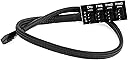
The Rabi PWM Fan Hub is a 4-way splitter adapter designed to connect multiple 12V CPU and case fans (3-pin or 4-pin) to a single motherboard header. Featuring durable sleeved cables and an included adhesive tape for mounting, it supports precise fan speed control via PWM or BIOS settings, making it ideal for enhancing airflow in desktop PCs without upgrading your motherboard.
| ASIN | B07JD22QF5 |
| Best Sellers Rank | 51,875 in Computers & Accessories ( See Top 100 in Computers & Accessories ) 4,519 in Components & Replacement Parts |
| Brand | Rabi |
| Compatible Devices | Desktop |
| Compatible devices | Desktop |
| Cooling Method | Air |
| Cooling method | Air |
| Country Of Origin | China |
| Customer Reviews | 4.5 out of 5 stars 419 Reviews |
| Manufacturer | HBK |
| Manufacturer Part Number | PWM1-4/5 |
| Material | Polycarbonate |
| Noise Level | 0.08 Decibels |
| Number of Items | 1 |
| Number of Packs | 1 |
| Power Connector Type | 3-Pin |
| Power connector type | 3-Pin |
| UPC | 799392371415 |
| Unit Count | 1.0 count |
| Voltage | 12 Volts |
| Wattage | 3 watts |
M**N
Handy for an old motherboard
This item was used to adapt a CPU header on my old ASUS H77 motherboard to allow for more fans for the inside of my case. I'm not sure that it has actual PWM passthrough to the additional headers (the non-CPU labelled ones), but either way it works great and the adhesive is strong enough to mount it to the back of my motherboard tray. The sleeved cable and sturdy connector is a nice touch and makes it look neat and stealth inside a well cable managed PC. I would recommend this product.
C**C
Set the mode to DC fans in the BIOS if you want to control 3 pin fans on this adapter.
Initially my motherboard was detecting the adapter as a PWM fan controller and running any DC connected fans full speed as the adapter has 4 pins but, to fully control DC fans, I just changed the fan mode from PWM to DC in the BIOS and itโs fully controlling the DC connected fans. Working great on NZXT N5 z690 with full DC fan control in NZXT CAM. Amazing item, just what I needed.
K**A
Easy to use and to stick to case.
Nothing special, it should be even cheaper but it came quickly. It does the job.
M**A
Great little cable for the price
Looks really slick and has a braided cable with heat-shrink tubing on the connectors. Note that if you intend to use 4-pin PWM fans and wish to control them via something like ASUS Ai Suite then you need to make sure one of the fans is plugged into the first socket labelled "CPU", even if the fan isn't mounted to a CPU cooler, otherwise they were just all running at 100%.
J**.
Does the job well
In short, this does what it is supposed to do and does it well. Cable length and size of board were perfectly fine for my o11d mini/ m-atx build. Did not use the included adhesive pad as it was not needed for my build. Packaging is minimal and not great, there could be a possibility of receiving a unit with bent pins or damaged if Amazon uses the usual small packet for delivery.
I**R
Small and neat
I will be honest I haven't used the product yet as I changed my mind at the last minute and bought a case with RGB fans already fitted but I am keeping it handy in case I replace my current fans( as they cannot be controlled by the system BIOS) so when I use it I will update my review but delivery was excellent and the price was good.
P**E
A good solution.
Some smaller motherboards omit the 2nd case fan header, so this comes in quite useful in that situation. While you should probably make sure your board has enough headers BEFORE you buy it, if you're installing fans a while after purchasing a board this works well.
M**W
Does the job.
I got this as my PC motherboard only had 3 headers and I needed 6, it works great first time and feels pretty good, one pin was slightly bent but a quick wiggle fixed that. Only thing for me is anything plugged in doesn't show the fan RPM in the bios, So I get set that header to a set speed at it sets all fans, as the hub is controlling my front 3 fans it does the job for me, but you don't get fine control over your fans.
Trustpilot
1 week ago
2 weeks ago