Buy anything from 5,000+ international stores. One checkout price. No surprise fees. Join 2M+ shoppers on Desertcart.
Desertcart purchases this item on your behalf and handles shipping, customs, and support to Greece.
🚀 Elevate your Wi-Fi game — never miss a beat or a byte!
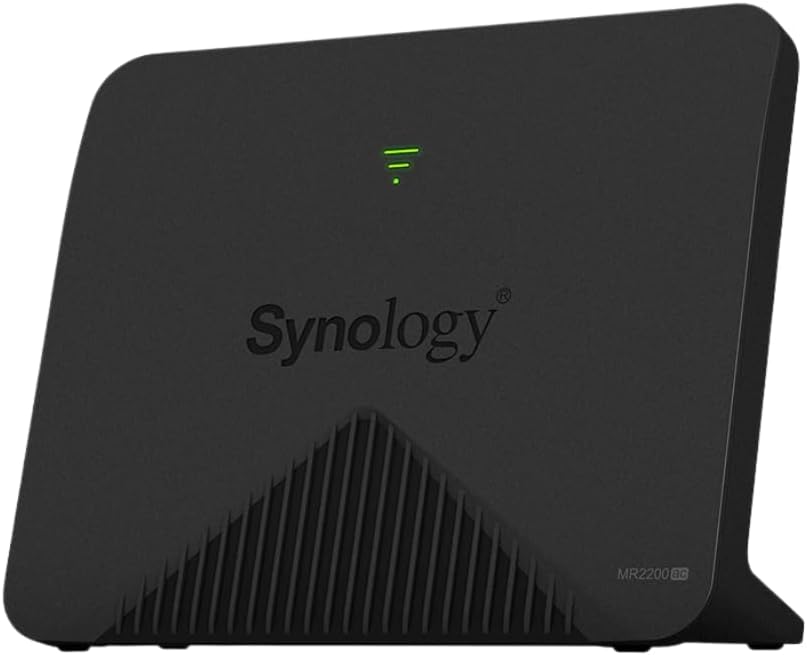
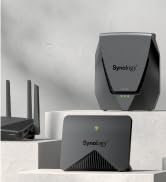
The Synology MR2200ac is a high-performance tri-band wireless mesh router delivering up to 2.13 Gbps bandwidth, designed for professional-grade reliability and coverage. Featuring easy app-based setup, seamless roaming with a single Wi-Fi name, advanced VPN capabilities, and comprehensive parental controls, it’s engineered to eliminate dead zones and maintain stable connections across up to 2000 sq ft. Ideal for demanding home and small office environments, this router combines cutting-edge hardware with Synology’s intuitive OS for a smooth, secure, and powerful networking experience.


| ASIN | B07JH4R76K |
| Antenna Location | Home, small office, gaming, streaming |
| Antenna Type | Internal |
| Best Sellers Rank | 42,265 in Computers & Accessories ( See Top 100 in Computers & Accessories ) 330 in Routers |
| Box Contents | AC Power Adapter X 1, Main Unit X 1, Quick Installation Guide X 1, RJ-45 LAN Cable X 1 |
| Brand | Synology |
| Brand Name | Synology |
| Colour | Black |
| Compatible Devices | Gaming Console, Personal Computer, Printer, Security Camera, Smart Television, Smart Thermostat, Smartphone, Tablet |
| Compatible devices | Gaming Console, Personal Computer, Printer, Security Camera, Smart Television, Smart Thermostat, Smartphone, Tablet Compatible devices Gaming Console, Personal Computer, Printer, Security Camera, Smart Television, Smart Thermostat, Smartphone, Tablet See more |
| Connectivity Protocol | Wi-Fi, Ethernet |
| Connectivity Range | 2000 Square Feet |
| Connectivity Technology | Wi-Fi |
| Control Method | App |
| Controller Type | App Control |
| Country of Origin | Taiwan |
| Coverage | Up to 2000 square feet (estimated) |
| Customer Reviews | 4.5 out of 5 stars 669 Reviews |
| Data Transfer Rate | 1 Gigabits Per Second |
| Frequency | 2.4 GHz |
| Frequency Band Class | Tri-Band |
| Frequency band class | Tri-Band |
| Global Trade Identification Number | 04711174723010 |
| Has Internet Connectivity | Yes |
| Has Security Updates | No |
| Is Modem Compatible | No |
| Item Dimensions L x W x H | 15.2L x 17.8W x 12.7H centimetres |
| Item Type Name | Synology MR2200AC Mesh Router |
| Item Weight | 450 Grams |
| LAN Port Bandwidth | 1000 Mbps |
| Manufacturer | Synology |
| Manufacturer Part Number | MR2200AC |
| Maximum Upstream Data Transfer Rate | 1000 Megabits Per Second |
| Model Name | MR2200ac |
| Model Number | MR2200ac |
| Model name | MR2200ac |
| Number of Antennas | 3 |
| Number of Ports | 1 |
| Operating System | Synology OS |
| Other Special Features of the Product | WPS |
| Product Warranty | 2 years |
| RAM Memory Installed | 256 MB |
| Router Firewall Security Level | Basic |
| Router Network Type | Wireless |
| Security Protocol | WPS |
| Smart Home Compatibility | Not Smart Home Compatible |
| Special feature | WPS |
| UPC | 846504003013 846504003211 |
| Unit Count | 1.0 count |
| Voltage | 12 Volts |
| Wi-Fi Generation | Wi-Fi 5 |
| Wireless Compability | 802.11ac |
| Wireless communication standard | 802.11ac |
T**Y
Superb mesh router with great reliability, coverage and interface
Oh thank god, a router system that doesn't break the bank and actually works as advertised. I'd moved over to a use-the-isp-router-just-as-a-modem set-up a while back to try to keep a lid on the kids' Internet usage which was getting out of hand. Asus rtac86u was the WiFi router component which was good to begin with though it still needed a booster to reach the furthest part of the house. But... The thing (memory) leaked like a sieve and needed rebooting at least once a day and after a couple of months' reasonably hard use just died on the 2.4g band. Very disappointing. I then discovered 30+% of all other buyers found the same.. Set off in search of a mesh capable router, had used synology nas products before and like their interfaces and after reading an effusive review about these MR2200 units took the plunge. Have two in a mesh pair, have never had wifi at home like it, it's revolutionised home working. It can sustain simultaneous video calls on three devices while maintaining HD streaming on TV and general surf Internet activities. *And* it has all of the parental control bells and whistles too. Only time will tell whether the hardware lasts but if uptime is anything to go by it's a winner (has gone 10 days between boots with no deterioration of service or weird connection hang ups etc). The interface is great with lots of control over everything (caveat - you can't dial up or down the wifi signal strength in mesh mode - no biggie in my case - and once meshed the interface treats the pair as if they were one - again don't really find this to be a problem). Only other thing might be the single lan rj45 jack but this is a _wifi_ router and you can always stick a switch in the back if desperate for more ports. I highly rate / recommend these.
C**R
Fast and expandable
Like many things with technology, you can pay a variety of prices to get performance required, but with the proliferation of smart home kit, the limitations of cheaper routers is becoming apparent. This is especially true of the routers provided free with broadband connections as many struggle with more than a couple of dozen connected devices. This is one of the reasons I went for the Synology MR2200ac router - the other being I am a fan of Synology equipment, having one of their NAS boxes for many years. What you get is a sleek black plastic router with built in antennas - so no ears sticking up. There is a bank of LEDs shaped like a triangle on the front. The back has a single gigabit Ethernet port, a single RJ45 WAN port, power socket, USB3.0 port, Wi-Fi/WPS buttons and power button. There is also a small hole for resetting the router. Setting up the router was easy - just plug a cable between my modem (I have G.Fast so used a BT Openreach modem) and log into the router interface to set up the PPPoE connection. The router connected first time, although there is no way to see the connection speed as this is internal to the modem and not the router. The routers interface will be familiar to those who have used Synology NAS boxes and is a bit like a desktop inside your browser. There are a huge amounts of different settings you can configure within the router, including setting up user profiles so you can control what your children can and cannot get up to and what times their internet connections should cease. The router also supports safety databases like the Google Safe Browsing database, helping to reduce risks of going to bad sites at a router level. This means all devices are covered at the edge of the network and do not need tools installed on them (note that you should still have anti-virus installed on computers). There are also so applications you can install like VPNPlus to make your router a VPN endpoint - allowing you access into your network from away from the home/office. It supports up to 10 clients using SSTP, PPTP, L2TP or OpenVPN protocols - I would recommend SSTP or OpenVPN, although SSTP is a Windows protocol so not suitable for Apple or Android by default). The VPN server comes with 1 client licence and you have to purchase the others, although Synology have been running a free licence campaign during lockdown and any purchased free do not appear to have an expiry date on them. The built-in USB port can serve a couple of functions as required. It can have a 3G/4G dongle fitted (you need to make sure it is compatible) to provide an internet failover in the event that the primary link is down, it can have a USB printer plugged in to make this a network printer or it can have a storage device (pen drive or hard drive) fitted and provide a basic file share. Unfortuately it does not appear that the storage device can be used to supplement the built in storage for any Synology apps you may install. The Wi-Fi has 3 channels - 2 5GHz and 1 2.4GHz and runs quickly even with over 50 devices connected. It supports up to ac standards but like all Wi-Fi, it will slow down as more devices connect. For bandwidth hungry devices, cable connections are best and this is one of the weaker points of the router as it only has a single LAN port - you will also need a switch if you want to connect more than 1 device via cable. The maximum number of devices the router claims to support is 90 and I have seen no issues with over 70 connected - my older mesh setup claimed 100 but suffered with more than 50 devices. A nice additional feature of the router is its ability to be part of a Synology mesh with other Synology SRM mesh routers - they do not all have to be MR220ac models. I have not found a need to add a second router yet as the coverage I am getting from the single unit placed fairly central in my home is good enough and beats the coverage I had from other routers (both ISP supplied and expensive bigger brand ones). There are many more benefits to this router than can be covered in a simple review. If you have questions, ask in the question section and I will answer where I can.
H**K
The best mesh networking gear you can buy!
Have you tried using range extenders to increase the coverage of your Wi-Fi network? Found they're not exactly seamless when handing over as you move around? Dropping out or being a bit flaky, or needing re-booting at inopportune moments? Me too... My Synology router is a great piece of gear with an excellent user interface. I've now added three MR2200ac access points to create a mesh network around my large property, and couldn't be happier with the set-up. Configuration is a piece of cake, using the excellent Synology app. It's genuinely plug and play. The option to use a dedicated wireless channel or ethernet cable for back-haul is excellent and reduces demand on your useable bandwidth considerably. Same SSID and password throughout the coverage area, of course - but the handover between access points is genuinely imperceptible. Now, instead of multiple networks with different SSIDs criss-crossing my property, there's a single, lightning-quick mesh network that just works marvellously! Make the switch to Synology and get full, easy control of your network! You'll be glad you did! *** If you've found this review useful, please hit the "Helpful" button. I neither receive nor accept any incentive or reward for commenting on products, so this is a genuinely independent perspective. Your appreciation is what makes writing reviews worthwhile 😊 ***
D**L
Great WiFi Extender by supplied with an EU plug instead of a UK version
This router has been used to extend the WiFi network from my Synology RT2600. Set-up was extremely simple as the RT2600 just automatically detects and configures the extender. There is no need to plug in a network cable when used as an extender. This device has generally boosted the WiFi around my home so I no longer have any dead spots. It is also very easy to move the device to another location around your house without any reconfiguration. The BIG complaint that I have is that the power supply comes with a EU type plug instead of a UK type. This is not acceptable considering how much it costs. Using a plug adapter makes the power supply hang-out a long way from the wall socket.
P**L
Works like a charm
I started off with an MR2200ac replacing a unifi security gateway (in order to more easily manage kids devices). It worked a treat and the wifi speed was very impressive. I've now replaced my entire unifi system (which was hit and miss when upgrading software - requiring manual intervention via ssh) with synology routers. I now have have a Synology RT6600ax in the loft acting as the main router and multiple MR2200ac devices acting as mesh points in various rooms (mainly connected to the main router via ethernet, but have one connected via wifi). The entire system is so easy to manage, that my non-techie wife set up the last one via the Synology app. And the wifi speed on these is great - I get 500Mbit/sec internally when connecting to these. More than enough for my needs. Can't recommend these enough.
P**R
Great router with all the usual Synology benefits, but LIMITED MESH AVAILABILITY.
An excellent wifi router, with the added bonus of the familiar Synology approach to device management and support. That includes comprehensive and easy-to-use configuration software, and the backing of a responsive, well-organised, well-informed and helpful support operation - an example that some of Synology's competitors would do well to follow! However, if you are considering, as I did, buying these devices to create a mesh network behind some other existing router (ie, you wish to run in these Synology units in Access Point mode), then THINK AGAIN:- THE MR2200ac WILL NOT CREATE A MESH NETWORK WHEN OPERATING IN ACCESS POINT MODE. I will return to this later. The first thing you will notice when commissioning these units is that they are painfully slow to boot, and it typically takes several minutes from power-on to full operation. If you have multiple units, the initial process of pairing them is simply agonising. Pairing cannot begin until both units have reached an operating state - say 10 minutes from cold boot. The the main unit must then "find" its subsidiary unit, and then send it configuration information, all over wifi. This again takes a considerable time, during which the internet connection is unavailable, and the less patient user is likely to have given up long before the process is complete. I don't doubt that this is Synology being thorough, but I can't help feeling that much time might be saved if initial pairing could be completed using a wired connection between the units. However, the pairing process explicitly requires wifi connection only - wired connection can only be made once pairing has been completed, which strikes me as silly, as well as wildly unintuitive even if it is common practice. I have already mentioned mesh networking. Remember that this device is advertised and sold as a mesh router, which to me seems to be only partly true. The main point of a mesh network is that on can have multiple router/access-points working together to provide seamless wifi coverage over an area that could not be covered by a single unit. The benefit of this to the user is that one can move around anywhere within the covered area, connecting invisibly and without interruption of communication to the unit providing the best signal at that particular moment. Switching between units should be instantaneous. After I had installed my Synology units in addition to (and not as a replacement for) my existing DrayTek router, I found that there could be a hiatus in communications of several seconds, occasionally tens of seconds, in switching between units. It was only when I eventually queried this with the Synology support department I was told that mesh communications is only available when the master unit is operating in full router mode, otherwise it is explicitly disabled! I remain more than a little annoyed about this, as I found no indication of it before purchase, and nor does it seem a remotely reasonable limitation on so pricey a piece of kit. I am an enthusiastic user of other Synology NAS devices, and so I had no qualms in purchasing these devices. However, had I known of the mesh limitations I would most certainly not have done so.
S**O
Excellent . Was happy to disable isp wifi functionality and have 4 2200s creat a solid Mesh
These are amazing I ended up getting 4 for the perfect mesh . Only tip I would give is from time to time just double check Synology for any new updates ,for the latest version of SRM .I only had one tiny issue where the latest update wasn't installing automatically as I had set . So I had to do it manually.. it was a painless process to update takes fiew minutes.
E**E
Excellent WIFI Mesh solution
Wanted to upgrade my home Wifi to get better coverage particularly on the patio outside and get away from a couple of range extenders that I had previously used. I did a fair bit of research on line, initially I tried Google Nest Wifi mesh but I couldn't get it setup. Eventually their tech decided I needed an Android phone to do the setup (and no one in my household has one! So I sent them back and ordered the Synology MR2200ac, I decided to choose these units because of good reviews and having a Synology NAS for many years which has been very reliable . After 3 months since I installed the MR220ac mesh I am very pleased, the 3 units provide good stable Wifi coverage around my house and garden. The Synology interface is easy to use, I used a Draytek Vigo 130 modem as part of the setup.
P**E
Caro pero lo vale
Un producto excelente. Muy buena estabilidad en la red. Muy buena velocidad, se actualiza de vez en cuando automáticamente, tengo 4 de estos con el módem de synology. Es un producto caro desde mi punto de vista. No me arrepiento. Casa de block, concreto, 2 pisos. 500 mts2.
A**O
Qualità produttiva al TOP, grande stabilità in combinazione con l'RT6600AX
Già possessore di un paio di NAS dello stesso brand, ed avendo da poco acquistato il loro TR6600AX (fenomenale), per avere l'intera copertura del WIFI in casa, ho acquistato questo MR2200AC. Che dire, prodotto di ottima fattura (non sembra affatto che da un momento all'altro si spacchi in due), ma la cosa più importante è la facilità di collegamento con il router principale a prescindere si scelga il collegamento via WIFI oppure Ethernet (si può anche scegliere entrambi). Ovviamente lo stesso godrà di tutti i servizi forniti dal router principale fra cui il Threat Prevention e Safe Access. Stabilità e velocità davvero notevoli. Ottima la rete mesh, il passaggio da un apparato all'altro mentre ci si muove in casa è immediato e non si ha perdita alcuna di segnale. Ne consiglio assolutamente l'acquisto poiché il sistema operativo nonché l'interfaccia di gestione è assolutamente fantastica, intuitiva e comunque alla portata anche di coloro che non hanno molta dimestichezza con sistemi del genere. Anche il supporto (help direttamente nelle maschere dove si settano i vari parametri oppure sul loro sito),è assolutamente all'altezza del marchio.
S**T
Top product
I'm using this as a bridge in the top floor of the house, there is also a mix of diverse range extenders which I now really don't need. The router easily picks up the signal from the main WLAN Router downstairs (Synology 6600) and has made all my extenders redundant. We now have a High speed WLAN bubble of about 50m diameter around our house. At last we are getting our moneys worth from our 1000er internet connection. Our old router was slowing everything down. My son has hardwired his PC into it in his room.and is very happy with its performance. Set-up was easy using the main Router and the Synology App. The software offers everything that we need. Definitely recommend this brand.
L**N
Great router
needs latest update to work with TPG.
D**O
Perfecto para ampliar red mesh
Lo ido como satélite de un 2600RT. Funciona perfecto.
Trustpilot
1 month ago
3 weeks ago