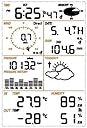


🌦️ Your Personal Weather Guru at Home!
The Ambient Weather WS-2080 is a compact and reliable wireless home weather station that measures essential weather parameters including wind speed, temperature, humidity, rainfall, and barometric pressure. It features a user-friendly LCD console, USB connectivity, and EasyWeather PC software for real-time monitoring and data logging, all at an affordable price.


| ASIN | B003OSJ08S |
| Additional Features | Alarm |
| Brand | Ambient Weather |
| Brand Name | Ambient Weather |
| Color | Silver |
| Connectivity Technology | USB |
| Customer Reviews | 3.9 out of 5 stars 582 Reviews |
| Display Type | LCD |
| Finish Type | Glossy |
| Global Trade Identification Number | 00857450002029 |
| Included Components | Receiver, Thermo-Hydro Transmitter, Wind Speed Sensor, Wind Direction Sensor, Rain Sensor |
| Is Used Where | Indoor, Outdoor |
| Manufacturer | Ambient Weather |
| Material | Glass, Plastic |
| Material Type | Glass, Plastic |
| Model | WS-2080 |
| Number of Items | 1 |
| Part Number | WS-2080 |
| Power Source | Battery Powered |
| Sensor Technology | Wireless |
| Shape | Rectangular |
| Special Feature | Alarm |
| Style | Compact |
| Style Name | Compact |
| UPC | 857450002029 |
| Unit Count | 1 Count |
| Upper Temperature Range | 149 °F |
| Warranty Description | One year parts and labor. |
D**E
Best Valued Wireless Internet Home Weather Station
Ive never had weather station before like the reasonably priced ws-2080. easy to use and install. Love it. when used with weatherunderground, the station can be accessed anywhere. I have had the unit since November of 2013, and would choose this product again rather than the other brands out there. It's a great station for the money. It's a great way to dip your toes into the world of the home weather stations without a large investment. From a reviewer i found helpful From Paul... I'm a weather nerd. I've had several home weather stations over the years, some were better than others. Davis' stations are the best on the market, but they are expensive. You can have four complete WS-2080's for the price of the least-expensive Davis w/ the appropriate data-connect module. The Davis machines are definitely superior in accuracy & build quality and are (I believe) made in the US. All great things, and if you're very serious about home weather then Davis is the way to go. But if you're looking for a decent home weather station that has PC/Mac + Internet capabilities for a low price, the WS-2080 is an excellent choice. I've had mine up and running for over a year now, with no problems. I've had no problems with the sensor range; my base is sitting about 75' away from the outside sensor, through 1 exterior (with a few windows) and 3 interior (no windows) walls. No connection problems at all. Unlike some of the other low-cost home weather stations, I've not had any problems with erroneous data. It's clean. With a previous station I'd get frequent erroneous 57mph wind gusts when it rained, despite my best efforts of sealing & ferrite-choking the cables. A few caveats: 1) Use good lithium batteries in the outside sensor unit. It takes two AA's. Yes, lithium's are 2-3 times as expensive as alkalines. But lithium batteries will last much longer than standard alkalines, and they are much better in the cold. I live in the midwest, and I'm still on the first pair of AA lithiums from over a year ago, and they went through a brutally cold winter without any complaints. Alkalines are fine for the base. My station's connected to a PC, so it is powered via the USB connection anyway. 2) Build quality of the sensors is very low. The sensors work well and are decently accurate, but it's all made with the cheapest plastic. Don't drop any of the parts, they will break. Be *very* careful of the wind cups. I recently moved, and in moving I managed to accidentally tap the wind vane on my garage ceiling. Barely grazed it. One of the struts that supports the cups immediately snapped. The cup itself had the integrity of an egg shell; easily crushed by thumb & forefinger. Very brittle. I'm not sure if this is how it was when new, or the result of a year's worth of exposure to the elements. Luckily AmbientWeather sells replacement parts, so I'm just out a few bucks. 3) Buy the better radiation shield that Ambient Weather recommends. The station comes with a small shield, but it's woefully insufficient. Using the included one, my station would get temps 15+ degrees (F) above ambient in direct sunlight. Using AmbientWeather's suggested shield, temperatures are now unaffected by direct sunlight, just as it should be. If you are placing the thermometer/hygrometer sensor somewhere always shaded, then you'd be fine with the included shield. But if the sensor ever receives direct sunlight (not just during the day, but any day of the year too...), buy the better shield. 4) The wind & rain sensors must level to work properly. You absolutely must pay special attention to level the rain sensor. Must. The rain gauge in this (and most other) station works like a see-saw. As water pours through it, two little buckets tip back and forth inside the housing. As they rock, the sensor records that motion as amounts of water. If the housing isn't level, the buckets won't rock properly and the gauge won't work. Take the time to make sure it's level when you install the station. If the price were higher, I'd knock off a star for the build quality. But as it is, it's a decent station for the money. It's a great way to dip your toes into the world of the home weather stations without a large investment.
T**R
Perfect Home Weather Station
To be clear, I rate this a 4.5/5. It's been an entire year since I purchased this station which allows me to make a complete review. First of all, reading other reviews I feel lucky that mine hasn't failed. The installation was very straight forward and I had it mounted in no time. Installed the software and configured my station as needed. Because I planned on uploading my data to Wunderground, I installed the free software Cumulus and data was online in minutes following the instructions. My station is mounted about 20ft off the ground and around 100ft from the receiver (through 2 walls) and the signal is rarely lost even in a blizzard. From the actual data perspective, I couldn't be more pleased. Yes, this is a somewhat cheap model compared to many other stations out there, but it stands toe to toe. I live in the Midwest area and you can bet our weather is anything but ordinary. This station in its first year has been through temps of 100ºF down to -20ºF (-50ºF wind chill) and has worked flawlessly. You MUST purchase a set of very good batteries to maintain your station working (I recommend Energizer Advanced Lithium). If you want to avoid spikes in temperature reading due to direct sunlight, place the sensor in a shady area (facing north) or purchase the larger solar shield. To obtain accurate wind speeds, make sure you place the station away from very tall objects (trees, homes, etc.) or place them higher up. The rain gauge is OK. For light to moderate rain, the sensor works perfectly and is off by less than 5% when compared to a physical rain gauge. When experiencing torrential rainfall the error can be up to 50% due to the rain drops bouncing off the plastic from the gauge and not landing inside. However it's still very good in collecting data. This station has few problems that should be noted. As many people have probably already said, the receiver sometimes loses connection to the computer when connected via USB. This happens around once a month or so. The station itself is still sending out data and the receiver is collecting it and showing it fine, however it doesn't get sent to computer. The only fix is to disconnect USB from computer and take out the batteries of receiver and reinsert (calibrate as necessary). While this takes seconds to do, it can become annoying when your station is stuck sending same data for hours on Wunderground if not caught in time. Another thing is the update interval of 48 seconds. While this isn't an issue for most of the sensors, I've found that my wind speeds are lower than what they actually are. Sometimes if there's a very strong gust between intervals it isn't recorded and it's like it never happened. This is the most annoying part for me as wind speed is one of the top things I wanted to work. Through one of the coldest/snowiest winters our area has seen in decades, I'm glad I had this weather station to record data. It was well worth the cost and it can't be beat for the price. However, this station is no longer being produced (although it can come back if there's a strong demand).
S**S
WS2080 is cheap but works well
when we purchased the ws2080 it was going for around $160 on amazon (oct2011). as of jan2012 it is available at $120; as of nov2013 it is going for $110 or so. this is a great station if you are just getting into weather monitoring. a davis might last longer, but then again you could just buy another WS2080 in two years and still be out less money than you would have paid for a davis. these mid-range weather stations are manufactured by FineOffset then resold by ambient weather and others. the 2080 has a fairly comprehensive feature set. the 1080 has larger console, touchscreen, and requires more batteries. the 3080 has uv/sunlight sensors. there is a solar-powered option for the sensors. the 2090 has an integrated anemometer/windspeed. below are the PROs, CONs, and a few NOTEs about the WS2080 based on use on an island in mid-coast maine. PRO: - inexpensive. you can get 3 of these (or 2 stations with 2 extra consoles) for the price of a single davis. - reasonably accurate, except for wind gusts. - trivial to set up. - wireless range is decent, but not great. - batteries (use lithium!) last a long time even in cold weather. requires 2 AA for the sensor and 2 AA for the console. - multiple consoles can be used with a single instrument station. the console is WS-2080-C and can be ordered directly from ambient weather for about $40. - console can be powered via the USB port. CON: - the console update interval is every 48 seconds (davis is every 2 seconds). as a result you'll miss a lot of wind gusts. not a big deal for the other data. - there is no option to add uv/sunlight sensor. the 3080 units seem to be hard to find in the US. - instruments are made of rather brittle, cheap plastic. they work, and they last at least a year or two, but they are cheap. - no heater in the rain collector, nor is there an option to purchase one. easy enough to build your own, but beware that without it your rain collection data will be off when it snows. - contrast in the display console is not great. for example, the wind direction indicator is difficult to read. the view angle for all readouts is rather limited. - the backlight is splotchy - the diffuser is horrible. - the instrument battery level is not reported to the console (nor is it accessible programmatically, for that matter). - no access to the wireless protocols this device uses, so there is (not yet?) any way to use zigbee or other wireless device to collect data - must plug in to the console usb port, and that makes for a less aesthetically pleasing configuration. - no external antenna port on the sensors for adding larger antenna or booster. no external antenna port on console either. if you want a bigger antenna you will have to modify the case. - the console buttons are not very well-designed. they work well enough for configuring the console the first time, but they are not very convenient for getting to the weather history data or for quickly changing the display (e.g. from F to C and back). NOTES: - we have two consoles communicating to a sensor cluster 200 ft away, with wood and brick walls between. in this configuration communication is lost about 30% of the time, but re-establishes itself. with direct line-of-site and 200 ft the connection is never lost. - be sure to keep the temperature/humidity sensor out of direct sunlight. if you must place it in direct sunlight, then build a shield (plywood or styrene will work) or purchase the $40 shield from ambient. - you do not have to mount all of the sensors on the mast. there are 3 parts: temperature/humidity, rain gauge, and wind speed/direction. these are connected by 2- and 4-conductor phone wire with RJ11 connectors, so you can extend the distance between sensors with some standard phone wire and connectors. - the rain collector has no guard around its collection surface. if the collector is in a windy location, the readings will be low as most of the water will blow out of the collection dish. you might want to build a vertical wall around the collector to block the wind. - the rain collector does not have enough surface area to read low rainfall amounts very well. build a funnel-like bowl around the collector to improve low-rainfall readings, but if you do this you will have to recalibrate the sensor. - the console is not great for browsing historical data or even quickly changing between F and C. it is much better to hook up a data logger then display the data on a tablet or phone or computer for detailed analysis and manipulation. - highly recommend using weewx, pywws, or wview to collect and display data purchase a plug computer (ionics or dreamplug work very well), connect to the WS2080 using usb, run weewx on the plug, and you've got a robust system that records years of weather data and is accessible via web browser, mobile phone, or whatever you like. and it can upload your data to the weather underground if you're into that. UPDATE: 01jan2013 if the radio-controlled clock (RCC) does not lock on, call ambient weather and get the sensor package replaced before the warranty runs out. if the RCC is working you will see WWVB at the top of the console display, and the console clock will set itself automatically. there is now a module for the WS2080 so it will work with weewx. weewx is similar to wview, but much easier to work with and customize. the module supports the WS2080 and all of the other FineOffset variants. the WS2080 console occasionally loses contact with any computer attached via USB. the console still displays data from the sensors, but the computer cannot get the data from the console. the only solution is to power cycle the console. we have seen this happen every month or two with one console, but never with the other console. it makes the WS2080 inappropriate for use in remote/unattended locations. UPDATE 15nov2013 the anemometer starts to stick after about 2 years of continuous use in a salt air environment. a few drops of light oil in the bearing will free it up. sometime in mid-2013 the 2080A console started shipping. this adds calibration constants for temperature and humidity, but otherwise behaves just like the 2080. recent updates to pywws and weewx seem to reduce the frequency of the USB lockups. in some cases, specifically with the 2080A console, weewx manages to recover from them automatically. no one knows yet what causes the lockups. older stations (pre-2011) seem to have no lockups. not all newer stations suffer from the lockups.
O**Y
Failure #3
I don't see a date of when I originally wrote this, it's been about a year since I bought it, so this is an update. Today is September 28, 2013. Purchased August 2012. The "atomic" clock never did pick up a signal and sync to it. I'm just outside of Jacksonville FL for a geographic reference point. The warranty just expired about a month ago, the wind speed indicator expired today. This is the second time that I've had the wind speed indicator fail on an Ambient product product. Wind is the only moving part so naturally that's what fails. Seems to me it fails pretty quickly too. I'm very disappointed in this company. Unless you want to spend the money replacing these every year, I'd say spend a little more and get something of a higher/better quality. This is the last Ambient product I buy. My best friend lives on a farm in Ohio, and his fails every year to year and a half too! Same thing. The anemometer. I received this a few days ago. The first thing I noticed was that the physical product seems well designed and equal or better made than other similar products I've purchased in the past. This is my third weather station. Putting it together was a snap. At least for the recommended temporary test phase. Then I got to the "console operation" section. That's where everything fell apart and why the review went from five stars to three, and as I think about it, I might make it even lower before I'm done. Set up is cumbersome, anything but straight forward, and you can't go to a particular function without going through ALL functions. The manual recommends setting it via computer. So I loaded up the software that came with it. It wasn't very intuitive either. I punched the "help" function which takes you to Ambient's web site, which is even more confusing than anything I'd come across yet. Then the damn alarms start going off, and of course there in nothing to tell you how to silence that. In the end I pulled the batteries, exited the software and disconnected the USB cord. Day two in console setup. Most people want to get their new items up and running as soon as they can. If that's you, start at the back of the manual that came with it and move towards the front. It turns out there are certain things that can only be altered with the pc software that comes with it. I found this out from the Cumlus alternate software and instructions. Which is much better software than what comes with this thing. After installing the software again, I finally found where the actual alarm on/off page was hidden. Making sure all items were unchecked I clicked on "save". Sweet silence! Next I find that contrary to what the manual implies, there is no way to set the date and time from the computer. It's either the RCC signal, or wear your thumbs out on the display. Why it won't accept the computers clock has got to be one of the biggest oversights of the decade. In three days the RCC hasn't registered on this, but my other weather stations are receiving it fine. Tech support says wait for up to two weeks. The transmitter is sending everything else, Cumulus is reading and recording everything using the computer clock. Everything else seems to be working now in its temporary setup. The manual dropped it one star, the dumb clock setup dropped it another star.
E**Y
Decent USB capable station for the price
I've had my WS-2080 up & running for 5 months, and for the most part, I'm satisfied with it. It's no Davis (or other pro-level) station, but for the price, and features, it's a good deal for starting out. Assembly of the sensor array was quite easy, however the plastic used feels rather light & flimsy - I'll just have to wait and see how it survives my Northern winters. Installation on the mast was not too difficult, the only challenging part was in getting the wind vane oriented to North while up on a ladder. The included solar radiation shield for the thermometer/hygrometer (which is actually the outdoor transmitter module) is not at all adequate if you plan on installing the array anywhere with direct sun exposure...the temps will not be accurate. You can buy a 'proper' shield from Ambient, build your own (Google is your friend), or try to mount the transmitter away from direct sun. The other sensors, including the rain gauge are pretty accurate, provided that you properly plumb the mast. The indoor station is easy to read, good contrast on the LCD, but the smallish buttons and menu system are a bit tedious to get things configured...much easier to use the software to set it up. I would have preferred an actual base stand to support the station vertically, as with the flip-out back stand it sits on an angle, taking up more desk space (and reduces the viewing angle of the screen). Once configured and connected to the computer, it's relatively easy to monitor & track your weather data, and upload to the various weather sites such as Weather Underground. Cumulus pc software works quite well. I was tired of needing to keep the pc running at all times to upload my 'live' data, so I have made the switch to a Linux based software package called pywws. It runs on my USB router 24/7, and does not rely on a pc being active to upload/log data. If you have an open source router, and a bit of Linux knowledge, and want to avoid the pc route for uploading/logging, I highly recommend pywws. The code & group can be found on Google. I've been having some random loss of signal from the outdoor sensors since the beginning, despite having fresh lithium batteries and being pretty much 40' line of sight between the sensors and the base unit. Not sure if it's a positional problem, or a hardware issue, but it's not software related - as the loss of data is being stored in the base unit's memory itself (and reading the data with 3 different apps all show the same error). Ambient's support was poor - I emailed them about the issue, they responded with a "guess", and they never responded to my messages after that point. I could live with the occasional hiccup, but it would have been nice to know if this could be a hardware defect or not.
L**N
Loving it
I got this about a year ago and bolted it to the vent on top of the house to ensure the wind would get to it. I. Love. This. Thing... It has survived all year with the same batteries I threw in there when I first got it and supposedly, they have another year to go before they'll need replacing. It has survived sustained temperatures of 0 degrees (F) and the worst hurricane sandy had to offer, and being that I live about a mile from the shore on long island NY, I would say that is worth mentioning. It gets accurate air temperature readings in the BLAZING SUN, I mean this thing BAKES and gets the temperature correct give or take a degree. The barometer is adjustable to relative or absoloute, and allows you to choose what variation will trigger the rain warning indicator to flash on which changes depending on your geographic area. Not much to say about the rain meter, it gets the same readings a raincatch does. The wind vein works in the slightest of breezes and is great at telling you which way the wind is blowing from, but if you live in a wooded area it does not register high winds if you have it below the tree line (picked up a maximum of 30mph in sandy). Humidity is always handy, I have nothing to compare it to but it is great to know when you need to water your yard because the air will be about 30% or below. It all comes with software that allows you to track the weather you have experienced by linking it up with a computer via USB. It's rather simple to assemble too. Two chrome coated steel poles, a top arm for the wind veins, and 2 sub-arms for the rain catch and sensor/transmitter. To make things short, WELL worth what I paid, considering the parts are replacable it can last you forever. PS: DO NOT expose the indoor console to humid enviorments (70% humidity or more), it shorts out, won't display anything, and beeps until you rip the battery out. A mistake I only made once, it dried out and worked just fine afterwards but who knows if I would be so lucky twice.
J**N
Save Your Money!
the temperature indoors is accurate, outdoors is another story. as mentioned in some previous reviews, has inaccuracies caused by the poor quality of the cover of the narrow meter. people recommend forking out an extra $40 on an "upgraded" cover...Why? Shouldn't this better functioning piece that is pivotal to the basic function of this weather station be the Standard piece of which the station is shipped with?! Because without it, you basically only have accurate temperatures when the temp/humidity device is not being cuddled with sunlight. A fatal flaw in design quality that impedes its function of the very basic thing you buy a system like this for. If you can manage to find a way to overlook the worse disaster in home meteorological history that is the failure to obtain an accurate reading of the temperature outside, then you might be happy with the other functions it happens to do well (one of which is NOT measuring outside temperature during 8am-7pm generally). We found wind speed to be accurate and helpful, as well as direction. Rain gauge is spot on (though gets put out of commission during winter where it's regularly freezing and getting good amount of snow. the range has never been a problem, and one thing i DO like is its durability gainst the elements. In the 3 years this has been in use, it has never malfunctioned (except for not giving accurate readings of outside temperature during sunlight hours) and small parts have withstood the tests of time in a mountainous region with high wind gusts, harsh winters, and hot, wet summers. Final Thoughts: The Ambient Weather WS-2080 is sturdy, reliable (for everything but outside temperatures during sunlight hours, due to design/shade flaw), and has a solid foundation for something that would be perfect for any home to own, if not for having to fork out an extra $40 for something that any person with basic reasoning skills would determine that the current uv radiation shield should be recalled and trashed, and the upgraded version be included in its place at no extra charge, just good business practice. As-is, no, i do Not recommend anyone who plans on putting this in an area outside that gets any sunlight at all, get thiss weather station. There are other better-made ones on the market that dont try to play customers for fools. Why 2 stars and not 1? Every other part of this weather station is well built and durable, and will surely last many years to come. I have an analog dial thermometer that tells the temperature very very well that cost $1.00 at a garage sale, right outside the kitchen table.
G**G
Twice the Station at Half the Price
My Ambient Weather WS-2080 replaced a 5-yr old Oregon Scientific (OS)sytem and Virtual Weather Station (VWS). The WS-2080 is smaller in comparison, but was a snap to set up, taking just 30 minutes. Everything can be set up on 1-2 rods (included) or set up separately if you wish. The sensors are connected via RJ-45 wire to a transmitter; my is 120' away and works great. The new console is smaller, easier to read and far easier to use, it also connects to my PC via USB cable, not the clunky serial cable which my old system had (what a pain). After setting up the system, I turned on the console. It recognized the data readily and was fairly easiy to customize to my tastes. But what I'm most interested in, however, is reporting my weather to Wunderground.com. I had hoped to be able to use my VWSsoftware, but it is incompatible with the WS-2080. Not a proble though as, although the system comes with it's own software Easy Weather, I just downloaded the free app 'Cumulus' weather. Cumulus easily connects to WS-2080. Although not as nice an interface as VWS, is easier to use and best of all, far easier to configure and calibrate. After a couple rainfalls and temperature watches I easily was able to adjust settings to match my manual weather station figures, something I could not do with OS. It also measures rainfall to 0.01" instead of 0.04" as on OS, (I hated that). Connecting to Wunderground.com was easy, too, as Cumulus has a special internet connect section just for Wunderground. Be advised, though, that it will take awhile to see your data displayed in Wunderground. I didn't see my data until the next morning even though I enabled Rapid Fire. Probably the one difficiency I noted was that it uses AA Batteries and there's no way to recharge them as with OS. But I used long-life Lithium batteries so hopefully the will last awhile. Twice the system at half the price. It's well worth the money.
ケ**ん
メンテナンスが大事
購入し運用して約5年になります。メンテナンスをしながら現在も活躍してます。畑の中に1.5メーターのポールを立ててそのポールに観測装置を取り付けています。最初は家の中では電波状態が悪くちゃんとデーターが拾えないことが多かったので受信機をばらし本体の中にあるビニール線アンテナをちゃんとしたロッドアンテナに取り換えたところ格段に受信感度が上がりました。また、雨量計は長い間使っていると観測装置の中のシーソーマスの中に土がたまり動かなくなるので定期的に取り出して掃除をする必要があります。一度だけ風向センサーに蜘蛛の巣がはられ動かなくなったことがありました。やはりちゃんとメンテナンスが大事です。
地**8
異常気象の時期です。活躍しています。
この商品については、まずまず満足しています。組立と設置はマニュアルに頼らずできましたがコンソールとデーターの作成ではやはりマニュアルが必要となり、付属の英語版マニュアルを和訳して対応、これについては出展者にも連絡させていただきましたが、その後のなんの連絡も入ってきていません。安価な商品であってもうまく使いこなせてこそ機器の商品価値があるものとも考えます。やはり、最低限の日本語解説の必要性を感じています。
A**ー
WS2080A使用に関して
WS2080A 日本語の取扱説明書が必要でです 温度の華氏と摂氏の切り替えができない?
A**ー
日本語に対応していません
マニュアルも、WEBページ閲覧でも、日本語に対応しておらず、意味不明。 その様な商品であることを記載すべきです。返金して欲しい
Trustpilot
2 months ago
3 weeks ago