Desertcart purchases this item on your behalf and handles shipping, customs, and support to Greece.
⚡ Cool speeds, hot tech—upgrade your storage game now!
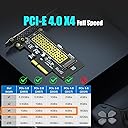
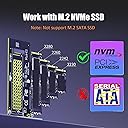
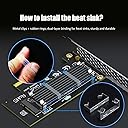
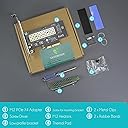
The GLOTRENDS M.2 NVMe to PCIe 4.0 X4 Adapter transforms your PCIe X4/X8/X16 slot into a high-speed M.2 NVMe SSD interface, supporting up to 4TB drives and delivering blazing 64GB/s transfer rates. Equipped with an efficient heatsink that reduces SSD temperatures by up to 20°C, it ensures reliable performance across Windows, Linux, and Mac platforms. Compatible with multiple M.2 sizes and includes versatile mounting brackets, this adapter is a must-have for professionals seeking cutting-edge storage upgrades.


| ASIN | B07FN3YZ8P |
| Additional Features | PCI-Express 4.0 X4 Full Speed Support |
| Best Sellers Rank | #3 in Serial Adapters |
| Brand | GLOTRENDS |
| Built-In Media | M.2 Heatsink |
| Cache Memory Installed Size | 6 GB |
| Color | Black |
| Compatible Devices | ['Desktop PC'] |
| Connectivity Technology | PCI-Express X4 |
| Customer Reviews | 4.6 out of 5 stars 5,511 Reviews |
| Data Transfer Rate | 64 gigabits_per_second |
| Digital Storage Capacity | 4000 GB |
| Form Factor | M.2 Key M |
| Hard Disk Description | Solid State Drive |
| Hard Disk Form Factor | 22 millimeters |
| Hard Disk Interface | PCIE x 4 |
| Hard-Drive Size | 64 GB |
| Hardware Connectivity | PCI Express x4 |
| Hardware Platform | Linux, Mac, PC |
| Installation Type | Internal Hard Drive |
| Item Dimensions L x W x Thickness | 2.76"L x 2.76"W x 0.12"Th |
| Item Weight | 0.08 kg |
| Manufacturer | glotrends |
| Mfr Part Number | PA09_HS |
| Model Name | PA09-HS |
| Model Number | PA09-HS |
| Number of Items | 1 |
| Read Speed | 64 gigabytes_per_second |
| Special Feature | PCI-Express 4.0 X4 Full Speed Support |
| Specific Uses For Product | M.2 NVMe SSD |
| Unit Count | 1 Count |
| Warranty Description | 30 Day Warranty Against Manufacturer Defects |
G**S
Super simple and cheap to add NVMe at near max spec speeds
I have to give 5 because of the price. Red LED is bright (electric tape req'd, not big deal) and it does install upside down in my case. Which might be a good thing. I have no idea how thermals in my case are pro/con for GPU and other things by this fact. Also I figured I'd get the full 7,000 mbps I expected for WD Black, but that's my bad for not reading product details. I haven't tested. 6,300 or whatever it states for Gen4 is pretty damn good to add an extra drive to the motherboard. You can hardly buy anything for $10. This is a great value. So 5 stars. 0 setup issues, simple.
A**R
Cheap extra NVMe slot, easy to install
I needed a quick fix to let me use a second NVMe drive in my PC, and this has been working great. No latency or data bandwidth difference between this and my motherboard’s built-in NVMe.
S**M
Worked fine in my older X99 PC
I have an older PC with an X99 Extreme4 board that is perfectly adequate for productivity and gaming, but unfortunately only has one M.2 slot for adding storage. This card was cheap enough that I was comfortable rolling the dice, and I was thrilled to find that it’s compatible out of the box! I haven’t tried booting to a drive in this adapter, but the BIOS recognizes it so I have no reason to suspect it wouldn’t work.
J**N
Easy-to-use PC card or an extra NVMe
It works great with the Gen 3 NVMe I bought, but I'm not a fan of the red LED. Still, it's super easy to mount.
N**Y
Works perfectly in 10-year-old Z97 computer.
Used GLOTRENDS PA09-HS M.2 NVMe to PCIe 4.0 X4 Adapter to install a 2TB Samsung 990 PRO NVMe M.2 SSD in my 10-year-old computer build that is sporting an ASUS GRYPHON Z97 motherboard and Intel i7-4790K CPU. Been running a Samsung 1TB SATA 850 Pro SSD for ten years with no issues at all but, need more hard drive space. I knew going in this was on the edge of working at all but had to give it a shot. A new 2TB Samsung SATA drive is three to four time more expensive than this newer Samsung 990 PRO NVMe M.2 drive. The Z97 only support PCIE 3.0 so I knew before getting started I wouldn't get the full speed out of the drive, if this worked at all, but it would at least be a little faster that the SATA drive it was to replace. After installing the adapter and drive I booted PC as normal. Device manger showed the new devices installed. Running the latest version of Samsung Magician software showed the new drive as available for data migration. It performed the migration on the fly in 45 minutes. Next, I turned off the computer and disconnected my old drive. Went into the BIOS settings, and the new drive showed in the boot menu. Selected the drive and the computer booted right up with the new drive. More as an experiment than a necessity I noticed the drive was setup with old school MBR partition table so decided to upgrade the file system to the more modern GTP partition table using MiniTool Partition Wizard 12. After doing so the computer would not boot until I set the boot mode in the BIOS to UEFI mode by disabling fast boot mode. Computer boots right up and all is well! Also, I didn't use the included heat sink as according to the Samsung Magician software the drive is running well within specs averaging 90-100°F without it. Nice to be able to squeeze more life out of this old computer that is still plenty fast for what I use it for. I highly recommend the GLOTRENDS PA09-HS M.2 NVMe to PCIe 4.0 X4 Adapter with M.2 Heatsink for M.2 NVMe SSD.
S**.
Let me boot a new SSD in ASRock Z97 Extreme6
This is working excellently in my older PC using an ASRock Z97 Extreme6. I had an SSD with Windows 7 in the Ultra M.2 slot. The Ultra M.2 slot was special because it was on the PCIe 3.0 lanes from the CPU. With an SSD there, the 16 PCIe 3.0 lanes from the CPU were 8 to PCIe x16 slot 1 (your graphics card), 4 to PCIe x16 slot 2, and 4 to the M.2 Ultra slot. I wasn't running anything needing full 16 lane bandwidth to the graphics card. The SSD access speed up was far more beneficial. Upgrading the system to Windows 10, I wanted a new fresh SSD for that, and would just move the Win 7 SSD to the second M.2 slot (which ran off PCIe 2.0 lanes from the southbridge, sufficient for archive access). Got a new WD_Black SN7100 (PCIe 4.0 native, but should downshift to the slot's 3.0 capability). Even when messing with the BIOS to get it to show storage in the slot, could not boot that thing for nothing. Played with it, searched, others had issues, going PCIe addin board seemed the answer. Thankfully, these boards are not very expensive. Put the Glotrends board in the second x16 slot (which gets four lanes in the current config) with the new SSD mounted to it. I didn't bother with the heat pad stuff. Cooling in the case setup will keep air flow right over the board all the time. Booted up and installed windows and been booting and running no issue since. Excellent! So now there's the GPU on x16 slot 1 with 8 lanes, the old SSD in the M.2 ultra slot with 4 lanes, and the new SSD on the Glotrends board in the x16 slot 2 with 4 lanes. And it's all working great. Glad the product was out there so I could simply update the OS without having to invest a lot of money in any other new components.
L**S
Great Product
Works, plug n play, no issues
C**S
Well made, easy to use.
Works as advertised. I was able to make use of some SSD drives I bought when they were cheap, and though I didn't use the provided heatsinks (I bought some better ones), they looked good enough that I almost regretted not just using them. There's a little drive activity light on the board, which I wasn't expecting. It's blue, so keep that in mind if you're building a PC with a glass window and you want all the lights to match. For anyone who doesn't already know: you can use these on a larger slot than they physically require. The bus will recognize how many lanes are in use and reduce bandwidth to what is required.
D**L
Competent card
Works.
J**N
Good option for those who need an extra NVMe drive for their PC
Easy installation, worked straight away with a 2TB Samsung 970 EVO Plus.
J**Z
Needs a slot, metal fittings are suspect, but is fast
I thought I could get a NVMe to 2.52 sata enclosure - how wrong was I ? I got a NVMe to use as a standard SATA in this PC to future proof as most of my kit are laptops and they are all now NVMe, so thought I'd get one of those, get the 2.5 adaptor and use a spare SATA port and be done. - nope Saw this at a reasonable price, decent reviews. I did have a slot to use otherwise that would be a problem. I read the other reviews about the metal clips being suspect, so I simply went for the rubber bands (I had 3 in my pack) which hold the heatsink on pretty well - not sure if my drive needs it as it has a heatsink layer on it, but still Device was read by the machine and installed into the OS with no problems. Moving data around and I am getting pretty good speeds between the various drives in my device
M**N
Just Perfect
I ordered it because I didn't have a second NVME slot on motherboard. Only use it for games and vfx, so far works flawlessly without any issues.
イ**き
キワモノは世界の中心に咲く華、偉大なる大中国様に限る
ヒートシンクにつける金具がちょっと怖いくらいであとは全て表記通り。正常動作。安い。
Trustpilot
3 days ago
2 days ago