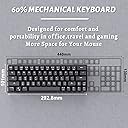
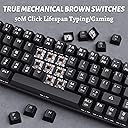
โจ๏ธ Compact power meets pro-level customizationโyour deskโs new MVP.
The DIERYA DK63N is a sleek 60% mechanical keyboard combining wireless Bluetooth connectivity with wired versatility. Featuring 63 ultra-compact keys with tactile brown switches, it supports simultaneous connection to three devices and offers up to 20 hours of battery life. Its 19 RGB backlight modes and ergonomic design make it ideal for professionals and gamers seeking portability without sacrificing performance.


| Additional Features | Travel |
| Antenna Location | Gaming |
| Asin | B07FZVCH4H |
| Best Sellers Rank | #89,302 in Video Games (See Top 100 in Video Games) #3,840 in PC Gaming Keyboards #37,288 in Legacy Systems |
| Brand | DIERYA |
| Built In Media | USB Cable |
| Button Quantity | 63 |
| Color | black |
| Compatible Devices | PC |
| Compatible Operating System Family | MacOS, Windows |
| Connectivity Technology | USB-C๏ผBluetooth |
| Customer Reviews | 4.2 4.2 out of 5 stars (3,091) 4.2 out of 5 stars |
| Enclosure Material | Plastic |
| Hand Orientation | Ambidextrous |
| Item Dimensions L X W X H | 12"L x 5.6"W x 1.9"H |
| Item Weight | 700 g |
| Keyboard Backlighting Color Support | RGB |
| Keyboard Description | Gaming |
| Keyboard Layout | QWERTY |
| Manufacturer | DIERYA |
| Mfr Part Number | DK63 |
| Model Name | DK63 |
| Model Number | DK63 |
| Number Of Batteries Required | 1 |
| Number Of Keys | 63 |
| Number Of Packs | 1 |
| Number Of Sections | 7 |
| Series Number | 1001 |
| Style Name | Contemporary |
| Switch Type | Tactile |
| Theme | RGB Gaming |
| Unit Count | 1 Count |
| Warranty Description | 1 year |
User
Great keyboard, with some caveats
The keyboard feels very solid and well made. I love the compact size, the switches feel great and the RGB settings are beautiful. The wireless connection was easily established over Bluetooth and was consistent.There are some cons. Due to its extremely small form factor the right shift key, /? and arrow keys placement is non-standard and I find it a bit annoying, but I'm getting used to it. The instructions in English are also quite poor and you will have to experiment with key combos on your own to fully figure out the options; I haven't quite figured everything out yet. Also this is probably a QC issue since I didn't see it in other people's pictures, but my right shift keycap seems to be misprinted (the arrow is tilted to the left a bit); not really a big deal and doesn't change my experience much at all, but I figured I'd mention it.I thought I'd be okay with a lack of function row, but for everyday home use I think I might need it. I'm definitely keeping this board to throw in my backpack for work though and for occasional use in games that don't need quick access to function keys perhaps.Overall I'm happy with the purchase and think this keyboard is a great value!
User
Perfect for travel... however it wasn't for me.
This review is on the keyboard, not my feelings about it. Keyboard is actually pretty good, I like the louder clicking, Bluetooth worked great, RGB Backlit was bright, response was good and I never missed a click. Really did like all it's features and small for when I travel for work... Battery lasts me all week and I'm putting in 10-12 hours a day sometimes.But... It just wasn't for me, I'm giving it 5 stars all around because it's a pretty nice keyboard. But for me, I use a lot of the F1-F12 key commands while using the mouse with the other hand... So having to press the FN key each time I wanted to use an F key was a bit of a pain, that is my major gripe about it.The fact that the keys have large letters is a ++++ really lets the RGB thru. I wound up buying a 75% keyboard but using the keycaps from this keyboard because I liked them much much better than the other ones!
User
Defective One Stopped Working--Replaced by Seller
I would expect something that costs almost $50 to last longer than 32 days. It seemed to work fine at first but now it will not stay connected to the computer. The "Q" almost continually flashes as if it is trying to be discovered, the computer says it is connected but suddenly all the keys will stop working or stop working correctly. I got this for my husband as a gaming keyboard so he could just relax and be able to see the keys but instead he ends up being totally frustrated because suddenly he cannot do anything. Sometimes if you plug it in, or unplug it if it is plugged in, it will goose it to work for a few minutes before it goes out again. It is charged up, the computer connection says it is charged to 100%. If you turn the bluetooth off and just plug it in, it will work as a wired keyboard but the connection is loose so you have to be very careful to keep it plugged in. Of course this happens right after the 30 day return period is up. $46 is not something we have to just throw away on stuff so I am really unhappy.Update:The seller was very helpful and found the keyboard to be obviously defective. Even though it worked for a short time something is wrong with the bluetooth in it. They replaced the keyboard immediately even though it was a couple days past the return window. The replacement seems to be working as intended--so far. We are very happy with this keyboard when it is working and I expect the replacement to continue to do so. It has seemed happier from the very start and the charging cord sits in the socket much more securely. The original defective one had more than one issue which the replacement does not seem to have.Changed up to 4 star because of the good service and because the replacement seems to be in good shape. Would have been 5 star except for the stress and hassle. Seller got a 5 star rating for good service.
User
Perfect keyboard for high mobility remote work
At first I didn't love the switches on this keyboard (they kinda take a fair amount of force to actuate), but once I got used to them, I could not ask for a better keyboard. At Just over $50 this guy is perfect. The 60% sizing with the addition of the arrow keys is what really sells it for me. There are tons of other 60% keyboards but there are very few (as far as my naive self could find) that have this addition. If you do a lot of work in excel or writing or whatever needs arrow keys, this is the ideal compact keyboard to go with. The keys feel solid and the sound is honestly pretty satisfying. I will say that I am a bit slower (5-10%) on these keys than on my Cherry MX blues on my big board at home, but honestly not too big of an issue. Haven't tried to change the switches since I got this right before traveling, but may give it a shot at some point. I will say the board is a lot heavier than I expected, but it also gives it a much more solid feel and makes it not feel like a piece of plastic garbage. Using it for two days in a row will kill the battery, so I usually just use it wired if I have the option. The preset backlights are honestly pretty good, I would like if there was an option for no lights (there may be I just haven't found one yet). Overall, absolutely fantastic keyboard and is definitely worth the money if you want an ultra portable option with arrow keys.I'll update this if anything happens or if there are any issues. I'm also not sponsored, I just really like these keys
User
Great Non-standard keyboard.
When I ordered the keyboard I didn't read all the info on it and didn't realize how small the board was, very non-standard, with sharing the f1 keys with the number keys. Not an issue for me because I'm using this mostly for chatting and streaming computer.A great non-standard keyboard. The switches feel pretty good. In Bluetooth, I don't feel any lag. The colors of the keyboard are very bright and look very good, especially considering the cost of the board. Love the brown switches feel and sound great. I've done some of the fastest typing on this board, after getting used to it. Not everything in it is perfect, had some issues with connecting to it some times. Especially after the battery dying and recharging, but this might be more on the windows side. No issues connecting to my phone either. long-lasting battery also.The keycaps have a slight "soft" finish on them, kinda a rubbery feeling. It was really noticeable when I first got it. but I'm actually really into it.
User
Good board, good price, but odd layout.
This keyboard looks great, but the key apps have some kind of coating on them that makes it feel yuck. I would describe it as rubberized and personally, I think it feels awful.The sound is great, and the key switches are nice... when it is not making a ting noise with every keystroke. When typing at my desk at work I can hear a metal ting resound after each stroke. On softer surfaces or on my lap, I can not hear the same ting. I assume if you use a mat under your keyboard this wonโt be an issue for you.The layout is actually the biggest issue for me. I canโt get over the right shift being moved to the left and the ?/ key being all the way on the right side. I use 4 different keyboards regularly and the moved keys are more of a hassle than I expected.if not for my issues with the layout Iโd probably keep it because it has a great look and if the keycaps were replaced, it has a great feel when typing. Unfortunately, I will be returning this one due to the odd layout.
User
Great compact, bluetooth keyboard
Love the keyboard, keys are all matte coated and feel great over just a regular abs plastic set of keys. I got mine with the brown switches and have 0 regrets (last keyboard had blue switches with great physical feedback but a much louder clicking sound, the brown switches are great for that same physical feedback without the loud clicking). The RGB effects are good, battery life is good, the multiple bluetooth options on the keyboard is interesting and I can already imaging many uses for it after short use, and as I said before the most important part is that the keys feel great and the product arrived as advertised with correct switches.The only thing about this keyboard it will take time to get used to if you aren't used to using reduced size keyboards. The location of the arrow keys results in a couple other keys being moved and changed (only ones I've noticed have been that the shift key is reduced in size and has been moved slightly to the left of its position on a normal keyboard and the ? key is moved to the right of the up arrow key to allow room for the full arrow key set. l
User
I really wanted this keyboard to work!
I spent quite a few hours using the Dierya keyboard in the few days of ownership. This was my first 60% keyboard but not my first mechanical one. Actually this would have been my third mechanical keyboard. I bought this because I wanted to see what all the hype was about with 60% keyboards and I needed a Bluetooth keyboard for my second PC so I thought why not try it out. For $45 this keyboard is cheaper than any other 60% keyboard on Amazon but more expensive than a lot of membrane Bluetooth keyboards out there. I thought it might be worth a shot. When I opened up the box I was really impressed with the look of it and how it felt. Has a little bit of weight to it and felt like it was made out of good material. The packaging provides a premium presentation to the unit as well. This keyboard also has the added arrow keys on the bottom right which people tend to like over other 60% out there. I personally did not since the shift key is an off size and I knew it would have been hard to find custom key caps for it down the road.The switches: Simply, the Dierya has terrible switches! I got the MX Brown equivalent switches. I've only ever had Cherry MX switches in the past. I knew these were knock offs coming into it but I thought to myself, "how can you mess these up?" Well, you can apparently, every key has a completely different feel than the last! They feel sticky and unresponsive. It didn't help that the Bluetooth has a tremendous amount of lag! I considered these might need to be broken in but I've never had to "break in" a mechanical keyboard ever before!Bluetooth: I was able to connect the keyboard through Bluetooth but noticed right off that the Q button would constantly keep flashing about every 2 minutes while being connected. I tried reading the manual, looking online, (there isn't much info out there!) and even getting Amazon support involved and everything said to use FN + R which all that does is switch it from wired to Bluetooth. That was well and annoying for about 3 days when the Bluetooth just stopped working completely! I could not connect it back to my PC for the life of me. Followed the instructions to reconnect but couldn't. The Bluetooth on this is completely useless!Needless to say I returned it after 4 aggravating days. If you're looking for an inexpensive 60% keyboard I'd say look elsewhere. Even in wired mode I would never do real gaming with the Dierya due to its terrible switches! I learned my lesson and ordered an Ann Pro 2 (which I'm using to type this review.) It was the only other 60% with Bluetooth that I could find although, twice the price, but already feels like a way better keyboard! For reference, I also own a Corsair K70 with MX Speed switches that I absolutely love! I can't recommend the Dierya keyboard to anyone. You will be much happier in the long run if you just spend a little more on one of the tried and true 60% keyboards out there.
User
Best Value for Money Bluetooth 60% Keyboard in the Market
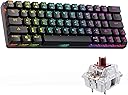
Good:At a price point of around AUD$50, this keyboard gives demands solid keystroke force, gives moderate key stroke sounds, and has an interesting font choice. I personally enjoy these basic features of the board. In addition, using the finger levelling test, the board has a well calibrated centre of gravity, maybe 5% to the left, but certainly very well balanced. When combined with its minimal deck flex that comes from strong plastic material, this is clearly a champion in build quality against what I imagine anything within the AUD$110 range.There are two flip legs at the bottom of the keyboard to prop up the keyboard, with a satisfying click sound. It gives around a 13% incline angle by feel, but is unlikely you would need this. The anti slip rubber base does help stabilise the board as well.While the white parts of the switch is noticeable between the black keys and the base board itself, I must say instead of looking like a half-finished product, the rigidness and details in the design is demonstrated in a way that is endearing. The point I am trying to make is that the manufacturers were able to pull off a designer look that the build quality allows for, and that is only seen in other competitors priced at around AUD30 higher, like RK 71 60% keyboard, for example.Neutral:Weighing at around 450g it is clearly not the lightest 60% keyboard out there, but at this price point with all these impressive features, it is a great addition as your on-the-go keyboard for gaming or light work. For one, I bought it myself to go with my lenovo m10 gen 2 tablet, it connects easily through bluetooth and is working fine, just fine. You do need to worry about getting a keyboard sleeve, or some form of a cushioned bag to carry it around, as even though I have maximum confidence of any blunt damage potentially from the bottom up, I cannot say the same about that from the top to bottom, as the switches are somewhat exposed.I personally work and study later at night and is more sensitive to light. The RGB brightness level is just right for me, while it can be slightly dimmer than what the general population might want.Negative:I don't think it is particularly the seller's fault, this is likely more a marketing gimmick. But there is no wireless connection by 2.4GHz or 5GHz, it is simply a bluetooth connection compatible/featured keyboard, please make note of this distinction in case you need to pair this with a device with no bluetooth sensor and only a wifi sensor.OverallThis would be a great surprise gift for someone struggling with working during travels, and certainly a great addition to the arsenal of pc gamers.Product Specifics/DetailsThe DIERYA DK63 keyboard ordered came with black keycaps, brown switches, at least 4 replacement switches, 1 key remover. When switched on, the RGB lighting is readily activated.
User
Goed mechanical keyboard
Goed keyboard met goeie brown switchesKwam een dag eerder dan verwacht
User
do not buy
after 2 month of use the shift key stopped working
User
Amazing value, great keyboard
I have recently got into the mechanical keyboards side of things and had heard a lot about this one.I ideally wanted a 60% keyboard with bluetooth and was stuck between this and a couple more expensive options.I am not a gamer but really like the look and feel of these keyboards, along with the minimal look.The packaging this came in looked way more premium than the price and I have been using it solidly ever since.Pros:Great PriceBluetoothUSB-Clooks greatCons:It's hard to say much negative about this keyboard. It is exactly what I was looking for. If I was hard pushed, the location of the question mark takes a little bit of getting used to but you quickly adjust.I personally am not a fan of RGB in general, but for some reason, I can't access the DIY lighting setup so either leave it in all white or turned off, but I think this is probably user error.Some users may find this slightly loud, but that's pretty much the case for all mechanical keyboards.I hugely recommend this and can't see anyone being disappointed. I am also using this exclusively on a Mac so have repositioned the keycaps for Alt and Windows to what I am used to and just adjusted the commands on the Mac. Super easy to do, I only wish it had a command icon instead of windows!
User
bad build quality
Very good and solid bluetooth keyboard for its priceEdit: after 4 weeks of moderate usage the red led on the letter V is broke
Trustpilot
1 month ago
3 weeks ago