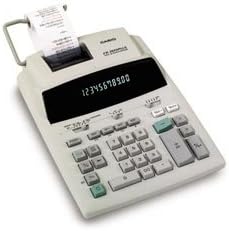
Casio FR-2650A Plus Printing Calculator
Product ID: 79511849
Details
- BrandCasio
- Calculator TypePrinting
- Colorfluorescent
- Model NameFR-2650A
- Power SourceAC Adapter
🔍Large-character output
🔢12-digit display
🖨️3.0 lines/sec print speed
📈 Elevate Your Calculations with Style!
The Casio FR-2650A Plus Printing Calculator is a professional-grade tool featuring a 12-digit, two-color fluorescent display, capable of printing at 3.0 lines per second. Its large-character output and item count function make it an essential device for efficient data management, all while being incredibly user-friendly.
| ASIN | B00004U1PB |
| Brand | Casio |
| Calculator Type | Printing |
| Color | fluorescent |
| Customer Reviews | 3.9 out of 5 stars 7 Reviews |
| Display Type | LCD |
| Enclosure Material | Metal |
| Global Trade Identification Number | 00079767132774 |
| Item Dimensions L x W | 13.75"L x 8.63"W |
| Item Weight | 3.8 pounds |
| Manufacturer | Casio Inc. |
| Material | Metal |
| Mfr Part Number | FR-2650A |
| Model Name | FR-2650A |
| Model Number | FR-2650A |
| Power Source | AC Adapter Powered |
| UPC | 079767132774 |
A**E
this is a good machine. If you key really fast
Prints out kind of slow. If you're not a speed demon, this is a good machine. If you key really fast, I recommend spending a little more and getting a more heavy-duty mode.
S**A
GOOD OLD FASHIONED 10 KEY!!!
This is my second and identical 10 key. Just easier to stick with what I know. So glad I found a used one on amazon!!
J**S
Casio FR-2650, the net is no place to replenish ink
We use this in the office of our non-profit organization. It works well, keys are straight forward. Only problem we have encountered so far is failed attempts to find out how to reink the rollers on the web!
J**E
Great Calculator!
I've used this product for many years so when mine finally gave up, I searched for another and this one meets all my expectations! Great Product!
M**N
Great for small business!
When you're hesitant to go to the expense of a cash register, this is a great calculator for a small retail business - which is exactly why I purchased it. The keys are large, paper roll insertion is easy and the automatic tax calculation key (TAX+) for sales is helpful. The Casio website is also helpful for tech support. I purchased this item used without a manual and needed to know how to set the tax rate. (It was preset to 5% and I needed to change it to 6.5%.) Within a day they emailed me back with step-by-step instructions. If you are also struggling to figure this out and can't find the info on the web (as I couldn't) here are the steps as they provided to me: 1. Set calculator to "print." 2. Press CA. 3. Press SET key for about 3 seconds. 4. Enter tax rate. 5. Press TAX+. 6. Press SET. By the way, the SET key is the percent key. Hope this helps!
Trustpilot
1 month ago
1 month ago