


Desertcart purchases this item on your behalf and handles shipping, customs, and support to Greece.
⚡ Upgrade your rig with PCIe 5.0 speed and chill vibes ❄️
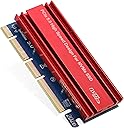
The RIITOP NVMe PCIe Adapter transforms your desktop with PCIe 5.0 x16 bandwidth, enabling ultra-fast NVMe SSD performance. Its advanced heat sink design ensures stable operation during intense data transfers, while broad M.2 size compatibility and plug-and-play setup make it a versatile upgrade for professionals demanding speed and reliability.


| ASIN | B0G3VM5N2W |
| Best Sellers Rank | #104 in Computer Memory Card Adapters |
| Brand | RIITOP |
| Compatible Devices | NVMe PCIe 5.0 SSD, Personal Computer |
| Customer Reviews | 4.7 out of 5 stars 11 Reviews |
| Hardware Interface | PCIE x 16 |
| Manufacturer | RIITOP |
| Mfr Part Number | M2T16XPE50 |
| Model Number | M2T16XPE50 |
| Number of Items | 1 |
| Number of Packs | 1 |
| Style | Standard |
| Style Name | Standard |
| Unit Count | 1 Count |
| Warranty Description | 12-Month Warranty |
T**E
Works as Advertised on a Linux Platform
Easy peasy installation on a Linux platform, and recognized without any issues.
M**Y
Good speeds, manufacturing seems a bit off
This nvme to pci-e 5.0 adapter provides a convenient way to add another nvme ssd to your computer if all of your ssd slots are full. It doesn’t need any special drivers and just works once you boot up. The pci-e 5.0 speeds are a nice level of performance, although those drives are quite expensive currently. Luckily you can install older nvme drives that are rated at pci-e 4.0 or 3.0 and use those with this adapter too. The compact size makes it only as big as your pci-e x16 slot itself and although I couldn’t test it, you should be able to plug this into an x8 or x4 slot as well, thanks to the notched connector. Although the clip on the x16 slot holds it in place, it did feel a bit loose and the card droops slightly. It doesn’t seem to affect performance, and having a screw in bracket on the case would have made it much more secure. I also found the thermal interface pads to be awkward, they don’t really seem to be the right length/thickness for optimal interface with the SSD. The smaller length pad seems to work better on top of the SSD and the longer length one, which seems thicker, works better below it. When using the longer pad on top, it was actually bending my ssd due to the excess thickness of the pad against the memory chips. I’m not sure how effective the heat spreader is going to be if the full ssd isn’t making contact with the heat spreader. Of course you don’t have to use the heat spreader if you don’t want, or if your drive already has one installed. The picture shows both TIM pads below the ssd and a gap on top under the heat spreader. I couldn’t find a configuration that made solid contact all the way across.
A**G
Stable NVMe Adapter With Effective Cooling
This RIITOP NVMe PCIe adapter is a well‑engineered solution for adding an M.2 NVMe SSD to a desktop system, especially if you need stable performance and broad slot compatibility. The card supports PCIe 5.0 x4/x8/x16 slots, which ensures it works across a wide range of motherboards, including older boards that lack dedicated M.2 slots. Even though NVMe drives themselves top out below PCIe 5.0 bandwidth, the high‑spec interface ensures the adapter never becomes the bottleneck. From a technical standpoint, the PCB layout is clean and optimized for signal integrity. The adapter supports M‑key NVMe drives in multiple lengths (2230/2242/2260/2280), and the mounting points are clearly marked, making installation straightforward. The slot connector seats firmly, and the gold contacts are well‑finished, which helps maintain stable communication under sustained load. The included heatsink and thermal pad are functional rather than decorative — the heatsink has enough mass and surface area to meaningfully reduce SSD temperatures. During heavy workloads, NVMe drives can throttle when they reach thermal limits, and this cooler helps maintain consistent performance. The thermal pad has good conformity and ensures full contact with the SSD controller and NAND. Functionally, the adapter performs exactly as intended. There’s no driver requirement, and the system recognizes the NVMe drive immediately as long as the motherboard supports NVMe boot or storage. For users upgrading older systems, this card is a reliable way to add high‑speed storage without replacing the motherboard. Build quality is solid, with a rigid PCB and clean machining on the heatsink. The card fits securely in the slot without wobble, and the screw hardware is appropriately sized and easy to work with. Overall, this is a stable, well‑cooled NVMe adapter that provides dependable performance, wide compatibility, and a straightforward installation experience. It’s a strong choice for anyone adding NVMe storage to a desktop build or repurposing an existing SSD.
S**E
Solid card
In the world of massively increased prices for computer parts, buying new is less attractive than expanding the functionality of what's already on-hand. This PCIe adapter is a simple, handy tool that can set up any PCIe slots to become an NVME drive, without needing to splurge on a new motherboard (or one of those external adapters for USB/thunderbolt, which can get pretty costly and don't match the performance of a PCIe slot). Installation was a cinch. There are no issues with the card fitting into motherboards, and it also stays firmly in place (no mounting issues). The card itself is fairly small and won't negatively impact computer case real estate for the vast majority. Performance is great. I tested out speeds and responsiveness, and the card easily brings of the best of NVME drives with no compromises. The card is compatible with PCIe5.0 and below, and truth be told, it doesn't need the highest bandwidth slots to bring out the best in the drive. I didn't have the time to do an extended stress test, as continued high heat can cause drives to throttle, but the heat sink is large and initial results suggest it should work fine for both gaming and productivity so long as you have decent airflow around the card. All things considered, it's a good card. It's competitive in cost, has strong performance, and slides into PCIe slots without issue. Recommended.
A**R
it works
This PCIe 5.0 NVMe adapter turned out to be a solid little upgrade piece. Installation was straightforward, and the card feels well‑built for the price. It supports full PCIe 5.0 bandwidth, which means you can drop in a Gen5 NVMe drive and actually let it stretch its legs — assuming your motherboard slot supports it too, since performance is limited by the slowest component . The included heatsink and thermal pads are a nice touch. The grooved design helps keep temps under control during heavy transfers, preventing thermal throttling or disconnects from overheating . Compatibility is broad as well, supporting 2230, 2242, 2260, and 2280 NVMe drives Current page. Overall, it’s a clean, inexpensive way to add another NVMe drive to a desktop without fuss. ✅ Pros Supports PCIe 5.0 speeds, doubling PCIe 4.0 bandwidth for high‑end NVMe drives Includes a heatsink with cooling grooves for stable performance under load Compatible with multiple NVMe sizes: 2280 / 2260 / 2242 / 2230 Works in PCIe x4, x8, and x16 slots for flexible installation Comes with thermal pads and screws — everything needed to install Good price for a Gen5‑capable adapter ⚠️ Cons Not compatible with SATA or AHCI M.2 drives — NVMe only Older motherboards may not support NVMe booting, so OS installs may be limited Maximum speed depends on both the SSD and the motherboard slot — not everyone will see Gen5 speeds Only one customer review so far, so long‑term reliability is still unknown
R**M
Get the Full Available Speed
If you have obtained a new Generation 5 NVMe M.2 SSD rated at speeds exceeding 14,000, it is natural to aspire to achieve these speeds in your data transfers. To accomplish this, several prerequisites must be satisfied. First, an appropriate PCIe NVMe enclosure, such as the one exemplified here, is required. Subsequently, a Generation 5 NVMe M.2 SSD must be installed. Several reputable manufacturers produce these high-end NVMe drives; however, in our custom computer builds, we prefer products from Samsung and Gigabyte. After assembling the NVMe into the enclosure and mounting the heatsink, it is important to consider an often-overlooked requirement: the PCIe slot into which the enclosure is inserted must be located on a Generation 5 motherboard equipped with a Generation 5 PCIe slot. It should be noted that most Intel motherboards typically feature only two Generation 5 PCIe slots, whereas AMD motherboards often have additional high-speed lanes. Installing the SSD into a PCIe slot of Generation 4 will limit its speed to approximately 7,000, rather than achieving the specified 14,000+ speed. Therefore, ensure that all necessary requirements are fulfilled prior to installation.
B**L
Super easy to install.
I'm currently setting up a server rack, and I am frankensteining a bunch of computer parts. I have a spare NVMe drive that I wanted to use, but I don't have any more slots for them, so I decided to pick this up. Overall, it was super easy to get installed: just a few screws on the back, and you have the device open. One screw holds it to the board, and they give you a generously sized heat sink to help pull any additional heat off. Now I can plug this into my PCIe and have the full capacity of the drive. Starting out, the BIOS automatically detected it. It was pretty much just plug and play. The only real setup was with the drive itself and not anything to do with the hardware. Overall, I think this is a pretty affordable entry point for getting your drive on your computer. Just make sure to be cognizant of the speed of your drive vs. the speed of what you are actually plugging it into.
M**S
Great adaptor
Great adaptor, very cool way to add storage to a computer with no Nvme slot. So far it’s worked perfectly. It fits well and was easy to install. The speeds I’ve clocked are comparable to a factory Nvme slot. No noticeable heat increase in the case or the adapter itself.
Trustpilot
1 month ago
2 weeks ago