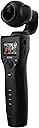


| Asin | B075VK1MK3 |
| Aspect Ratio | 16:9 |
| Audio Recording | Yes |
| Brand Name | Removu |
| Colour | Black |
| Compatible Devices | Camera, Cellphone |
| Customer Reviews | 3.5 3.5 out of 5 stars (152) 3.5 out of 5 stars |
| Effective Still Resolution | 12 MP |
| Exposure Control Type | Automatic |
| File Format | MP4 |
| Global Trade Identification Number | 08809430040745 |
| Has Self Timer | Yes |
| Item Weight | 12 Ounces |
| Manufacturer | samsung |
| Manufacturer Part Number | RMK1 |
| Media Type | Micro SD |
| Model Number | RMK1 |
| Screen Size Unit Of Measure | 1.5 Inches |
| Video Capture Resolution | 4K |
User
REMOVU-K1 camera
I have one Removu-K1 camera which is presented by relative from USA. I want the necessaries for the above camera like Base Charging Stand, Extra Battery, Tripod, USB Reader and Lens cleaning pads.
User
Gut, wenn das nicht wäre....
eigentlich, ein Produkt was gut verarbeitet ist und dennoch erhebliche Schwächen aufweist.Die Aufnahmezeit ist in allen Modis begrenzt Bei 4K lächerliche 30sec und dann braucht das Teil auch noch Ewigkeiten zum wegspeichern der Daten.Etwas anders sieht es bei anderen Auflösungen aus:2560 /60P = 0:42 Sec2560 /30P = 01:21 Min1080 /P60 = 02:41 Min1080 / P30 = 07:48 MinDas alles, kenne ich von meiner Gopro 7 nicht, obwohl die Bildqualität bei der K1 besser ist. Aber was nutzt es, wenn ich die Scenen nicht im vollem Umfang aufzeichnen kann, nichts.Auch die dazu gehörige App hat Handlungsbedarf, man kann nur einzelne Clips herunterladen.Ich habe bei Removu Support eine Anfrage gestellt, mal sehen was heraus kommt.Der Support hat innerhalb von ein paar Stunden geantwortet, sollte so nicht sein.SD-Karte gewechselt und alles läuft.Danke für den schnellen Support, hätte ich nicht erwartet.Also, schön aufpassen, welche SD-Karte man herein schiebt!!Passt in fast jede Jackentasche und die Qualität der Clips sind außerordentlich gut, besonders nachts.
User
Peoblemi nelle panoramiche
E' il secondo che acquisto e il secondo che rendo, il prodotto sarebbe eccezionale, se non avesse il difetto di perdere l'0rizzonte durante le panoramiche e gli spostamenti destra/sinistra sia con movimento manuale sia con movimento tramite joystick, anche durante i motion time-laps, cosa che rende inutilizzabili i filmati. Utile invece lo zoom 3x, mancante in altri prodotti similari (tipo il DJI). Se venissero risolti questi problemi, probabilmente dovuti al softweare, lo ricomprerei.
User
An excellent product. Well ready for prime time!
I ordered the Removu K1 as a pre-release item on Amazon. While I impatiently awaited its delivery I watched every review I could find on YouTube, read all I could about it on internet. Not one person had a meaningful bad thing to say about it.I already had a Smooth Q smartphone gimbal from Zhiyun that does an adequate job, but its software left much to be desired, it was cumbersome to install the camera (leaving me with an empty phone case to carry around or lose), and was just inconvenient in general. And, besides, it was bulky; too easy to be bumped by passers-by when in use. So, more often than not, when packing my gear for the day, the Smooth Q was left on the shelf, collecting dust. I was tempted, several times, to opt for the DJI Ozmo+ but, while the software seems to be more robust, in the end it also suffers from the same bring-your-own-device requirement that killed my joy with the Smooth Q. And, to boot, the Ozmo+ is even bulkier than the Q.So the K1 hit all my checkboxes, with its all-in-one design including a usable built-in LCD display, large enough to show me what I need to see. When the K1 arrived on 7-March (more than a week earlier than expected), I couldn't wait to unpack it and put it to use.PackagingThe Removu K1 is packaged in a minimalistic box containing only the bare essentials: the camera, a carrying pouch, one battery, an operator's guide and a USB cable. I also ordered the accessory kit, which includes a lens protector, LCD screen protector, charging dock, cleaning cloth, a wrist strap and a microphone. For the omnidirectional microphone, there is a foam windscreen and a fur ("dead cat") windscreen.First useI charged the battery overnight, so cannot say how long that first charge took. Finally, in the morning, I was ready to start putting it through its ropes. I turned it on, and within about three seconds it was ready to go, with its reassuring beep. I found the menu system very easy to navigate, settings were nicely organized, and easy to change. (That is, except for setting the WiFi password and the WiFi name - something I like to do with every WiFi broadcast device. There is no way I could find, to set these through the built-in menu system; it must be done through the [free] app.)The app for my android phone installed quickly and easily, and connected to the device right away. It provides all the function of the menu system, plus gives me a live view of what's on the built-in LCD display, a nice touch for when doing time lapse, for example. I found the app also to be easy to navigate, and stable. Here I was able to set the WiFi attributes, but otherwise it was pretty much a convenient duplication of what could be done through the unit's menus.ResultsI am very happy with the results of most of the features of the K1. From a gimbal standpoint, I could expect no better; it smooths out the bumps and makes the viewing experience oh-so-much better than the non-mechanical options.I've tried almost all of the features by now, a week later; I've run it through its ropes and I must say that overall, though my expectations were already high, in general I've not been disappointed. The video quality is excellent - even in fairly low light. The time lapse feature - when given enough time to be meaningful - yields an amazing result. The thing just works.Negatives and WishesLike other reviewers, I didn't find many ways to improve on this great unit, and what I did find are minor points.It would be nice to have a face-tracking capability - even if that had to be managed through the smart phone. It's not often needed, but would be useful, for example, when following a sports event.For me, the 1080 120FPS slow motion mode seems to produce a jerky result, not the buttery smooth slow-mo I expected. Not the end of the world; for that I just shoot in 1080 120FPS movie mode, and then slow it down in post processing, but I think there is opportunity for improvement here. (Or again, maybe it's just me.)For moving time lapse (a fantastic feature!) I hope that additional "waypoints" may be set. Rather than just Point A and Point B, I'd like to be able to set a few (say up to five) points for it to hit along the way. This would be consistent with what some of the other handheld gimbals offer.ConclusionI don't plan to give up my K1 anytime soon. As I mentioned, the advertisement and reviews hit all my checkboxes, and the unit delivered on the expectation. I'm very happy with it; it's small, convenient, and practical... and it just works. Well done, Removu!
User
Great for Vlogging & B-Roll with Base.
I've been through a whole slew of devices to try and get something that allows me to do behind the scenes footage and b roll for YouTube video with ease. The K1 has been ticking pretty much all the boxes. It's ready to go as is, no need to add phones and connect up stuff. The menus are straight forward to use and there are plenty of options for video resolutions from 4k down. I've been mostly using 1080 @60 and Slo Mo modes. Delivery was quick and I was pleasantly surprised to get it earlier than anticipated.The iOS app is now available and works as expected based on trying the android app first. You don't need the app to use it, but it's handy to have.Is this perfect? No, but they're updating it with users requests. The top current request is a linear mode that removes some of the wide angle distortion-but in the 1080 50/60 mod, it's not bad anyway. For a tool that does all it does at this price, it's no brainer. The 5 stars are for the product and the value it gives.
User
la camera se fige en enregistrement
j'ai acheté une carte SD EXTREME type A2 64GB AVEC LA CAMERAl'appareil plante en enregistrement IMAGE SE FIGE plus possible d’éteindre l'appareil "il faut enlever la batterie !!!!cela vient il de la carte SD ou de l'appareil LE CONSTRUCTEUR PRÉCONISE UN CARTE DE TYPE A1Avez-vous eu le même problème????
Trustpilot
4 days ago
5 days ago