Desertcart purchases this item on your behalf and handles shipping, customs, and support to Greece.
🚀 Elevate your home server game—power, speed & expansion in your pocket!
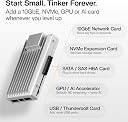
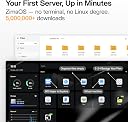
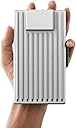
ZimaBoard 2 1664 is a compact, server-class x86 home server featuring a 3.6GHz quad-core CPU, 16GB LPDDR5 RAM, and 64GB eMMC storage. It offers native PCIe 3.0 x4 expansion for high-speed upgrades, dual SATA and dual 2.5GbE ports for robust storage and networking, and comes preloaded with ZimaOS for a secure, private cloud experience. Designed for 24/7 operation, it replaces multiple devices with one versatile, low-power solution ideal for NAS, routing, Docker, and homelab setups—all backed by a 2-year warranty and 24/7 support.
| ASIN | B0FYPBZQ3Z |
| Additional Features | Remote Access |
| Best Sellers Rank | #36,749 in Electronics ( See Top 100 in Electronics ) #1 in Computer Servers |
| Brand | zimaboard |
| Built-In Media | 12V/5A Power Adapter, Cooling Fan, SATA Y Cable, User Manual, ZimaBoard 2 1664 |
| Color | ZimaBoard 2 1664 |
| Compatible Devices | mini computer |
| Connectivity Technology | Ethernet |
| Customer Reviews | 4.3 out of 5 stars 27 Reviews |
| Data Transfer Rate | 6 gigabits_per_second |
| Digital Storage Capacity | 64 GB |
| Form Factor | 3.5-inch |
| Hard Disk Description | Mechanical Hard Disk |
| Hard Disk Form Factor | 3.5 inches |
| Hard Disk Interface | eSATA |
| Hard Disk Rotational Speed | 7200 rpm |
| Hard-Drive Size | 1 TB |
| Hardware Connectivity | Ethernet |
| Hardware Platform | x86 |
| Installation Type | External Hard Drive |
| Item Dimensions L x W x Thickness | 1.2"L x 3.2"W x 5.5"Th |
| Item Weight | 1.5 pounds |
| Manufacturer | zimaboard |
| Media Speed | 6 gigabits_per_second |
| Model Name | ZimaBoard 2 1664 |
| Model Number | ZMB2-1664 |
| Number of Items | 1 |
| Special Feature | Remote Access |
| Unit Count | 1 Count |
| Warranty Description | 2 |
D**.
Very capable Server!
Great device, but they really need to work on documentation, especially first time startup is very skechy. Other that documentation issue it works great. For standard setups only use one of the ethernet ports unless you combine them with software first (if you try it without combining them first it really confuses windows apps!).
D**L
One small, but important defect to have fixed.
It works great and I have no issues except for a stubborn screw on the bottom plate of the Zimaboard 2. It looks like a threadlocker was applied to all 4 of the screws because there was a blue colored residue on them. Why would you do that? I see that's a common complaint across the community. I was able to get the screw out, but I had to use a Hex Bit because I stripped the head slot. It almost ruined the entire experience for me. Accidents happen, but I hope this issue is addressed for future buyers. Everything else? FLAWLESS. *chef's kiss* I have this Zimaboard 2 1664 and my Zimaboard 1 832 setup together for a Jellyfin server and another project. Maybe more. Who knows. I'm gonna have some fun with these bad boys.
J**O
Keep sleeping in the master bedroom
Awesome piece of technology. This is the kind of hardware that can allow you to have a Home Lab and not be exiled to the garage because of the noise. Kudos to the design team at IceWhale. The packaging, the look, everything. Easy to setup, easy to manage and easy to use.
J**M
Perfect home lab in your hand
You can literally set up an entire home lab with Proxmox, pfSense/OPNsense, and an Ubuntu VM on this board, and still have room to grow.
D**L
System os is great at running many instances.
Insane system for the amount of things I can run in parallel.
J**Y
Great product for headless NAS/Homelab
A great homelab or NAS setup for those interested in running a headless setup! The ZimaOS web interface is very easy to use and allows for a much simpler experience for adding apps and other services than your typical linux based homelab. The app store has a nice selection of apps and utilities to choose from in the realm of network solutions, file sharing, media servers, etc. I also appreciated the ease of setting up file sharing compared to linux based/command line alternatives. My only issue with the product was that despite having a miniDP output, the ZIMA OS does not natively support a display. In my case, I purchased this device to partially serve the purpose of a NAS as well as power a display for my home automation system via touchscreen display. Ultimately, I had to abandon the ZimaOS and install a linux distrobution instead to have it meet my needs. That said, it was also very simple and the hardware did very well accommodating multiple different distros and touch screen capabilities. I do however wish that the product description made clearer that despite the hardware having a display output, the Zima OS does not support an external display.
B**N
The ZimaBoard 2 is a Great Little Server!
I got the ZimaBoard 2 1664 to use as the "Brain" for my new SSD-based NAS server, and I love it! At the time we ordered it (from my husband's Amazon account) it was on sale for ~$280. That is an absolutely excellent value. Especially, right now during the AI apocalypse. Even at MSRP I wouldn't hesitate to recommend this single-board server. I debated for a bit whether to stick with ZimaOS, or install another OS like Proxmox or TrueNAS. In the end I chose to stick with ZimaOS, and I am glad I did. While I do find the immutability a tad limiting, I have been able to do everything I want with it using some workarounds. The ZimaOS dashboard makes configuring your storage pools easy, and I can still get SSH access to do more advanced configurations and customization. I ended up getting two 4TB SATA SSDs for my main storage pool, and I am using an NVMe SSD on a PCIe card for the container and VM storage. Setting it all up was a breeze. The immutability of the operating system does have an advantage. The OS updates are just a single file, and if anything goes wrong you can chose to just boot the old version instead. You can get back up and running in a matter of minutes. For my setup I 3D-printed a bracket I found on Printables with ABS filament, and I mounted it into a GeeekPi RackMate T0 10" mini-rack. I actually found out that IceWhale actually features the model for the bracket on their website too. I did end up buying a SATA extension cable for the one drive just because the bend radius on the included dual SATA drive cable was a bit tight. Other than that, the setup went perfectly. I cannot recommend the ZimaBoard 2 enough for your homelab. It is such a great value, and the hardware is very high-quality. I wouldn't get the 8GB RAM version though. That seems too limited for 2026 to me. Especially, if you want to utilize virtual machines.
G**O
Zimaboard 2 died- Worked for 30 minutes, then died.
I set up the ZimaBoard 2 as a small NAS: two 6TB SATA drives plus a 2TB NVMe on the included PCIe card. The first boot was fine — ZimaOS came up, I built a RAID 1 across the two 6TB drives and formatted the NVMe. The only warning sign was that the board ran quite hot, which I assumed was normal. After moving my app mount points to the NVMe and starting a Home Assistant install, the board suddenly died mid-setup — and it has never booted again. I was using the included 12V/5A (60W) adapter, which clearly isn't enough for two spinning 6TB drives plus an NVMe under load, so part of this is on me for pushing it before the 10A supply arrived. But a board with proper power protection should shut down safely, not brick itself. Now the LEDs and fan power on, but there's no video output (I tried two different adapters), it won't boot the ZimaOS recovery ISO, and clearing the CMOS overnight did nothing. It's simply dead. Good hardware on paper, but it ran hot and didn't survive its advertised use case. If you buy one, get the 120W adapter from day one — and even then, be cautious loading it up. I wrote an email to IceWhale, but no one replied.
E**O
Extraordinário
Produto sensacional, atendeu todas minhas espectativas e ainda mais pelo tamanho. Como não tenho muito espaço disponivel, encaixou como uma luva.
Trustpilot
1 month ago
5 days ago