

Desertcart purchases this item on your behalf and handles shipping, customs, and support to Greece.
🔥 Elevate your living room with Alexa-powered 4K brilliance!
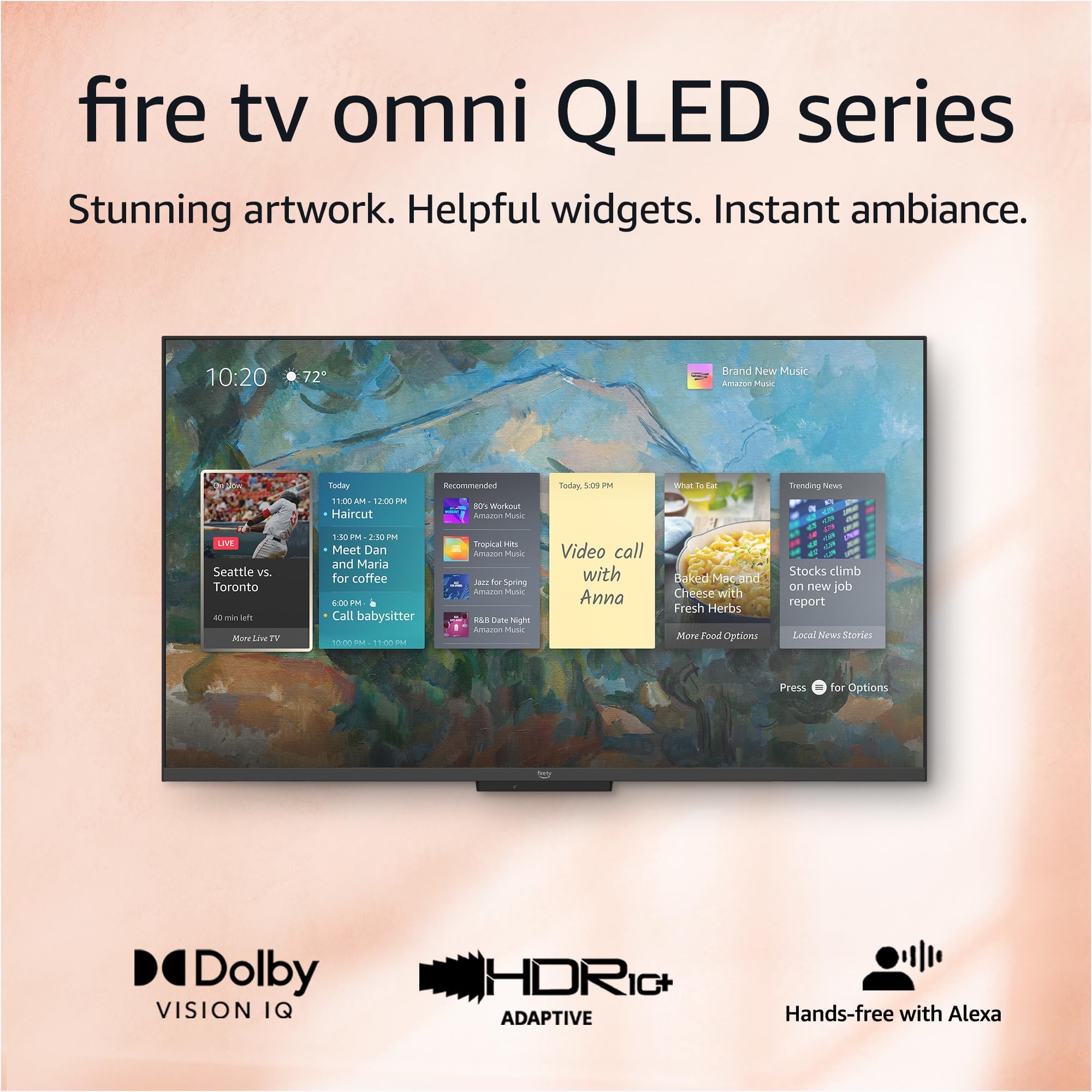
The Amazon Fire TV 50" Omni QLED Series combines a stunning 4K Quantum Dot display with Dolby Vision IQ and HDR10+ Adaptive for breathtaking picture quality. Featuring 48-zone full array local dimming, it delivers exceptional contrast and vibrant colors. Hands-free Alexa voice control and Fire TV Ambient Experience turn your smart TV into an intuitive entertainment hub and personalized art display. With multiple HDMI inputs, eARC support, and privacy-focused design, it’s the ultimate centerpiece for a modern, connected home theater.
| Resolution | 3840 x 2160 |
| Display Resolution | 4K UHD |
| High Dynamic Range (HDR) format | HDR10, HLG, HDR10+ Adaptive, Dolby Vision IQ |
| Backlight type | Full Array Local Dimming |
| Refresh rate | 60 Hz |
| Screen size | 55“ |
| Viewable display size | 54.6“ |
| HDMI ports | 3 HDMI 2.0 + 1 HDMI 2.1 with eARC |
| Ethernet | 1 Ethernet port |
| USB | 1 USB 2.0 port |
| IR device control with included Fire TV Alexa Voice Remote | The included Fire TV Alexa Voice Remote can control certain functions, such as power and volume, on a wide range of compatible IR-enabled devices, soundbars, and A/V receivers. Note: Certain functions may not be available on some IR-enabled devices. |
| Voice support | Yes, hands-free with Alexa, press and ask Alexa with the Fire TV Alexa Voice Remote or the free Fire TV app (available for download on Fire OS, Android, and iOS). |
| Audio support | Dolby Digital Plus with passthrough of Dolby-encoded audio |
| Audio power | 8W + 8W |
| OS | Fire TV OS |
| Product size without stand (WxHxD) | 48.5” x 28.6” x 3.3” |
| Weight (without stand) | 33.3 lb |
| Bezel size (mm) | 1.2 mm |
| Front finish | Gray metal |
| Distance between TV legs | 46.2“ |
| SKU Number | QL55F601A |
| VESA Wall Mount Standard | 400 x 300 mm |
| Accessibility features | VoiceView screen reader enables access to the vast majority of Fire TV features for users who are blind or visually impaired. Screen magnifier enables viewers to zoom in and out, and pan around the screen. Text Banner consolidates onscreen text into a compact, customizable banner that appears on the screen. Watch videos and TV shows with closed captioning displayed. Use Audio Description for verbal descriptions of what is happening on the screen, including physical actions, facial expressions and scene changes. Captions and audio descriptions are not available for all content. Fire TV 2-Series, Fire TV 4-Series, Fire TV Omni Series, and Fire TV Omni QLED Series support audio streaming for select compatible Bluetooth hearing aids and devices for a private listening experience. You can also listen to Fire TV with compatible Bluetooth headphones. Learn more about accessibility for Fire TV. Note: “Hearing aids” refers to compatible Bluetooth hearing devices such as traditional hearing aids, cochlear implants, and bone conduction hearing devices. |
| Content availability | Certain apps and services are subject to change or withdrawal at any time, may not be available in all areas and languages, and may require separate subscriptions. |
| Connectivity | Wifi or Ethernet |
| Digital Optical Audio Output | 1 Digital Optical Audio Port |
| Warranty and service | 1-year limited warranty and service included. Optional 3-Year and 4-Year Extended Warranty available for U.S. customers sold separately. Use of Fire TV is subject to the terms found here. |
| Included in the Box | Fire TV Omni QLED 55”, Fire TV Alexa Voice Remote, power cord, 2 AAA batteries, 4 screws, TV stand (2 legs), Quick Start Guide (PDF / Accessible HTML) |
| Software security updates | Learn more about these software security updates. If you already own a Fire TV, visit Manage Your Content and Devices for information specific to your device. |
| Size | 38.2 x 157.7 x 17.1 mm |
| Weight | 51 g (without batteries) |
| Batteries | 2 AAA required (included) |
| Technology | Bluetooth 5.0 |
| Compatibility | Compatible with Amazon Fire TV smart TVs: Fire TV 2-Series, Fire TV 4-Series, Fire TV Omni Series, Fire TV Cube (3rd Gen), Fire TV Omni QLED Series |
J**R
Just What I Wanted
Great Fire TV for the price and features. Picture and sound are both good on the 50” version that still has local dimming. Some infrequent blooming but overall another TV that proves less dimming zones isn’t a detriment with proper processing. Peak brightness isn’t as high as more expensive TV’s but is still noticeable with HDR content and very acceptable at this price. HDR10, HDR10+, HLG and Dolby Vision IQ all work well with good brightness range and color volume. Note: no Dolby Atoms for sound. I knew this, my TV is wall mounted high and tilted down slightly in a small bedroom and I have no need for a sound bar. NOTE: if using a sound bar with an optical cable, try turning the TV speakers off AND changing the output to PCM or Dolby Digital; and use HDMI 4 (ARC/eARC). This TV is a great value for my application and the budget I set for it. I’m just using the Fire TV interface and none of the HDMI inputs. So I can’t speak on Hue, Contrast and Color issues others may see. Out of the box, mine seems spot on and I currently have no want or desire to go in and adjust any settings based on the content from the various apps I’ve used. The interface isn’t as fast as the Fire TV Cube 3 or Fire Stick 4K Max but still pretty good overall. Note to new Fire TV users: the interface is slower when updates are being downloaded and installed. Check the Device Info for updates several times when first starting the TV. There will be several updates: some very big ones and 2 to 3 more little ones at the least. Keep checking back until it says that it’s “up-to-date”. THEN start to really enjoy the interface. Also the network connection and its QUALITY also plays a factor. This TV supports 2.4/5Ghz and wired (100Mbps). Ambient mode is great but just remember what the TV tells you. The power button on the remote TOGGLES between the Fire TV interface and ambient mode and that long pressing it turns the TV off. No issues with any widgets so far for me. Also, my TV easily recognizes when I enter and exit the room. If you have other Amazon products nearby that listen for “Alexa”, simply change the TV’s wake word to Computer, Amazon or Echo. Absolutely no issues with this. 1. I haven’t found any “inescapable” ads to get to content. You can “click” on these shortcuts if you want but you can just user your voice to search for titles instead. Like every other TV interface or box, third party apps have their own interfaces, sign-ins, ads, etc. that can’t be controlled by Amazon, Apple, Google, TCL, etc. Third party apps also place their own ads onto the TV platform they are on based on the deals they have in place. 2. The Fire TV interface is anything but complex. You can set it up anyway you want. Again, the various interfaces, profiles, etc. of third party apps are completely independent from Fire TV and on the makers of them and this would be the same on any other TV platform. 3. YMMV on the interface. Third party crashes and bugs are possible too. Third party interface issues need to be reported to their makers. They manage the various versions of their app across various platforms and sometimes they aren’t all equal in performance or features offered by platform. 4. It hasn’t quite been a decade for Apple to allow the removal of 1st party apps (2016) but maybe Amazon will allow certain apps to be deleted one day. But understand these devices are meant to interface with and promote Amazon products and services primarily. 5. The remote button press sounds can be turned off in options for the main interface. Don’t know about the Alexa Home Theater mode but if there isn’t a way, find out if there is one and if not ask that it be implemented. 6. Again, out of the box settings being what they may for everyone, at least there are detailed picture settings available for the TV and all of its inputs – all independent of one another to get things looking the way you personally prefer.
J**A
75” Omni QLED - Great TV Depending on Your Preferences
Upgraded to this TV from a Samsung about 6 years old. Liked the idea of the Alexa and fire tv integration. Came from primarily using Roku so Fire TV has been a little bit of adjustment but not that big of issue. The Bad - the Fire TV integration is a little slow at times, or bringing up settings lags. Not sure if it’s the TV or the other devices but have had some difficulty connecting to other Alexa devices for pairing. The layout of the fire tv is a little wonky, not hard to find something necessarily, but how things get arranged sometimes is a little odd. The Good - a lot of features with being able to use Alexa and Fire TV in general. If you use Alexa a lot or like using Alexa to organize schedules, activities, etc. then you’ll get a ton of use out of this TV. I personally like the TV speakers on it, much better than other flat screens I’ve had. I’ve seen other reviews complaining about brightness, but I haven’t experienced that, if anything I’ve had to turn the brightness down. I like the screen savers and be able to modify photos, landscapes, art, etc. It has all the major streaming services, and has performed well with video games. The Mixed - the display is good, definitely a step up from what I had. I think there are some other brands that probably offer a slightly better picture in the price range this is at, but it depends on what you’re watching. With live tv is where notice it the most that’s partially TV and partially the service you’re using to stream and internet. I don’t always get a 1080p picture but not every network broadcasts in 1080. If something does broadcast in Ultra HD or 4k the picture is fantastic. Could it be better, maybe, but fits my needs. I think what you lose in picture is made up with Alexa integration and being able to personalize the TV how you want. It could be viewed as good or bad but I do find myself modifying the display and sound to prefilled settings depending on what I’m watching quite a bit. That’s more preference than anything. I think that the movie setting for the picture display fits my preferences for watching a movie and others (sports, vivid, natural, etc). It does offer a lot of options for modifying which I like. I’d preface overall the picture is good it’s not like you lose a ton in quality, it’s marginal. Is it a straight out the box ready to go TV? No not really, yes technically you can just turn it on and go, but it would be recommended to explore the features and options it has. I’m happy with the purchase. If you want just a basic plug and play TV and you primarily utilize cable or satellite then I don’t know if this the route I’d go, would focus more on picture quality if going that route. With the 4 HDMI ports you could certainly accommodate that option but the built in features kind of get you that already, would just be redundant. I dropped cable so a one stop shop was more in the cards for me and this definitely fits that bill.
T**L
Defective
I’m not sure I’ve ever had such a bad purchase experience. I’ve had the 65” version of this tv in my cart for months waiting for a deal, checked it the other day and it said “early prime day deal”. The deal was so good I sprung for the 75” and I was ecstatic. To be fair it’s a beautiful tv, the picture is incredible, I love the smart home capabilities with Alexa, and I love having a huge tv for such a good deal. However, it has a major flaw. Setting the tv up and the initial update was difficult as it seemed to be having connectivity problems which was odd because I’ve had no issues with my internet otherwise, and I tried both on WiFi and connected with an Ethernet cable, but I eventually got passed the update and setup. As soon as I got to the Home Screen I went to download the apps I typically use. Netflix, Hulu, YouTube tv, YouTube, prime video, Spotify. None of them will install! I click the download button and it says “queued”. But it stays queued forever! It never installs. I researched online and it seems to be a somewhat common problem with this tv as other people are posting about this on forums, but none of the forums had a solution that worked. I tried all the troubleshooting steps I could find anyways and sure enough, nothing worked. So I had a friend who works in tech support look at it. After a couple hours of trying different things he says I got a lemon. So the next day I try going through the Amazon app to call their tech support and I only get error messages and can never actually call. Great. Now I decide to call customer service to see what my options are. I have no idea how I’d go about returning this massive tv as I don’t think I could even get it back in the packaging, and I KNOW I can’t drive it anywhere. The woman I spoke to from customer service tells me my options are exchanging it for another tv, OR I can be refunded my money WITHOUT returning the tv…then she puts me on hold and comes back changing her tune now telling me my only option is returning the tv for a refund, but they’ll send someone to pick it up. I’m thinking she meant someone that will actually come in my home, pack it up and take it away. I’m still not thrilled with the experience, and I was suspicious because I’ve never heard of that but she says she’ll email me instructions, so I agreed. Upon reading the instructions I realize I was correct, they don’t have a service where someone comes and packs it for you. The instructions were to box up the tv and leave it on my front step, after I told her I don’t think I’d be able to get this back in the box… This tv doesn’t do much without the apps. I know I can use other devices for these apps but that is not what I bought an Amazon fire tv for. My friends are telling me that’s why it was on such a good sale but the tv was not listed as refurbished or defective, it was listed as an early prime day deal. I’ve now canceled my return and have paid several hundred dollars for a very large monitor. I don’t think I’ve ever bothered to write a review in my life but this one takes the cake. Defective tv and horrible customer service. Stay away from Amazon fire tvs.
T**Y
Its good but not perfect
The tv is amazing and the picture quality is good but it does lag alot but when you ask alexa to do anything it basically cancels out the lag and does it quickly but using the remote its not the quickest to react I've had this tv for 7 months now and I can say it is really good I've bought the alexa pack with the sub and 2 echos I can say it make the tv 100 times better cause the tv speakers are dull and they honestly suck they are loud but you dont get any feel from them and the home theater set up really makes the experience enjoyable i use this tv for everything and even gaming it does very well but it only is 60 fps so most of the games I do play it does fall behind I haven't had any major issues with this tv that unplugging it didnt fix the only issues I've had was the remote not reading the phone app not working and the home theater glitches alot but all I do is reset the tv and everything works fine but these issues happen extremely often and but it happens so much im kinda expect it to glitch and crash when its working its great when it doesn't its very annoying to deal with it does consume alot of energy in Dolby vision mode I calculated it and its about 320 watts with that and gaming mode but on energy saving its only about 60 watts so it Definitely dies down its definitely a good tv because it also controls everything in my house if I had a choice I probably wouldn't buy it again simply for the glitches and they do not make a OLED version of the alexa tv yet so im just waiting on them to make a oled version to replace this one because I love the interface and everything i have set up the downside is it lagging alot
S**A
Great picture for the price if you have reasonable expectations
The negative reviews are correct, out of the box the picture has some noticeable issues. Once I was rid of the dreaded soap opera effect and tweaked the color settings, I was very happy. The picture on this TV beautiful and not too far off from my 65" QLED LG (also required calibration and settings changes out of the box). I'm not going to knock stars off for an advertisement or two on the home screen because I knowingly purchased an Amazon TV. If you don't want or like all things Amazon then buy another brand. Anyone that owns a Kindle or an Echo device knows the game. Back to the picture - be very wary of installing the 3rd party apps that are available. I installed one and lost my ability to change picture settings. The problem went away once I removed it. On to the last complaint I've read in the reviews. Honestly, unless you are shelling out thousands for the best TV out there, you're going to see some lag. It's a slower then my LG but not as bad as the Insignia I returned - that was truly awful. I really like the ability to easily connect it to my new Echo Pops that sit on our night stands. Its nice to hear sound next to me while I'm relaxing on the bed. If you are connecting to multiple Echo devices, during the process the TV will ask you if you would like to hear a sound preview - do it - it's awesome I also like the functionality of voice control with Alexa. If you purchase this TV, like to play with your tech and have reasonable expectations, it's a great TV for the money. If your standards won't budge, spend more or you won't be happy.
M**N
You won’t be disappointed
What a great TV for the price! this tv is replacing an old Vizio 50” I’ve had forever as a bedroom tv. I’m going to be having surgery soon so a lot of time will be spent in my master bedroom either in the recliner or the bed so I figured it was time to upgrade. What an upgrade it is. Pictures fantastic and the setup and use is very simple. Very satisfied with my Amazon day purchase. Can’t beat this TV for the price.
E**H
The picture is phenomenal at this price point. Has slight glitches though
55" Omni 4k QLED The picture is amazing in 4K full HDR! You cannot beat this TV for this price. I found out through my Roku that the manufacturer is Toshiba. So I had some issues. First it would log me out of my Amazon account and I would have to go in and set up my home screen again. No biggie and it stopped doing that. The Pandora music app plays but lags so bad that you can barely use it besides just letting it play. The fire TV will not support the spectrum TV app which was almost a deal breaker. The ARC HDMI will control my home theater receiver, turn up and down the volume, turn it on and off, etc but only if I don't have a receiver installed through the TV. When I install it through the TV settings it will be fine most of the time but then glitches and mutes the receiver when turning the volume up, will randomly display the volume every 20 seconds unless I turn the volume up or down a few times etc. The Alexa works great on it and actually took the place of the echo dot that I had installed in the room. Bonus because I can use that echo dot as another zone in a different room for my smart home. It automatically controlled all of the same things, lights, switches etc, and required no extra setup which was very cool. So the good... Well the really good... I've always used Roku and, sorry Amazon, totally prefer Roku over the fire OS. I bought the more expensive Roku 4k stick and it does full HDR and Dolby Vision in beautiful, dazzling picture even though it's not plugged into the HDMI 2.1 port (HDMI 4 ARC). I need the ARC input to control my home theater receiver. The other three ports, HDMI 1 through 3 are HDMI 2.0 ports according to the description, but it still pushes the full HDR signal through these ports. So I'm extremely happy with the TV now. The Roku also controls TV power on/off and volume through my home theater receiver. The only issue I have is when I turn the TV off through the remote it's not turning my receiver off. But I'm sure there's a setting somewhere that I haven't found yet to fix this. Also with the Roku I get the spectrum TV app and my Pandora works fine and switches to the screen saver (the Pandora app through the fire TV OS stays on the blue screen while playing and I'm afraid that will cause burn-in on the TV screen after countless hours of play). Bottom line, you won't be disappointed with this TV. The fire TV OS will work great for you I'm sure, but I just prefer Roku. I spent the extra for the 4 year extended warranty as this is a relatively new line of TV. But being manufactured by Toshiba I'm sure it will be fine! ENJOY!
C**N
Software is still very buggy
Edit 7/27/2023 This will be my final edit. I gave up on the TV completely. Less than 1 year of ownership. The software never got fixed. It would get stuck inside of apps. Pressing the home button would only return you to the app you were trying to leave. And when powering the TV on it would also go into the app you last used. Makes it very difficult to switch between apps. I was unplugging the TV daily to get it to reset. The dead pixel cluster did grow too. At first I could only see it standing next to the TV, by the time I gave up, it was noticeable from the couch. Plex was still broken as well. Still would crash at exactly 5 minutes into a song. Plex logs show it was the TV that sent the kill command. It is now sitting in the dumpster. I bought a new TV that doesn't use Amazon software. Edit: 2/25/23 I've given up on using Plex with the Fire software. I plugged in a separate streaming device and OMG that device is miles better. Content actually loads. Music actually plays. The Fire OS on this TV is straight broken. Stay far away from this TV. Edit: 02/01/23 Another month down, at least 2 updates I think and absolutely no progress made in making this software better. Still has problems with Plex. Music still only plays exactly 5 minutes and crashes. Which then causes an issue of not loading metadata. Still has the problem of trying to get to the home screen. Press the button once, it flashes the home screen then loads back into whatever app you were in. Press the home button again and it is 50/50 as to whether it'll stay on the home screen. And the software just freezes some times. You can press a button on the remote and nothing happens...press again, still nothing, press a 3rd time and it finally accepts the command and does all 3 commands rapidly. Do not buy this TV. There are many better choices at this price range. I'm hoping for a decent sale to pop up before the big game so I can replace this piece of garbage. Edit: 12/24/22: Another month down and this TV still does not play nice with Plex music. Plays exactly 5 minutes then crashes. After the crash metadata fails to load in Plex. And the issue with getting to the home screen has come back. Pressing the home button tries to load the home screen, but then reloads whatever app you were in. Most of the time a 2nd time pressing the home is 50/50 that it'll go to the home screen and stay there. Overall navigation in the app is just super slow. The dead cells in the center of the screen have gotten slightly more noticeable. I'm passed the return window, so I'm stuck with this garbage for a while. Edit: 11/29/22: I've spoken with customer support and they did refund me the $250 price difference, so that was nice. Too bad the software still does not play nice with Plex. I can not listen to a song for more than 5 minutes before it crashes the app and shuts the TV off. Plex's logs show the TV is what is crashing. I am fully up to date on software and still having this problem. Then, I noticed I now have a small group of dead pixels right in the middle of the screen. Such a disappointing device. It is amazing how this TV's Fire software is soooo buggy compared to older Amazon TV's running the same software. Right now this TV crashes apps and turns off the TV. It also has a problem where you can't get back to the home screen. It just gets stuck inside whatever app you are using. Pressing the home button or asking Alexa doesn't work...it tries, but then right back to the app you were in. Letting it sit turned off for a long time kinda fixes it...as does unplugging it. There is no hard reset option other than unplugging. Plex in particular crashes a lot when playing music. It also has created a problem where metadata art fails to load. It works fine on an older Fire TV running software that has the same home screen as the new TV. Also super disappointed in Amazon when they price dropped this TV $250 from what the pre-order people paid. That is that extra kick in the teeth.
Trustpilot
2 months ago
2 weeks ago