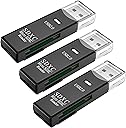
💼 Elevate your workflow—fast, flexible, and always ready to connect.
The Wansurs USB SD Card Reader 3-pack offers dual SD and MicroSD slots with USB 2.0 interface delivering up to 480 Mbps transfer speeds. Compatible across Windows, Mac, Linux, and Android, these compact, plug-and-play adapters provide versatile, portable memory access for professionals on the move.

| ASIN | B0B9R7H765 |
| Batteries Included | No |
| Batteries Required | No |
| Brand | Wansurs |
| Compatible Devices | Camera, Laptop |
| Connector Type | USB |
| Customer Reviews | 4.6 4.6 out of 5 stars (7,083) |
| Data Transfer Rate | 480 Megabits Per Second |
| Date First Available | 22 September 2022 |
| Hardware Interface | USB 2.0 |
| Item Weight | 18 g |
| Manufacturer | Wansurs |
| Media type | MMC, SD Card, SDHC, microSD |
| Number of items | 1 |
| Operating System | Android, Linux |
| Package Dimensions | 11.71 x 7.39 x 1.09 cm; 18 g |
| Special Features | Compact |
K**D
Used it for, flashing switch worked great
C**N
Bon produit fonctionne très bien
A**.
This is a tidy little card reader, and it worked like a champ when my larger, fancier, far more expensive card reader seemed not to recognize the SD card from my camera. Whew! This is definitely a five-star value, and - at the price - a winner. It's fast. It's easy to use. The light on it confirms that it's working, even with a tired Windows 10 laptop, so its compatibility is impressive, as well.
L**O
O produto chegou bem embalado e no prazo previsto. Já consegui utilizar com 2 cartões de memória, e funcionou perfeitamente, inclusive na velocidade USB 3.0. Recomendo!
A**S
For the price, five stars. It works, and it is cheap. What are you getting? A slow card reader. Plain and simple. Below are hdparm tests using the same microSD card for both runs. The only variable changed was the adapter. hdparm tests using the same micro sd card for both tests, only changing out the adapter: ``` user@dev:~$ lsusb Bus 001 Device 001: ID 1d6b:0002 Linux Foundation 2.0 root hub Bus 001 Device 002: ID 8087:0029 Intel Corp. AX200 Bluetooth Bus 001 Device 003: ID 062a:4101 MosArt Semiconductor Corp. Wireless Keyboard/Mouse Bus 001 Device 004: ID 258a:00a0 SINO WEALTH USB KEYBOARD Bus 002 Device 001: ID 1d6b:0003 Linux Foundation 3.0 root hub Bus 002 Device 006: ID 067b:2731 Prolific Technology, Inc. USB SD Card Reader <-- other adapter Bus 003 Device 001: ID 1d6b:0002 Linux Foundation 2.0 root hub Bus 004 Device 001: ID 1d6b:0003 Linux Foundation 3.0 root hub Bus 005 Device 001: ID 1d6b:0002 Linux Foundation 2.0 root hub Bus 006 Device 001: ID 1d6b:0003 Linux Foundation 3.0 root hub user@dev:~$ lsblk NAME MAJ:MIN RM SIZE RO TYPE MOUNTPOINTS sda 8:0 1 58.2G 0 disk └─sda1 8:1 1 58.2G 0 part /media/tbrinkhuis/76E8-CACF <-- test card (Kexin Micro XC U1 I) nvme0n1 259:0 0 465.8G 0 disk ├─nvme0n1p1 259:1 0 512M 0 part /boot/efi ├─nvme0n1p2 259:2 0 8G 0 part [SWAP] ├─nvme0n1p3 259:3 0 97.7G 0 part / └─nvme0n1p4 259:4 0 359.6G 0 part /home user@dev:~$ sudo hdparm -t --direct /dev/sda /dev/sda: Timing O_DIRECT disk reads: 264 MB in 3.02 seconds = 87.40 MB/sec ``` Same card, different adapter: ``` tbrinkhuis@mint-dev-2:~$ lsusb Bus 001 Device 001: ID 1d6b:0002 Linux Foundation 2.0 root hub Bus 001 Device 002: ID 8087:0029 Intel Corp. AX200 Bluetooth Bus 001 Device 003: ID 062a:4101 MosArt Semiconductor Corp. Wireless Keyboard/Mouse Bus 001 Device 004: ID 258a:00a0 SINO WEALTH USB KEYBOARD Bus 001 Device 011: ID 14cd:1212 Super Top microSD card reader (SY-T18) <-- This adapter Bus 002 Device 001: ID 1d6b:0003 Linux Foundation 3.0 root hub Bus 003 Device 001: ID 1d6b:0002 Linux Foundation 2.0 root hub Bus 004 Device 001: ID 1d6b:0003 Linux Foundation 3.0 root hub Bus 005 Device 001: ID 1d6b:0002 Linux Foundation 2.0 root hub Bus 006 Device 001: ID 1d6b:0003 Linux Foundation 3.0 root hub tbrinkhuis@mint-dev-2:~$ lsblk NAME MAJ:MIN RM SIZE RO TYPE MOUNTPOINTS sda 8:0 1 58.2G 0 disk └─sda1 8:1 1 58.2G 0 part /media/tbrinkhuis/76E8-CACF <-- same test card (Kexin Micro XC U1 I) nvme0n1 259:0 0 465.8G 0 disk ├─nvme0n1p1 259:1 0 512M 0 part /boot/efi ├─nvme0n1p2 259:2 0 8G 0 part [SWAP] ├─nvme0n1p3 259:3 0 97.7G 0 part / └─nvme0n1p4 259:4 0 359.6G 0 part /home user@dev:~$ sudo hdparm -t --direct /dev/sda /dev/sda: Timing O_DIRECT disk reads: 58 MB in 3.10 seconds = 18.74 MB/sec ```
Trustpilot
3 days ago
3 weeks ago