Buy anything from 5,000+ international stores. One checkout price. No surprise fees. Join 2M+ shoppers on Desertcart.
Desertcart purchases this item on your behalf and handles shipping, customs, and support to Greece.
🚀 Tiny Titan: Power, Speed & Style in the Palm of Your Hand
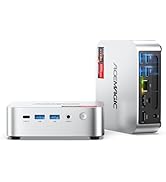
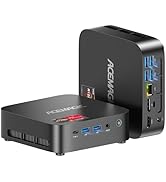
The ACEMAGIC Mini PC packs a 12th Gen Intel N97 processor with 16GB DDR4 RAM and a 512GB NVMe SSD into a palm-sized chassis. It supports dual 4K displays, WiFi 6, Bluetooth 5.2, and dual Ethernet ports including a blazing 2.5Gbps connection. Designed for professionals craving high performance without the bulk, it offers silent cooling, VESA mount compatibility, and expandable storage options, making it the ultimate compact desktop for home and office productivity.


| ASIN | B0FN49QQGY |
| Aspect Ratio | 16:9 |
| Best Sellers Rank | #2,045 in Computers & Accessories ( See Top 100 in Computers & Accessories ) #67 in Mini Computers |
| Brand | ACEMAGICIAN |
| CPU Model | Intel N |
| CPU Model Number | N97 |
| CPU Speed | 2 GHz |
| Cache Memory Installed Size | 16 |
| Cache Size | 16 |
| Color | Silver |
| Connectivity Technology | Bluetooth, Ethernet, USB, Wi-Fi |
| Customer Reviews | 4.4 out of 5 stars 511 Reviews |
| Display Resolution Maximum | 3840x2160 |
| Graphics Coprocessor | Integrated |
| Hard Disk Interface | USB 3.0 |
| Hardware Interface | DisplayPort, Ethernet, HDMI, USB 2.0 |
| Item Weight | 1.3 Pounds |
| Keyboard Description | Integrated |
| Keyboard Layout | QWERTY |
| Manufacturer | Shenzhen CYX Industrial Co., Ltd. |
| Memory Storage Capacity | 512 GB |
| Model Number | V1 |
| Native Resolution | 3840 x 2160 |
| Number of Component Outputs | 2 |
| Operating System | Windows |
| Processor Brand | Intel |
| Processor Count | 4 |
| Processor Series | Intel N |
| Processor Speed | 2 GHz |
| RAM Type | DDR4 SDRAM |
| Resolution | 3840 x 2160 |
| Screen Size | 75 |
| Total Number of HDMI Ports | 2 |
| Video Output | HDMI, DisplayPort |
| Video Output Interface | HDMI, DisplayPort |
H**S
Excellent performance, expandability, and value for the money!
This is a review of the Ace Magician AM06 PRO (Ryzen 5 5600U) Photos included with review: 2 photos show size comparison to common items (a mouse and a 3.5" hard disk). 2 phots showing available ports. 1 Photo shows location of internal components. 2 photos show how to properly install the SATA drive cable. The Hardware This system utilizes an AMD Ryzen 5600U CPU. This CPU packs a surprising punch for a CPU that sips so little energy. It's amazing what AMD has accomplished here. This CPU has 6 cores and 12 threads. It also includes AMD Radeon graphics. Others have already commented on the raw performance metrics, so I'll concentrate on providing general information and a few tips for getting the most out this system. General System Information Please see the first two photos that illustrate how compact this system really is. You will find the usual compliment of ports on the system which include two USB 3 ports, one USB 3 type C port, two USB 2 ports, HDMI, Display Port, and a 3.5 mm audio jack . One unique design feature that AceMagicians have incorporated is the inclusion of not just one, but two Ethernet adapters, including one 2.5 Gbps and one 1 Gbps port. Why might this be helpful? There are several possible scenarios, but for me, I often perform testing using Windows Hyper-V. If I had only one Ethernet adapter, then I would need to share that adapter between the VMs and the primary installation of Windows. My preference is to NOT share the adapter. By having two adapters, I can assign one to my VMs and have a separate adapter available for exclusive use by the main OS. So having this feature available on a mini PC is very welcome. In addition, it just makes sense to have a 2.5 Gbps Ethernet adapter on modern systems with SSDs. Transferring data between machines with SSDs can easily saturate a 1 Gbps Ethernet so this extra speed is very welcome and matches well with a system containing SSD storage. I also like the fact that this system has a microphone built-in. That is something typically missing in most mini PCs. It allows for one less having to be plugged into the system. Another nice touch is the fact that the power connector is a USB-C type connector. That's really helpful for people like me who are always carrying USB-C power adapters around with them already. TIP: You may find that some standard off the shelf USB-C power adapters may not work to power this system. In my testing with several different adapters, I found that some of them would power the system on initially, but the system would shut down within a few seconds of being turned on. I found that the latest line of Anker GaN and GaN prime adapters (available here on Amazon) work fine with this system. When purchasing an adapter, make sure that it has a minimum of 65W output power and that it supports 19V (20V) output. I suggest a unit with a single USB-C output because plugging in a second device may momentarily interrupt power to the Mini PC which you obviously do not want to happen while it is running. What's really amazing is how all this processing power and all these ports are incorporated into such a small case. As you look through included images, take note of the size of this system in relation to some common items such as a pair of glasses and a computer hard disk. Initial Setup The initial setup of the system is very quick and simple. AceMagicians have preinstalled a pristine, clean, Windows 11 Pro installation on this system with no bloatware. I really appreciate this because it makes ensures that you have Windows running at peak efficiency without a bunch of stuff that you will never use slowing the system down. TIP: After you get the system up and running, make sure that you have an internet connection. I would suggest allowing the system to install all available Windows updates. Once updates are done, open an elevated command prompt and then run these commands: MD C:\Exported_Drivers pnputil /export-driver * C:\Exported_Drivers This will make a backup copy of all system drivers. I would suggest copying or moving that folder to a thumb drive, external HD, etc. for safekeeping. Then, if you ever perform a fresh installation of Windows, you can simply open Device Manager, right-click on the computer name at the top of the device tree, select "Add drivers", and point it to your backup copy of the drivers. This will install all the drivers. Note that when the display driver is being installed, the screen may go blank for a few seconds. This is normal. Expandability Clearly, AceMagicians has thought about servicability with this system. Simply loosen four phillips type screws on the bottom of the unit and the bottom cover pops right off. There is no need for any prying, wedging, or force of any kind. With the bottom cover removed, access to the SSD and RAM is extremely simple. This system utilizes dual channel DDR4 3200 Mhz SODIMMs and can be expanded to 64 GB, should you wish to do so. Note that the SSD is an NVMe module with a 2280 form factor. Beneath the SSD is the Realtek WiFi module which can be upgraded should you wish to do so. My personal preference is to use an Intel AX210 WiFi 6e module. TIP: The system comes with ribbon cable to SATA connector to allow you to add a 2.5" disk in addition to the M.2 SSD that is already installed. However, my system came with no instructions for installation. Reasons for Purchasing a Mini PC There are many reasons to consider a Mini PC: 1) The complete system is a very cost-effective solution. This system is very reasonably priced. Why spend a fortune on a computer when you can purchase an entire system in a small box at an affordable price? 2) More than enough speed and power to rapidly accomplish all the tasks that most people perform. A Mini PC is ideal for people who use Word processing, browse the web, perform some mild to mid-level gaming, perform photo and video editing, and much, much more. It is true that if you want to play the latest, cutting-edge, high-end games, you will need more power than a Mini PC will offer, but that is not the case for many individuals. 3) Space savings: It's almost difficult to explain just how remarkably small these systems are. It's probably best to look at some of photos that I have included to get a really good sense of the size. Because of the small size, these units will occupy very little space on your desk. Since they include a VESA mount, they can also be directly attached to the back of any monitor with a VESA mount. In that case, they will occupy no desk space! 3) Energy efficient: Because these systems are so energy efficient, they won't drain your wallet. 4) Expandability: Many persons are surprised at the level of expandability that such a small system can provide. This system comes with 16GB of RAM, which is a generous amount more than sufficient for most tasks. However, if you wish, this system may be expanded up to a whopping 64GB. As for storage, a 512GB NVMe SSD is included with the system. However, even here you have options. A 2.5" drive can also be added to the system and the NVMe could be swapped for a larger unit if so desired. 5) External connectivity: This system allows the connection of up to 3 monitors simultaneously using the DisplayPort, HDMI, and USB-C connectors. Naturally, you will also have access to additional devices via the USB ports. Even network connections are plentiful with WiFi and Bluetooth, as well as both a 1Gbps Ethernet port AND a 2.5Gbps Ethernet port. Summary I can whole-heartedly recommend this system. My initial thinking was that I could use it for some offline data storage and some very light tasks, but after realizing how much better the performance was compared to what I expected, I decided to promote this system to a more important role in my digital life. If you are considering a Mini PC, I think that you will be pleasantly surprised by the performance and value that this little beauty provides.
J**O
A super mini PC at a super price
Tl;dr highly recommended. Background: I was looking to replace my existing very large tower PC (c. 2015) with something that was a) more up-to-date and b) less power consuming. To be clear, I have been transitioning to an M1 MacBook Pro and QNAP NAS, and I no longer need to do image and video processing on the PC. So my mid-level nVidia GPU and lots of hard drives were no longer requirements. I was willing to give up the BluRay writer as well. But the Windows PC was still an important part of my multi-level backup strategy. Namely, I keep a copy of all photos, videos and documents on the PC, synchronized using GoodSync from my NAS, and from there I let Backblaze handle cloud backup. (Backblaze won’t sync from network shares.) The Ace Magician AM06 Pro had a number of appealing features for me. The tiny size was, of course, a big asset. And I do mean tiny. The ability to add a 2.5 inch SSD was mandatory. And the second NIC allowed me to connect my QNAP NAS directly to the PC using 2.5GbE. While this was a step down from my previous 10GbE NIC, that was no longer really necessary. While there are other mini PCs that have a 2.5GbE NIC now, there are very few that have a second NIC, let alone at this price. Oh, and price, which in this case equates very nicely to value. I ordered the mini PC, and my experiment began. Before I ordered a large SSD, I wanted to see if this was going to work for me. I plugged in the DisplayPort to one of my monitors that had a free DP connection, connected my Logitech mouse and keyboard using their dongle, plugged the 1GbE into my home LAN, and we’re off to the races. Right out of the box, the system came up in seconds, running the Windows 11 OOBE. A few questions later and the system connected to my Microsoft account. Everything seemed fine, so I started with any Windows updates that might be available. There were only a few, so I let that process complete. At this point, I made no changes to the BIOS and no changes to the default Windows configuration. Now I needed to add Hyper-V support, and I expected to need to change a BIOS setting or two. But no, not necessary, virtualization support was already enabled! I moved a VM over from my other system - with some difficulty that had nothing to do with the mini PC, but I got it sorted out. Then I connected and configured a private network for the 2.5GbE NIC to my QNAP directly, Jumbo frames enabled. No problems there. I ran a short stress test and I could hear the fan spin up. It’s not a pleasant sound, but I don’t plan on stressing the PC. The next day I came back to continue on the transition, and found the PC had shut down. Oh, no! Very curious, I determined it was after exactly 3 hours of idle time. Hmm, I had disabled sleep. But crafty Microsoft, the power plan still had hibernation set for 180 minutes. Grr. Set to Never now. A few more days, and it was time to move on to phase 2: add a 4TB SSD. I know the description says that 2TB is supported but I could not think of why the limit (and I have 40+ years in the storage business under my belt). Suddenly a sale price directly from WD appeared, and I proceeded with that. Adding it was a little hairy - the ribbon cable (included) to the motherboard connector looked fragile, and took some care. I knew that at first (before any power applied) I didn’t have it just right and I took my time until I got it. Power up, perfect, no issues, 4TB now available. I won’t go into great detail about the rest of my configuration other than to say after 10 days, the old tower was powered down, the new AM06 Pro handling everything I needed. I think you get the point now. My experience has been overwhelmingly great. In the process, my constant power load dropped by more than 60W as reported by my UPS - this was expected. But no review is complete without some “cons”: The power switch. I can’t tell you how many times I inadvertently touched it and my system shut down. I had to device an approach to make sure this didn’t happen again. My “Server Rack” (photo) keeps me - and more importantly, my cat - from hitting it. I hope Ace Magician does not repeat that design. It looks cool, but asking for trouble. I should drop a star for this, but I won’t :) The power supply. OK, this is not going to cost them a star. When you have such a small PC, the big brick with detachable cord is out of place. I started looking for a tiny USB-C GaN charger to replace it. My first try (a 3 port unit) didn’t go so well as it shut down in 30 seconds every time I powered it up. Someone on the minipc forum tried a bunch of these and found the one that worked: a single USB-C port, Anker Nano II 65W. Same overall rating as the supplied PS. The actual power draw of the PC (in my use case) is more like 20-30W. But this is important: the new GaN charger - added just today - is far more efficient, and switching to it dropped another 20+W from my overall total. Wi-Fi performance. Meh. I don’t care, I don’t need it, you might. I disabled in Windows. A second NVMe slot would be “nice to have”. EDIT: One additional note The included VESA bracket did not work for me as I have my monitors mounted on arms. If you are considering mounting behind a monitor, you might need a different sort of bracket. Back to my conclusion: buy it. Incredible value. Seriously. Addenda: Summary of changes I made from out-of-the-box configuration 1. Disabled hibernation! I blame Windows 11 for this, it was not a default in Win10. 2. One BIOS setting: After a day or so, I could hear the fan spin up sometimes. Poking around in the BIOS, I found fan control was set to “Manual” and there were optional settings. But I figured I would try “Automatic” before getting too geeky, and that’s worked well for me. No more whining! 3. Disabled the Wi-Fi NIC (in Windows). 4. Removed Chinese fonts. No offense, it’s just not one of my languages and I don’t expect to learn it.
F**D
The Acemagician AM06 Pro mini-PC packs a lot of features and performance into a tiny footprint
I recently purchased the Acemagician AM06 Pro and have been so impressed with this little machine I decided to give it a thorough review for those out there who may be considering buying one. This was a replacement for a 7th generation Intel NUC I used for media streaming and light gaming on my living room TV and I couldn’t be happier with my purchase. Specs The specs of this mini-PC are extremely impressive considering the cost. The PC come with an AMD Ryzen 5 5600U processor (6 cores / 12 threads, 16MB L3 Cache, and boosts up to 4.2 GHz), built in Radeon RX Vega 8 graphics, 16GB high-speed DDR4 ram, a 512GB NVMe SSD, and the ability to add an additional 2.5” SATA hard drive. I/O for the system includes 1 x HDMI Port, 1 x DP Port, 1 x 2.5Gbit and 1 x 1Gbit RJ45 LAN, 2 x USB 2.0 Ports, 2 x USB 3.0 Ports, 1 x USB Type-C Port, and one audio-in/out jack. The HDMI port, Display Port, and USB Type-C Port can all be used to drive a monitor, so you could use this mini PC in a three monitor setup if you wanted. The timings for the memory in this system according to CPU-z are 22-22-22-52 @ 3200MHz running in dual channel. The case measurements for this mini-PC are about 5.19” square and is approximately 2.13” tall. Build quality The build quality of this machine if very good. The system is easy to open (4 screws) and upgrade the memory or storage if desired. The whole thing weights just over a pound (1lb 4oz) and just feels solid sitting in my hand. I think the design of the case looks great and I really like the subtle red glow around the power button. Performance The performance of this PC is amazing and blew my NUC out of the water. In Cinebench R23 I got 7124 in the CPU multi core benchmark, and for the Unigine Valley graphics benchmark I got a total score of 1822 at high settings, 720p, and 2x anti-aliasing. At 1080p I got a total score of 926 at high settings and 2x anti-aliasing The Radeon RX Vega 8 graphics chip in this system is one of the better integrated graphics chip designs out right now and it has opened up a lot more titles I can now play from my Steam library on my living room TV. The NVMe for this mini-PC is pretty zippy too, in Crystal Disk Mark I got around 2050MB/s reads and 1550MB/s writes. Power / Sound The fan on this mini-PC is whisper quiet. I recorded the fan noise with my iPhone dB sound meter from about a foot away and got around 36 dB when it was at idle. Under load when running the Cinebench R23 benchmark, it climbed and bounced between 39 and 40 dB. The power draw on the PC was just 6W at idle and 37W when running the Cinebench R23 CPU benchmark. Final thoughts Overall, the Acemagician AM06 Pro mini-PC packs a lot of features and performance into such a tiny footprint. I’m completely happy with purchase and wouldn’t hesitate to recommend it to a friend. Hope this helps anyone out there thinking about buy one. Cheers.
S**N
Very nice, affordable mini!
The little guy is a wonder of miniaturization. It runs Win 11 nicely and handles all the USB accessories I’ve got attached with no issues. HDMI is strong, good refresh rate with live TV and portable DVD player. Great little PC at a really good price. Could use onboard card slots, but for the money, it’s not an issue. I plugged in a 1tb solid state drive with built in USB hub and card reader. I could afford to given the price point of the PC. It’s tucked away in a little drawer and still runs cool even on 24/7.
M**S
I recommend it
Good computer. great value and fast. I'm impressed it is been a week and it is working great so quite you can't even hear it. powerful and small size doesn't take much space, pictures and video looks great.
J**R
Great little desktop PC replacement!
It has been 8 months since I bought this model as a temporary replacement of my desktop computer which needed some upgrades. As I was delightfully surprised by its performance I thought I would share my experience and findings. I rely on my desktop computer for pretty much everything. That includes running engineering, imaging and video editing applications on a daily basis in addition to the usual web browsing, document handling and most importantly short to mid term safe data storage (until everything is eventually dumped into permanent archives on a dedicated in-house file server). Thus performance and reliability are essential factors in the selection of my daily use system. I also expect it to be able to drive comfortably a 43" monitor with 4K resolution. This small unit which is powered by a 6 core, 12 threads AMD Ryzen CPU comes with 16 Gigabytes of RAM and 512 Gigabytes of fast NVME storage. For networking it integrates dual band wifi capability along with two ethernet ports of which one can go as high as 2.5 Gigabit per second while the other one sports 1 Gigabits. The wired network ports work well and achieve the specified speeds. The wifi feature on the other hand falls short as the internal antenna hardly allow for any meaningful speed or distance. But it's there and in some circumstances it might be of help. When it comes to connectivity, this little box comes with 3 USB3 ports on its front panel and 2 USB2 ports on its back. They all work very well and they achieve their respective specified performance levels! Now the power adapter provided within the original package is something that has troubled me a bit from the start! Why? Because frankly it looked very flimsy! Indeed, lightweight, made of cheap plastic, simplified electronic components, using inexpensive steel wire instead of good old copper wiring, it really features everything that's wrong in power supplies incorporated in today's short-lived consumer electronics! So early on I bought a better quality power adapter compatible with this unit and set it aside for the day which would come and would require replacement. And as I suspected, that day was not too far out, when indeed it failed after about 3 months of daily use! Finally a word on the incorporated fan which is relatively quiet most of the time. Over the 5 month period when I used this box most intensively the fan's acoustic tone has changed quite a bit. Such change usually correlates with wear and tear and much like with laptop computer fans it's expected to happen sooner or later. It's not rattling yet, but it seems to be close! To recap: - The computer electronics are top-notch! (9/10) - The computer's housing is just average and on the fragile side. (6/10) - The power supply is not good. (2/10) - Performance for the price is good. (8/10) - Value for the price is average. (6/10) - Not really suitable for long term professional use. (4/10) - Excellent for home/consumer use with the exception of the power adapter. (8/10)
B**N
Amazing little computing device perfect for anyone and everyone!
This little PC is an amazing product to use if you are looking for something to attach to a TV to use as a streaming box. I bought this in order to not have to use my main gaming PC as a streaming service box as well and this mini PC is just amazing. Considering that this can also be used as a normal computer to do things like surfing the internet and some gaming, I would consider this a great purchase for anyone looking for a small computer that takes up virtually no space. Also the fact that you can just plug it in to any free HDMI port on your TV and turn it on makes it extremely easy to use and setup, paired with a wireless keyboard and mouse and you can control this from anywhere in the room. For the amount of use that you can get, I would call this a great buy for anyone and you will definitely see the value of it right away for the cost that you are paying.
M**K
A powerful small unit with the worst support ever.
Edit: I have now called, emailed and tried to webchat. Even in the webchat they did not respond. This is ridiculous. If you expect any sort or warranty or support, this is not the vendor or the product for you. Edit: Worst customer service experience from any vendor I've had. I emailed and called 4 times, and it's been almost 2 weeks with no response. Cancelling 2 stars. Before I begin, let me put down some credentials here. I work in I.T. I've done desktop/server support for decades and now develop software. So, let's suffice it to say that I consider myself an expert in technology. I wanted to replace a desktop unit I have in the living room. It's bulky and a bit outdated. So, I've been shopping around and looking to use a much smaller unit. This item fits that bill perfectly for obvious reasons. Now, I wanted something that would be comparable in CPU power and in RAM...and maybe a little GPU power in case I want to game a little. I also don't want to pay a gaming system price. Well, when I saw this for an extremely reasonable price, I could see that on the spec sheet, it checks all of the boxes. My previous experience with systems like this though is that they have all the right numbers but when you actually put them into the field, they crap out performance-wise. This was not the case here. This system is exactly as advertised. A powerful mid-grade system. It's small, it's quiet and it's solid state. The only moving part on this thing is the fan. It's very responsive and is perfect for all the reasons I went looking for this system. This is one of the best purchases I could recommend to someone looking for a system that's not quite a gaming system, but will do Sims 4 on high quality without breaking a sweat. It has but one downside I've found but it is not a dealbreaker in my opinion, and I don't remove a star for it. It is Wifi5, which was clearly listed in the specs. I knew it when I ordered it. This means the best speed I get wirelessly is about 100MB. A Wifi6 chip would have been 10x faster, but I understand...cost cuts have to come somewhere. If it ever becomes a big deal, I can always get a USB adapter to get Wifi6 speed. tl;dr It's worth it. Edit: I decided to crank up the Sims 4 to Ultra mode and check out the FPS rating. 20 hours of play and it averages 126.7 fps. This thing solidly performs. I decided to buy a 2nd system that I'll be beefing up with 32gb of ram and an addition 1tb drive to run my external drives I use as a NAS & Plex Server. By my calculations, swapping from a standard PC setup with a 650watt p/s to this will save enough electricity cost to pay for itself in about 6 months.It's almost a free upgrade. Edit: 8 Month update. The SSD in the unit died on me for no apparent reason. I have the system hooked up to a UPS and there were no brownouts. I am still happy with this unit, replacing the SSD is super simple and getting a quality replacement with twice the size will only be about 50 dollars. I would still recommend this to a friend.
J**A
Excelente custo benefício
Um "super computador". É muito pequeno. Fixei ele atrás do Monitor. Liguei dois monitores (suporta 3, mas não testei a terceira saída, USB C. Mas atende muito bem as necessidades diárias. Configuração muito boa, memória e processador satisfatórios. Excelente custo benefício. Melhor do que um Gabinete enorme. Claro, não é um PC gamer. Se você precisa de um PC para coisas normais da vida, eu recomendo fortemente Ressalva: o Windows 11 Pro que vem no produto não tem suporte para português brasileiro, apenas português de Portugal
M**Y
Excellent
Excellent
É**S
Me admirei do tamanho... extremamente pequeno mas muito eficiente... dentro das condições que uso..
Estou usando direto... muito satisfeito.l.. tb uso como ferramenta de trabalho e auxilio , apoio nos trabalhos de faculdade... nao uso com jogos ou edição de videos grandes... ta otimo extremamente satisfeito... uso com um hd externoide 1 tera pra nao carregar o espaço no disco dele... dessa forma ta excelente... recomendo...
Trustpilot
2 weeks ago
1 month ago