๐ Unlock your Macโs hidden speed with ACASIS SSD enclosureโbecause fast storage is the new status symbol.
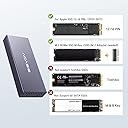
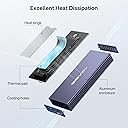
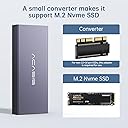
The ACASIS USB C 3.2 SSD Enclosure is a precision-engineered external storage solution designed for original Apple 12+16-pin SSDs from 2013-2017 MacBook, iMac, and Mac Pro models. Featuring blazing 10Gbps USB 3.2 Gen2 transfer speeds (up to 20Gbps on compatible systems), a built-in M.2 2280 NVMe adapter, and a robust metal case for optimal heat dissipation, it delivers reliable, high-speed portable storage with easy plug-and-play setup.


| ASIN | B09PFQX277 |
| Brand | FREEGENE |
| Brand Name | FREEGENE |
| Colour | Grey |
| Compatible Devices | Laptop |
| Customer Reviews | 4.2 out of 5 stars 276 Reviews |
| Data Transfer Rate | 5000 Megabytes Per Second |
| Enclosure Material | Aluminium |
| Hardware Interface | USB Type C |
| Hardware Platform | Mac, Windows |
| Hardware interface | USB Type C |
| Hardware platform | Mac, Windows |
| Item Dimensions L x W x H | 43L x 15W x 107H millimetres |
| Item Weight | 0.71 Ounces |
| Manufacturer | FREEGENE |
| Manufacturer Part Number | MAC3W |
| Material | Aluminium |
| Memory Storage Capacity | 4 TB |
| Model Number | MAC3W |
| Product dimensions | 43L x 15W x 107H millimetres |
| Supported Devices Quantity | 1 |
| The Standard Size of the Hard Drive or the Bay the Hard Drive Is Compatible With (in inches) | 2.5 Inches |
| UPC | 714216233588 |
B**5
Runs Very hot with NVMe drive inside but works fine
Easy to set up, fast performance connected to an iMac USB Thunderbolt. Runs hot though although no Thermal Problems (Throttling etc) per se, definitely a cheaper alternative to the OWC enclosure but for Mac your limited wih choice with a spare drive on your hands. Nice touch the apapter being Thunderbolt 3 and Regular USB 3 running Bootcamp Windows at the moment can transfer from iMac to MacBook Pro and Boots equally well on both Machines. Not tested the enclosed converter however its handy to have if you wish to upgrade either internally or externally with a non proprietary drive at a later date.
M**S
Refund process
It should be 5 star if it works with my owc, however i think there is a compatibility issue with the owc that i have! Anyway i got the refund and the reseller is very helpful!!! Thanks
L**T
Solid Product
Work great, the case is robust, a solid product.
A**T
Saved my bacon; Works perfect; Gets hot under pressure
TLDR: Worked 460% better and 33,600% faster and 43% cheaper than my computer repair man; Watch out for the heat while copying over all files. Details: my 2015 Macbook Pro motherboard died a month ago. Right in the middle of a project. (Thank goodness for backups on Dropbox.) I tried everything on my own. Replaced the battery. Watched YouTube. Reset memory. On and on. Nothing worked. Took to a local computer shop. He said he couldn't fix, that the YouTube solutions were bogus, but could back it up. Darn it. Okay. Do it. Said it would be ready in a couple of days. After checking in/calling every other day for two-three weeks, the back was finally ready. He charged $99. I was grateful for the backup but it was incomplete. 61 GB. I thought, "Oh well. Guess I learned a lesson." But ... on Prime Day this dropped to $56. So I finally bit the bullet, said, "Why not", and got this device. Easy to set up. Plugged it in. One hour later ... I had a full 264 GB backup. Wow. I feel bad for the repairman that he had to waste all that time. Maybe it copied slowly due to using an old USB. But this tool is PERFECT and copies over USB-C (or you can use the included adapter to an old USB). Now I have all my old files. Yes, it gets super hot, BUT only while I copied over the ENTIRE hard drive. After it was done copying, the drive cooled down and felt completely normal (not hot at all).
D**D
unit does the job I needed it to do with my upgraded mid-2015 15" MBP
Although there were initial thermal problems with their unit, since I had a Samsung 1 TB Apple SSD installed from my upgraded mid-2015 15" MacBook Pro (MBP) that apparently generated too much heat too quickly for their enclosure, which caused premature shutdowns by their unit due to their designed-in over-temperature protection for the SSD that would shut their unit down when a temperature limit was exceeded. I then contacted their technical support, who assigned a competent person that helped to properly diagnose the cause of the problems. As a result, ACASIS sent me thermal pads and heat sink to resolve the problem. Once I installed the additional thermal protection ACASIS sent me, the unit worked to my satisfaction. Otherwise, the unit is well made, has a very fast data interface, and now provides me with reliable performance for my needs, which is to sometimes boot from my previous 1 TB SSD that's installed in their enclosure to locate and transfer sometimes large folders of files, which are 100's of GB in size, to my upgraded MBP that I sometimes need for my work. I also use the their external enclosure to backup large folders of files to my previous SSD that I sometimes create on my updated MBP, which are no longer needed at the time, but which I want to have for the future. Thus, my use of their enclosure with my SSD is intermittent, but when used, involves intense data access and transfer use of their unit. I don't use it as an always on unit, which would probably need additional external cooling to properly dissipate the accumulating heat that continuous use of the SSD would generate, since there is no internal fan in the enclosure, which I don't need to do.
Trustpilot
2 days ago
5 days ago