
Desertcart purchases this item on your behalf and handles shipping, customs, and support to Greece.
🚀 Elevate your home network to pro-level speed and security — because buffering is so last decade.
The ASUS RT-AX88U PRO is a dual-band WiFi 6 router delivering up to 6000 Mbps combined wireless speed, powered by a 2.0 GHz quad-core CPU. It features dual 2.5G ports for prioritized wired connections, ASUS RangeBoost Plus for extended coverage, and advanced security with AiProtection Pro and WPA3. Designed for professionals and tech-savvy households, it supports adaptive QoS, parental controls, and lifetime internet security, ensuring a fast, reliable, and secure network experience.
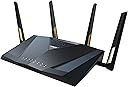


| ASIN | B0BTTY7QFH |
| Antenna Location | Business, Gaming, Home |
| Antenna Type | Fixed |
| Best Sellers Rank | #15,920 in Computers & Accessories ( See Top 100 in Computers & Accessories ) #523 in Computer Routers |
| Brand | ASUS |
| Built-In Media | Power adapter, Quick start guide, RJ-45 cable, RT-AX88U PRO Networking router, Warranty card |
| Color | BLACK |
| Compatible Devices | Gaming Console, Personal Computer, Smart Television, Smartphone, Tablet |
| Connectivity Protocol | Wi-Fi, Ethernet, USB |
| Connectivity Technology | Ethernet, USB, Wi-Fi |
| Control Method | App, Touch |
| Controller Type | App Control, Push Button, Web GUI |
| Coverage | Extended |
| Customer Reviews | 4.4 out of 5 stars 542 Reviews |
| Data Transfer Rate | 6000 megabits_per_second |
| Frequency | 5 GHz |
| Frequency Band Class | Dual-Band |
| Item Dimensions L x W x H | 11.81"L x 7.4"W x 2.38"H |
| Item Type Name | Network router |
| Item Weight | 2.2 pounds |
| LAN Port Bandwidth | 2.5 Gigabit |
| Manufacturer | ASUS |
| Maximum Upstream Data Transfer Rate | 6000 megabits_per_second |
| Mfr Part Number | RT-AX88U PRO |
| Model Name | RT-AX88U PRO |
| Model Number | RT-AX88U PRO |
| Number of Antennas | 4 |
| Number of Items | 1 |
| Number of Ports | 6 |
| Operating System | App, Linus, Mac OS, Windows |
| Other Special Features of the Product | Access Point Mode, Alexa Compatible, Internet Security, Parental Control, QoS |
| RAM Memory Installed | 1 GB |
| Router Firewall Security Level | High |
| Router Network Type | dual-band wireless router |
| Security Protocol | WPA2-Enterprise, WPA3-Personal, WPS |
| Special Feature | Access Point Mode, Alexa Compatible, Internet Security, Parental Control, QoS |
| UPC | 195553911054 |
| Unit Count | 1 Count |
| Voltage | 110 volts |
| Warranty Description | 3 years warranty |
| Wi-Fi Generation | WiFi 6 |
| Wireless Communication Standard | 802.11ax |
| Wireless Compability | 802.11ax |
M**S
Powerful Router with Great Features – VPN Fusion Is a Game Changer!
The ASUS router has been an excellent upgrade for my home network. It’s fast, reliable, and packed with features that are perfect for more advanced setups. One of the standout features for me is VPN Fusion — it lets me route only specific devices or apps through a VPN while keeping others on the regular connection. That level of control is a huge win. However, while it does have built-in load balancing, I ran into issues when using it with multiple WAN connections. If one connection failed and the router switched over, it would temporarily expose my VPN traffic, which wasn’t ideal. That’s why I added a TP-Link ER605 in front of it to handle the WAN balancing. Now the ASUS sees just one stable line, and the VPN Fusion works perfectly 24/7 with no leaks or interruptions. Overall, this is a high-performance router that’s perfect for power users. The interface is clean, firmware updates are consistent, and it plays nicely with complex setups. Highly recommend! - Easy to setup - Great wifi range - Up to this date, Asus still the best router. - Asus VPN Fusion Option - Works great with OpenVPN and Wireguard - Dual WAN - Great!
�**R
Fast, Reliable Router
This router has been amazing! The setup was smooth, and the speed boost was immediately noticeable. We have multiple devices streaming, gaming, and doing schoolwork all at once, and it handles everything without lag. I really like the parental controls and security features they’re easy to use and give great peace of mind. The signal range is strong throughout the house, and the dual 2.5G ports make it even better for future-proofing. Definitely worth it if you want fast, reliable WiFi.
C**S
AX6000 Pro - Thoroughly impressed!
First I want to say that I'm not the type of person to typically buy consumer grade networking hardware. Where possible, I will go out of my way to purchase MikroTik, Cisco, etc.. This provides me more flexibility within my home lab and ensures I won't have all services die when that typical low-grade consumer product runs itself in to the ground to where it won't boot anymore. That being said, even with MikroTik's latest WiFi 6 equipment I have been burned out in the past by their WiFi offerings in general, and I'm not the only person voicing those issues (see: MiktoTik forums). Hardware for routing is phenomenal though. Ubiquiti has their offerings, but I'm not wanting to dig in to yet another ecosystem of software - I've run TP-link gear prior with Omada controller, just don't want to put the time in to all that stuff again. Grasping at straws, I decided on the ASUS AX6000 Pro. First boot of the AX6000, set it up in to AP Mode, plugged it in to the MikroTik RB5009 2.5 port and away it went. As I do, instead of assigning a static IP I grabbed the MAC and gave it a DHCP reservation. Confirmed on the MikroTik that it auto negotiated at 2.5 Gbps. Immediately upgraded the stock firmware on the AX6000 Pro. Started poking around in settings. I was actually fairly surprised at the offerings provided by stock firmware. Typically you are very limited in tools, services etc. on consumer hardware but a lot of good stuff was there as it was. Some things were still lacking though. Likely because ASUS would not want to be liable, you cannot for example upload your own certificate for SSL/TLS use, it is either their self-published certificate or if DDNS is set up on WAN a Let's Encrypt cert. Nothing wrong with Let's Encrypt but 1) I've already got a cert I want to utilize from another public CA and 2) I'm not utilizing the WAN port anyway since we're in AP Mode. Thankfully, the Merlin firmware came to the rescue and allows a custom certificate to be uploaded plus lots of other improvements to stock firmware. All around I am thoroughly impressed with what I've been working here. My WiFi 6 NICs / devices around the house are finally being utilized to their full potential and I've had speeds that were capped on WiFi 5 (200 Mbps up and down respectively) blast way beyond that point (average 500 to 600 Mbps Internet, sometimes 700 to 800 Mbps, LAN file transfers regularly hitting 1 Gbps which is beautiful especially for the NAS). If you are in the market and unsure of quality, I'm sure this would be fantastic for an all-in-one device (utilizing WAN, providing Internet). If you are looking for more, Merlin firmware is great for this.
M**L
Good work router
Does exactly what you need it to do for a higher end Asus Router, I am currently using it in AP mode and it works great in extending my coverage and keeping all my DNS and DHCP settings as configured from my main Gaming Asus Router
P**E
The ASUSwrt UI is industry best - but derivative MERLINwrt open source blows the doors open!
Have had this router for almost a year. It is not the newest or flashiest but does have an interesting combination of being the maturation point of WIFI 6 routers that are hardware compatible with the newer Wifi 7 product line which means that firmware upgrades will continue to be provided ... but you really want to upgrade to MERLINwrt from stock ASUSwrt. Merlin shares the same basic UI and enhances it out of the box. ASUSwrt rarely updates after stable release but MERLINwrt is an open source project based upon ASUSwrt being put in the public domain by ASUS. So Merlinwrt has more recent continuous updates and some more features. But the companion AMTM script installer blows the doors off when used with MERLINwrt. It adds the options for incredible features managed and displayed through the Webgui and ssh to get started. Mind blowing for a home router - more professional like features such as a local DNS resolving server (Unbound) to replace external ones such as Google or your ISP. This is a huge deal for safety, privacy, and speed up. It has the optional adblocker Diversity and major optional firewall enhancement Skynet. While these typically are found on larger Linux systems, they run well and fast in the router which after all is a rather complete embedded Linux computer. There are addition management and reporting tools available. The integration into the Webgui for reporting and control is simply awesome. You can really see what is going on such as on my router how Bulgaria keeps attacking the router which Skynet which keeps resisting. ASUSwrt is already the best router UI on the market, but MerlinWRT with addons knocks it out the park. That isn't a just a router - its an entire home network management system. You do have to be ssh literate to install the options through a well craft old school character interface but even vanilla MERLINwrt is worth the price of admission. I would never buy a non-ASUS router simply because of ASUSwrt --> MERLINwrt --> MERLINwrt + AMTM addons. For further details just Google for "merlinwrt' and "merlinwrt amtm" - don't leave home for the Internet without it!
K**.
Reliable router with fast 10gbps ethernet and good wifi coverage
Very reliable for me and good coverage in my house. It is a little large but that doesnt bother me. I have it linked to an older ax88 and it is seamless. Only one SSID in the house and no reconnection issues as you move around the house.
O**N
Privacy Concerns with ASUS RT-AX88 "Pro" and Trend Micro Integration
Upon purchasing the ASUS RT-AX88 "Pro" router, I was surprised to discover that in order to utilize the advanced features that attracted me to this device, I had to grant Trend Micro permission to monitor all network traffic on my home network. If I chose not to do so, the optimization features would be disabled, leaving me with an underperforming router. Had this privacy requirement been disclosed in the product packaging or mentioned in the reviews I consulted, I would have reconsidered my purchase decision. The ASUS RT-AX88 "Pro" has essentially become an Internet traffic monitoring device that also happens to function as a router. The relationship between Trend Micro and ASUS seems to imply that user privacy is compromised in order to ensure optimal performance, particularly for gaming. This raises concerns about the balance between security and privacy, and whether customers should be required to relinquish their privacy rights in exchange for enhanced functionality. In summary, while the ASUS RT-AX88 "Pro" offers advanced features, the mandatory integration with Trend Micro's monitoring system raises significant privacy concerns. Potential buyers should carefully consider these implications before investing in this router.
R**E
Extremely stable internet connection!
Bought a ASUS RT-AX88U Pro to be used as my main router and a ASUS RT-AX86U Pro to extend coverage as a AIMesh unit that connects to the main router using 2.5 GHz as backhaul. So far I am very happy with the performance and they have both been extremely stable now for seven months. I have only had to reset the main router once which may or may not have been needed because it might have just been the cable modem? Both are WiFi 6 capable, dual band (2.5 GHz and 5 GHz), able to create mesh network using one of the bands (2.5 GHz or 5 GHz) as a back haul, supports up to 6 SSIDs, and has very good operating system/app support in that you can see traffic statistics on all connected devices combined and or drill down to a specific device. The configuration that I am using is, • Two SSIDs, one for 2.5 GHz and one for 5 GHz, doing it this way makes it easier to hookup internet of things devices that only use 2.5 GHz • Main router located downstairs, provides very good coverage to 1st floor of house and front of property • AIMesh router located upstairs, provides very good coverage to 2nd floor and backyard and side of property • Shared drive using USB memory stick connected to main router Based on performance so far I would highly recommend this product.
A**S
Su rendimiento es muy inferior a su versión anterior
Desde que se compró ha tenido diferencia de rendimiento con la versión que no es pro, que tuvimos que devolver por qué dejó de funcionar súbitamente, pero este su rango de alcance no es equiparable. Además que ha tenido problemas de rendimiento en cuanto la conexión de múltiples equipos. Dando velocidades inferiores a distancias medias.
Trustpilot
3 weeks ago
1 month ago