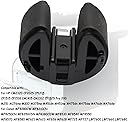
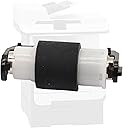
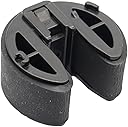
🖨️ Upgrade your print game—never miss a beat or a sheet!
This Paper Feed Roller Kit is engineered for seamless compatibility with multiple HP and Canon printer models, delivering durable performance and easy installation. Designed to reduce paper jams and maintain smooth printing, it’s a reliable upgrade for busy professionals seeking efficiency and longevity in their office equipment.
| Best Sellers Rank | #572,830 in Office Products ( See Top 100 in Office Products ) #967 in Computer Printer Transfer Rollers |
| Customer Reviews | 4.8 out of 5 stars 5 Reviews |
C**N
Easy job to replace parts, solves pickup issues quickly, well worth the price.
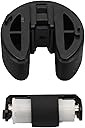
My aging laser printer (first gen M475dw) started having problems feeding paper from the bottom tray a few weeks ago. I could hear the rather distinctive "pickup sound" repeating several times before it would grab a sheet, so I knew it needed this service kit. Fortunately this item came up in my feed, so I ordered it immediately. For those with a listed HP or Canon Laser, search the internet for videos on how to install the feed rollers. View at least 2 or 3 of them to familiarize yourself with the procedure. The steps to replace the two parts are easy, but for an HP Laser in the M4xx line, you do need to get into the service menu to position the larger pickup roller. (See my one image showing where you need to press simultaneously; it's not entirely clear in some of the videos I found.) Once I removed the old parts, sure enough, both rollers were age-hardened and worn smooth on their surfaces. (See the one image of the old parts.) 20 minutes later my printer was back to its old reliable self, and feeding paper on the first try, every time. This kit is WELL worth the price, and I can confidently recommend it to anyone who has a listed printer that has problems picking up paper.
J**L
It worked!
For newer models I had to: press and hold the OK button, then press and release the left navigation arrow and the Cancel button in quick succession to get to the secondary service menu, which allows you to select Pick roller. Then turn the printer off unplug it and take out the tray 2 (bottom). Flip the printer upright so the power cord would be on the bottom (if it was still plugged in) Now you can rotate the top roller so you can get it out. If you do not do these steps you will NOT be able to get the top roller out! Watch utoob(speeled wrong on purpose) videos closely the smaller piece should be pulled out with the plastic holder in tact. I managed to accidentally pull out just the roller! Dont do that lol. This item by its very nature was hard to install. I did have to look at some videos. It seems like it’s well made only time will tell for as long as it stands up. I put it in a HP LaserJet and it works well fixed my problem with the paper, not picking up and constant paper jam alerts
Trustpilot
2 weeks ago
1 month ago