Desertcart purchases this item on your behalf and handles shipping, customs, and support to Greece.
🖥️ Triple your screen, triple your productivity — don’t just work, dominate your digital domain!
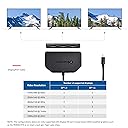
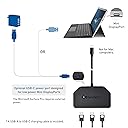
The Cable Matters Triple 4K Mini DisplayPort MST Hub leverages DisplayPort 1.4 technology to extend or mirror your Windows PC’s output across three simultaneous 4K HDR displays. With 32.4 Gbps bandwidth, support for up to 240Hz refresh rates, and a bus-powered design enhanced by USB-C charging, this compact, magnet-mounted hub is engineered for professionals and gamers seeking seamless multi-monitor performance without clutter or compromise.

| Additional Features | Magnet |
| Amazon Bestseller | #157,141 in Computers (See Top 100 in Computers) #458 in Computer DisplayPort Cables |
| Asin | B0874V968M |
| Brand | Cable Matters |
| Color | Black |
| Compatible Devices | Monitors, Projectors, Televisions |
| Customer Reviews | 3.9 3.9 out of 5 stars (240) 3.9 out of 5 stars |
| Data Transfer Rate | 32.4 Gigabits Per Second |
| Enclosure Material | Plastic |
| Global Trade Identification Number | 00818707026489 |
| Hardware Interface | DisplayPort, Mini-DisplayPort, USB Type C |
| Manufacturer | Cable Matters |
| Mfr Part Number | 101075-BLK |
| Minimum Required Operating System Version | Windows 10 |
| Model Number | 101075 |
| Number Of Items | 1 |
| Number Of Ports | 3 |
| Operating System | Windows |
| Unit Count | 1.0 Count |
| Upc | 818707026489 818707027998 |
User
FHD144hzでトリプルディスプレイ
追記2(2024/02/11)DPのプラグアンドプレイが無効化されると書いてますが、どうもモニター側との相性だったようです。先日新しいディスプレイを購入し接続したところ、きちんと(?)DPのプラグアンドプレイが動作し、ディスプレイの電源を切ると、電源を切ったディスプレイの認識が外れることがわかりました。今までもたまーに、古いほうのディスプレイの電源を切ったときに認識が外れてたのですが、そっちの方が正しい動作のようです。追記商品画像を見てもわかる通り、ケーブルは非常に短く、必然的にPCの近くで分岐される。なので、ディスプレイまではケーブルが3本伸びることになります。それが嫌だったので、ディスプレイ近くまでDPケーブルの延長ケーブルを使って、分岐後のケーブルを短くしようと試みました。ですが、信号が弱くなるのか、FHD 144Hz トリプルディスプレイができなくなります。というか、FHD 60Hz 3画面すらうまく映りませんでした。解決策として、PC - DPケーブル - DPリピーター -本製品 という感じにすればきちんと表示されることを確認。DPリピーターは同じCable Matters製の、2000円くらいのヤツを使っています。GTX1080に接続して、フルHDモニタを3台つないでトリプルディスプレイとしています。3画面とも144hzで表示できており、今のところ特に不具合もありません。グラボ側のDisplay portバージョンは1.4です。Type-cの補助電源は使っています。マグネットでPCケースに張り付いてくれるのもいい感じです。欲を言うならば、miniDP端子→DP端子変換プラグを使うと結構出っ張るため、あと10cmでいいのでケーブルが長いとPC側面に取り付けやすかったかと思います。また、地味に便利な点として、Display portのプラグアンドプレイが無効化されます。意図した仕様なのか、私の環境固有のものなのかはわからないですが、ディスプレイの電源を切っても、PCからディスプレイの認識が外れなくなりました。
User
拡張モードで使える
期待通りに3画面拡張ができたので良かったです。DisplayPortはHDMIよりマイナーですが、分配拡張できることろが良いですね。
User
画面が暗くなります。
電力供給コネクタ付いてますが、普通に数秒暗くなります。チョコチョコ起こるのでイライラします。
User
surfacepro6でトリプルディスプレイ化
surfacepro6に拡張モニタを3つ接続してトリプルディスプレイ化するのに使いました。給電も必要なのでちょっと面倒さはありますが、画面表示は問題なくできています※本当はsurface本体画面含めてクアトロにしたかったのですが内蔵グラボの仕様で3画面までしか表示できなかったのでご注意下さい
User
安定性ないです
急に画面が落ちたり、一時的に映らなくなったり、全く感知しなくなったりと、動作に安定性がありません。継続的にモニターを見続けたい方にはオススメできません...接続するだけなので操作は簡単です。ただし、出力側もディスプレイポートになっているので、HDMIや他のコネクタでモニターと接続したい場合には別の物を購入したほうがいいです。
User
オンボードDPを分岐させるのに便利
マザーボードに搭載されているiGPU出力用のDP端子1つを、3つに分岐できるとても便利な商品。重宝している。
User
非常に良いです
CAD用にモニター三つ並べて使用してます。快適です。通信速度も問題無しです。(遅いヤツはカーソル移動時に残像が残るがこの商品はなりません)後は耐久性ですね。ありがとうございました。
User
3画面マルチでレースシミュレータ気分
FHDモニター3枚の横長表示が出来てレースシミュレータ気分を味わっています。雰囲気はバッチリ、わたしのような素人レベルでは遅延や残像も気になりませんでした。DP-HDMI変換ケーブルを介して、古いHDMIオンリーのモニターへの出力でも3画面マルチ可能でした。わたしの環境ではUSB-Cの電源供給により安定動作しています。
User
3x 1080p @144hz läuft ohne probleme
Ich nutze den Adapter für 3x 1080p Monitore zum simracing. funktioniert ohne Probleme mit 144hz.
User
Très pratique car petit et facile à installer
Fonctionne parfaitement avec 3 moniteurs branchés par son intermédiaire (sans exploitation du passage de son), la source étant un PC portable. Ce HUB est petit, facile à installer. Ne chauffe pas excessivement (tiède au toucher) même après 6h de fonctionnement en continue.
User
Works great!
I paired this with 3 monitors((1x 38”wide and 2x 32”), at first I didn’t connect the power supply and would notice monitors flicker. I added the power supply and since then no further issues. If you read the instructions, it also informs for 3 monitors to attach the USB power cable, I was just excited and missed that step at first.
User
bueno pero con cierto orden de conexiones
lo he usado para conectar una 4rta pantalla a mi portatil. mi portatil es un msi gt75 titan y tengo que decir que a mi me ha funcionado pero teniendo que poner los conectores con un cierto orden para que me funcionaran. no se si a alguien mas le ha pasado pero a mi solo me funciona con un cierto orden a la hora de conectar. si es asi que alguien deje algun comentario mas al respecto. tambien decir que mi pantalla es de 144hz y solo me llega a 120hz. no se si llegaria a soportar una quinta pantalla ya que de momento no me es necessario pero si tengo que decir que la pantalla del portatil me la detecta
User
3 1080p 144hz displays works.
Be sure to read about the limitations of this thing before you buy it cause everyone's use case is different. Like I'm sure if I want to upgrade to like 4k 144hz multi monitor in the future I'll prob have to get a different one of these cause I don't think it's using display port 2.0 it's prob on display port 1.4 and I'd also have to upgrade my cables to 2.0 cables as well. This is something you'll have to make sure of does your graphics card support or output display port 1.4, do you have cables rated to that spec, and you need to know about how your monitor works like if it's being overclocked or can only support x standard etc. It's definitely a pain but when it works it works. I had my graphics card slots filled from my 3 monitors that need display port to get 144hz and I needed a display port for the valve index but I only had 3 ports so I had to use and hdmi display port converter and I wasn't getting full 144hz. Then I found out about this and I did a bit of research and decided to give it a go. It works flawlessly and if I wanted to I might be able to get another and run even more display but idk how far I could push the graphics card before it'd cause problems. 3 displays is enough for me but I've seen other setups on this product that push more.
Trustpilot
3 weeks ago
2 weeks ago