Desertcart purchases this item on your behalf and handles shipping, customs, and support to Greece.
🖨️ Ink that keeps up with your grind—print more, stress less!
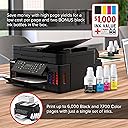
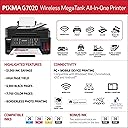
The Canon G7020 Wireless MegaTank All-in-One Printer is a powerhouse for home offices, delivering up to 13 pages per minute in black & white and vibrant color prints with ultra-low ink costs thanks to its refillable MegaTank system. Featuring wireless and Ethernet connectivity, mobile printing support, automatic duplexing, and an ADF for multi-page tasks, it’s designed to streamline your productivity. Bonus Alexa compatibility adds smart convenience, making it a top-tier choice for professionals who demand efficiency and quality without the cartridge hassle.

| ASIN | B081TZ38X2 |
| Additional Printer Functions | All In One |
| B&W Pages per Minute | 13 pages_per_minute |
| Best Sellers Rank | #88,647 in Office Products ( See Top 100 in Office Products ) #81 in Ink Tank Printers |
| Brand | Canon |
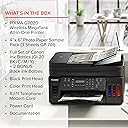
| Built-In Media | PIXMA G7020 Wireless MegaTank All-In-One Printer, 4” x 6” Photo Paper Sample Pack (3 Sheets GP-701), Setup CD, Manual, and Other Documentation, Set of Ink Bottles (PGBK, C, M, Y) + 2 Bonus Black (PGBK) Ink Bottles, Black Print Head, Color Print Head RJ-11, Telephone / Modem Cord Power Cord |
| Color | Black |
| Color Depth | 24 bits_per_pixel |
| Color Pages per Minute | 6.8 pages_per_minute |
| Compatible Devices | Printer |
| Connectivity Technology | wired, wireless |
| Control Method | App |
| Controller Type | iOS |
| Customer Reviews | 3.8 out of 5 stars 4,076 Reviews |
| Duplex | Automatic |
| EU Spare Part Availability Duration | 1 years |
| Hardware Interface | Ethernet |
| Ink Color | Multiple |
| Item Dimensions D x W x H | 14.6"D x 15.9"W x 9.3"H |
| Item Type Name | Inkjet Printer |
| Item Weight | 17.8 pounds |
| Manufacturer | Canon USA |
| Maximum Copy Resolution Black and White | 4800 x 1200 dpi |
| Maximum Copy Resolution Color | 4800 x 1200 dpi |
| Maximum Copy Speed Black and White | 13 pages_per_minute |
| Maximum Media Size | 8.5 x 14 inch |
| Maximum Print Resolution Black and White | 4800 x 1200 dpi |
| Maximum Sheet Capacity | 350 |
| Maximum print Resolution Color | 4800 x 1200 dpi |
| Model Name | Canon PIXMA G7020 Wireless All-In-One Supertank Printer, Copier, Scan and F |
| Model Number | 3114C002 |
| Model Series | G7000 |
| Number of Ethernet Ports | 1 |
| Number of Trays | 2 |
| Other Special Features of the Product | refill ink,wireless |
| Paper Size | 3.5” x 3.5” (Square), 4” x 4” (Square), 4” x 6”, 5” x 5” (Square), 5” x 7”, 7” x 10”, 8” x 10”, Letter (8.5” x 11”), Legal (8.5” x 14”), U.S. #10 Envelopes |
| Power Consumption | 15 watts |
| Print media | Paper (plain) |
| Printer Connectivity Type | wired, wireless |
| Printer Output Type | Color |
| Printer Type | Inkjet |
| Printing Technology | Inkjet |
| Resolution | 600 x 600 |
| Scanner Type | document |
| Special Feature | refill ink,wireless |
| Specific Uses For Product | home office |
| Total Usb Ports | 1 |
| UPC | 013803323078 |
| Unit Count | 1 Count |
| Warranty Description | 1 year limited warranty |
| Warranty Type | Full Warranty |
| Wattage | 15 watts |
W**0
Great Printer-Never Going Back to Cartridges Again-Fast, Super Cheap w/ Ink (refills too)- Love It
So after having Canon printers from way back in 2003 for a few years and getting excellent results and pictures (using the Canon high gloss photo paper back then) i switched to Epson when it died a few years ago. The Epson WF 4730 and most recently when that died the WF4740 (which also just died) I decided to go back to Canon again. I REALLY like the Megatank system. This printer has a pretty small footprint too as far as it's size compared to the Epson we just replaced. It seems like it will be a lot more efficient on ink and the replacement bottles are really reasonable (on Amazon colors are only $11/each and slightly more for the black ink which is a larger bottle). The text prints fast and the colors are spot on. Haven't tried pictures yet but will update my review when I do try printing them. The only gripe I have with this printer are a couple of things. First, the LCD screen is small and doesn't light up making it basically useless. But, I have learned after having a few printers over the years I never use the bloatware by the printer company anymore. I use the print application on my Imac or Windows computer. Much faster to access and works better with less headaches. And, second, the operating panel which folds out HAS to be open when printing. This is good and bad at the same time. Annoying if you are in another room and want to print and forget to fold out the panel first (panel can be left forward position to print always or just pop it out when you want to print something. The good thing about the panel having to be open is if I leave the printer cover on the printer and someone wants to print from another room (and they haven't opened the control panel first) the printer won't print and jam up papers because the printer cover is on. Scanning so far works great on this All In One. Haven't tried faxing yet and basically....who needs to fax anymore anyway. I scan and email any document. I can tell you even though Epson has their own tank version of printers (Ecotank) I am done with Epson for awhile. Best thing about Epson was the speed of print....that was it as far as superiority. The Canon so far has been a great machine. By the way, using the computer to print rather than the bloatware supplied by either Canon or Epson is not only fast to use but a lot easier when setting the printer up. So, after only owning this printer for less than 2 weeks (but we have used it quite a bit as my wife and I are both working at home during the Coronavirus quarantine) I can say that I would highly recommend this AIO to anyone looking for a great, fast and do all printer that is efficient on ink as well. I used to HATE running out and having to run to Office Depot or ordering online for ink only to have to spend about $38 for a small color ink cartridge for the Epson. The whole kit of 3 colors with black was about $125...crazy expensive. This computer comes with 3 colored ink bottles (enough to fill each of the 3 colors once) and 3 slightly larger black bottles (one fills it up and 2 extra bottles are included). I read all the reviews on Consumer Reports online as I subscribe and a lot of them pointed to the lower priced models by Brother or HP. The problem with the Brother printer they recommend (while easy on using the ink) was that the reviews stated that color printed papers came out very dull and light on color. Thus the "efficiency" of using ink on a Brother. Not like that with this Canon at all. Colors are superb on regular bright white paper. You definitely get what you pay for here. A top of the line refillable tank AIO printer that does everything very well....including saving money on ink (and the convenience of storing extra bottles to refill when needed). Spend a little more now on a great Canon G7020 but save in the long run. Hope this helps anyone who is on the fence about which printer to buy. I know even with having the Consumer Reports information online to view I spent a few hours doing research on the all around best printer. Oh, and also the print heads (2...one for colors and one for B&W) pop in easy when setting up and that means replacing if ever needed should be easy. Hopefully I won't have to for a very long time though. Just buy this printer.....I can't imagine you'll regret it. I also purchased a NON Canon product that I would recommend as well. The semi-clear printer cover by Comp Bind is great. Made for this printer it keeps dust and anything else out of the printer when not in use. I truly believe using a cover extends the life of your printer too.
C**A
Great at 1st, but ultimately junk
Firstly, I was happy to have this printer in the beginning. Setup was easy and I loved that I just had these bottles of ink rather than wasteful, expensive cartridges! I had just switched from HP and their junk ink subscription service, but thats a whole other story! I liked the idea that I could just buy cheap ink bottles from any random seller and bee free of the shackles of the Ink Cartel. Setup was a breeze and the 1st run was great. We dont print very much, but when I need to print I want reliability without a monthly fee. So far so good. Then it sat for a few days before I tried to print again. Upon the next print I got an error that the back paper slot was jammed. I wasnt using the rear feeder though. For some reason it didnt recognize the paper tray underneath and was trying to pull from the rear feeder. I messed with the settings on this unbelievably tiny, dark, and completely useless LCD screen. Seriously, its so tiny and dark it was near impossible to see without a flashlight right on it in a fully lit room. Once I got it set to default to the bottom tray feed, I successfully printed a dozen or so things no problem. Then I didnt touch it for a couple months. Thats when the real fun started. Upon the next use, the same thing. It kept reverting to the rear tray feeder even after setting it to the bottom feed. I didnt have room to use the rear feed and so I tried to disable that so it would only pull from the bottom tray. Nope. I kept getting errors. After trying for about an hour, I rearranged my ENTIRE office space so I could use the rear tray, which this printer insisted was the ONLY way it wanted to print. And guess what happened then?! Immediate JAMS. This method would not let me print AT ALL! I tried everything. The paper was normal size. The ink was all good. There were no error messages or anything inside the machine. I went over it with a fine tooth comb and we had only used it 2 times prior to this! Now Im gettin angry as I spent hours trying to get things I actually needed printed out! But nothing. I ty printing form the bottom tray again and it keeps trying to pull from the rear tray! And its giving me errors that rear tray is jammed even after Ive removed the jam. After multiple unplugs and resets, nada. It just would print at all, from either tray. Wouldnt recognize the bottom and would only jam from the top no matter what I tried! Now here I am a couple of months after my return window and this garbage is giving me fits! Im on my way to pick up my printed legal docs from Staples. After my last 2 printer experiences, Im over it. I will just print stuff at a print shop form now on to save the headache and drama. So unnecessary. Why is it so hard to have things that JUST WORK these days?!
L**K
Great Printer!
After decades of buying only HP printers, I got frustrated. My HP All-in-one wouldn't work with non-HP cartridges and wouldn't work when I filled the old HP cartridges. The replacement cartridge from HP were almost half the original printer cost. So, I thought I'd give Canon a try and so far I've been very pleased. The printer was easy to set up. I connected it to my network with an ethernet cable so I didn't have to deal with Wi-Fi password. One of my two small complaints about the printer is that the screen is a small LCD display that isn't backlit; kind of like the HP LaserJet control panel. I have a reading light on my desk and I have to point it at the panel to read it. Having said that, once it's set up, there's not much need to see it. My other complaint is the appearance of the printer control software. The HP software has large lettering and icons in the selection process. The Canon software is strictly small text. I don't see well, so this effects me more than most. But the software functions fine and you can accomplish all of the necessary printing and scanning tasks. I'm a little disappointed that I can't FAX using my cell phone. We abandoned our land line long ago. But I don't know of any printer software that uses cell phones for FAX, so it's a mild disappointment. I loaded printer software for my wife's I-pad that worked well. Never had much luck with remote printing for the HP. Was able to scan a document to her I-pad, mark it up with an Apple pencil, and print it to the G7020. This printer comes with a large ink supply to fill the tanks, as well as two additional bottles of black ink. That's enough black for like 20,000 pages. I'm retired and don't print a lot so that's probably a lifetime supply for me. And even if I do run out, replacement ink is about $30. I've only had the printer a week, so I can't speak to it's durability, but the construction seems similar to HP. Canon actually manufactures a number of the HP print engines, so I'm not expecting any problems there. Bottom line, this is a great all-in-one and I'm really happy with my purchase.
G**M
Great printer, finally works as intended after latest firmware update
We bought this printer in 2020 after previous positive experience with an older Canon printer. As expected it provides excellent print quality for both text and images, even on plain paper. That said, until the latest firmware update earlier this year (2024) we had a number of issues with the printer. The worst was that it would fail to initialize and present error code 5100 that indicates it had a problem aligning the print head during startup. We would sometimes need to turn the printer off and on several times before the error cleared and we could actually do printing. The recent firmware update has made the printer into the device we had hoped to get at the beginning. Now when we send it a print job it turns on, prints the job and later turns itself off automatically, all according to settings. All the early problems are the reason we gave it four stars rather than 5. The printer integrates into a network relatively straightforwardly. We have used connectivity both wired and Wifi. The only issue with the initial setup is the small and hard to read LCD display and the way text is entered using the buttons on the front panel. Once on the network, the printer settings can be adjusted from Windows or the OS of your choice. The use of ink tanks and bottles of ink are very economical. One can print a large number of pages on a full tank. The tanks are relatively easy to refill from a bottle of ink, but one needs to be careful to avoid spills. One other warning, the printer needs to be exercised regularly, or the ink can dry up in the print head, which makes printing stop working correctly. Fortunately, the print head can be removed and manually cleaned if this happens. We have done this. The process is straightforward, if messy. The included scanner works decently well. We use it with the open source app NAPS2 (naps2.com). We have not used the fax feature, nor have we done copying directly through the unit.
J**N
A very efficient printer for large workloads
My wife and I recently began homeschooling our kids. We've been leaning on our local library's low-fee printing service for any of our printing needs, but with a majority of our kids' curriculum being based on printable materials, we quickly realized that we were going to need to invest in our own printer. I've had inkjet printers from other brands over the years, but they all seemed to dry up prematurely and not print well if I went the route of refilling the cartridges if I went the drill-and-fill route. I've had very good experience with Canon's other equipment for well over ten years, so I decided to give the G7020 a shot. Right out of the box, I was impressed with the overall build quality for a $200-250 printer. No, it's not a Corporate-grade built-like-a-tank machine like you're going to find in a lot of offices, but those printers cost orders of magnitude more, so I wasn't expecting this thing to feel like it was built out of metal. The ink tanks are huge, and I have no doubts we're going to get a lot of mileage out of them before having to refill, but it's super helpful that Canon included three total bottles of black ink, since a majority of what we'll be printing will involve black text. It remains to be seen whether the color will also last a while, but based on initial experience, I think this printer will go the distance. Setup was a bit tedious, but as long as you follow the instructions, you won't have any trouble. This is a wireless printer, not a wired one, so setting it up pretty much by default takes a little more time than just plugging a cable in and letting the computer detect the printer. Thankfully, once we got the printer online, we were easily able to get our other devices (two phones and a laptop) quickly connected, and all printed documents with no issues. Print quality is "very good" at the default settings, if maybe a little less vivid when compared to what we printed from our library's laser printer - but that's likely down to the difference in how a laser printer lays toner down on top of the paper instead of having ink absorbed into the paper with an inkjet, and the print quality can be adjusted to a higher quality from the default settings, so it's a non-issue. Literally the only "con" is that I did not realize there was a version of this printer available that omits the fax connection, since there is little to no chance we'll ever use the fax functionality and could have saved $20-25 by buying the G6020. All good. My in-laws went for that printer after we bought ours and have had no trouble with theirs (including being in their 60s and still being able to set up the printer themselves - which says a lot about these devices' ease of use). That said, we're only a few weeks in with this printer, but so far impressions are very good. I'll update this review if we end up having less than a five-star experience down the road, but at the moment, I'm very glad that this is the printer we picked. If you're in the market for an inkjet printer with refillable tanks and are willing to spend a little more on it vs. a chintzy $50-100 that's going to give you what you pay for it, you owe it to yourself to check out this printer (or the G6020 if you don't need fax functionality).
T**W
Does it all and ink lasts a very long time at a much lower cost
I purchased a Canon G7020 to replace a Canon MX320 that still worked great with my Windows 10 machine, but at 10 + years was not supported by my new Windows 11 laptop. The scrooge in me resisted spending money on a new printer when the old one still worked, but the promised savings on ink finally convinced me to buy the G7020. I'm very glad that I did. A year and hundreds of pages and photos later I'm still using the original ink shipped with the machine. I would have spent more than the printer cost on the cartridges for the MX320 by now. Another plus for me is the wifi connection on the G7020. It works great and was easy to set up. With the old printer, duplex printing was done one side of the document at a time with manual flipping and reinserting the paper in the infeed tray. With the G7020, it does full duplex printing without operator assistance, though this does slow down the printing process some. That is a great feature. I liked it so much that I bought a second one for the makerspace that I had donated the MX320 to. They sold the 10 year old MX for $40, which bought 2 bottles of black ink for the G7020. We are both set for another year.
C**Y
Worst Auto Document Scanner ever
I very rarely rate something just out of the box, but today is an exception. I needed to replace my Old Brother printer because it kept jamming on cardstock. I spent several hours researching and decided that the Canon G7020 would give me the most of what I wanted without spending a boatload of money. Here are my concerns so far. 1. The nasty little control panel screen really is as awful as they say it is. If you happened to have one of those word processors back in the 90's you know what I mean. 2. The control panel either lays flat against the machine or tilts up, just as many others do. The problem with this machine is that when it is flat, the printer won't do anything. Not only can't you use the control panel itself, but the printer won't accept wired or wireless print jobs. Not sure if they did this to prevent people from accidentally bumping into buttons, but I think it sucks. My printer sits up high and I will have to stand up any time I want to see the screen. I will probably end up seeing if I can tape something to the back of the control panel to keep it from shutting fully. 3. The quality of the scanner is actually quite good when you use the flatbed. Unfortunately, I use the automatic document loader extensively and the quality with that REALLY sucks. I wasted lots of time just to show you. On the left is a page from a yearbook scanned on my old Brother Printer using Windows Fax and Scan and the auto feeder. I have been using essentially that same printer model for about 20 years and always took for granted the good quality of the scans. The middle picture is a scan on the flatbed of this Canon printer. I actually think the quality is a little better. The picture on the right is from the Canon printer, using windows fax and scan and the auto feeder. It looked even worse using Canon's software. I don't think I can send it back once I've put all the ink in it. Too bad. I guess I'll keep my Brother printer as a very large paperweight and scanner. This isn't the one for you if you need to have high quality scans using the automatic feeder. Oh, and it does print really slowly also.
A**E
Another Insult to the Consumer
The conclusion here is another depressing example of a corporation so out of touch with its users, and cares so little, it becomes a disgusting commentary on how their laziness adversely impacts the people who buy their goods. HUGE TYPE HERE: DO NOT BUY! But what are you going to do? All of the war stories here are correct. But why are there so many different ones? These inkjet printers use technology that's 35 years old! These jet printers have all been a pain in the butt the whole time. I installed enough of them. The entire system is nothing but layers and layers of crap. The Canon printer setup utility freezes my computer EVERY TIME. Everything is brand new. Setup will be misery. Calling Canon for assistance will be misery. The "manual" is misery. Different instructions online from the manual from the phone techie will provide you more misery. This "display" went out on toasters in 1998. But when you're in it, what do you do? Press "OK" to proceed? Or press RIGHT ARROW to proceed? Each Canon technician has their own style. Enter the New WiFi Password, enter it on the Princess Phone keypad. Need a "v?" Press "8" three times! Like the toy phone you pull on a string. Who ON EARTH would know that? Canon doesn't. The manual is less than useless. EVERY time I have had to fix settings, it somehow starts working; I'm not sure how. Judging from the myriad of problems others report, this is chewing gum, rubber bands and spit. It''s amazing it works at all. But good luck. Epson and HP are exactly the same. There are NO printers for the home that are easy. Amazon ought to provide either Zero stars or a simple "negative" rating. Although It doesn't appear Canon or the rest will ever care. I don't know what else to tell you. Welcome to the world of home/small business printers, where technology never changes. I've installed dozens of these, along with Epson and HP, and the tech hasn't changed since the 90s. This IS a cartridge inkjet printer. The only difference is that the ink, lots of it, is stored onboard and fed to the standard cartridges. When you see it, you wonder how much ink was really in those little cartridges, especially color. Well, it was the most expensive commodity on earth. I won't talk about laser printers, but they cost like a Bentley to maintain. But how can printer companies continue building these without developing new technology? The given: It's all cheap plastic with the prime point of contact—the paper tray—cheapest of all. And be careful. Load new, clean paper or it will jam. Mine did on the 10th sheet. And don't overload. I open the box, out drops a CD(!) for Windows and a familiar owners manual, emphasis on Manual. Then the abyss. Three hours later, drop a dime to Canon. It was the final piece of my new upgrades and all the fun and anticipation of setting up this printer was stolen from my grasp by the space takers at Canon. How much money does Canon pay people to walk me through setup when it should be like falling off your bike? These things couldn't shake hands with a network if Thing was inside. And it's the same old 35-year-old software. It ruined my day, although it was reminiscent of all the others. My old HP 5680 is dead after not many sheets. Planned. The guy at Canon laughed at me when I asked him how many schmoes like me he has to talk to because their software and instructions are from Al Gore's inventin' days. He ran me through a process I SWEAR I had covered before. It worked! Ran some test sheets, printed a cat picture. Next day, Saratoga. Fire up Canon and a big bright yellow hazard triangle lights up: Construction Ahead. Could NOT figure out what it meant. Pressed it. Resume. Sheet after that: JAM! Use virgin paper. I THINK that's what that meant. The color photo print was nothing spectacular and certainly not improved from my seven-year-old dead HP. You think about it, HPEpsCan uses such old technology, supply chain intact, mindlessly pushing this old technology out the door, along with software nothing more than stacks and stack of code—or not—designed for 2400baud or something. At ever-rising prices. I will faithfully maintain this unit (instructions lax there too), I'm guessing new cartridges (See how they did that?) hopefully only with every fillup. There IS a "maintenance door" on the back, which I will have to SOMEHOW learn. (P.S. Box opening and "setup" videographers: CUT! You're no help when you don't show it.) I did open it to fix the paper jam, on a hunch. I will never forgive Canon for taking away my pleasure in setting up this printer. I still shutter at the thought of a grandma out there never getting it to work. The two stars is for that and the future that lies ahead, obsolescence-wise. I've been in this movie before. Will update. AND! Amazon has to stop playing with its delivery notifications. "DELIVERED" when it isn't. I was here, waiting. Email. Delivered! NOPE. NOW, all delivery bets and information are off. We have thieves around here. I talked to the driver as she delivered. That thing was marked delivered before she even got here. Amazon, you're nothing but a guy on a pony if you keep this up. UPDATE072725 Saratoga. I needed One page. Kept getting "Needs Paper" or something like that in my Mac printer utility log. Burped the paper tray. Unplug reset. Stumbled upon what the Canon printer saw on my system, and it was a series two generations old. Searched for this problem and deduced: Go to Canon for downloads. But wait. When I installed, it "looked for" the latest software. Bottom Line: It's "Installation Lite." HOW (your words here) is THAT? As I said, ancient software. THEN. Look in the Canon Downloads: A photoprint editor whatever that is, speed dial fax utility and wi-fi connection assistant. Installation Lite doesn't mention these. As for online "contributors," I won't write code. Download these. Printer OFF, run each installer (I'm Mac). Printer ON, run Canon 'Setup." Mine went smoothly. It even printed a test page that Lite did not!
Trustpilot
3 days ago
3 weeks ago