❄️ Cool your rig, light your style, own the game.
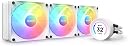
The NZXT KRAKEN RGB 360 White is a premium all-in-one liquid CPU cooler featuring a 1.54-inch LCD for real-time hardware monitoring, a powerful yet quiet 7th generation Asetek pump with adjustable speeds, and ultra-durable tubing. Its addressable RGB fans deliver stunning customizable lighting controlled via CAM software. Compatible with the latest Intel and AMD sockets, it combines cutting-edge cooling performance with sleek aesthetics and a reassuring 6-year warranty.

| ASIN | B0BY3HCW17 |
| Amazon 売れ筋ランキング | パソコン・周辺機器 - 48,624位 ( パソコン・周辺機器の売れ筋ランキングを見る ) CPUファン - 238位 |
| UPC | 810074842280 |
| おすすめ度 | 5つ星のうち4.5 1,077 レビュー |
| ブランド | NZXT |
| ブランド名 | NZXT |
| メーカー名 | NZXT |
| メーカー型番 | RL-KR36E-W1 |
| モデル番号 | RL-KR36E-W1 |
| ユニット数 | 1.0 個 |
| ワット数 | 2.4 W |
| 保証内容 | 6年保証 |
| 冷却方法 | サーマル |
| 同梱商品 | LEDコントローラー×1、取り付け用ブラケット一式×1、取り付け用ネジ一式×1、接続用ケーブル×1、USB 2.0ピンジャック用二股ケーブル×1 |
| 品目寸法(L x W x H) | 39.4長さ x 2.7幅 x 12.1高さ cm |
| 商品の入り数 | 1 |
| 商品の寸法 | 39.4長さ x 2.7幅 x 12.1高さ cm |
| 商品の重量 | 1620 グラム |
| 対応アイテム | デスクトップ |
| 最大回転速度 | 1800 毎分回転数 |
| 消費電力(ワット数) | 2.4 W |
| 電圧 | 12 ボルト |
| 電圧(ボルト) | 12 ボルト |
| 電源コネクタタイプ | 4ピン |
| 騒音レベル | 33.88 デシベル |
色**馬
やはりシンプル
何がいいってまずは液晶モニタに好きなgif画を載せて自分だけのパソコンを作れる。 液晶も綺麗に映るし 滑らかに動きますね。 皆さんが評価しているように冷却性能もすごいです。 重たいゲームもしますし使っているCPUも14世代のCore i7 発熱も凄いのですが45~60この幅でキープしてます。 凄すぎ
毛**民
包裝完整無損
包裝完整無損
I**O
爆熱CPUもしっかり冷却。液晶ディスプレイのカスタマイズが楽しい
発熱が高いことで有名なCore i9に使用しています。 【冷却性能】 さすが360mmラジエーターです。高負荷なベンチマークを回してもサーマルスロットリングを起こすことなく、安定して冷やしてくれます。ポンプの音も静かで気になりません。 【デザイン】 この製品の最大の魅力はポンプヘッドの液晶画面です。専用ソフトで好きなGIF動画やシステム温度を表示できるのが本当に楽しい。PCケースの中を覗くのが日課になりました。 【総評】 見た目にも冷却性能にも妥協したくない自作PCユーザーには最高の選択肢です。所有欲を満たしてくれます。
三**星
涼しい
水冷ファンの涼しさを舐めてましたが、案外涼しかったです。排気と吸気でケース内の温度が違う時感動しました。
池**人
良い
ファンだけ最新の物に変えました。購入したらすぐ新型のクラーケン出ちゃいました。そのうち乗り換えます。
L**A
見た目だけじゃなくて性能もいい
初めての水冷に挑戦しました。 取り付けは簡単でしたし、見た目もいい。なによりNZXTのソフトで自由に色、デザイン、ファンの回転数や光度も簡単に変更できるところに驚きました。特にほんと見た目がいいですね美しいです。 <追記> 使用CPU : i9 12900kf 主に3DCGのレンダリングでCPUをぶん回すんですが、70後半で冷やされてるんですよ。 空冷でRyzen5 3600だった時は冬場でも80後半でなんなら90を超えてしまうのを考えると水冷って凄いんすね👏 という感想でした〜 余談なんですがただ1つ注意だけして欲しいのは、知ってる人もいると思いますがケーブルを刺すのがマザボのCPU_FANというところでは無く、AIO_PUMPに刺すので初起動する際にエラーを吐いてしまうかも。自分も画面に「CPU Fan Speed Error detected」との文字が出てbiosに飛ばされまくるという事態に陥りました。要はpcが【cpuファン刺さってないよ】って勘違いしてるので、こういう文字がでた場合は適当なケースファンでもcpu_fanの所に刺しとけば治るので焦らなくて大丈夫です。 これは自分がこうなってしまったので書きました。もしかしたら間違っているかもしれませんし皆さんがそうでは無いかもしれないのでへぇ〜くらいで大丈夫だと思います。
A**ー
ファンの信頼性…
10月に購入して3ヶ月半で140mmファン1機の軸ブレが始まり、翌日には逝きました。 こまめに掃除してるのでケース内に埃や詰まるものなど一切無い環境です。 今までPC自作を10年以上やってきて安物のファンも多く使ってきましたが、ここまで早く壊れたのは初めてでとても残念です。 値段も高く、RGBコントロールも独自規格のケーブルで敷居を上げておいてこれはなかなか酷いです。
じ**じ
流石
NZXTのクラーケンが 欲しかったので買ってみましたか見た目も冷却もかなりいいかと 光り物方も綺麗です。
M**D
Working great so far. Looks awesome.
I had a very nice 360mm AIO made by Deep Cool (Castle RGB). It was great. I had no complaints. I liked the RGB effect on the pump, and it cooled quite well on a i7 10700K that was overclocked. I upgraded my system to a i7 14700K, and while I was doing it I decided to modify my open loop on my video card, and because my case is Star Trek themed, I wanted an AIO with a display on it for my CPU. Specifically I wanted one that could show a video. So I picked up the Kraken. I did not want to add another fan controller to my system since I already have one fan controller and a strimer controller from Lian Li and an aRGB hub. One more controller would have been just too much. I already had 3 Lian Li Uni fans I was using on my old cooler so I am still using them because they match the rest of my build. I am only using the pump and rad. The pump plugs into an internal USB header. This allows the software to control the pump and the display. I used an Animated GIF for the video. The cooler is working about the same as the Deep Cool did with these same fans. So far (after about a month) I like the cooler and especially the display on the pump. I can't say anything about the fans since I am not using them. I do recommend this cooler. It was not hard to install, and it works well.
Á**Z
No lo pienses, cómpralo ya!
Lo ocupo con un Intel Core i9-13900KF y todo va en orden, en juegos y en edición de video y fotografía, nunca pasa de los 80C°. Llevo mas de un mes con el y sin ningún problema, lo recomiendo ampliamente.
M**Y
Gimme linux support!
This is the first AIO I have purchased and it seems to be doing its job as intended. This was put in a white Hyte y60 case as it seemed to be one of the only 280mm white AIO. I was originally going to buy the last gen version of this cooler, but figured I might as well buy this new one which just got released. Glad I did too as the larger screen is much nicer to look at. All of my opinions here are based on the out of the box behavior of the cooler, no NZXT cam configuring was done. Performance: Cools my 7900x pretty decently. According to the cooler screen, it sits around 33-34 idling and the highest I've seen it hit is 37 degrees when doing short intense computations. Installation: Really straight forward with an AMD x670e board. Way better than my previous experience installing a BeQuiet! Dark rock pro 3/4 to an intel based system. It's also great that the cooler can be oriented at different angles (30 degree steps I believe) which gives it even more flexibility in installations. (the default orientation has the tubes coming out the bottom of the screen/coldplate. Rotating the screens image requires software) Noise: Runs quiet enough. I can somewhat hear the whoosh of the fans, however it is over powered by the stock fans my case came in. As for pump noise, I'm not entirely sure I hear it. Occasionally I hear a sound from my PC, but I have yet to determine if it is coil whine from my new build, or if it is the pump occasionally whirring. Fans: I plan on upgrading the fans at a later date with lian li infinity fans, but I have honestly been pleasantly surprised by how well the rgb looks. However, I would have preferred being able to buy the cooler without the fans and fan hub included. If I wanted NZXT fans, I would get NZXT. Let me make the choice and save money by not having to buy stuff I am not going to use. Linux software support: One gripe I have is that there is no official software support in linux. But I guess I can't complain too much as I am probably 1 of 3 people that it matters to. Still, I'd like to see companies like NZXT support projects such as openrgb and coolero/liquidctl. [Rant: Even if I ran windows, god forbid I install bloatware like NZXT cam + a million other rgb software to suck up my hardware resources. I just don't get why so much money is spent on software no one likes when NZXT could just spend a day giving the open source community the usb com specs for the cooler and reap the benefits of 'free' work.] Thankfully by default the leds on the fan are white, and the temperature on the screen is also colored white. One of these days when i have hours to waste, I will try fooling around with liquidctl and see if I can get the experimental controls to work. Conclusion: It's a high end, white, 280mm AIO with a big ol' screen. And its price reflects that. It looks great and the install is easy. If you are going to blow money on a high end AIO, its going to be pretty hard to beat this one. I really only have issues on the software side.
C**S
Excelente
Buen producto de NZXT, mantiene mi Ryzen 9 5950x a trabajo normal y juegos ligeros entre 45-52 °C y en espera esta en 34-36 °C según la temperatura ambiente, espero ver cuanto baja ahora que termine el clima caliente.
A**R
The perfect AIO
Trustpilot
1 week ago
2 weeks ago