We remain fully operational. Our teams are working around the clock to ensure your deliveries continue safely.

DOWNLOAD THE APP


Customer Services
Copyright © 2025 Desertcart Holdings Limited
DOWNLOAD THE APP


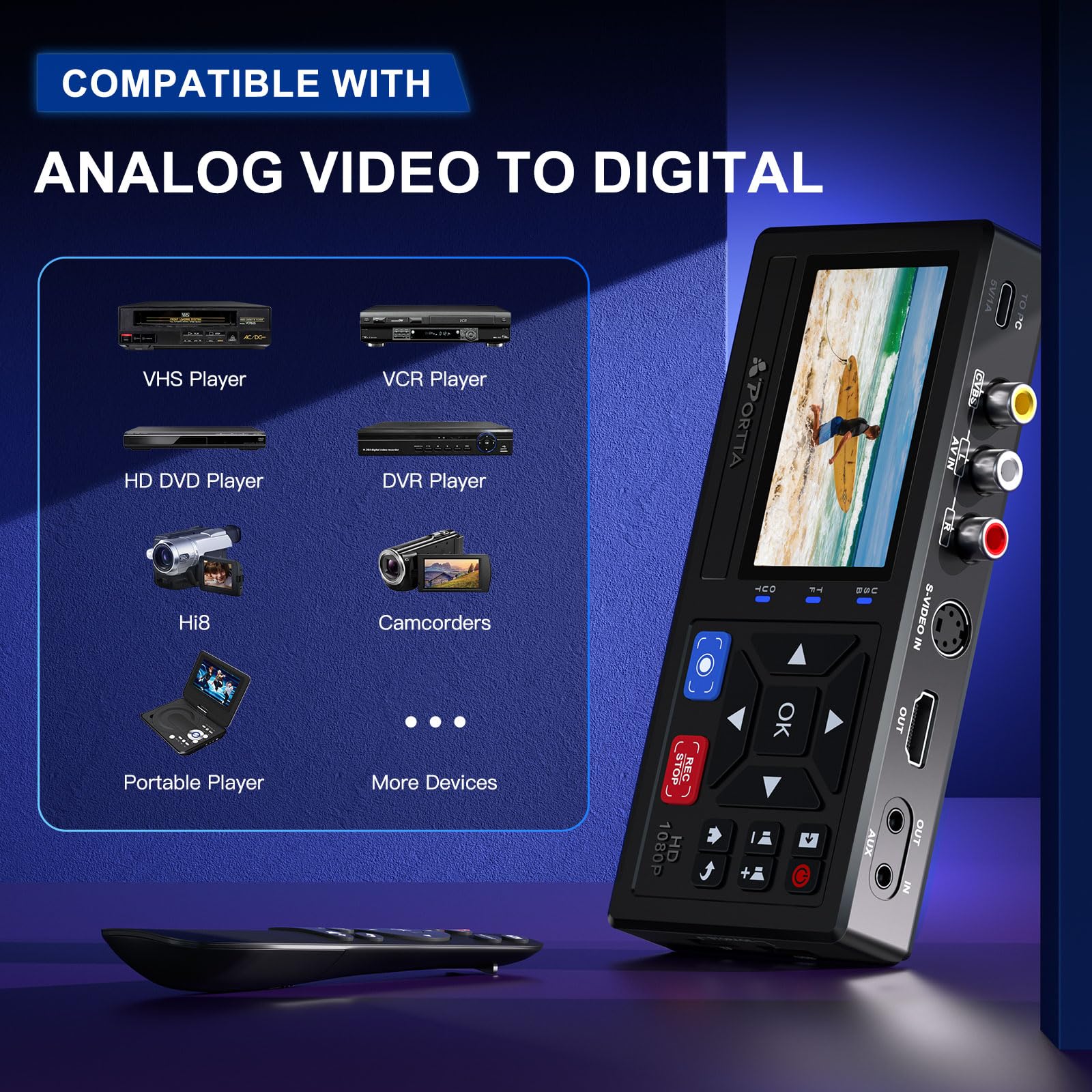



📼 Digitize your nostalgia—because your memories deserve the spotlight!
The Portta VHS to Digital Converter is a compact, lightweight device that converts analog video and audio signals from a wide range of legacy devices into crisp 1080P digital files. Featuring plug-and-play functionality with no software or PC required, it supports RCA, S-Video, and AUX inputs and includes a remote for easy control. Perfect for preserving old tapes, camcorder footage, and even gaming console output, it’s a top-rated, hassle-free solution to future-proof your cherished memories.


| ASIN | B0D8XGYZ8L |
| Amazon Bestseller | #12,280 in Electronics ( See Top 100 in Electronics ) #2 in Video Converters |
| Batteries Included | No |
| Batteries Required | No |
| Brand | Portta |
| Customer Reviews | 4.5 4.5 out of 5 stars (1,496) |
| Date First Available | December 5, 2024 |
| Item Model Number | CHR101 |
| Item Weight | 183 Grams |
| Item model number | CHR101 |
| Manufacturer | Portta |
| Product Dimensions | 15.8 x 7.55 x 2.72 cm; 183 g |
角**ブ
1時間のハイエイト動画を4mbps 128kHzで録画すると、2ギガくらいのファイルになりました。オフタイマーでセットし、ビデオを見ていなくても録画が自動で終わるので、楽ちんです。買って良かったです。
マ**ン
8ミリビデオ用ヘッドクリーニングカセットがあると、ハンディカムでの再生時に影像の乱れを取り除けます。
A**ー
簡単操作で、思い出のビデオをデジタル化できる優れもの!
F**I
データ化するのに簡単でした。但し、2時間以上の映像をデータ化するとファイルが2つになってしまいました。予想ですが、2時間分で1つのファイルになるようです。他は特に問題無かったです。
で**ゔ
画面は小さいですが画質は良いです
ご**ょ
昔撮影した大量のアナログテープ。ミニDVテープやVHSテープ。約20年前のものばかり。 この機器とテープを再生できる機器さえあれば、簡単にデジタル変換、同時にMP4形式でUSBメモリーに保存できました。 ポイントは.ミニDVテープを再生できることと、なんらかの方法で出力できる端子があること。昔の多くの出力端子は、赤白黄色のRCA端子だと思いますが、問題なくいけます。 すごい感動です!
A**ー
簡単操作でできました。
L**9
初代プレステを繋げても、画像が映らないので非常に困りました。 試行錯誤した結果、別のレコーダー(昔購入したDVDレコーダー)を介したら、なんと表示されました。 その後、ゲーム映像のデジタル化に成功したものの配線が複雑に… 「レトロゲーム機のビデオ録画」を宣伝文句にしてる以上は、信号処理をちゃんとしてくれないと困る。 せっかく使いやすい商品なのに、肝心なところが残念です。
D**N
The recorder works quite well and does the job I needed. The only thing I had an issue with is the HDMI output. It would be better if it had a separate audio output for monitoring the recording, as some of the HDMI monitors I had would not connect to the HDMI output.
E**S
Bra kvalitet, enkel att hantera och att överföra video till usb minne .Jättenöjd
A**L
It is very good device. I recorded 5 old DV cassette. Then I had a problem with my old camera . Then I fixed my camera. It is working now. The manual is difficult to read . It needs much better explanation as I spent one day to make porta to work again after fixing my camera .
J**M
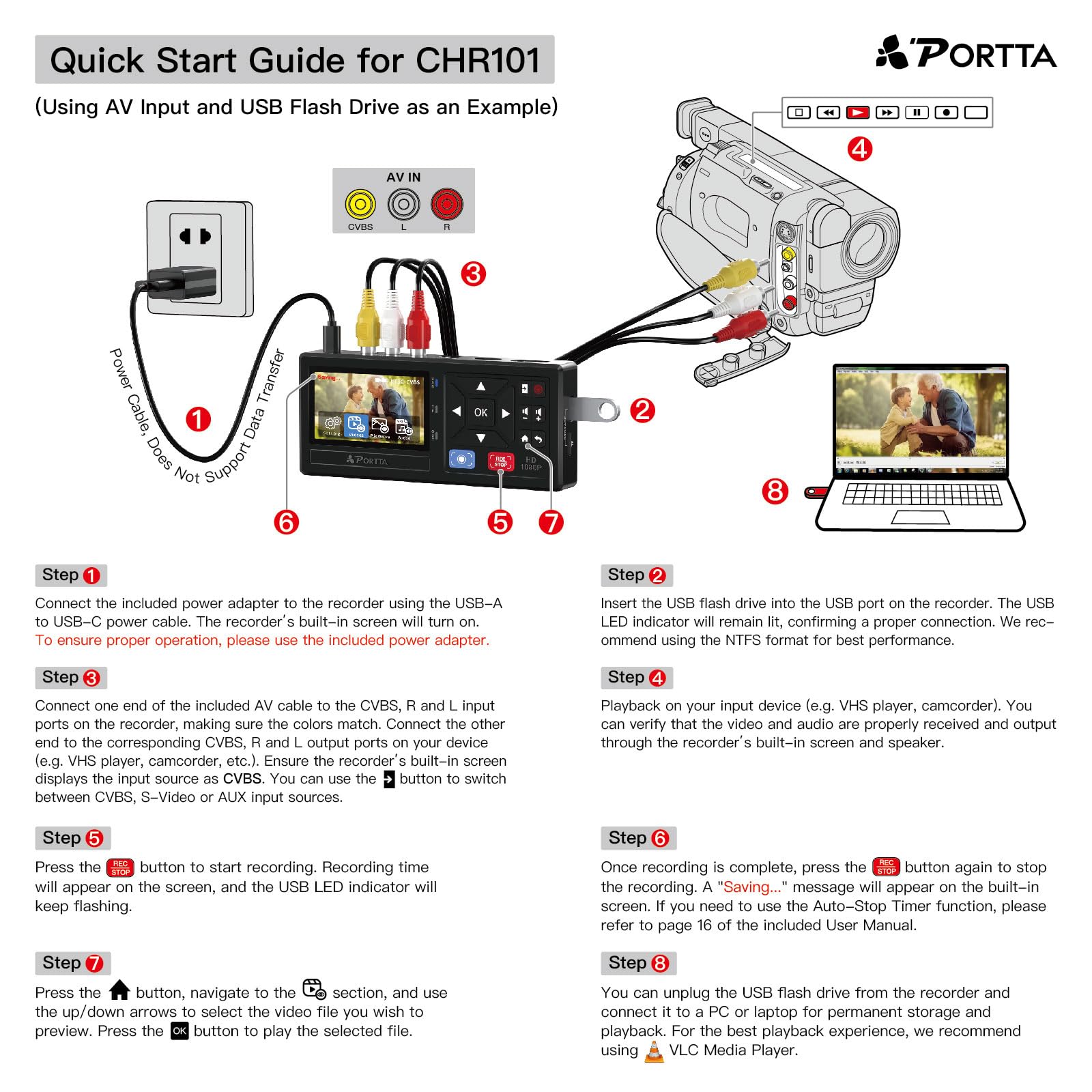
Je suis d'accord avec la majorité des commentaires : cette machine est incroyable ! De l'électronique comme on en rêve : on branche et ça fonctionne ! J'ai d'abord relié le boitier au secteur avec l'adaptateur fourni. On peut alors accèder à un menu simple facile à mettre en français. Le menu permet de faire quelques réglages : j'ai tout mis en qualité maximum, je ne sais pas si c'est totalement nécessaire. Ensuite, d'un côté avec les prises RCA j'ai branché mon camescope acheté il y a 30 ans, de l'autre une clé USB formatée en NTSC. J'ai appuyé sur "PLAY" du caméscope puis sur "REC STOP" du boîtier. Une fois la lecture de la cassette terminée, j'ai réappuyé sur "REC STOP" pour arrêter l'enregistrement : et c'est tout ! J'ai obtenu instantanément un fichier mp4 (environ 4,5 Go pour une heure en qualité maxi) directement lisible sur la télévision. Alors, on peut peut être obtenir des images de meilleure qualité en utilisant un autre système ou en passant par un professionnel. Pour moi, les images obtenues sont vraiment correctes et de qualité nettement suffisante (vidéos de famille) et surtout c'est tellement simple. Le mini écran et le haut-parleur sont vraiment qualitatifs. Si on veut plus grand pour visionner les images (à plusieurs par exemple), avec ou sans enregistrement, on branche tout simplement le boîtier avec un câble HDMI sur un téléviseur. Sur le site internet de PORTTA on trouve un fichier de mise à jour système (une archive zip) que j'ai téléchargé mais que je n'ai pas réussi à installer sur le boîtier. J'ai copié les fichiers à la racine d'une clé USB et j'ai utilisé le menu de mise à jour. Je n'ai pas trouvé comment faire dans la notice jointe ni sur internet. Si quelqu'un a fait cette mise à jour pourrait-il partager la procédure à suivre ? Merci d'avance.
K**I
If you have old VHS tapes sitting around collecting dust, I would highly recommend getting them transferred sooner rather than later. Tapes do not last forever. They deteriorate over time, they can get sticky, they can jam your machine, and worst case, they can ruin your VCR heads. The earlier you transfer them, the better chance you have of preserving those memories without issues. Originally, I thought about getting one of those basic video capture devices that connects to a computer. But honestly, this unit is so much better. The fact that you can actually see what you are recording on the screen while it is happening makes a huge difference. It gives you peace of mind that everything is working correctly and nothing is cutting out halfway through. One thing to note is that it does not have built in storage. You will need your own USB drive or TF card to save your recordings. That is not a deal breaker for me, just something to be aware of. It does have HDMI out, so you can connect it to a modern TV and preview everything easily. I also love that it supports multiple inputs. You get standard RCA connections for most VHS, Betamax, or camcorders, and it even includes S Video input for higher end players, which gives better quality. It also comes with the cables, power adapter, and even a remote, which is refreshing since a lot of products these days skip the power block. It records in 1080p, which is more than enough. VHS quality is nowhere near 1080p anyway, so you are basically capturing the maximum possible quality from the source. For anyone serious about preserving old family memories without needing a computer setup, this is a super convenient and easy solution. I am excited to start transferring a whole stack of old tapes and finally get them backed up safely.
Trustpilot
3 weeks ago
3 days ago