
DOWNLOAD THE APP


Customer Services
Copyright © 2025 Desertcart Holdings Limited
DOWNLOAD THE APP

🚀 Dominate your creative and gaming universe with ASUS TUF RTX 5090 – power, precision, and durability redefined!
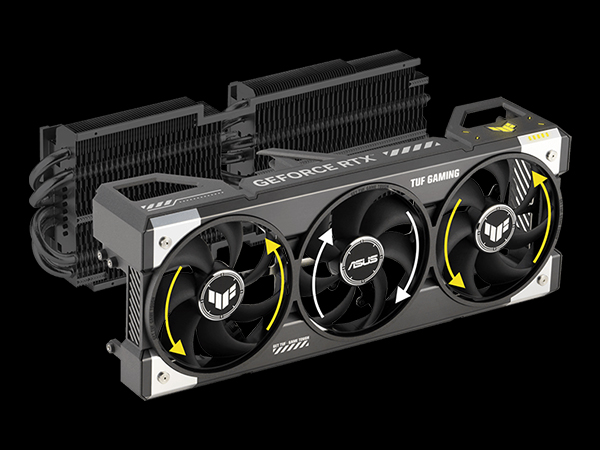
The ASUS TUF Gaming GeForce RTX 5090 OC Edition is a top-tier graphics card featuring NVIDIA's Blackwell architecture, 32GB of ultra-fast GDDR7 VRAM, and advanced cooling with a 3.6-slot vapor chamber and triple axial-tech fans. Built with military-grade components and protective PCB coating, it offers exceptional durability and longevity. Designed for professionals and gamers alike, it delivers unparalleled performance in demanding tasks like 61MP photo editing and AI denoise processing, while supporting PCIe 5.0 and HDMI/DP 2.1 for future-ready connectivity.




| ASIN | B0DS2X13PH |
| Item model number | TUF-RTX5090-O32G-GAMING |
| Manufacturer | ASUS |
| Product Dimensions | 34.8 x 14.48 x 7.11 cm; 2.27 kg |
J**Y
Card is just and absolute beast and runs quiet - I was able to get it undervolted and running 100-200W less power than stock for stock performance depending on whether raster or RT workload. Cooling is great never goes above 75C
G**E
Unlike most people who purchase this graphic card for gamming I only purchase it for photo editing in Lightroom Classic. Here is my 2023 test results regarding Lightroom Classic 12.4 AI Denoise processing time with different Nvidia GPUs with a 10 years young DIY system: Test Method: Image source from DP Review A7RV 61MP RAW files. Five cycles per test with full Disk Cleanup & reboot per cycle 2023 Test System: - Intel i7-6700K 4.0GHz - Asus Z170-A w/XMP Enabled - 32GB (8GBx4) DDR4 2400MHz CL14 RAM - WD Black 1TB M2 SSD - Windows 10 Pro - Antec P190 Dual PSU 650W + 550W =1200W - 18 years young case GTX 1060 6GB GDDR5: 1-pic: 159s10-pics: 1569s Idle: 108W Average: 234W Peak: 279W RTX 3060 OC 12GB GDDR6: 1-pic: 32.08s 10-pic: Not tested Power: Not tested RTX 3060 Ti 8GB GDDRX6: 1-pic: 26.90s 10-pic: Not tested Power: Not tested RTX 3070 OC 8GB GDDR6: 1-pic 25.18s 10-pic: 221.73s Power: Idle: 117W Average: 378W Peak: 585W RTX 4060 Ti 8GB GDDR6: 1-pic: 26.97s 10-pic: 247.62s Power: Idle: 108W Average: 288W Peak: 369W RTX 4070 12GB GDDRX6: 1-pic: 20.08s 10-pic: 180.2s Not tested Power: Not tested RTX 4070 OC 12GB GDDRX6: 1-pic: 19:74s 10-pic: 175.61s Power: Idle: 117W Average 324W Peak: 414W RTX 4070 Ti OC 12GB GDDRX6: 1-pic: 17.29s 10-pic: 148.81s Idle: 117W Average: 369W Peak: 441W RTX 4080 OC 16GB GDDRX6: 1-pic: 13.88s 10-pic: 120s Idle: 126W Average: 423W Peak: 576W Here are my 2025 test results regarding Lightroom Classic 14.4 AI Denoise processing time with some hardware changes on two RTX cards : 2025 System Changes on Lightroom Classic 14.4: - Enable "Above 4G Decoding" in BIOS - Windows 11 Pro upgrade (On a Un-supported CPU system) - 64GB (16GBX4) DDR4 3200MHz CL16 RAM - 1000W ATX 3.1 PSU w/PCIe 5.1 GPU direct cable connection to RTX cards RTX 4070 Ti OC 12GB GDDRX6: 1-pic: 13:41s 10-pic: 139.88s Power: Idle: 117W Average 266W Peak: 362W RTX 5090 OC 32GB GDDRX7: 1-pic: 6.41s 10-pic: 75.47s Idle: 126W Average 621W Peak: 743W As the Denoise process speeding up with the higher end GPUs so does the refreshing speed of the 61MP image. When applying mask or brush process especially at 100% zoom-in/out while navigating around the 61MP zoom-in image. It's almost instantaneous with any RTX card with 16GB VRAM and above while other cards takes a second or even a few seconds to refresh constantly from the pixelated image. The 16GB VRAM RTX cards makes the entire editing experience much more fluid and pleasant even on a 10 years old system with a few basic upgrades (16GB VRAM is now the minimum requirement for GPU acceleration for building previews on Lightroom Classic 14.5). Even though the lower GPU consumed less power they also take much longer time to perform in complex editing so the advantage is no longer there especially when processing 50~200+ images at a time. RTX 5090 OC is incredibly smooth most of the time in loading, preview and edit but still has very little delay some times when navigating 61MP/50MP images that has Denoised and some masks applied to the image.
A**R
Awesome graphics card
A**G
This Manufacturer(TUF) has been known for driver instability, as I have returned this product I have encountered the same problem After 4 "Clean" Windows 11 reinstalls still get lag every time I load my PC for the first time in the day. I turned off everything in Start-up, Uninstalled all except for Nvidia App. Still the same problem.
C**.
This RTX 5090 is a beast, plain and simple. If you’re just browsing the web, watching videos, or playing basic games, this card is complete overkill. But if you’re like me and running a triple-screen sim rig with everything maxed out, while streaming at high quality, this is exactly what you want in your build. I’m using this in a triple 32-inch 1440p setup with a 1440p ultrawide up top for telemetry and controls. Running titles like Le Mans Ultimate, iRacing, and Assetto Corsa Competizione, the 5090 barely breaks a sweat. Ultra settings across the board, full ray tracing, heavy ReShade overlays — and still pushing high frame rates with headroom to spare. Streaming to OBS while running overlays, VRS telemetry, and browser extensions? No lag. No stutter. No dropped frames. The performance uplift compared to my previous 4080 Super is unreal. Thermals are solid and it runs quieter than expected given the power it’s pushing. I’m feeding it with a high-end PSU and optimized airflow, and it stays cool even during long race sessions. Plus, having 32 GB of VRAM future-proofs this thing for anything coming down the pipe — sim titles, Unreal Engine games, AI workloads, you name it. This card isn’t made for average gamers. It’s made for power users who demand stability, headroom, and extreme performance. If you’re building or upgrading a serious racing sim or content creation rig, the 5090 is worth every penny.
Trustpilot
1 week ago
2 months ago