Desertcart purchases this item on your behalf and handles shipping, customs, and support to Greece.
๐ Elevate your home network to WiFi 7 speed and security โ because buffering is so last decade!
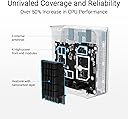
The ASUS ZenWiFi BD4 (1-Pack) is a cutting-edge dual-band WiFi 7 mesh router delivering up to 3600 Mbps speeds and coverage of 2450 sq.ft. Featuring dual 2.5G Ethernet ports, four internal antennas, and ASUS AiMesh technology, it ensures seamless whole-home connectivity. With commercial-grade AiProtection Pro, advanced VPN support, and smart parental controls, it offers robust security and easy management for modern smart homes.


| ASIN | B0DHWCWZ9Z |
| Antenna Location | Business, Gaming, Home |
| Antenna Type | Internal |
| Best Sellers Rank | #32,850 in Computers ( See Top 100 in Computers ) #118 in Whole Home & Mesh Wi-Fi Systems |
| Brand | ASUS |
| Built-In Media | Power adapter, Quick start guide, RJ45 cable, Warranty card, ZenWiFi BD4 router |
| Color | WHITE |
| Compatible Devices | Personal Computer, Smart Thermostat, Smartphone, Tablet |
| Compatible devices | Personal Computer, Smart Thermostat, Smartphone, Tablet |
| Connectivity Protocol | wi-fi |
| Connectivity Technology | Ethernet, Wi-Fi |
| Control Method | Touch |
| Controller Type | App Control |
| Coverage | 2450 mยฒ |
| Customer Reviews | 3.5 out of 5 stars 34 Reviews |
| Data Transfer Rate | 2882 Megabits Per Second |
| Frequency | 60 Hz |
| Frequency Band Class | Dual-Band |
| Frequency band class | Dual-Band |
| Has Internet Connectivity | Yes |
| Has Security Updates | Yes |
| Is Modem Compatible | No |
| Item Dimensions L x W x H | 14L x 7W x 14H centimeters |
| Item Weight | 1.21 Pounds |
| LAN Port Bandwidth | 2500 Mbps |
| Manufacturer | ASUS |
| Maximum Upstream Data Transfer Rate | 1800 Megabits Per Second |
| Mfr Part Number | BD4 (W-1-PK) |
| Model Name | BD4 |
| Model Number | BD4 (W-1-PK) |
| Model name | BD4 |
| Number of Antennas | 4 |
| Number of Items | 1 |
| Number of Packs | 1 |
| Number of Ports | 2 |
| Operating System | ASUSWRT |
| Other Special Features of the Product | 3-Step Easy Setup, Alexa Compatible, Networking standard: WiFi 4 (802.11n) WiFi 5 (802.11ac) WiFi 6 (802.11ax) WiFi 7 (802.11be), Operating mode: Wireless router, AiMes Nod, Access Point, WiFi 7 (802.11be): (2.4GHz): up to 688 Mbps, (5GHz): up to 2882 Mbps, Worry-Free Smart Home Mesh |
| RAM Memory Installed | 128 MB |
| Router Firewall Security Level | Advanced |
| Router Network Type | Hybrid |
| Security Protocol | WPA/WPA2/WPA3-Personal, WPA/WPA2-Enterprise |
| Special features | 3-Step Easy Setup, Alexa Compatible, Networking standard: WiFi 4 (802.11n) WiFi 5 (802.11ac) WiFi 6 (802.11ax) WiFi 7 (802.11be), Operating mode: Wireless router, AiMes Nod, Access Point, WiFi 7 (802.11be): (2.4GHz): up to 688 Mbps, (5GHz): up to 2882 Mbps, Worry-Free Smart Home Mesh Special features 3-Step Easy Setup, Alexa Compatible, Networking standard: WiFi 4 (802.11n) WiFi 5 (802.11ac) WiFi 6 (802.11ax) WiFi 7 (802.11be), Operating mode: Wireless router, AiMes Nod, Access Point, WiFi 7 (802.11be): (2.4GHz): up to 688 Mbps, (5GHz): up to 2882 Mbps, Worry-Free Smart Home Mesh See more |
| UPC | 197105643802 197105534674 |
| Unit Count | 1 Count |
| Wi-Fi Generation | Wi-Fi 7 |
| Wireless Compability | 802.11.be, 802.11ac, 802.11ax, 802.11n |
| Wireless communication standard | 802.11.be, 802.11ac, 802.11ax, 802.11n |
L**Y
Great Choice with WiFi 7. iPhone 16 surfing super fast.
Got this as refurbished, it was in great condition. Added to my home mesh system with another BD4 that was bought refurbished. I get 200+ mbps easily in the corner room in my basement, where I was getting around 100+ before. I moved on from an Orbi system as parental and NetGear Armour was becoming too expensive. This has parental and internet home protection built in for free. The only negative is adding this a node did not work the first time in my basement so I had to move it around a bit to get it detected. Since it is WiFi 7, my iPhone 16 feels way faster now when browsing. Recommended.
J**Y
great
This has been a great router for my oddly-designed home w lotsa space & brick walls between rooms. ASUS tech support has been very good helping me w some installation ?s I recently ran across as well
A**R
Too big of a company, no support.
It wouldn't work with tha Asus AC2900. Asus sites says it came be used outdoors but you can see the boards though the case. Not weather proof. No support from Asus. Item returned.
J**R
Really unstable
I just got this tonight and tried setting it up. What a nightmare! It seemed to work great at first. I plugged it into my modem and a switch, and it went through the setup. It told me that everything was working perfectly, but for some reason it immediately gave me a red light, indicating that there was no connection to the internet. I tried restarting the modem. Still no connection. It turned out that it had decided to make the switch the WAN connection, so I disconnected the switch and plugged the modem into that port, restarted both devices, and I finally got a connection. That lasted all of 20 seconds. So I reset the thing to factory settings and tried to start the process again. This time, it connected to the internet right away and I got a notification that there was a firmware update. I let it download and install, and was them met with a red light and no internet again. I tried everything I could think of to fix this, but ultimately had to reset it to factory defaults again and set it up a third time. This time, everything went smoothly. I started getting my devices connected and even got the switch to work. All seemed fine until I did a speed test and got a mere 100 mbps. I was expecting more than ten times that. So I restarted the thing again, and was met with a red light when it booted up. No more internet. But this time, I couldn't even connect to it through the app, and it would start restarting itself every five or six minutes. I don't even know where to begin to troubleshoot this thing anymore. I'm going to contact support tomorrow and I'll update this review based on what happens next, but this thing has been such a huge pain that I thought I should mention it. ---Edit--- I got a new unit sent to me, and I successfully set it up, but that also wasn't without problems. The short version is, for whatever reason, I have to restart my modem every single time the router restarts, even during setup. If I don't do this, the router can't figure out that it has a WAN connection. This took entirely too long for me to figure out, and I don't like it one bit, but at least it works now. I have confirmed that the previous unit is definitely not working this way, and so I really think it's just a broken unit. Now that the new one is working, it is a fairly decent router. Speeds are high, latency is low, and I thoroughly enjoy having a 2.5G wired connection to my switch and NAS. It does take a very long time to reboot, however, and that's definitely not nice when you have to troubleshoot. I also just really can't shake the feeling that this thing could stop working like the first unit did. Fingers crossed, I guess. If you do buy this, just make sure you give it plenty of time to do it's thing during setup. If you get a red light or it seems like it's not doing what it's supposed to, give it an extra 2-3 minutes longer than you want to and try restarting your modem before you do anything with the router. Same with firmware updates. If you think it's broken, give it a lot of extra time and reset your modem before you try to mess with it.
J**.
Disaster on AIMesh and compatibility
This product seems not working well as an AIMesh node. Spent bunch of time figuring out this. DO NOT USE IT for AIMESH!!!
Trustpilot
3 days ago
1 week ago