


๐ See More, Strain Less โ Work Smart, Play Smooth!
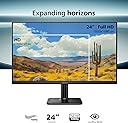
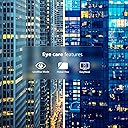
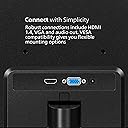
The Philips 24E2N1100B is a 24-inch Full HD IPS monitor featuring a 1920x1080 resolution and a fast 100Hz refresh rate for smooth visuals. Its wide 178ยฐ viewing angles ensure consistent color accuracy, while Eye Care technologies like LowBlue Mode and flicker-free operation protect your eyes during extended use. Designed with a sleek, nearly frameless bezel and equipped with HDMI and VGA ports, itโs a versatile, stylish choice for professionals seeking productivity and comfort backed by a 4-year early replacement warranty.





| ASIN | B0CZ1TQY1M |
| Adaptive Sync | FreeSync |
| Aspect Ratio | 16:9 |
| Aspect ratio | 16:9 |
| Box Contents | HDMI Cable, Monitor, Power cord, User manual (English language not guaranteed) |
| Brand | PHILIPS |
| Brand Name | PHILIPS |
| Colour | Black |
| Compatible Devices | Desktop, Gaming Console, Laptop, Tablet |
| Contrast Ratio | 2000:1 |
| Customer Reviews | 4.5 out of 5 stars 170 Reviews |
| Display Technology | LCD |
| Display Type | LCD |
| EU Spare Part Availability Duration | 4 Years |
| Hardware Connectivity | HDMI, VGA |
| Has Color Screen | Yes |
| Image contrast ratio | 2000:1 |
| Item Dimensions D x W x H | 18D x 54.1W x 41.6H centimetres |
| Manufacturer | TPV Technology |
| Maximum Display Resolution | 1920 x 1080 Pixels |
| Model Name | 24E2N1100B |
| Model Number | 24E2N1100B |
| Mounting Type | VESA Mount |
| Native Resolution | 1920x1080 |
| Network Connectivity Technology | HDMI, VGA |
| Picture Quality Enhancement Technology | Adaptive Sync |
| Product Features | Adaptive Sync, Adaptive Synchronization, Eye Care, Flicker-Free, Frameless, Lightweight |
| Refresh Rate | 100 hertz |
| Resolution | FHD 1080p |
| Response Time | 4 Milliseconds |
| Screen Finish Type | Glossy |
| Screen Size | 24 Inches |
| Screen size | 24 Inches |
| Screen surface description | Glossy |
| Specific Uses For Product | Business, Desktop, Gaming |
| Total HDMI Port | 1 |
| Total Video Out Ports | 1 |
| UPC | 810112791426 |
| Unit Count | 1.0 count |
| Viewing Angle | 178 Degrees |
I**R
The plastic bezel, buttons, and stand, are beautiful.
Many devices, cars, and things that exist today are atrociously ugly. I purchased the Philips monitor, 24E2N1100B 24" monitor with 100hz IPS screen, because it looks like it was made in 2006, back when looked amazing. There are visible labels for the buttons, and the buttons are actually accessible on the bottom of the outside edge (not behind the monitor and hidden). Hiding buttons (see Acer) is foolish, because function is ultimately always more important than form when using technology. You can use the buttons EASILY on this Philips 24" monitor. I am so relieved to have actual buttons that have a heavy tactile feel to them. In a world of weird touch screen devices, buttons are almost unheard of, especially buttons with a heavy solid feel. The Philips logo is clean, very clean. Not stupid, like the ViewSonic monitor which has 3 birds on it. I was going to buy a ViewSonic, but the larger monitors like the 27" have 3 birds on the front as their logo, and it just looks ridiculous. Do people really want 3 little parrots on their computer monitor? No. The Philips logo is one of the major selling points on this monitor. I installed 2 monitors as a pair, on a stand, and the monitors just look stunningly beautiful. But they also look clean, and precise. They don't have ridiculous stupid oversize logos like the Sansui monitor or Sceptre monitor, which would be fine if they didn't have such ENORMOUS logos that are distracting and bright chrome. The "Low Blue Light" mode is very easy, you just push the menu button, and select it. Then the monitor goes into Low Blue Light mode. I am using an adapter on my PC, to adapt the HDMI cable input on the 2nd monitor, to a DVI output on my old video card. I don't have any HDMI outputs on my computer. I have a VGA and a DVI only. So what I did is buy a $10 converter plug that plugs into the DVI port, and it creates a pseudo HDMI port on the back of the computer. The DVI to HDMI adapter plug works perfectly, there is no loss of quality or contrast and no problems with the frequency. The VGA input on this monitor works fine, but for some reason my computer doesn't recognize the monitor that is connected to the VGA port. It shows up as a "Generic" monitor. The sharpness and color of this monitor is really, really artful and pretty. The colors are SUPER powerful and it pops. It's twice as bright and twice as intense as my old 2009 era monitors that I was using previously. I am shocked to see such a dramatic difference. Conclusion: These Philips monitors have the best (very neutral and plain, but somehow also very bright and intense) color saturation and overall "feel" to the onscreen images and videos. I've honestly never seen any monitor that was so beautiful to look at. A normal image of a forest is like somehow more beautiful on this monitor. But the saturation is just right, not over saturated. The colors are very neutral. I think photographers and artists would like this monitor, and video editors. Cons: The Philips monitor has only one major con. The viewing angle vertically, when standing up at your desk, is terrible. There is a sharp glare that you can see as you begin to stand up when looking straight ahead at the monitor. Once you're about 1 foot higher than the monitor, it begins to have pretty serious viewing problems; not due to a loss of color or sharpness, but due to a weird moire-like glare that is a diffuse pattern of cloudy shading that covers the middle of the monitor (typical at extreme viewing angles on flat screen monitors). The horizontal, side to side viewing angle is slightly better than the really old flat screen monitors from 2009-2012 era, but not much better. But the side to side viewing angle is good enough for multiple people to be seated at a desk and watching movies on the monitor. But if you're someone who stands up, and you need a good vertical viewing angle, when looking downward at your monitor, then this monitor is just not acceptable. Conclusion: I ended up returning the 2 Philips 24" monitors I bought, and had to purchase an MSI MSI PRO MP251 E2 24.5-inch IPS 1920 x 1080 monitor instead. To my delight, the MSI monitor has no glare and has no moire or weird diffuse glow on the screen when viewing it from above or below or side to side. I will say, the Philips monitor had a slightly more warm and inviting feel to the colors and the sharpness. You get a better picture with the Philips, but significant glare, typical of glossy screens. The MSI has a semi-glossy screen, but has an anti-glare filter on it. The MSI also has a proper full length DC power cord, on the power adapter. On the Philips monitor, the DC portion of the power cord isn't long enough, so the power adapter cannot sit on the ground, behind your desk, because the cord is only about 29" long.
K**H
Easy to use and high quality
This is perfect for an office or home office. It is easy to connect to a laptop or docking station. The video quality is excellent too and easy to use in a dual monitor setup. For the price I highly recommend.
D**L
No Complaints On This Philips Monitor!
This Philips 24โ monitor has good color with sharp images and letters. The package arrived in good condition and the monitor was well protected. I would definitely buy this again.
S**R
Not for gaming, Good secondary
Its a good monitor, While I don't recommend it for gaming because of its lower refresh rate, its good for office work or as a secondary monitor for streaming or discord or other stuff. Its picture quality it good, its colors are way different than my main monitor but a few setting tweaks makes it great and much more brighter. Not a fan of the power cord with the box. Limits replacements but overall a good monitor. Just hope people don't purchase thinking its a gaming monitor.
S**Y
So far so good
So far works as expected
Trustpilot
3 weeks ago
2 weeks ago