Buy anything from 5,000+ international stores. One checkout price. No surprise fees. Join 2M+ shoppers on Desertcart.
Desertcart purchases this item on your behalf and handles shipping, customs, and support to Greece.
🚀 Elevate your network game with silent speed and sleek sustainability!
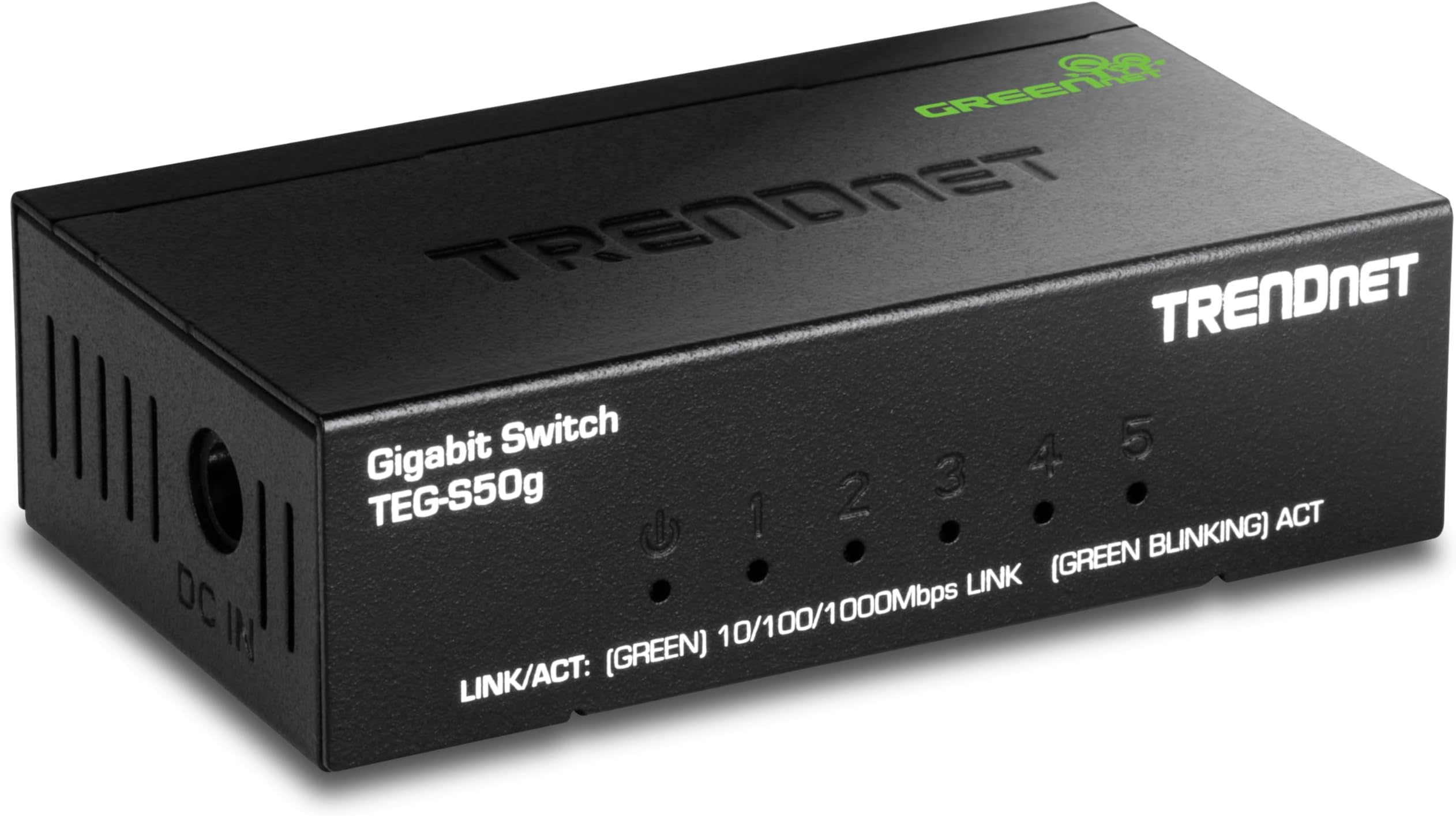
The TRENDnet 5 Port Mini Gigabit Switch (TEG-S50g) is a compact, fanless Ethernet switch featuring five gigabit RJ45 ports and a 10Gbps switching capacity. Designed with durable metal housing and GREENnet technology, it delivers high-speed, energy-efficient networking ideal for professional and home environments. NDAA and TAA compliant, it offers lifetime protection in the U.S. and Canada, making it a reliable, future-proof choice for seamless wired connectivity.


| ASIN | B001QUA6R0 |
| Best Sellers Rank | #47 in Computer Networking Switches |
| Brand | TRENDnet |
| Built-In Media | TEG-S50g |
| Case Material Type | Metal |
| Color | Black |
| Compatible Devices | Desktop |
| Current Rating | 1 Amps |
| Customer Reviews | 4.6 out of 5 stars 2,331 Reviews |
| Data Transfer Rate | 10 Gigabits Per Second |
| Global Trade Identification Number | 00710931610147 |
| Included Components | TEG-S50g |
| Interface | RJ45 |
| Item Dimensions L x W x H | 3.24"L x 1.84"W x 0.9"H |
| Item Type Name | TrendNet 5 Port 10 1000Mbps GB Switch (TEG-S50G) |
| Item Weight | 3.84 ounces |
| Lower Temperature Rating | 32 Degrees Fahrenheit |
| Manufacturer | TRENDnet |
| Mfr Part Number | TEG-S50g |
| Model Number | TEG-S50G |
| Number of Layers | 1 |
| Number of Ports | 8 |
| Platform | Windows |
| Product Dimensions | 3.24"L x 1.84"W x 0.9"H |
| Switch Type | Gigabit Ethernet |
| UPC | 710931980684 710931610147 |
| Unit Count | 1.0 Count |
| Upper Temperature Rating | 104 Degrees Fahrenheit |
| Voltage | 110 Volts |
| Warranty Description | Limited Lifetime Warranty |
T**E
Very simple, very easy, it works.
Overall this is a terrific switch. I replaced an old Ethernet hub with this. The hub was severely adversely impacting my bandwitdth over the network. The switch is now plugged in to my home (wired) Ethernet port and I have it plugged in my XBox 360 and Denon AVR-3310ci receiver to the switch. Both receive full signal now and work great. It was such a no-brainer. Just plug in the router to the power supply, plug in your internet cable, and then your other devices (PC's, game systems, receivers, etc.) to the other available ports. Works great and was super easy. Also nice is that the switch apparently can detect differences in cable lengths, along with knowing when data is needed and which ports are being unused and adjusts power consumption accordingly to presumably be "green" and save money. Not sure how much I'll save with this, but it's a nice feature. Attractive packaging and look (which I personally really couldn't care less about, but it is nice and makes me think TRENDNet is a credible, mass-market kind of company if I ever need support, etc.). The device is actually smaller than it looks online (which I also like- a small footprint helps when placed inside a media cabinet with a bunch of A/V stuff.). The device itself is very clean and simple- the display shows you which ports are active, the speed of the connection (I, sadly just have a 10/100 modem, so that's what it shows- someday I'll have a Gigabit but in function, everything works great for now with 10/100 so no big deal). Some of this will vary by cable provider (I have Brighthouse), but since I installed this switch, I've watched Netflix HD, listened to internet radio, etc. and it has never readjusted for quality problems, etc. (If you have streaming Netflix, you have probably experienced the 'quality' adjustments mid-viewing which is super annoying. With this switch- haven't had a problem yet- full HD). I also am streaming recorded HD video from my PC through Windows Media Center, which I use like a DVR/PVR. I just watched a full HD recording of 'Fringe' and it looked amazing. Fast-forwarded, rewound, played, paused with no issues and it looked and sounded perfect. Anyway- this was so easy to install, and the price is great for what it does. You can get cheaper Gigabit routers if you really shop around and wait for deals, but you probably won't find one for much less (I would say there is maybe a $5.00 +/- differential between this and the cheapest generic 5-port Gb routers I saw). I justified the little bit of extra money for this because of the build quality, good reviews, power saving features and 'branded' manufacturer which I felt might provide better support if I ever need it (though you never really know). All in all, a great switch. Should've bought one years ago. So far, so good! Strongly recommend the product.
R**R
This device solved my AV network problem
This router solved a digital interference problem that occurred when I plugged network AV devices into the network port of my uVerse set-top box. I had been using a powerline network adapter to connect internet to my network enabled DVD player, TV and home theater PC (HTPC). For video, powerline networking is a slow connection, even though this powerline adapter was advertised as good for video. However, I frequently saw that my streaming Netflix was dropping back to a low bandwidth connection because the powerline network adapter couldn't provide the bandwidth required to stream HD from Netflix. Recently I subscribed to AT&T uVerse, and I discovered that the uVerse set-top box had a network output port. So I plugged the HTPC into that, did some DSL speed tests and discovered that the uVerse network connection was a lot faster than the powerline adapter. Apparently the uVerse box gets it's internet connection via the video coax cable. So I ordered the TrendNet router just to split the internet signal from the uVerse box to all three audio/video devices. A gigabit switch is overkill for that purpose, but the price was right, and it's nice to have technical headroom as well as some future-proofing. While waiting for the router to arrive, I left my HTPC connected directly to the network port on the uVerse box. Soon I was disappointed to find that as long as the computer was connected to that uVerse port, I would often get digital interference (giant pixelation) on the TV shows I was watching or recording in the uVerse set top box. "Uh-oh," I thought, "This probably means the TrendNet router is going to create the same kind of digital interference. The uVerse documentation doesn't mention using the network port as a local internet connection, so maybe it's not really meant to be used that way." I ended up disconnecting all devices from the uVerse network port, because every device did cause interference in the uVerse signal. (It's possible there was something defective in the uVerse box, of course. I didn't pursue that with AT&T, probably should have.) Well, I received the TrendNet router. I wasn't going to return it because I knew I could use it elsewhere in the house. However, I decided on a whim to try it as a router on the back of that uVerse box. It worked! I was able to hook up all three devices to the network with the TrendNet as the "buffer" router between the uVerse box and the AV devices. I've never seen the digital interference again, and my streaming Netflix movies always connect at the highest HD bandwidth. So, I don't know what magic is inside this TrendNet router that solves the digital interference problem, but I'm happy that it did. I've been using it for 2 months now with no problem. Installation required no drivers - I just plugged in everything and it worked perfectly. The sturdy metal enclosure is good because the router tends to get shoved into the back of the cabinet and gets things piled on top of it, so it is handling a lot of physical abuse. Update October 2012: Has now worked flawlessly for 15 months.
H**M
Awesome Gigabit Switch - Cheap Price - Can't Go Wrong
I've been networking computers for over 18 years and I've been a Network Engineer for 9 years. I can hands down say I'm very impressed with this product. Despite working with Cisco products for almost a decade, I however sadly admit that my home network definitely needed some upgrades. You see, back in 1999, my friends and I decided to upgrade from a hub to a switch. You can't find hubs these days any longer but just know that switches replaced the hub. That switch, an 8-port 10/100 switch costed us $120. I ended up keeping that switch when all of us moved away. Surprisingly it still works but because of my shoddy network performance lately transferring from PCs and my NAS (network attached storage), I realized it was time to upgrade it and the 100Mbit speed was my bottleneck. What's amazing is that recently, switches are very cheap. This TRENDnet 5-port Gigabit switch is an AMAZING value for $25.80 (purchased in June 2013). I didn't need many ports, just a switch to replace my 10/100 switch. Here's what I like about this switch. What's amazing about this switch is that it has a large packet buffer. Larger buffer = better performance when transferring files. And because of the 10Gbps forwarding capacity specs, you can guarantee that this switch will perform very fast EVEN if you had all 5 ports occupied and transferring data. What's icing on the cake is that it also supports 9K jumbo frames. While the majority of you readers may not even know what that is or use it, just know that this switch is letting you future proof yourself by allowing you to support a high performance Gigabit Ethernet LAN. The auto-MDIX (medium dependent interface crossover) is a nice touch, allowing you to use crossover and straight-through Ethernet cables without any issues. Aesthetically, I like & don't like this switch. The metal housing is the same as what was on my old switch and it just feels like it's well made. There are no mechanical fans inside, so this thing also runs very cool. Although being light & small is sometimes a good thing, in my case I don't like that it's not a bit heavier. I have 4 devices plugged into it and all that weight makes it shift relatively easy. Honestly, four Ethernet cords are heavier than the switch. So if you're looking for a Gigabit switch and need one that packs a punch on a budget, look no further than this device.
D**R
Used to recommend, but no longer
I liked these little switches before. However, the most recent model I received no longer fits that description. As a switch, it works fine - full bandwidth, easy to hook up, low power consumption... It's still a fine switch. However, there are two serious steps down with the new one v/s the old ones. The biggest one: the power cable attaches from the side now. There's plenty of room on the back, but for some completely incomprehensible reason, they moved the barrel jack power connector to the *side*. This is ridiculous; other cables will be coming from the back, which is also where the power cable should be going - so now the power cable has strain on it at all times. And it doesn't fit into as narrow a place as before. Wall mount? Do you want network cables with 90 degree strain, or the power cable? :/ The other change is that there is just one LED per port now. It blinks for activity, and lights up for a link. It's a single-color LED, too, so no link speed indication. On the old model, there were two rows of LEDs - one for activity, and one for link speed (the traditional "amber = 10/100, green = 1000" scheme). This means the new switch doesn't make it easy for you to tell if your cable is sketchy and your gigabit NIC only established a 100Mbps link like with the old one. Given the target audience for these isn't likely to be the enterprise-grade pros who have cable testers, that's annoying. How expensive are five SMD LEDs in quantity (and five extra holes punched in teh faceplate)? Not very. The other electronics are likely cheaper now, so it's unclear why the price hasn't dropped to match the even cheaper build.
R**B
Does its job well
Build quality: This model is all metal, and is built like a tank. The LED's are bright enough that you'll know at a glance which mode (10/100/1000) your individual connections are operating in. Even after running constantly for days, this device isn't even warm to the touch, and I have no doubt that heat won't be an issue even during the summer. The LED panel at the front displays the link information (what speed, if any, a port is connected to) which makes it easy to see if your connection is properly auto-negotiating to the full speed of your network interface card, or if something is keeping that from happening (a bum ethernet cable, for instance) Ease of use: This device couldn't be simpler to use. You plug (this isn't wireless) an ethernet cable from your modem or router into the switch, and the switch essentially multiplies that connection by four. I suppose the switch is technically "5-Port" (you could connect five computers together with crossover cables probably, for instance) but really, with the one taken by the connection coming from the router/modem, you've got four effective ports to be used to connect anything with a standard ethernet jack. This device is auto-negotiating as well, which means that it will automatically select the highest speed available on your network card (as long as your card supports auto-negotiation). Connecting the device to my computer, a connection was instantly established between the switch and the computer at 1gbit (1000 Mbps). Plugging in another computer, I was able to use the full 1Gbit speed to transfer files between them. Connecting to an Xbox 360, I was greeted by the 100mbps LED on the switch, which instantly let me know the speed of the connection. All devices were instantly able to connect to the internet, and take full advantage of the 23ish mbit download speed, and 3ish mbit upload speed of my internet connection. If you need to ask about some of the advanced features of the device (like jumbo frames, which I believe this device supports) you definitely don't need to be using those features. Run one ethernet cable between your modem/router and the switch, and one between the switch and each of your devices, and you should be ready to go without having to do anything else (use CAT5E or CAT6 ethernet cable for Gigabit LAN) My Uses: We recently switched from Comcast cable internet to AT&T U-verse. With Comcast, any room in the house was capable of housing the modem (as long as it was wired for cable TV) and as such, I was able to place the modem in my office, where it directly ran multiple devices (computers, game consoles, etc). After switching to U-Verse however, I found out that the residential gateway (the box that controls U-Verse TV/Internet/Phone) could only be located within a short distance to a box outside where U-Verse enters the house, which is located far away from my office. This didn't work for me, as I have too many devices without wireless adapters, and I didn't want to go out and spend the money to buy some. The solution I came up with, was to run a CAT5E cable through the wall, terminating it on both ends with a wall plate. With a hard line now run into my office, all I had to do was split the connection somehow, and run ethernet cables to all of my components. This switch has been working perfectly in that regard, with everything auto negotiating properly. I couldn't be happier with this device, and for the price compared to the quality of the construction, I would definitely recommend this to others (as long as they don't need the features of a router).
C**E
The best network switches
I have been using Trendnet switches for a decade or more. They form the backbone of my home wired network. The switches are flawless for managing data and internet traffic. The low energy usage is also a plus. The gigabyte switches work 24/7. i have never had an issue with any of them. Metal enclosures, network status lights. No software to install. You cannot go wrong with Trendnet switches. The picture on the left is the 5 port one. The other pictures show 3 Trendnet 16 port switches on the hub of the system. On an Apple network it is super easy to share data around the system. I built a robust home network for under $1000 that would have cost 10-20 X that if I had someone else do it. You need some networking tools, RJ-45 connectors ( cable ends and wall jacks), Cat 5E or now Cat 6 cable. Having access to the walls is key in an older house. You Tube videos will show you how to arrange the twisted wire pairs and terminate them. I used the 506 B wiring system throughout. I followed old wired phone lines and made them into double outlets of phone and Cat 5e in many areas. Having attic access to drop lines into bedrooms also helps. The value this adds to a home is dramatic. Wifi networks will never give you the speed of a wired connection and are vulnerable to hacking. Never buy a network cable again when you can make one to any length you need. I do not do this for a living, and never had any training other than reading books and watching You Tube videos on the subject.
B**N
I highly recommend
Ran into an issue when we had a home alarm system installed. Purchased this product based on reviews of people who ran into similar issue and it worked perfectly!
W**Y
Design, Function and Performance Is FANTASTIC With This Switch
I have never had occasion to use a dedicated Gigabit Ethernet Switch like this Trendnet procured 5-port switch that I bought at Amazon.com for a ridiculously low price, and Kudos for that! We just got FIOS TV, Phone, and Internet from Verizon, and contrary to what most people do with their networks (wanting everything to be wireless in general, if possible) I wanted to wire up all of my PC's of consequence with the Verizon Dual Core CPU-controlled Router/Modem for the FIOS system, which is a most remarkable system to put it mildly. When the technician first wired up the FIOS network we picked my main PC as the No.1 "system PC" which we based all of the network settings on, cloning them to each PC desktop. I have three dedicated Folding@Home (Stanford research program that crunches proteins to simulate "protein folding" in order to study how diseases propagate, mature, and change amongst other things) rigs, which are Core i7 CPU-based desktops and I wanted each to benefit from the FIOS system's raw speed for transmitting the vast array and substance of data that they necessarily work through each day...literally many hundreds of millions of bytes of data transferred from Stanford to my PC's, and then after synthesis and the "folding" is complete and a Work Unit is done, the resulting 100-million+ byte files get transmitted back to Stanford. Using wireless with my previous system, Time-Warner Cable internet and TV, resulted in transmission times of up to 25 minutes for the largest Work Units which are called "Big Advanced Work Units",that is just plain unacceptable. The Cable network had a grand total of 1MB/sec or "megabits per second" upload speed, which is typical of cable modems and services. However the new FIOS system has 35MB/sec upload and download speeds both, a most remarkable thing to use I'll tell you right now, and I wanted the PC's to be hard wired to take advantage of this unbelievable speed for uploading my files day in and out. Hence enter the Trendnet switch for including all of my PC's, my network printer, an external backup USB HD, my twin RAID system for PC No.1 which communicates through the network also, so I had a need for exactly 4 extra ports, and this switch is exactly what the doctor ordered. Wiring up the system with Cat-5 Ethernet wires was simple, and our technician cut the cables to be exactly the correct length for each PC in the room, with fresh, brand-new, clean and nicely colored beige cable to match our carpet, a nice touch. The Verizon FIOS Router had the usual 4-ports for use, typical there, and combined with the Trendnet switch I had just enough ports to include all 4 PC's including the PC No.1 which is my server also on the PC side. On the Mac side (entertainment and AppleTV mostly used for that system) I have one PowerMac G5 M9591LL/A Server to run on the network also, and an AppleTV system also with a line from the Mac to the ATV system, so the technician cut wires for that application also, thanks Verizon! The Trendnet Gigabit switch works a treat in practice, as I didn't lose any of the FIOS network speed to cable or switch loss, to speak of anyway, with upload file speeds approaching 1000 bytes per second, a most welcome change from the cable system! Typically now using the FIOS system we are averaging 1.5 minute transmission times for the biggest files now, and as little as 20-30 seconds for the nominal sizes files from the PC's to Stanford's servers at the FAHome Labs in Palo Alto, CA. My network printer works perfect using the switch also, so no pain there at all, it's just simply perfect through the switch. My RAID systems are also working 100% through the switch, without data or packet loss to speak of, so on all fronts this switch is as perfect performing as I could have imagined, and then some! I like the design especially, a very strong point, with a steel case, albeit small but sturdy and strong, and having the LED indicator lights on the front of the switch, and the connections on the rear of the switch is ideal. Very nicely done, Trendnet! The switch comes with a 3-year warranty also, a nice touch from Trendnet to compliment this high-quality switch that looks ever so KUHL with its green LED's flashing off and on, indicating activity through the PC's and the network and RAIDs. This is a very high quality switch from all angles, and I don't think it's necessary to spend $100 or more on some fancy Gig E switch when this little switch does all you want and then some. Overall I'm rating the switch 5-Stars for fantastic design, performance and functionality par supreme! I can't think of anything I'd change about it, since Trendnet thought it all out thoroughly before marketing this switch series in several configurations, so Kudos to Trendnet. I have nothing but compliments for this thing, as it is seamless, does its job 100% of the time 100% effectively without any speed loss or packet loss through the network that I can tell of anyway. Of course we kept our laptops (2 MacBook Pros and one PC notebook+ a PC netbook) wireless for the new FIOS system, and they are getting 20MB/second upload and download speeds, most remarkable there also! Between the FIOS 35MB/sec and higher (we measure typically up to 45MB/sec speed during downloads, and 31-35MB/sec upload speeds in the network so far) speeds and the Trendnet switch's ability to work with the FIOS Router to bring the speed of this new network to each component is superb and I can't find any fault with this switch, it just performs 100% and then some again, seamless in the network. That's the story of my uses for this switch, and I am totally satisfied with its design, performance and utility with 5 effective ports for use. Give Trendnet a big Thumbs UP for the switch that costs a pittance and performs like the multi-hundred $$ switches. You won't be disappointed if you purchase this switch, it looks great, performs 100% and then some, and I highly recommend its use for any type of network duty, be it for PC's, Macs, printers, full duplex RAID systems and the like, it all works great with this switch in the mix. Best of all? It' silent and runs cool no matter what the load is, in my observations so far. Trendnet's 5-port Gigabit Ethernet Switch is a solid value, and performs with the best switches out there for a very inexpensive price, so get yours today! Don't hesitate because of anything to do with price or performance, this one's together 100% and more!
C**N
13 Jahre absolut zuverlässig im Dauerbetrieb
Ich schreibe diese Rezension, weil ich dieses Gerät nun ein zweites mal kaufen werde. Das erste läuft seit seit Januar 2011, also seit 13 Jahren (!!) völlig stressfrei. Steht auf dem Spitzboden und verbindet die Fritzbox, zwei WLAN-Accesspoints und den Sicherungskasten (SAT-over-Ip-Server) Das Gerät läuft und läuft und läuft…Ich habe das Teil seit Jahren nicht mal mehr angesehen. Deswegen kaufe ich es jetzt noch einmal für die Blockhütte (zum Glück haben wir seinerzeit im Haus und Gartenmehr als ausreichend Leerrohre verlegt) Ich hoffe, dass die nun aktuelle Version der alten in nichts nachsteht - damals habe ich übrigens 29,99€ bezahlt, 7€ mehr als der aktuelle Preis (heute ist der 15.2.2024)
O**N
Unbeatable for the price, must-have for Pioneer DJs
Although it has a slick look, the metal construction also feels sturdy. What else can I say? That functionality is perfect, very speedy and also functions in plug-and-play. All that at a very low price. Definitely recommend it for a PRO DJ LINK setup by Pioneer (2xCDJ900's, DJM800) The machine is also tiny, so I'd say the form factor is also a plus.
L**O
Conecta y Usa
La entrega del switch fue antes de la fecha acordada, sacas el equipo conectas cable del ruteador de tu empresa de internet, conectas tu computadora o tus tv y a disfrutar. Muy fácil de instalar y usar.
M**O
eccellente
Marca nuova e ho deciso di prendere questo anziché altre marche più conosciute che dire non lo immaginavo così mi stabilizza la connessione e il ping messo tra il router e il modem e va che è un amore design molto elegante e robusto penso che acquisterò anche altro della stessa marca.
J**N
The Best 5-Port Gigabit Unmanaged Switch?
I knew nothing about switches other than that I needed two of them. I have a Draytek router which, like most routers, has a built in 4 port switch. The problem with mine, a 2820n, is that only one of these LAN ports is gigabit, and I needed three at the router location, and four more in another room where various items are connected to a Devolo dLAN 1200+ WiFi, which only has two gigabit LAN ports for wired connections. Having put a lot of effort and expense into having PCs, Macs, iPads and home entertainment boxes working just the way I want them, I didn't want everything messed up by probably the cheapest bit of electronics in the system, so I started googling (actually DuckDuckGo-ing) switches to find out what was available and well considered. Most tech sites advised that, these days, almost any unmanaged switch will do the job perfectly well, with the only common advice being to consider getting one with a metal case for extra durability. All that was left was to sort the available switches by average customer review on Amazon, and look at people's real life experiences.This TRENDnet was by no means the only choice, but was well liked by network engineers and people who obviously understood switches, which I certainly didn't. It also makes much of its GREENnet technology for which it claims 70% power savings, reducing power supplied to unused ports, ports with equipment that's turned off, and to shorter cable lengths. It looked like a good choice, and I ordered two. I'd noted some reviews saying how small the units are, but I was unprepared for the tiny little thing nestling in its much larger cardboard box. People have also commented on which hardware revision they were supplied: mine were UK models V3.1R. There is now a V4.0R, but the main difference seems to be the front panel, which now has one row of multi purpose LEDs instead of two rows, one for connection and one for gigabit speed, on V3.1R. Apart from the switch, the box contained a UK power supply, an instruction booklet, and a pad of rubber feet. The box itself has a mass of technical information for those who understand it, and the welcome if surprising statement that this cheap little switch comes with a 3 year warranty and 24/7 tech support! The back panel has the power socket, and five gigabit ports. I connected a short Cat6A patch cable from the router's gigabit port to the TRENDnet's port #1, and then, to begin with, my main PC to port #2, the Devolo 1200+ Powerline to #3, and then plugged it into the mains. The switch is Plug & Play, and no configuration is needed or possible. It was immediately obvious that something wasn't right. I had both green lights on for the router and Devolo connections, indicating that both were connected at gigabit speeds, but only one green light for the PC, meaning that it was connected but only at Fast Ethernet speed. I unplugged the PC from #2 and transferred it to #4 and promptly got the two green lights. Given the price of the switch, and the fact I didn't need all five ports at the moment, I was tempted to just carry on with the configuration that worked, but having seen the offer of a 24/7 helpline, I thought I'd give it a go. I went to the UK website, and the first pleasant surprise was an 0800 phone number! The call was answered straight away, and after being routed through a couple of options to get me to the right person, I found myself speaking to a very polite tech person within 60 seconds of dialing. Of course, I might have just got lucky and phoned at a quiet time, but even so! The tech gentleman apologized for needing to take some details, and then asked for the problem. He asked me to plug the PC into the as yet unused port #5, which worked as it should, and then back into the original port #2. Embarrassingly this port now also worked perfectly. It was my turn to apologize for wasting his time, but he couldn't have been nicer, gave me a tech support ticket number and told me to phone back with any further questions or problems. I then unpacked the second switch, and, long story short, everything worked perfectly first time. I've only just bought these switches, so I can't comment on how long they will keep working, but with a 3 year warranty that shouldn't be a problem. Apart from that, I can't imagine how an unmanaged gigabit switch could be any better. You need to use cables that are at least Cat5e, and as with all 5 port switches, one port is used to connect to the source of the signal, the router, other switch etc, so you will have four expansion ports. If this isn't enough, consider an 8 port switch, a bit bigger and a bit more expensive. Your network devices will need to support gigabit speeds, sometimes written as 1000 Mbit/s, to take advantage of the best possible speed, but if they are the slower Fast Ethernet standard, sometimes 10/100 Mbit/s, such as a Sky box, most Blu Ray players etc, they will still work but no faster than their own lower maximum speed. So, thoroughly recommended, a genuine 5 star buy.
Trustpilot
1 week ago
1 month ago