Desertcart purchases this item on your behalf and handles shipping, customs, and support to Greece.
⚡ Future-Ready Wi-Fi 7 Mesh: Speed, Coverage & Power in One
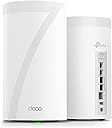
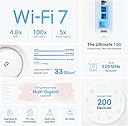
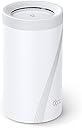
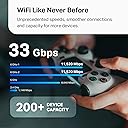
The TP-Link Deco BE33000 Quad-Band WiFi 7 Mesh System delivers ultra-high speeds up to 11520 Mbps on dual 6GHz bands, covers up to 7,800 sq.ft, and supports over 200 devices simultaneously. Featuring 2 x 10G Multi-Gig Ethernet ports and AI-driven smart antennas, it ensures lag-free connectivity for gaming, 8K streaming, and smart homes. With advanced security via TP-Link HomeShield and easy app management, it’s a future-proof solution for professional-grade whole-home Wi-Fi.


| ASIN | B0BRD7YGR6 |
| Antenna Location | Home |
| Antenna Type | Internal |
| Best Sellers Rank | #28,475 in Computers ( See Top 100 in Computers ) #105 in Whole Home & Mesh Wi-Fi Systems |
| Brand | TP-Link |
| Built-In Media | 1 x RJ45 Ethernet cable, 2 x Deco BE95 unit, 2 x Power Adapter, Quick Installation Guide |
| Color | White |
| Compatible Devices | Gaming Console |
| Compatible devices | Gaming Console |
| Connectivity Protocol | Wi-Fi |
| Connectivity Technology | Ethernet, Wi-Fi |
| Control Method | App |
| Controller Type | App Control |
| Coverage | up to 7,800 sq. ft |
| Customer Reviews | 3.9 out of 5 stars 243 Reviews |
| Data Transfer Rate | 11520 Megabits Per Second |
| Frequency | 6 |
| Frequency Band Class | Quad-Band |
| Frequency band class | Quad-Band |
| Has Internet Connectivity | Yes |
| Has Security Updates | Yes |
| Is Modem Compatible | No |
| Item Dimensions L x W x H | 12.8L x 12.8W x 23.6H centimeters |
| Item Type Name | Mesh WiFi |
| Item Weight | 3.03 Kilograms |
| LAN Port Bandwidth | 1× 10 Gbps ethernet/fiber Combo port + 1× 10 Gbps port |
| Manufacturer | TP-Link |
| Maximum Upstream Data Transfer Rate | 1000 Megabits Per Second |
| Mfr Part Number | Deco BE95(2-pack) |
| Model Name | Deco BE95 |
| Model Number | Deco BE95(2-pack) |
| Model name | Deco BE95 |
| Number of Antennas | 1 |
| Number of Ports | 4 |
| Operating System | TP-Link OS |
| Other Special Features of the Product | Access Point Mode, QoS |
| Router Firewall Security Level | High |
| Router Network Type | hybrid |
| Security Protocol | WPA3 |
| Smart Home Compatibility | Smart Home Compatible |
| Special features | Access Point Mode, QoS |
| UPC | 840030706882 |
| Unit Count | 2.0 Count |
| Wi-Fi Generation | Wi-Fi 7 |
| Wireless Compability | 802.11.be, 802.11ac, 802.11ax, 802.11g, 802.11n |
| Wireless communication standard | 802.11.be, 802.11ac, 802.11ax, 802.11g, 802.11n |
A**O
Vale su precio
Su esperanza de vida es larga. Tiene lo más reciente en colectividad y eso le asegura mucho tiempo de uso. Se le saca más provecho si se usa en mesh, si sólo usas uno como módem recomiendo más la versión BE85 o la BE65. Tiene una potencia tremenda. Vengo del deco x20 y sí hay diferencia siempre y cuando tus dispositivos estén adaptados a la nueva tecnología de wifi 6e y 7
M**M
Exceptional performance and ease of set up
I bought the Deco BE95 to replace an Orbi RBK853 (WIFI 6) system. Although I my internet was a 1.5Gbs service, the Orbi was only getting 500-600 Mbps downloads to my devices and we experienced unusual drops and a few areas with poor coverage despite 3 units all connected via Ethernet. It took me about 15 minutes to set up the Deco BE95 and configure it with the same network name and passcode so all of our devices immediately reconnected. It was an exceptional decision. With only two units (vs. 3 for the Orbi), I’m getting full 1.5 Gbps downloads on our WIFI 6E and 7 devices. On older WIFI devices, I’m getting 650+ Mbps downloads. On the WIFI 6E devices, I’m getting 900-1000 Mbps in areas of the home the Orbi (with 3 units) was struggling to get 100-200Mbps. It was super easy to set up and I’m getting full speed within 40 feet of the Deco and almost full speed everywhere in the house. And, when my internet provider soon switches to 3Gbps internet, I’m confident the Deco will handle that with ease also. Great purchase and future proofed WIFI.
T**R
This is the flagship tp_link home mesh system. The be85, is no t newer than this unit!
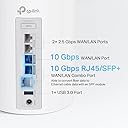
This unit, the BE95, is the flagship product for TP_Link home mesh networking. As a retired IT professional/engineer who worked with hardware and wrote more code than I want to remember, I have only high praise for the BE95 product. The incredible overall total throughput along with the capabilities to handle in excess of 200 connected devices fleshes this device out to be almost ultra-commercial in design. We had a very high end gaming router with some repeaters prior to this unit. We also have prior mesh systems from Asus as well as NETGEAR (Orbi) and they all sucked. Confusing back channel configurations and inconsistent connections plagued our connectivity daily. Originally I balked at the price, but figured I could just return it if it didn’t pan out and live up to promises. In the end, with just the 2-tower package, we are covering our entire home of 3000Sqft with full 5 bar connectivity and absolutely ZERO dead spots. Where we had constant drops and interruptions in our old system for our xfinity WiFi enabled tuner, we now see consistent 4k television. When I look for WiFi I look for reliability and signal quality. This unity excels at both. Even all the way back by our fence at edge of the property I get full bars. Walls are not a problem as the unit utilizes MLO (multi link …Ah crap, can’t remember what o stands for) in short, it will use more than one of the 4 channels to make sure there are no dead spots in the signal. The back channel is automatic and seamless. Once setup with the free app, you rarely need to access it. And speaking of the app, it is the only detriment to the system as the fine folks at tp_link decided to rely solely on the app for configuration of port forwarding and other granular stuff. There is no way to do that on the web based on fig tool I’m not sure if it was left out on purpose or if the unit was rushed and web app,just didn’t get finished in time. It does not feel like a rushed product so, some how I think they just left it out to avoid confusing the average person. The system provides connectivity on WiFi specs from 2.4g, 5g, bands as well as 2 others. High spectrum reserved for back channel connectivity to ensure quality service. WiFi 7 compliant (spec not completed yet but it will be soon) there is no WiFi they cannot connect to. The ports on the back provide 2 2.5 gig Ethernet and 2 10gig Ethernet/ as well as a high speed usb for attaching some hard drives for network attached storage. This thing is made to scream while pushing as many bits as possible. Over saturation of the network never happens. I can be transferring large video files, watching 4k tv, streaming something else, listening to music and have a torrent client running in the background while my son kicks butt on his gaming servers with ultra low lag….on WiFi. Faster than the Ethernet connect on our old router/ap. I can confidently say, barring some magic leap in tech, this will be he last WiFi router we buy for at least a decade. Highly. Highly recommended. This from a guy with 4-5 boxes of old devices sitting in his garage!!!
U**D
Fantastic mesh for Bell Fiber customers
**BELL CANADA FIBRE CUSTOMERS — THIS WORKS! (Bell Hub connection steps at the end)** I upgraded from an Asus mesh system to the **TP-Link Deco BE95** (check price history before buying!) — and the difference is massive. **Setup:** Super easy — TP-Link nailed it. **My layout:** 1. Main router (wired) on 2nd floor 2. Wireless node in bedroom across the hall (2nd floor) 3. Wireless node in living room (1st floor) 4. Wireless node near front door (1st floor) I kept each node within about 2 walls of the main unit, as recommended. Speeds jumped from **10–40Mbps** to **250–750Mbps**, depending on location. I now get solid signal even in the **basement, backyard, and driveway**, where I previously had none. **Speed test examples:** * 650 Mbps = across the hall * 740 Mbps = next to main router (Screenshots posted for proof.) ### How to Connect Deco (or any router) to Bell Fiber Modem (hub 3000, hub 4000, and probably 5000). **TL;DR:** During Deco setup, choose **PPPoE mode** (not Access Point), and use your **Internet Username** and **Access Password** from Bell. Done. **Step-by-step:** 1. **Get Internet Username:** Open the **MyBell app** → go to **Services** → tap **Internet** → your username usually starts with **b1...** followed by mix of numbers and letters 2. **Get or Reset Internet Access Password:** * Recommended: **Call Bell** to request it. * Otherwise this method will disconnect you from internet temporarily. In the MyBell app while on the Internet screen → scroll to bottom of Internet screen → tap **Internet Access Password** → set a new one. 3. **(Optional: If resetting password)** * Connect a laptop or desktop directly to your Bell modem with an Ethernet cable. * Go to **bell.ca/mymodem** or **192.168.2.1** in your browser. * Log in and go to settings and enter the internet access new password. 4. **Disable Wi-Fi on the Bell Modem:** Log in to modem settings → find **Wi-Fi settings** → disable both 2.4GHz and 5GHz networks. 5. **Set up Deco via app:** * Follow the prompts. * When asked for **Connection Type**, change it from **AP Mode** to **PPPoE**. * Enter your Bell **username and access password**. That’s it — your Deco system should now be online and fully functional.
J**D
Casi todo perfecto
Trabaja muy bien, super veloz. El único problema es el conector de alimentación a la corriente eléctrica se desconecta con mucha facilidad solo, no embona bien o es muy corto y no se alcanza a fijar bien al aparato.
Trustpilot
2 weeks ago
1 month ago