Desertcart purchases this item on your behalf and handles shipping, customs, and support to Greece.
🎨 Elevate your art game—where precision meets portability!
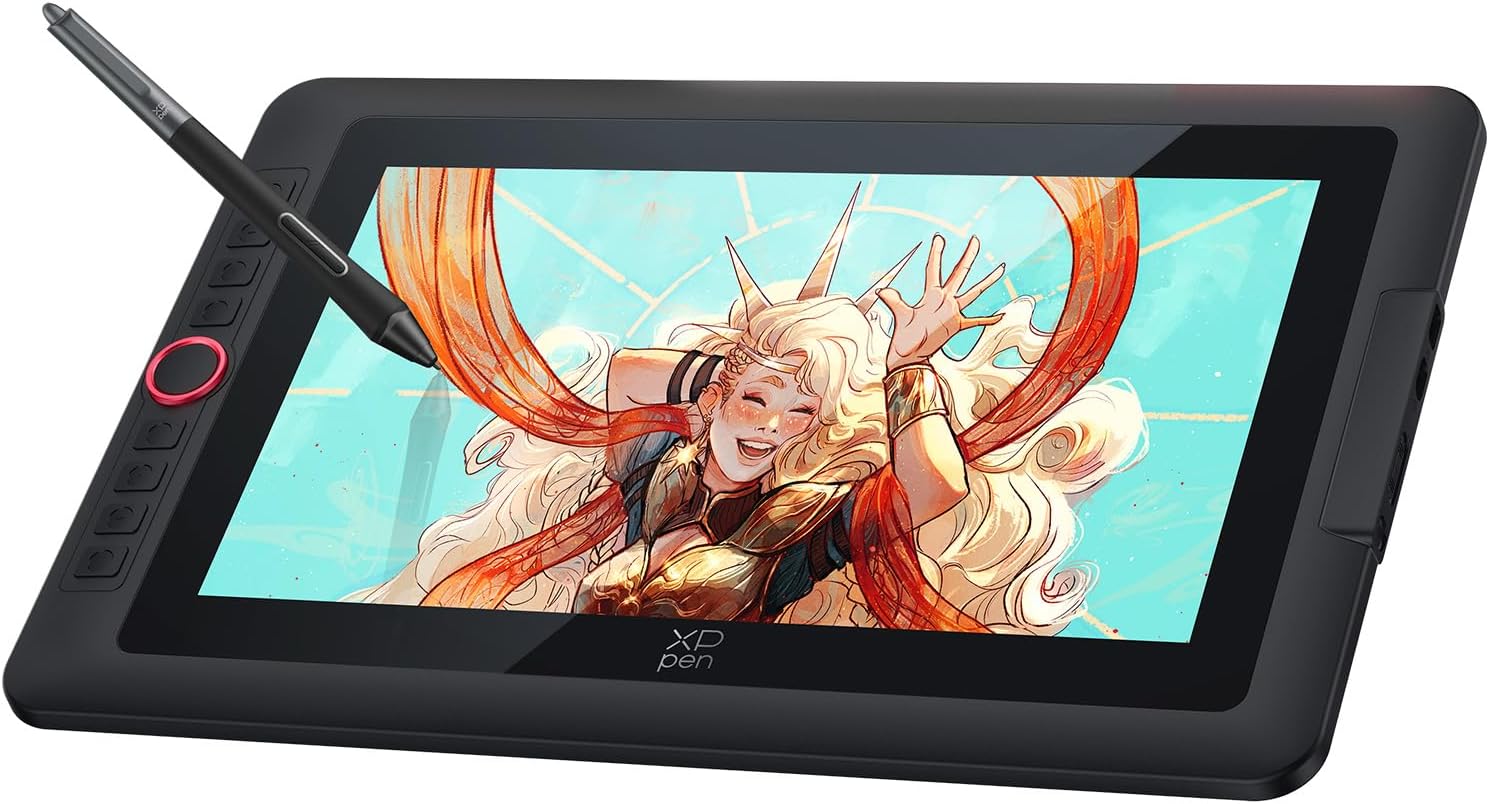
The XPPen Artist13.3 Pro V2 is a professional-grade 13.3-inch drawing tablet featuring a full-laminated, anti-glare screen with 99% sRGB color accuracy and 16.7 million colors. Equipped with the groundbreaking X3 Pro Smart Chip Stylus offering 16,384 pressure levels, it delivers unparalleled precision and a natural drawing feel. Lightweight and portable at 1.13 kg, it includes 8 customizable shortcut keys plus a Red Dial for enhanced workflow, compatible across Windows, macOS, Linux, and Android platforms, making it the ultimate creative companion for professionals and hobbyists alike.


| ASIN | B0DKT4Y74Y |
| Active Surface Area | 293.76 x 165.24 = 48.65 square inches |
| Best Sellers Rank | 14,740 in Computers & Accessories ( See Top 100 in Computers & Accessories ) 37 in Graphic Tablets |
| Box Contents | Stylus, Shortcut Keys |
| Brand | XP-Pen |
| Brand Name | XP-Pen |
| Colour | Black |
| Compatible Devices | Laptop, Desktop, Tablet |
| Connectivity technology | USB |
| Customer Reviews | 4.1 out of 5 stars 72 Reviews |
| Display Type | LED |
| Item Dimensions L x W | 39L x 25W centimetres |
| Item Weight | 1.14 Kilograms |
| Manufacturer | XP-Pen |
| Model Name | Artist 13.3 Pro V2 |
| Model Number | Artist 13.3 Pro v2 |
| Model name | Artist 13.3 Pro V2 |
| Native Resolution | 1920*1080 |
| Network Connectivity Technology | USB |
| Operating System | Windows, macOS |
| Operating system | Windows, macOS |
| Pressure Sensitivity | 16384 Levels |
| Pressure sensitivity | 16384 Levels |
| Product Features | Anti-Glare Glass |
| Product Warranty | 2 year manufacturer |
| Screen Size | 13.3 Inches |
| Special feature | Anti-Glare Glass |
| Specific Uses For Product | Drawing |
| Target Audience | Professional illustrators |
| UPC | 850065239552 |
| Unit Count | 1.0 count |
L**G
Work well
It good, but it was bigger and heavier than I thought it would be, drawing is lovely
M**D
Pressure sensitivity settings had to be changed to adapt the pen (highly recommend product)
The 1 star reviews were putting me off from this tablet (I had a Wacom one tablet that stopped working) but this is a great product at a great price, going from one tablet company to another also worried me since I thought adjusting would take a while but it hasn’t its also very simple and clear, the side buttons are handy, people had problems in their reviews but they are a very small percentage of the thousands of people who got a great product. The only problem I had was that the pen had 0 pressure sensitivity but I heard the XPPen was very good, it turned out that the software I use needed its settings changed to adapt to the type of pen and now it works perfectly especially since it doesn’t need to be charged.
J**A
No signal
I started return unfortunately I am so disappointed with this tablet.It was our daughter's Christmas gift but we couldn't never turned it on and connect to laptop or pc.Just ni signal. I've read and watched many rewiews and help guides and for me it's seemed obvious so many people were dealing with same problem as me.I even bought new ones cable pack and from same seller but all in vain (((It's sad actually we like the size of tablet and it's quality, looks very sturdy but we'll never know it's capabilities. So,I started return and i dropped off items on 27.12.2025 so still no updates on my return and it's not ok.Who going to buy this product do not waste your time,you gonna wait for your money back for weeks
A**R
Great gift
Great for a child that likes to draw
A**C
Great Value and Perfect Compatibility with Mac Pro 2024
Great product and good value for money. It works perfectly with my Mac Pro 2024.
S**Y
replace the anti glare film
Anti glare protective film makes the display look greasy, but replacing it with a 3rd party one makes it much nicer
S**H
Great buy of kit
Bought to help my wife with her online tutoring business. Uses it to interact and write on screen. She is delighted with it. Hasn't used it for art yet. Only negative is set up booklet waste very clear . Had to go online for video! On how to set up. Took a while.
S**N
5star
Excellent one
J**O
XPPen Artist 13.3 Pro V2 Tablet gráfico
Excelente produto. Corresponde ao anunciado
A**E
Good quality
After having had issues with 3 Huion Display Tablets (Dead pixels) I decided to go for an XPPen Tablet and I'm glad I did. No problems whatsoever, good quality display and pen for this price, also no dead pixels finally.
C**S
Bon produit
Superbe tablette graphique et livré dans les temps.
E**A
Muito boa
Muito satisfeito… rápido e eficiente …
W**.
Grafiktablett nicht nur für Fortgeschrittene
Das Grafiktablett ist überraschend groß, denn es hat, wie auch schon die älteren Modelle von XP-Pen, einen recht großen Rand. Ich habe das XP-Pen Artist 12 der ersten Generation und damit schon viel gemacht, doch es hat nun immer wieder das Problem, dass es bei der Übertragung das Bildsignal verliert und nur noch Streifen anzeigt. Deshalb traf es sich gut, dass ich ein neueres Modell mit größerer Bildschirmdiagonale testen durfte. Der Lieferumfang hat sich ebenfalls geändert. Bei dieser Variante ist zusätzlich noch ein Tablet-Ständer dabei, der absolut passgenau ist. In der eigentlichen Verpackung befindet sich das Tablet, der Ständer, eine Zeichen-Handschuh, diverse USB-C Kabel und der Stift in einer Box mit Ersatz-Spitzen. Eine Anleitung ist ebenfalls dabei. Dann gibt es noch ein extra Paket in der Versandverpackung mit einem Adapter-Kabel für HDMI, USB und die Stromversorgung, ein Netzteil wird nicht mehr mitgeliefert, das war bei dem XP-Pen Artist 12 noch im Lieferumfang dabei. Da aber ohnehin immer mehr auf USB-C umgestellt wird, sollte das kein Thema sein, Netzteile werden sowieso nur noch selten bei neueren Geräten mitgeliefert. Was die Funktion angeht, wer es erfolgreich schafft die Treiber zu installieren, bekommt ein gut funktionierendes Zeichentablett, dass es mit den Marktführern durchaus aufnehmen kann. Man darf jedoch nicht vergessen, dass es normale Tablets mit Zeichenfunktion und Stift gibt, die für viele Anwendungsfälle außerhalb des professionellen Bereichs bereits ausreichen und sich mit entsprechender Software auch als Zeichentablett am PC verwenden lassen. Hier beim XP-Pen Artist 13.3 bekommt noch ein Stück mehr geboten und es ist mir bisher auch kein normales Tablet bekannt, das mehr als 4096 Druckstufen unterstützt. Mit den hier vorhandenen 16k Druckstufen sind unfassbar feine Abstufungen möglich. Das sind direkt doppelt so viele Stufen wie beim XP-Pen Artist 12. Daher ist es für Profis eine geniale Lösung und ermöglicht sehr präzises arbeiten. Insgesamt ist es ein sehr stimmiges Konzept und wenn die Haltbarkeit mittlerweile Fortschritte gemacht hat, wäre das sehr zu begrüßen. Schade ist der üppige Rahmen um Display, der wäre so nicht nötigt meiner Meinung nach, das macht das Grafiktablett unnötig sperrig, doch dafür zeihe ich keinen Stern ab.
Trustpilot
2 weeks ago
3 days ago