Desertcart purchases this item on your behalf and handles shipping, customs, and support to Greece.
โก Connect, Charge & Conquer โ The Ultimate Hub for the Modern Pro
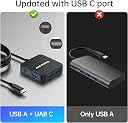
The Anyoyo 6-in-1 USB C Hub is a sleek, lightweight adapter featuring a 4ft cable that expands a single USB-C port into six versatile connections: 4K HDMI output, 100W Power Delivery charging, three USB-A 3.0 ports, and a USB-C data port. Compatible with MacBook Pro/Air, Windows, and Linux, it supports ultra-fast 5Gbps data transfer and crystal-clear 4K video, making it the perfect all-in-one solution for professionals seeking seamless productivity and entertainment on the go.
| ASIN | B0C88JK87J |
| Additional Features | USB C Hub Long Cable(4FT), 100W PD Charging Adapter |
| Best Sellers Rank | #52,080 in Computers ( See Top 100 in Computers ) #824 in USB Hubs |
| Brand | ANYOYO |
| Color | Black |
| Colour | Black |
| Compatible Devices | Keyboards, Laptops, Monitors, Tablets, USB Flash Drives |
| Compatible devices | Keyboards, Laptops, Monitors, Tablets, USB Flash Drives |
| Customer Reviews | 4.0 out of 5 stars 98 Reviews |
| Data Transfer Rate | 5 Gigabits Per Second |
| Enclosure Material | Plastic |
| Hardware Interface | USB 3.0 |
| Hardware interface | USB 3.0 |
| Item Dimensions L x W x H | 6L x 6W x 1.1H centimeters |
| Item Weight | 45 Grams |
| Manufacturer | ANYOYO |
| Minimum Required Operating System Version | Mac OS X 10.3 Panther, Windows 7 |
| Model Number | PM31-4FT |
| Number of Ports | 6 |
| Operating System | Linux, Mac OS X 10.3 or higher, Windows 7 or higher |
| Special features | USB C Hub Long Cable(4FT), 100W PD Charging Adapter |
| Total USB ports | 6 |
| Total Usb Ports | 6 |
| Unit Count | 1.0 Count |
M**S
Bom!
Bom!
S**B
Does everything I need and more
I could not be happier with this USBc Hub - i got the 6-in-1USBC with 4K HDMI. I teach an online fitness class on zoom and also record to my phone. I plug the HDMI into the hub and also to my computer so i can see my students but record to my phone- I can use the USBC to check my phone camera for room layout and level and then move it back to my computer to see my students. If I have my phone charger plugged into the hub, it charges my phone while recording. There is also another cord for my wireless Rodes mic RX that connects with the phone. I tried 3 other options out there and this is the only thing that works. I've had it for 2 months and so far so good. Brilliant really!
M**L
Works fine out of the box
A great little device. I wanted to connect my MacBook Air to my monitor and other peripherals. So I plugged the peripherals which I already have on a USB hub into the anyoyo and the hdmi cable from my screen into the anyoyo as well. The power cable (white on the photo) went in too. The MacBook Air has its USB ports only on one side which worked out to be the far side from where the hub is. That is why I got the variant of the anyoyo that has a long cable so it can reach up to there. Once everything was plugged together the MacBook Air automatically used the screen as a secondary screen and got its charge from the anyoyo. And that is what I wanted. The anyoyo has a bright little blue light when it is on which I find a bit annoying. I'll probably cover it with a sticker soon. For fun I also tested this by plugging the anyoyo in the same configuration into my Samsung S21 smart phone. The phone went into DEX mode and I was able to use the screen, mouse and keyboard on the DEX desktop of my phone which was pretty cool.
P**Y
Charge and display work perfectly
Itโs hard to find a device like this that charges and projects with one single cord, long enough to hide the ports and projects reliably without overheating or issues. So far, a month in, itโs working perfectly!! I will order another as a backup.
A**R
Almost perfect hub
I was looking for something for home office, so I can swap my work and personal laptops with just one cable. As I wanted to keep it clean I needed long cable. So it was either this or more expensive docks. And this one seems to be a very good value for money I've got it in two of my home office setups. It had no problems with FHD monitor. Got it set up straight of the box. I've only had to adjust refresh rate in Windows display settings. It got slightly more tricky with ultra wide monitor. The aspect ratio wasn't automatically detected. I was getting 16:9 instead of 21:9. I've manged to resolve it. I had to first change the refresh rate to the monitor native one. Then I was able to select 21:9 resolutions. From other issues it's loosing the HDMI signal from time to time. It lasts few seconds, and then the signal comes back to the monitor. If it doesn't reconnecting laptop always solves the problem. I didn't identify why that happens and if it's problem of my laptops or the hub. Postives: - 6ft cable allows to hide it under desk. There is not that many other options, especially at this price - power delivery works - small size makes it easy to fit Negatives: - loses the HDMI signal sporadically - not all aspect ratios are automatically detected.
Trustpilot
2 days ago
1 week ago