๐ป Elevate your listening gameโwhere vintage meets cutting-edge!
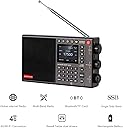
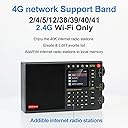
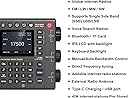
The CHOYONG LC90 is a cutting-edge portable internet radio combining traditional multi-band reception (FM, AM, LW, SW, SSB) with WiFi/4G connectivity to stream over 40,000 global stations. Featuring advanced GPT voice search, dual high-fidelity speakers, Bluetooth 5.2, TF card support, and a robust 5000mAh battery, it offers unparalleled versatility and sound quality for the modern audio enthusiast on the go.


| Antenna Location | Music |
| Asin | B0D26V7PGS |
| Audio Output Mode | Stereo |
| Best Sellers Rank | 175,099 in Electronics & Photo (See Top 100 in Electronics & Photo) 86 in Internet Radios 1,255 in Portable Radios & DAB |
| Box Contents | Owner's Manual, Quick Start Guide |
| Brand Name | CHOYONG |
| Colour | Black |
| Compatible Devices | [POSSIBLE VALUES: Speaker, Smartphone, Tablet, Laptop, Bluetooth Speaker, MP3 Player] |
| Customer Reviews | 4.2 4.2 out of 5 stars (53) 4.2 out of 5 stars |
| Display Technology | LCD |
| Display Type | LCD or LED |
| Enclosure Material | Electronic materials (plastic, metal) |
| Frequency | 60 Hz |
| Hardware Interface | 3.5mm Audio, 802.11 ac/b/g/n, Bluetooth 5, MicroSD, USB 3.0 Type C |
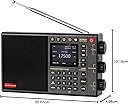
| Item Dimensions L X W X H | 20.1L x 4.1W x 12.2H centimetres |
| Item Weight | 1.41 Pounds |
| Manufacturer | CHOYONG |
| Manufacturer Part Number | CHOYONG LC90 Internet Radio |
| Maximum Speaker Output Power In Watts | 10 Watts |
| Model Number | Internet Radio LC90 |
| Network Connectivity Technology | ['2.4GHz Wi-Fi', 'Bluetooth'] |
| Number Of Batteries | 2 Lithium Polymer batteries required. (included) |
| Number Of Items | 1 |
| Power Source | Battery Powered |
| Product Features | Addable internet radio stations, Global network radio station and podcast, Two-way speakers, Voice gearch station |
| Radio Bands Supported | 5-Band |
| Style Name | modern and sleek |
| Tuner Type | SSB,AM,FM |
| Upc | 768484829363 |
| Voltage | 3.7 Volts |
| Water Resistance Level | Not Water Resistant |
User
I'm satisfied
Great radio
User
Good But Not Perfect
A lot has been said about the Choyong LC-90, good and bad, and I have to agree with most of it.This is an unique internet radio with MW, FM, SW, LW and SSB thrown in for good measure. When it works--it's great. When it doesn't it's really frustrating. It seems to need a very strong WiFi signal to get going.THE GOOD: long battery life (rechargeable), speaker/sound is good if bass-heavy, look and feel are nice, front panel and dials are impressive.THE BAD: MW/AM sensitivity could be better; should have an equalizer to offset the bass-heavy sound; internet seems to use its own gateway/directory and is hard to search; the "voice search" function takes a long, long time to recognize clearly spoken English. It is an almost comical experience to see how the LC-90 interprets your spoken request. After 4-5-6 or more attempts, you might even get it to understand "comedy," "American," "sixties" and other key words. You cannot input your request with the keypad.There is a way to add a desired internet station by using your phone and a QR code. I have now had some experience using this feature and will try to explain the steps:1. Identify the internet station you are interested in adding to the LC-90.2. Find the station on your computer or phone and click on the "listen" button. In other words stream the station you are interested in.3. Carefully write down the URL (web address) of the stream that can be found in your browser's address window. ***This step is crucial because the whole process will not work if you don't have the exact streaming address.*** (The Choyong video shows someone copying the stream URL to his phone's clipboard for later pasting. If you know how to do this procedure, by all means use it. But if you are using a PC, just write it down.)4. From the LC-90, press the button on the bottom row next to the NEWS button. It looks like a box with a line through it. This is the ADD STATIONS button.5. You will see a QR code on the LC-90 screen.6. Scan the QR code on your phone and open the link.7. An Add Station form will open up on your phone.8. Fill in all the required info: station name, streaming address, country and language. Again, it is vital that you have a correct streaming address. Don't leave out any "https," slashes, dots or colons. I used a Bluetooth keyboard connected to my phone to input all the info because it can be tedious, and remember that you need to be 100% accurate with the streaming address.9. Press "Submit" at the bottom of the form on your phone.10. The submitted station name will show up on your LC-90 "Add Station" screen. If necessary, scroll to highlight the name and hit OK or press in the top tuning knob. Your station should be loaded to the LC-90 and start playing.This procedure is complicated but actually works quite well. I've added a few missing station this way. I don't know how the station info gets from the form on your phone to the LC-90, but I did link my phone to the LC-90 via Bluetooth before I started. I don't know whether these steps will work with the Bluetooth turned off. The manual and YouTube video don't explain very well. (By the way, if you follow all these steps and you get a Network Error message, you may have to look for an alternate streaming address for the station. As I said, it can be frustrating.)Despite its faults, the LC-90 is a good but complicated internet radio but since you can update the radio over WiFi, I'm hoping it will improve over time.
User
Not cheap, but worth it.
This internet radio is amazing at picking up stations you can't hear clearly on Shortwave.
User
Great radio.
This is a great radio because it have different features with multi features, Battery life is good,reception is average like all shortwave radios. MW is poor,SS feature is available,it is easy to use.Now! I have also Choyong LC90 mini and they suffer from the same issue with sometimes the connectivity to WI FI fail or network error comparing with other brands but lack of multiband.I think it is a problem of firmware that i already update it to the latest available on October 2024 though Choyong is working hard to release a new firmware after Christmas.Currently running 4.8 version update in June 2025 great jump.I think that if Choyong correct this issue it would deserve more than five stars because this is a great radio.If you connect the Internet using a SIM card(I use EIOT sim card you can get it in Amazon works properly an no interruption for $15 a month is enough 2GB,better than using wi fi.Sensitivity is average as well.Works with 2.4 hz WI FI.I added a 2.4 hz router to my modem-router(Plugged both and connected Choyong LC90 to the second router WIFI address)to end the issues with connectivity.Works ok with great connectivity.
User
Quality Product, Terrible Owners Manual and Beware the Updates!
Triggered my biggest bug-a-boo. Why oh why are the Chinese so very fond of never providing a good, comprehensive owners manual. At the best we seem to get a list of what all the buttons and knobs do but never, ever 'how to do anything'. That said the radio is very well made. It is built like a quality Japanese bit of electronics from the 1990's. Nothing junkie. A recommendation, look up youtube videos to see how to do anything. A warning, beware the upgrade/update. If you make one error you brick the radio. Ensure you have a (no larger than) 32GB TF micro card installed. Reviewers seem to complain a lot about self generated noise in playback. They laud the firmware update but Choyong provided few hints as to actually updating.
Trustpilot
2 weeks ago
1 week ago