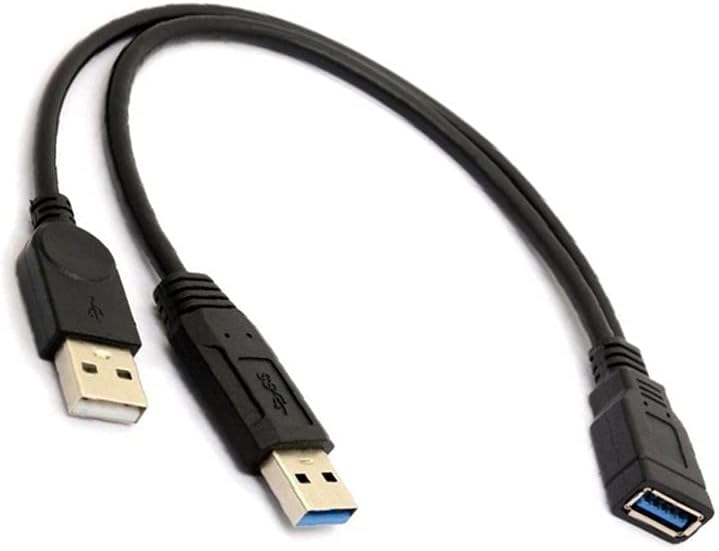
Original review in March 2020: After trying repeatedly to connect my Motorola Edge + 2022 to my new Toyota Prime 2024, which supposedly has wireless Android Auto, it became evident that the wireless capability was intermittent at best. It would work for a day or two, then it would fail to connect. This problem repeated over and over again. Contacting Toyota Customer Service revealed that their opinion was that Toyotas aren't compatible with Motorola phones. At least they were not supported. I tried to use my older Motorola MA-1, which worked like a charm in my Lincoln Corsair. No dice. It almost seemed like Toyota was trying to make things difficult for anyone with a Moto phone or dongle. They kept saying that only Apple or Samsung phones were supported. Using my MA-1 Android Auto dongle, it would enter the dongle into my phone's connected devices for about 2 seconds, then it would disconnect and pop down to the list of devices that it has connected to in the past. Then it would jump back up to the list of connected devices, then move back down to the "past connections" list again, over and over and over. So, I did lots of searching for a replacement for the MA-1 and found a wireless Android Auto adapter (see link below) and knew that if it didn't work, Amazon would have my back. It didn't work either, in the same way! So, I started preparing for a return. But I did a little more research and found a thread that says that you need this Y-adapter to boost the power to the dongle. I also needed to have a cigarette lighter power solution to add to the power from the car's USB plug. So I bought these two items: This Y adapter: https://www.amazon.com/dp/B098L4HTVG?ref=ppx_yo2ov_dt_b_fed_asin_title A power port for extra USB power: https://www.amazon.com/dp/B0CZNWRY4B?ref=ppx_yo2ov_dt_b_fed_asin_title This worked like a charm but it took a few tries. And the connection is even fault tolerant. I wasn't sure why there is a "phantom" Bluetooth connection called "Device1" but if you remove it, the thing stops working. Then by turning the car off and then on, wireless Android Auto starts up again just like there's no problem. I do receive a "Bluetooth Error" message from time to time, but Android Auto still works perfectly. Maybe it is confused by "Device1" that gets created automatically in the Bluetooth settings. I think it uses Bluetooth for phone sound and/or data but I'm not sure. Deleting "Device1" just makes Android Auto stop working. So, you plug the white end of the Y adapter to into the cigarette lighter power port. Then plug in the blue Y adapter end into the USB data port on the car. Then plug this dongle into the blue receptacle on the joined end of the Y adapter. It just works and works to my delight. Start the car and then Android Auto comes up, well, Automatically! So this is a useful end run around Toyota's primitive policy. Buying these three items prevents the need to follow Toyota's advice--go to the dealer and have them diagnose the issue. I did not try that, as I expect it would mean sitting in the waiting room only to have them tell me to buy an iPhone or a Samsung. This saved lots of money, and lots of time! I don't know why it took a few tries to get working, but once it "snapped into place" then it was great. Tuck the cables and the dongle away and it becomes almost invisible and dependable, as if the car supported it. I'm inserting the URL for the Android Auto dongle into this review because there are many threads all over the place about the problem and I cannot reach all of them. Copy and paste this entire message to help people save time and money as well, by buying these three things. They are not expensive. Folks, this post was put first on the review for this item: https://www.amazon.com/dp/B0DMDY9Y9T?ref=ppx_yo2ov_dt_b_fed_asin_title&th=1 by DG UPDATE 5-15-2025: I found that my wife's identical phone worked just fine on the car's wireless Android Auto without this device. Hmmm...so at least part of the problem is obviously within my phone. Also, since I wrote the original March review, my phone seems to be having problems keeping the connection and I receive error messages saying that the clock is out of sync with the phone, and that the car needs to be moved to a location with GPS to resync it. Strange--I'm nearly always in a location with GPS. So, my updated recommendation is to try just this item if you have wired Android Auto, and then if you have problems keeping connected, buy this USB booster/Y-adapter and cigarette lighter adapter. I'm awaiting shipment of my Motorola Razr + Ultra when it is released next week. I'm tired of the phone problems.