

Desertcart purchases this item on your behalf and handles shipping, customs, and support to Greece.
๐จ๏ธ Print Fast, Print Anywhere โ Stay Ahead of the Curve!
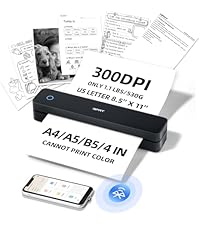
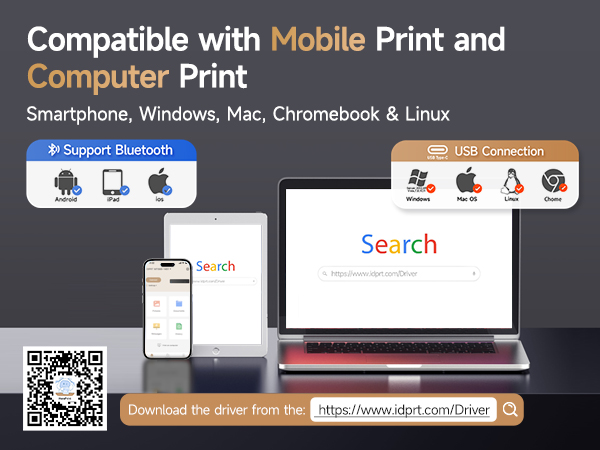
The iDPRT MT610 Pro is a sleek, inkless thermal printer designed for professionals on the move. Delivering high-quality 300 DPI prints in just 4-6 seconds, it supports wireless Bluetooth and USB connections across multiple platforms including smartphones, laptops, and desktops. Ultra-lightweight and compact, it boasts a powerful 2000mAh battery enabling up to 4 hours of continuous printing or 360 sheets per charge, making it the ultimate travel companion for seamless, mess-free printing.



| ASIN | B0DB22ZZ1B |
| Additional Printer Functions | Print Only |
| B&W Pages per Minute | 35 pages_per_minute |
| Best Sellers Rank | #58,565 in Office Products ( See Top 100 in Office Products ) #102 in Portable Thermal Printers |
| Brand | iDPRT |
| Built-In Media | 1 x Instruction Manual, 1 x MT610 Portable Printer, 1 x USB Data Cable, APP "HerePrint", Labels |
| Color | Grey |
| Color Depth | 1 bits_per_pixel |
| Color Pages per Minute | 35 pages_per_minute |
| Compatible Cartridge | NO |
| Compatible Devices | Laptops, PC, Smartphones, Tablets |
| Connectivity Technology | Bluetooth, USB |
| Control Method | App |
| Controller Type | Android, iOS |
| Customer Reviews | 4.2 out of 5 stars 610 Reviews |
| Duplex | Manual |
| Hardware Interface | USB |
| Initial Page Print Time | 4 seconds |
| Item Dimensions D x W x H | 10.5"D x 2.2"W x 1.6"H |
| Item Weight | 1.4 pounds |
| Manufacturer | iDPRT |
| Maximum Copy Resolution Black and White | 300 dpi |
| Maximum Media Size | 8.5 x 11 inch |
| Maximum Print Resolution Black and White | 300 dpi |
| Maximum Sheet Capacity | 360 |
| Maximum print Resolution Color | 300 dpi |
| Model Name | MT610 Pro Thermal Printer |
| Model Number | MT610 Pro |
| Model Series | MT610 Pro Printer |
| Number of Drivers | 4 |
| Other Special Features of the Product | 300 DPI Print Resolution, Built-in Battery, Energy Star, Lightweight, Portable |
| Paper Size | 8.5 x 11 inch inches |
| Power Consumption | 7.4 watts |
| Print media | High-resolution paper |
| Printer Connectivity Type | Bluetooth, USB |
| Printer Output Type | Monochrome |
| Printer Resolution Horizontal in Black and White | 8.5 inches |
| Printer Resolution Vertical in Black and White | 11 inches |
| Printer Type | Thermal |
| Printing Technology | Thermal |
| Processor Count | 1 |
| Resolution | 300 x 300 |
| Scanner Type | No Scanner |
| Series Number | 610 |
| Special Feature | 300 DPI Print Resolution, Built-in Battery, Energy Star, Lightweight, Portable |
| Specific Uses For Product | Home, Office, School |
| Total USB 2.0 Ports | 1 |
| Total Usb Ports | 1 |
| Unit Count | 1 Count |
| Warranty Description | 180 days |
| Wattage | 7.4 watt-hours |
C**.
Great little portable printer
This is an excellent little printer. I like that you can adjust the darkness and margins and it's easy to use. It also does not take up much room because I stick it in a drawer and only pull it out when I need it. It has always printed sharp, clear words and line drawings. I've never had an issue with it not being able to connect to my iPhone. i've used it quite a bit since I've gotten it and I'm very happy with the price and the product.
A**R
My Thermal Portable Printer
The instructions to set up the printer driver and other matters dealing with the printer comes in a little pamphlet and even though I downloaded the printer driver I could not set my computer to print on this printer. Also, since the pamphlet is so little, I misplaced it and then I was at a loss. Luckily my computer teacher, Catherine, helped me install the printer driver and I was able to print. After my teacher set it up, I found the pamphlet. I din't know how to use the Bluetooth connectivity to set up the printer driver. This is where my teacher came in handy. I still don't know how she did it but she is still my teacher and I can ask her to go over the set up with me on how to do it. The value for the money is great. The color print quality is good; it is quite dark. I am glad I do not have to buy cartridges for ink. How long will this last? What is the life span of a thermal small printer? How often do they have to be maintained and what kind of maintenance do they require? I didn't know a printer could print without ink cartridges. I am amazed.
S**T
Simple & convenient
This small printer works like a charm for my small office. It is so convenient to pull out & put away. The app Hereprint is easy to use. The printer also works with printing multiple pages with one print request using the thermal continuous printer paper I bought for this printer (https://www.amazon.com/dp/B07HNVDHK1?ref=ppx_yo2ov_dt_b_fed_asin_title). If there is any downside, it's that the thermal print paper is not recyclable, but the upside is that there is no ink cartridges to order or discard which to me is a big win.
C**V
Cannot recommend, I wish I could
1-star still implies there is something good about the item and there isnt. I have 3 phones and 3 PCs and installed drivers on all of them and then started testing. From an iphone it printed a photo badly. From a PC it printed a text document as well as my laser printer which was surprising. Very crisp and excellent. From then on, it variously printed half a page and then stopped, or printed entire sheets in solid black, or wouldnt feed paper or printed two lines and then the rest just a black page. The machine began making awful noises. This was maddening. I returned it and quickly got a replacement. On all 6 devices the new one refused to connect to bluetooth and after 1 hour of trying, I gave up. In between, I contacted the company for help but they offered no help, eventually writing to say to contact the seller but there is no seller to contact via Amazon. Since this was the best rated thermal printer I think it wont pay me to try another brand or to try another replacement. I live in my van now and cannot take along my giant laser printer so this was an excellent idea except that they do not work. I hope one day the company tests and fixes the products they sell. Something else important to know. Each time you print, you must first open the driver, go to the Image configuration tab and select how you want the printer to handle the job. The choices are completely non-sensical and there are no instructions how to set up Settings. Its trial and error. The build quality of the device is OK, its small and light and super easy to store. If it just worked I would certainly raise the stars. I regret I didnt take photos for you of the bad printing, I gave all in the return box for the seller to see. I never heard from them.
K**Z
Works well enough- UPDATE again
02-06-25 I purchased paper with better registration marks and ran the tests again. I increased the * to 4. Minus a * for the inconsistency with Word files. My test criteria: Handles US and European paper sizes. Handles continuous fanfold Supports Word and PDF files Lightweight Readable output Works with Galaxytab S9 ---- My test results: Galaxytab s9- YES Weight- 525g (this is the lightest weight of the printers tested) Output quality- EXCELLENT print output (Images were not tested) PDF- YES Word- Sometimes (HRT tech support suggests that Word files be converted to PDF) A4- YES US letter- YES Fanfold- YES 02-02-25 This has been an exceedingly frustrating printer. The output quality is the best of the printers tested. My Printer system (printer + app) test criteria: Handles US and European paper sizes. Handles continuous fanfold Supports Word and PDF files Lightweight Readable output Works with Galaxytab S9 ---- Galaxytab s9- YES weight- 525g (this is the lightest weight of the printers tested) output quality- EXCELLENT print output (Images were not tested) PDF- YES Word- NO A4- YES US letter- YES Fanfold- MOSTLY NO. Continuous fanfold relies on registration marks. There seems to be a sensor offset at about 8 cm from the right paper edge (the reg mark must be on the paper non-print side) but it is inconsistent in reading the mark (This is probably a problem in the app not the printer but both must work together). You can save Word files as PDF and feed single sheets of paper (this is tedious). If that is not a problem then the printer is good. The output quality is good enough that if your documents are short, it may be ok. 01-02-25 The HerePrint app fails with Word files. That makes this print rather useless. The app handled PDFs. The printer does not handle continuous fanfold paper. Feeding sheets one at a time is not a deal killer but why would I do it? Print quality is good and the weight is very good at 525g. The latch mechanism is good.
J**M
Amazing printer.
I have had this printer for 1 1/2 years and absolutely love it. It does not get heavy use but travels with me from home to vacation home frequently. Print copies are better than any I have had from conventional printers and the cost of thermal paper is minuscule compared to the cost and aggravation of ink printers. Its portability is also an absolute plus.
G**!
It gets the job done if you have time for it
The print quality is fine and I was able to easily add it to my computer. The only issue I have is it will only print one page. I work at an IT company as a level 2 desktop and network technician and I couldn't troubleshoot even with the help of AI to get this thing to work right. When printing my taxes, I would have eight or nine pages and it would repeatedly only print the same page over and over. The fix for me was telling it to print page one, after printing page one I would have to close out of the software completely as it would remember only page one. Then I would select print page two. I have to close out the software again because it would only remember to print page too even when I select print page 3. And I would have to do this repeatedly until all my pages were completed. I thought about returning it but because it's rare I need to print and never in color I figured this can sit on my shelf so I need it next year to only print one page at a time.
P**L
great printer
What I was looking for in a printer. I previously tried Phonemo's printer and had a couple issues with it. This printer solves those issues. 1. The sticker on this printer came off very easily. The phonemo sticker left a very scuffed surface which made the printer look bad. 2. The app is simple and clean. The phonemo app was cluttered and full of a lot of functionality most people won't use. I do have a couple things I'd improve - not enough to take away from 5 stars. - the app seems to want to print my image twice for some reason. Could be something I'm doing wrong but it's not obvious to me at least. - the fact it opens up slightly as opposed to fully feels weird. They mention on the sticker it doesn't open all the way so it's not confusing. It just feels like it should open more and I could see that part breaking by people who don't read the sticker. - the app seems to print the image to the full size of the paper regardless of image size. Again, this could be something I'm not understanding - but one solution would be to provide image resize/reposition functionality on the print screen. The margins can be used to size it so resizing isn't necessarily missing from the app - it's just not intuitive. Overall I really like this printer. Hoping it holds up over time :)
Trustpilot
2 weeks ago
2 months ago