


🚀 Power Your Network Like a Boss — Stay Connected, Stay Ahead!
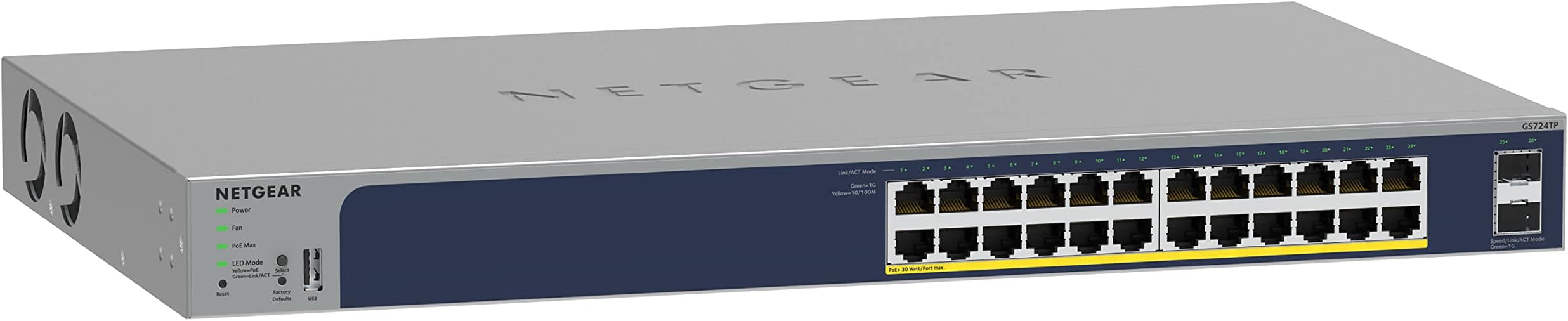
The NETGEAR GS724TP is a high-performance 26-port managed switch featuring 24 Gigabit Ethernet PoE+ ports with a 190W power budget, plus 2 fiber-ready 1G SFP ports. It offers smart management via an easy interface and optional cloud control through NETGEAR Insight, making it ideal for professional environments requiring reliable, scalable, and remotely manageable network infrastructure.


| ASIN | B0C2JLGLWQ |
| Best Sellers Rank | 299,272 in Computers & Accessories ( See Top 100 in Computers & Accessories ) 1,770 in Network Switches |
| Box Contents | Smart Switch AC Power cord (localized to region of sale) Mounting Kit Rubber footpads for tabletop installation Installation guide |
| Brand | NETGEAR |
| Brand Name | NETGEAR |
| Case Material Type | Metal |
| Color | grey |
| Colour | grey |
| Compatible Devices | Various |
| Compatible devices | Various |
| Customer Reviews | 4.7 out of 5 stars 218 Reviews |
| Data Transfer Rate | 1000 Megabits Per Second |
| Interface | SFP |
| Item Dimensions L x W x H | 53.3L x 34.5W x 10.2H centimetres |
| Item Weight | 400 Grams |
| Manufacturer | NETGEAR |
| Manufacturer Part Number | GS724TP-300NAS |
| Model Number | GS724TP-300NAS |
| Number of Items | 1 |
| Number of Ports | 26 |
| Number of ports | 26 |
| Platform | Not Machine Specific |
| Product dimensions | 53.3L x 34.5W x 10.2H centimetres |
| Switch Type | Managed |
| UPC | 606449162677 |
| Voltage | 240 Volts |
F**K
Great little PoE+ switch with 2 SFP ports
I needed a PoE+ switch to power some outdoor Wi-Fi APs and that also had an SFP port because my backhaul was coming from another building and there were available fiber strands that I could use to connect. The NetGear GS510TPP was perfect for the job. With a power budget of 190W, it was up to the task of powering 2 Wi-Fi APs and a PtP device. The fiber link worked without any problems, too. Also, it's a managed switch with SNMP so I was easily able to add it to my network monitoring setup. For less than $400, it's great little switch.
D**S
POE+ & 2 SFP
I have a number of POE IP cameras around my property and was having my previous switches fail when lightning storms were in the area, even if there was no really close hits. I switched to fiber optic to run between the buildings and now none of my switches have died. This Netgear switch gives me two SFP ports so I can link through to additional switches, and with the POE+ power, I can run many POE cameras as well as the occasional POE+ camera. If you need to run more that 2 POE+ devices, you might need a different switch because this device only supplies 55 watts total power. This is the 3rd GS110TP I bought, and I also have a few GE305EP where I did not have a fiber run and I am very happy with the reliability of my Netgear products. I love the web interface and the available options for managing the switch; it makes it super easy for me to get the information I need or power cycle remote POE IP cameras. Before I switched to fiber, Netgear was very helpful providing support on my devices that dies during storms and I expect that if I do end up having any issues, their support will probably be excellent. I highly recommend Netgear and the GS110TP switch.
D**L
Nice Switch
The switch arrived promptly, and I installed it without delay. Before programming, I performed a software update, which improved the user interface and added some great features. Setting up the PoE was straightforward, with the switch automatically calculating and displaying the maximum power usage—very useful for monitoring power supplied to connected PoE devices. I also disabled PoE on ports not connected to PoE equipment. After configuring my VLANs and connecting all devices, everything has been running smoothly. The switch has been in operation for about two weeks, so it’s still early, but performance has been solid so far. First Impressions: Sturdy, well-built design (my unit is rack-mounted) SFP expansion ports are a valuable addition Quiet operation Intuitive, user-friendly interface One layout issue worth noting is the placement of the Ethernet ports. Unlike my previous switch, where the ports were aligned from the left, this model positions them on the right side. This required me to replace some patch cables to accommodate the different layout—a minor inconvenience but something to be aware of. Overall, my experience with the switch has been positive, and it’s off to a great start!
K**M
Advanced Features without the advanced price
Great switch. Just be sure you make sure you actually buy it new. Netgear refused to replace my old one under the lifetime warranty because it wasn't invoiced as NEW. As for this unit, a few oddities occurred when I set it up. By default there is a setting that caused the ports to disable when a downstream switch isn't playing nice. I was able to find the fault, so I turned it off. If I get a chance, I'll update this review with the actual setting. But overall, this is just a software upgrade of the previous model. Any hardware enhancements aren't notable. This unit functions very well. But if you don't need the advanced features and programability, stay with the unmanaged version. This supports VLAN, Port Aggregation and PoE, the three main features advanced users need. This also supports Netgears online dashboard for remote management. This is mainly for SMBs with multiple switches across small to medium offices. For me, this is as close to a top end unit you can get with these features with a subscription fee.
B**Y
Set up in minutes.
Super easy plug and go.
Trustpilot
2 months ago
3 days ago