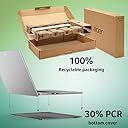
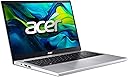
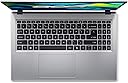
Desertcart purchases this item on your behalf and handles shipping, customs, and support to Greece.
๐ Elevate your productivity with sleek power and speed โ donโt get left behind!
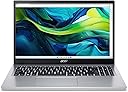
The Acer Aspire Go 15 Slim Laptop combines a 13th Gen Intel Core i3-N305 processor with 8GB of LPDDR5 RAM and a 128GB SSD, delivering smooth multitasking and fast storage. Its 15.6-inch Full HD IPS display offers crisp visuals in a slim, narrow-bezel design. Equipped with Wi-Fi 6 and Bluetooth 5.1, it ensures seamless connectivity. Running Windows 11 Home in S mode, this lightweight silver laptop is perfect for professionals and students seeking reliable performance and stylish portability.


| ASIN | B0CV5ZSR17 |
| Audio Output Type | Speakers |
| Audio Recording | Yes |
| Audio features | Equipped with built-in speakers for audio output |
| Automatic Backup Software Included | Windows 11 Home in S Mode |
| Battery Cell Type | Lithium Ion |
| Battery Life | 10 Hours |
| Best Sellers Rank | #77,492 in Computers ( See Top 100 in Computers ) #3,173 in Traditional Laptops |
| Bluetooth Version | 5.0 |
| Bluetooth support? | Yes |
| Brand | Acer |
| Built-In Media | Charger |
| CPU Codename | N30 |
| CPU Model Generation | 13th Generation |
| CPU Model Number | Intel core i3-N305 |
| CPU Model Speed Maximum | 3.8 GHz |
| CPU model | Core i3 |
| Camera Description | Front |
| Chipset Type | Intel |
| Color | Silver |
| Colour | Silver |
| Compatible Devices | External monitors, mouse and keyboards (via USB or Bluetooth), external storage devices (via USB or USB-C), printers (via USB or Wi-Fi), headphones and speakers (via jack to headphones/speakers), and other devices that can connect via USB, USB-C, HDMI, Wi-Fi or Bluetooth. |
| Connectivity Technology | HDMI, USB |
| Control Method | Voice |
| Customer Reviews | 4.2 out of 5 stars 788 Reviews |
| Display Maximum Resolution | 1920 x 1080 |
| Display Refresh Rate in Hertz | 60 |
| Display Resolution Maximum | 1920x1080 |
| Display Technology | LCD |
| Display Type | LCD |
| Form Factor | Clamshell |
| Graphics Coprocessor | Intel UHD Graphics |
| Graphics Description | Integrated |
| Graphics Ram Type | DDR5 SDRAM |
| Hard Disk Description | SSD |
| Hard Disk Interface | Serial ATA |
| Hard disk size | 128 GB |
| Hard-Drive Size | 128 GB |
| Hardware Interface | Bluetooth |
| Has Color Screen | Yes |
| Human-Interface Input | Touchscreen |
| Item Dimensions L x W x Thickness | 40L x 30W x 6Th centimeters |
| Item Weight | 3.86 Pounds |
| Keyboard Description | Chiclet |
| Keyboard Layout | QWERTY |
| Lithium-Battery Energy Content | 2.6 Watt Hours |
| Manufacturer | acer |
| Memory Clock Speed | 2400 MHz |
| Memory Speed | 2400 MHz |
| Memory Storage Capacity | 128 GB |
| Mfr Part Number | AG15-31P-3947 |
| Microphone Form Factor | Integrated |
| Model Name | Aspire Go 15 |
| Model Number | AG15-31P-3947 |
| Model Series | Aspire Go 15 |
| Model Year | 2024 |
| Model name | Aspire Go 15 |
| Native Resolution | 1920 x 1080 pixels |
| Notebook Pointing Device Description | TouchPad |
| Number of Items | 1 |
| Number of Packs | 1 |
| Number of Ports | 6 |
| Operating System | Windows 11 |
| Operating System Family | Windows |
| Optical Storage Device | NO Optical drive |
| Other Special Features of the Product | Copilot in Windows |
| Power Device | AC Adapter |
| Processor Brand | Intel |
| Processor Count | 8 |
| Processor Series | Core i3 |
| Processor Speed | 3.6 GHz |
| RAM Memory Installed | 8 GB |
| RAM Memory Slot Total Count | 2 |
| RAM Memory Technology | Lpddr 5 |
| RAM Size | 8 GB |
| RAM Type | DDR5 RAM |
| Ram Memory Maximum Size | 8 GB |
| Resolution | 1920 x 1080 |
| Screen Size | 15.6 Inches |
| Screen size | 15.6 Inches |
| Specific Uses For Product | Student |
| Total Number of HDMI Ports | 1 |
| Total Usb Ports | 2 |
| Touch Screen Type | Capacitive |
| Touchpad Feature | Yes |
| UPC | 195133242813 |
| Unit Count | 1.0 Count |
| Video Output | hdmi |
| Video Processor | Intel |
| Warranty Description | 1 YEAR |
| Warranty Type | Limited |
| Webcam Capability | Yes |
| Wi-Fi Generation | Wi-Fi 6 |
| Wireless Compability | 802.11ax, Bluetooth |
| Wireless Technology | Wi-Fi |
C**Z
Excellent deal for the PrimeDay $219 Price
This isn't the best PC laptop in the world, but likely one of the best PC laptops out there in the low $200 range. I ran it through a Passmark CPU benchmark and scored an 11,500 while attached to the charger which is quite impressive for this price range. I ordered this specifically for light duty use, and to replace a 14 year old Core i7 Dell Latitude that I ran HP Tuners software on to tune my hot rod. This Go 15 runs Win 11 Home very well. The first thing I did was take it out of S mode, deleted bloatware and other Microsoft apps that I will never use. After cleaning it up and updating it, I am thoroughly impressed with this PC, and how smoothly it actually runs. Especially since it was under $240 total with tax. The battery life seems great. I am certain it is severely lacking in battery in comparison to higher end laptops, but for what it is, 8hrs is excellent IMO. This is a huge upgrade over my old laptop, and I couldn't be happier with the purchase. Don't get me wrong, this is an entry level laptop for sure. If you game or heavily multi-task, get something with a more powerful processor and graphics. If you are a light user and want something that you can take with you, easily browse, easily stream video and hook up to a large TV... This will work well for that for sure.
K**R
Good cheap notebook
This machine isn't going to break any CPU power records for sure. I bought it to record music and write with, and it works for that very well. For the price it's punching a bit above it's weight class I've found so far. It comes out of the box with Windows 11S, and was easy enough to set up. It's definitely NOT a gaming laptop, you're not going to find anything this cheap that can run any super graphic intensive games. That said, the screen is 1080p HD and it's very compact. It is very lightweight, but it doesn't feel like it's going to break when you use it like some lightweight notebooks do. It has Microsoft Copilot built in, complete with a dedicated physical button for it on the keyboard, which can be a bit annoying but it's pretty nonintrusive. Overall, for the price, it's definitely worth looking into if you don't need a supercomputer and just need something portable and quick that does what you need it to fairly well.
T**R
Great laptop
I love this laptop. It does everything I need it to do. It is fast and light weight. The battery holds a charge for a long time. The low price just adds to the value of this.
L**A
Battery is crap! Lasted under 2 years!
So disappointed! My first Acer lasted 10 years! I loved it and actually just pulled it out, recharged it and am using it to write this! It booted up faster that this new ever did. This one is crap! It was slow turning on from the beginning then began not holding a charge in less than a year. Then wouldn't even turn on. I used the pin hole and that turned it on for a while then that wouldn't even work. It's dead! Waste of money! I highly recommend NOT buying this laptop. Acer has lost me as a customer.
C**.
Can be made into a decent Linux laptop
I needed a new cheap laptop, but didn't want to deal with the Windows 11 garbage that others have mentioned, so I purchased this machine with the intent to do a clean linux install. Two things to note if you want to install linux on this laptop. 1. The internal SSD hard drive is UFS based, and not all linux distros install the UFS module. I tried to install Ubuntu, and while the live version ran off my usb stick just fine, after install it would only boot to busybox and give me errors. If you're an experienced linux user, you can make sure the UFS module is installed when installing your distribution. If you're a linux noob like me, you can just install a distro that already includes the UFS module. I went with Linux Mint Debian Edition. Just make sure to turn off SecureBoot in the bios. 2. This laptop comes with a MediaTek wifi card that is incompatible with linux. General consensus on the Internet is that an Intel AX210 wifi card is the preferred replacement, so I ordered one and replaced the MediaTek card. Unfortunately, my screwdrivers had a hard time gripping the screw holding the card down, and the flexing of the motherboard didn't help. I had to use a dremel on the screw and then use a flathead to get it out. Luckily, once the screw was off replacing the wifi card was a simple process. Once I had LMDE and a new wifi card, this machine became a decent, cheap, daily driver laptop for browsing the internet, word processing, and experiencing linux as a noob. Beyond that, you get what you pay for; cheap, flimsy build quality, mushy keyboard, limited number of usb ports. But all told, a bargain if you know how to get the most out of a machine like this. UPDATE February 7, 2026: After about a year and a half of using this laptop I have more thoughts. The big one is that the 128GB of hard drive space turned out to be pretty limiting, even for a laptop that I had intended to use as a web browsing machine. I have a usb drive, so I wasn't too broken up about the limited storage on the laptop, but something happened that made me find a different solution. About a month ago, for reasons I can't figure out, the laptop wouldn't boot. I got a message on power-on that said "No boot device." I wasn't sure if something happened to the internal storage or if LMDE corrupted during an update. I figured that was as good an opportunity as any to try an upgrade that I had been mulling over. This laptop has a slot for an nvme m.2 SSD, so I purchased one, opened the laptop up and installed it. I installed linux on the new SSD, this time standard linux mint instead of linux mint debian edition, since you don't need a UFS module to install on an nvme m.2 SSD. After a successful install I used smartctl to check the health of the internal UFS storage and... no problems, and I've been storing data on UFS and have had no issue. I guess my linux install got corrupted somehow, which is good to know. I do think I prefer standard linus mint over debian edition if only because there are a handful of programs that currently work more reliably on standard mint (Spotify in particular). The only other real issue I've had in the year and half that I've owned this laptop is that I've had to replace the power cord, but that's true of every laptop I've ever owned. Otherwise, my final review of this thing hasn't really changed. It's a decent, daily driver laptop once you turn it into a linux machine. You get what you pay for, including limited internal storage, but you have the option to upgrade that if you're willing to spend the money.
Trustpilot
2 weeks ago
1 month ago