Desertcart purchases this item on your behalf and handles shipping, customs, and support to Greece.
🌐 Future-ready speeds, seamless coverage — own your digital domain!
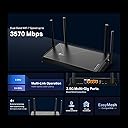
The TP-Link Archer BE230 Dual-Band Wi-Fi 7 Router delivers cutting-edge Wi-Fi 7 technology with up to 3.6 Gbps speeds, dual 2.5 Gbps multi-gig ports, and a powerful 2.0 GHz quad-core processor. Designed for modern homes, it covers up to 2,000 sq. ft. with 4 antennas and beamforming, supports up to 60 devices, and offers advanced security features via TP-Link HomeShield. Easy to set up and compatible with voice assistants, it’s the smart upgrade for professionals seeking future-proof, high-performance connectivity.


| ASIN | B0DC99N2T8 |
| Antenna Location | Home |
| Antenna Type | Fixed |
| Best Sellers Rank | #58 in Computers & Accessories ( See Top 100 in Computers & Accessories ) #8 in Computer Routers |
| Brand | TP-Link |
| Built-In Media | 1 * Power Adapter, 1 * QIG, 1 * RJ45 Ethernet Cable, Wi-Fi 7 Router Archer BE230 |
| Color | Black |
| Compatible Devices | Gaming Console, Personal Computer, Smart Television, Smartphone, Tablet |
| Connectivity Protocol | Wi-Fi, Ethernet |
| Connectivity Range | 2000 square_feet |
| Connectivity Technology | Ethernet, USB, Wi-Fi |
| Control Method | App, Remote, Voice |
| Controller Type | App Control, Voice Control |
| Coverage | Home Network |
| Customer Reviews | 4.2 out of 5 stars 1,601 Reviews |
| Data Transfer Rate | 3.6 gigabits_per_second |
| Frequency | 5 GHz |
| Frequency Band Class | Dual-Band |
| Item Highlight | 4-Stream | 2×2.5G + 3×1G Ports, USB 3.0, 2.0 GHz Quad Core, 4 Antennas | VPN, EasyMesh, HomeShield, MLO, Private IOT |
| Item Weight | 1.2 pounds |
| LAN Port Bandwidth | 2.5G/1G |
| Manufacturer | TP-Link |
| Maximum Upstream Data Transfer Rate | 2882 megabits_per_second |
| Mfr Part Number | Archer BE230 |
| Model Name | BE3600 Dual-Band Wi-Fi 7 Router |
| Model Number | Archer BE230 |
| Number of Antennas | 4 |
| Number of Items | 1 |
| Number of Ports | 5 |
| Operating System | RouterOS |
| Other Special Features of the Product | Access Point Mode, Guest Mode, Internet Security, Parental Control, Remote Access |
| RAM Memory Installed | 512 MB |
| Router Firewall Security Level | Medium |
| Router Network Type | Wireless Router |
| Security Protocol | WPA/WPA2-Enterprise (802.1x), WPA2/WPA, WPA3 |
| Special Feature | Access Point Mode, Guest Mode , Internet Security, Parental Control, Remote Access |
| UPC | 840030710162 |
| Unit Count | 1 Count |
| Voltage | 12 volts |
| Warranty Description | 2 Year Manufacturer |
| Wi-Fi Generation | Wi-Fi 7 |
| Wireless Communication Standard | 802.11.be, 802.11ac, 802.11ax, 802.11g, 802.11n |
| Wireless Compability | 802.11.be, 802.11ac, 802.11ax, 802.11g, 802.11n |
V**E
Review: TP-Link Dual-Band BE3600 Wi-Fi 7 Router Archer BE230
The TP-Link Archer BE230 is a very good router for anyone looking to step into Wi-Fi 7 without spending a fortune. Setup is straightforward, the signal is strong, and it delivers fast, stable performance for everyday use like streaming, gaming, video calls, and smart home devices. One of the best things about this router is that it gives you modern Wi-Fi 7 capability at a more affordable price than many higher-end models. Even if not all of your devices support Wi-Fi 7 yet, it still does an excellent job handling multiple connections and keeping speeds consistent across the home. The dual-band performance is solid, coverage is reliable, and the interface is simple enough for most people to manage without frustration. It is a practical upgrade for someone replacing an older router and wanting better speed, improved responsiveness, and a bit of future-proofing.
S**M
Great router for the money, solid performance
My fancy top‑brand router took a dump and this brand was recommended to me. I gave TP‑Link a shot and I’m really impressed. For the money, I’m getting the features, the speed, and a quality signal with very few issues. Most of the problems I had were from my provider, not the router. I would definitely recommend this to a friend.
A**O
TP-Link Dual-Band BE3600 Wi-Fi Router
The set up seemed very straightforward, but I encountered some problems with staying online with my cell phone and TV. It took a couple of days for me to find out that it had to do with a VPN which I didn’t know what it was and didn’t know I had one. Once that was turned off, everything worked perfectly. It was a little more than I had to spend, but was very much needed at the time since I have no cable TV and my router was eight years old. I think it’s a good purchase.
R**R
Disable Firmware Updates!
So this review is honest and mixed. First, the router out of the box is spectacular! Works like a charm and with the teather app its perfect for shipping to a parent or location that you want to remotely manage. Great signal strength and solid as a rock. Just make sure to disable firmware updates. The latest update made it unusable. Radios kept turning off after 30 minutes. No way to downgrade, trying kept failing. Router became a door stop. Had to return it. Customer support is a joke. So, great Router but disable updates. Support is offshore and terrible.
J**E
excellent router
An absolutely excellent router at a ridiculously good price on Amazon resale. I'm forever updating and expanding my TP-LINK network all over the house and out to the garage and yard. This is configured as an EXTENDER although you can also use it as a MESH, however the MESH multiple device limitations in a multi-router configuration is absolute garbage no matter which brand you use. Theoretically you should be able to use many devices but realistically more than 3 MESHED devices cause constant connectivity problems and dropped devices. TP-LINK consistently has good options in its configurations for these routers to serve your needs however you want to configure them and the speed is outstanding. This router retired 4 TP-LINK A7s since it has long range and very high device capabilities.
L**N
2.4 GHz band drop outs, likely hardware problem
Product has been excellent. Recently the 2.4 GHz band seems to fail and requires a power cycle to recover. I am being assisted by Roezelle in product support and hoping for a resolution.
E**E
Easy set up if you have many security and other old devices
Easy set up. I was reluctant to switch routers but my old Netgear was not being updated. I have many old devices that I feared would not hook up to new wifi 7 router. They all did flawlessly. You must use the exact SSIDs (what shows up when you are selecting your network) and exact wifi password. Must be exact. You can and should change the password to access router settings but NOT the password to access the wifi network. Also: choose WPA2 AND WPA 3 security option. Some old devices will not connect to WPA3 only. There are good set up videos that take you through all this. Not an expert but it worked for me. Internet speed increased and coverage is good in my not huge house.
T**E
TP-Link BE3600: Unlocking Potential, But Missing the Wi-Fi 7 Mark
I was initially excited to get the TP-Link BE3600 router because it was marketed as Wi-Fi 7. However, I quickly discovered that it actually operates on Wi-Fi 6. While it’s labeled as a Wi-Fi 7 router, it doesn’t support the full Wi-Fi 7 specification — specifically, it’s missing the 6 GHz band, which significantly impacts performance. As an experienced system administrator, I was looking forward to the advancements that Wi-Fi 7 promises, so this was quite disappointing. Additionally, since this is a 2 x 2 Wi-Fi router, it offers only half the theoretical performance of other dual-band Wi-Fi 7 peers, like the Asus RT-BE88U. On a positive note, the speeds are phenomenal; I’ve managed to configure the router to exceed the speeds I’m capped at by my ISP which is 150Mbps. I usually install DD-WRT on my routers for more control, but unfortunately, that’s not an option with the BE3600. The firmware provided by TP-Link is decent, but I prefer the customization that DD-WRT offers. While the router does have some positive features, such as WPA3 security and the ability to easily set up a VPN, the limitations are frustrating. There’s no admin login option, just a password login, and the password length is capped at 30 characters, which is far less than my preferred 72 characters for stronger security. Furthermore, the log file doesn’t collect any useful informational logs, making troubleshooting a challenge. On the plus side, it integrates well with TP-Link's mesh network, but overall, the misleading marketing and limitations make it a livable router until I find something better. Seriously, TP-Link, the lack of an admin login, detailed traffic logs, and capped password lengths leave me rating this router a 4.
M**.
Excelente Repetidor.
Excelente router , con el pareamiento con mi extensor tplin Rx705 , hacen un trabajo perfecto con el On MESH , y una comodidad en no tener que cambiar la conexión como antes tenía que hacer , la potencia y alcance aumentó notablemente en el extensor y ahora el cono de wifi se muestra completa., y el streaming corre perfectamente sin titubeos de ninguna especie. La capacidad de tener un usb o disco en el puerto usb3.0 es algo que quería conservar de mi netgear anterior , pero si me costo entenderlo como cambió del Ready share a como lo maneja aunque el asignar solo al windows media player en lugar de otro player como el VLC , eso no me gusto pero funciona. Ahora no hay info como acceder al usb de manera remota. Otra cosa que no mencionan es que tiene sus perforaciones en la base para poder montarlo en la pared que es muy util.
M**V
Value and Speed for money
I switched over to a new router as my old one was overheating and not reaching my full speed through the ISP. this router allows everyone in the house to connect their devices and it doesn't slow down at all. A good buy.
A**D
Worth changing
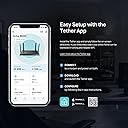
Been using for a while now super amazing parental controls access lists super easy to use by tether app fast speed highly recommend
C**.
Funciona muy bien
Funciona muy bien sin problemas de conexión.
T**R
Solid Upgrade with One Minor Issue
Our original router was an Asus, and it was fantastic—lasting about seven years without any hiccups and still receiving updates from Asus. Eventually, it started having connectivity issues and became unreliable, so we decided to replace it. We initially bought another Asus router, expecting a similar experience, but it turned out to be a disaster. It had constant wireless connectivity issues, wouldn’t reset properly (even with a power cycle), and would only start working again when it felt like it. We decided to switch brands and landed on this TP-Link router. So far, it’s been great. The setup was quick and easy using the mobile app, though a web browser setup is also available. I had it up and running in about five minutes. The wireless range is excellent, covering my entire home without any issues. The only problem I’ve encountered is remote streaming with my Xbox One on my local network. It worked perfectly on the previous Asus router, which had a dedicated gaming mode that optimized connections. This TP-Link router doesn’t have a similar feature, and I haven’t yet found a setting to tweak for better performance. I believe it’s just a configuration issue, not a flaw in the router itself—I just need to dig into the settings(more likely a me issue as I'm not a network savvy person). Other than that, this router has been fantastic, and I’d highly recommend it! Pros: ✅ Quick and easy setup ✅ Strong and reliable Wi-Fi coverage ✅ Stable connection Cons: ❌ No dedicated gaming mode (may require manual settings for Xbox streaming)
Trustpilot
2 weeks ago
3 weeks ago