🚀 Supercharge your USB game with StarTech’s 5-Port PCIe power hub!
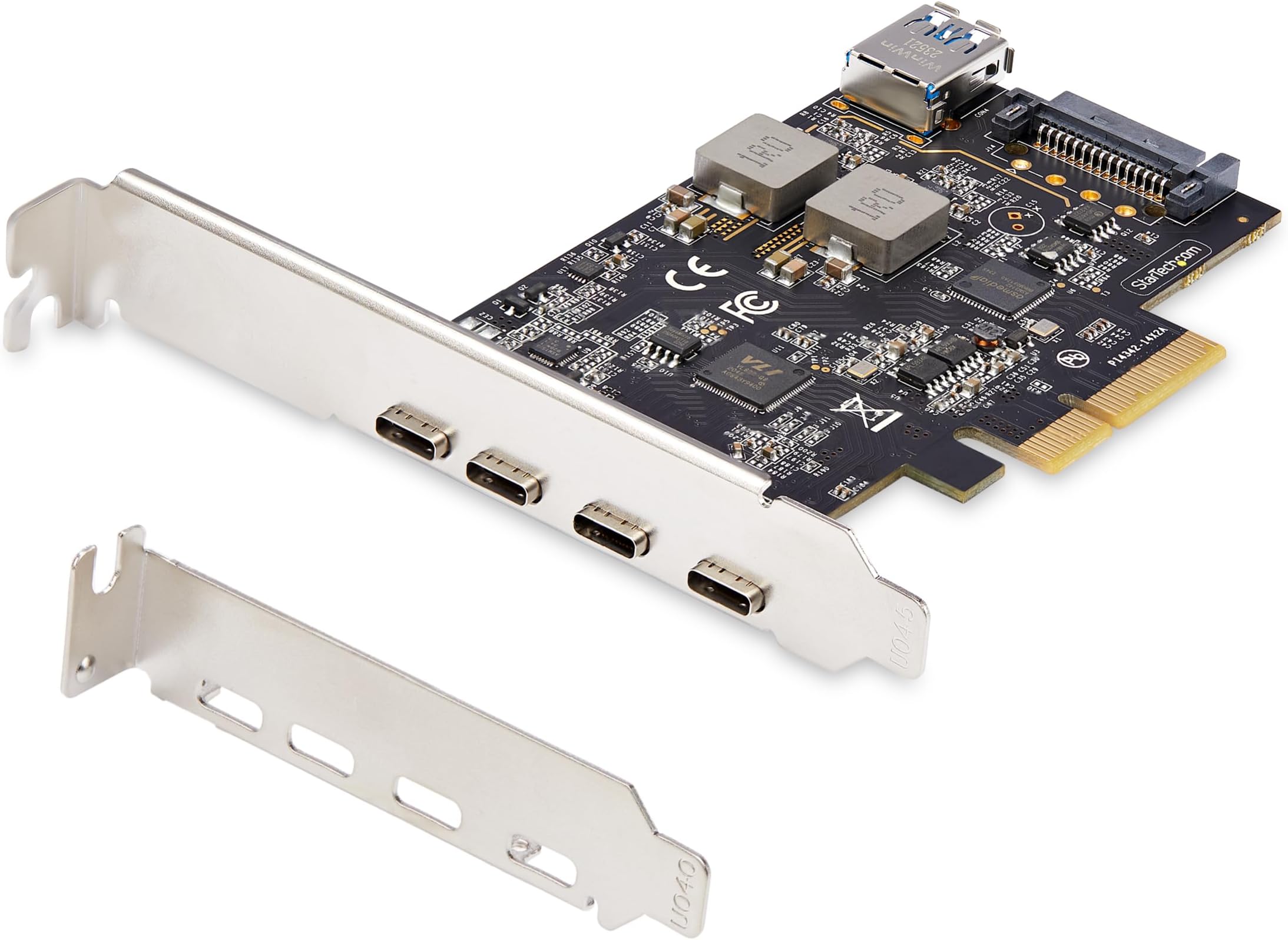
The StarTech.com 5-Port USB PCIe Card delivers ultra-fast USB 3.2 10Gbps speeds through 4 external USB-C and 1 internal USB-A ports, powered via PCI Express x4 with optional SATA power for stable high-wattage output. Compatible across major OS platforms and hardware, it’s engineered for professionals seeking reliable, high-performance USB expansion with expert support.


| Memory Speed | 2 GHz |
| Wireless Type | 802.11n |
| Brand | StarTech |
| Item model number | PS4C3IA3-USB-C-CARD |
| Operating System | Linux 3.5 and up -, LTS Versions only, Windows 7, 8, 8.1, 10, 11, Windows Server 2008 R2, 2012 R2, 2016, 2019, 2022, macOS Catalina (10.15), macOS Mojave (10.14) macOS High Sierra (10.13), macOS Big Sur (11.0), macOS Monterey (12.0), macOS Ventura (13.0), macOS Sonoma (14.0), |
| Item Weight | 2.12 ounces |
| Product Dimensions | 4.8 x 4.8 x 0.9 inches |
| Item Dimensions LxWxH | 4.8 x 4.8 x 0.9 inches |
| Color | Black |
| Voltage | 28 Volts |
| Batteries | 1 AAAA batteries required. |
| Manufacturer | StarTech.com |
| Language | Italian |
| ASIN | B0D8WDPD74 |
| Date First Available | July 5, 2024 |
H**K
Easy and worthwhile upgrade for more USB-C ports
My 5 year old tower computer had only one USB-C port. This inexpensive upgrade installed easily and worked perfectly right from the start. Definitely recommended if you're also short on USB-C ports and have a free expansion slot!
M**8
Windows 11 Pro recognized it quickly and it works!
I needed a USB-C 3.2 port for a new device. After much looking and reading item descriptions, BTW in technical items the details are important, I chose StarTech. Many Amazon sponsored were from dubious suppliers or their headers said they were 3.2 but in their descriptions were not. StarTech's quality was very good, it worked after a restart. Windows 11 Pro recognized it and the speed isn't an issue with any device I use. I would recommend this product.
T**E
compatible with high-speed devices, high performance, and easy to install
This 4-port USB-C PCIe desktop plug-in board is an excellent product that met all of my needs. Each external port supports 10 Gbps transfer rates (USB 3.2 Gen 2). Of course, you'll only approach these speeds if you have both a device and a cable that supports USB 3.2 Gen 2. Not all USB-C cables are marked but some brands are now using marks such as SS 10. When you purchase a USB-C cable, make sure that it supports USB 3.2 Gen 2 (previously known as USB 3.1 Gen 2). I found this card to be easily installed with Windows 11 - it was immediately detected after rebooting the system. I did not need to install any special driver. A word of caution about powering a USB-C device with this card. When installing the card, you should connect an internal SATA power cable to the SATA power port on the card. I had to use a 12-inch SATA extension cable https://www.amazon.com/dp/B00V6QA4AS . You might also need a SATA power splitter https://www.amazon.com/dp/B00V6QA65G . I have successfully used this card with my new AVerMedia 4K60 external capture card (which requires USB-C power) and my StarTech.com 1:1 M.2 NVMe Drive Duplicator (which does not require USB-C power). Both of these products support the USB 3.2 Gen 2 (10 Gbps) standard. I'm very happy with this product and I highly recommend it for its performance, ease of installation, and compatibility with high-speed devices.
M**R
Well priced upgrade for my PC
Plug and play, easy to install. Loading my large Lightroom photo library from external SSDs is fast and convenient.
K**1
Works great on Windows 11 Pro...if you can troubleshoot the driver installation.
So I noticed that a lot of people here and on the StarTech product page are having trouble installing this on Windows 11 Pro. On my PC, Windows 11 was able to recognize it, but nothing I plugged in was showing up. After some driver updates and some reboots, here are the steps I took to get it working. 1) Go to the StarTech website and download the latest drivers. Under Support and Find Drivers, enter the Product ID. In my case, it was "PS4C3IA3-USB-C-CARD". 2) Extract the ZIP file. Ignore the Setup.exe because it does not work; you'll have to do it manually. Remember the folder that says "Manual Driver". 3) Go to the Windows Search Bar and find Device Manager. 4) There are two devices: ASMedia USB Root Hub and ASMedia USB3.1 eXtensible Host Controller. In my case, USB3.1 Extensible Host Controller was recognized, but USB Root Hub was labeled "Unknown Device" under Other Devices. 5) Right-click ASMedia USB3.1 eXtensible and Update Driver. Browse my computer for drivers. Then find the folder called "Manual Driver" that you extracted earlier. Don't worry about the sub-folders because Windows 11 is smart enough to sort them out. 6) Now repeat Step 5 for the USB Root Hub or "Unknown Device" under Other Devices. If it doesn't show, you probably have to reboot the computer like I did. Hope this helps! Anyways, the card works as advertised and I'm able to connect by Samsung T7 Shield without any problems.
S**E
No regrets so far
It fits well on my board and working great as described.
D**T
WORST DEVICE EVER
Won't fit into my PCI-E slot. Cannot install. "Quick-Start Guide" provides NO ACTUAL INSTRUCTIONS, merely a QR code that leads back to this product purchase page. And, in the process, it scratched up my motherboard. THANKS FOR NOTHING! UPDATE: Finally got the darn thing seated in my system but little did that help, Though Device Manager indicates everything is working properly, the device does not recognize anything plugged into the c-ports. ANOTHER UPDATE: I downloaded the driver package from their website but, when attempting to install the driver, "This driver does not support your device." Really? Windows 11 version 24H2, fully updated as of 5/25/25, and it doesn't support my device?
M**P
meets all expectations for what it should do
works as it should. Charges my tablet, which the OEM USB-C port could not do. I appreciate the port density and additional power capacity
W**H
I needed usb c ports on my pc This card does the job. easy to install.
R**N
Alles top 👍. Funktioniert super. Der Preis war es Wert
A**E
Mit ca. 90€ ist die Karte zwar nicht die günstigste, aber dafür kann der verbaute ASM3142-Controller mit dem VL822 Hub auch die versprochenen 10Gbit/s liefern. Unter Linux wurde die Karte sofort erkannt und funktioniert problemlos ohne zusätzlichen Aufwand.
D**A
Die Karte ist zwar nicht die günstigste, aber dafür kann sie die versprochenen 10Gbit/s liefern. Die Karte wurde sofort erkannt und funktioniert problemlos, ohne zusätzlichen Aufwand.
J**.
Que maravilla, por fin puedo aprovechar la velocidad de mis discos externos ssd. Funciona perfectamente y estos 4 puertos me vienen de maravilla. El puerto interno no lo he usado aún pero la idea me parece bastante buena.
Trustpilot
1 month ago
2 weeks ago