
DOWNLOAD THE APP


Customer Services
Copyright © 2025 Desertcart Holdings Limited
DOWNLOAD THE APP


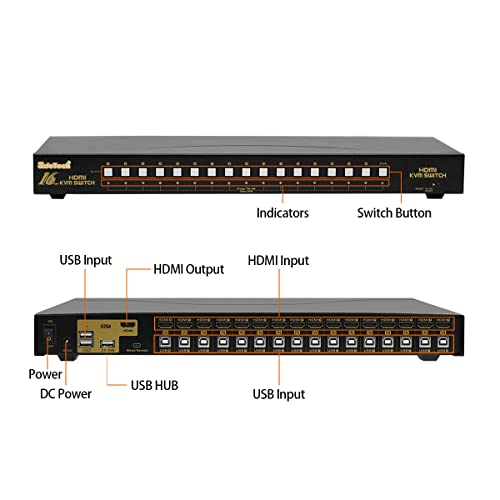

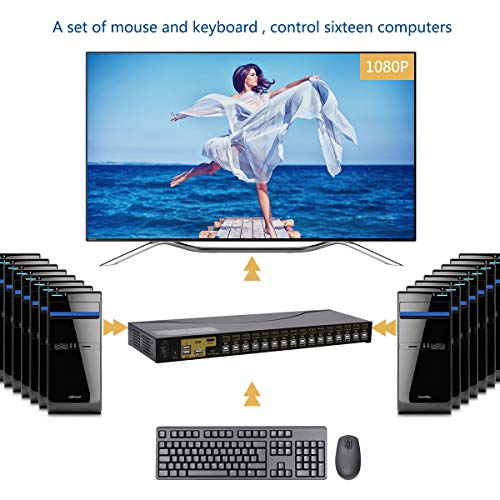


🎯 Master your multi-device empire with JideTech’s 16-port KVM switch — where power meets precision.
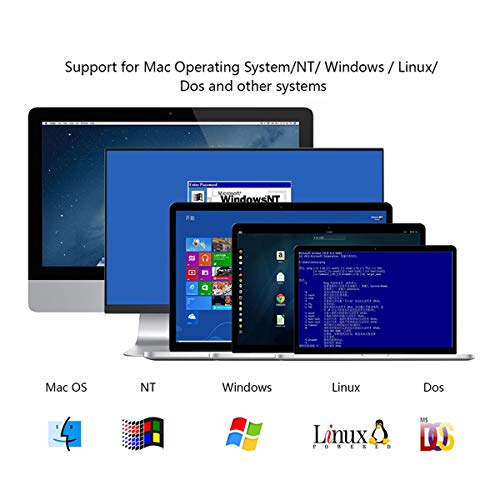
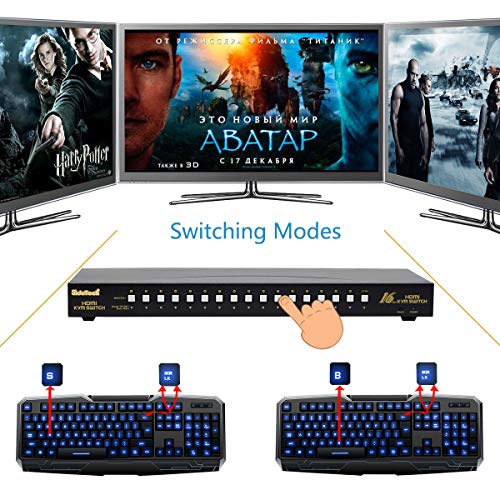
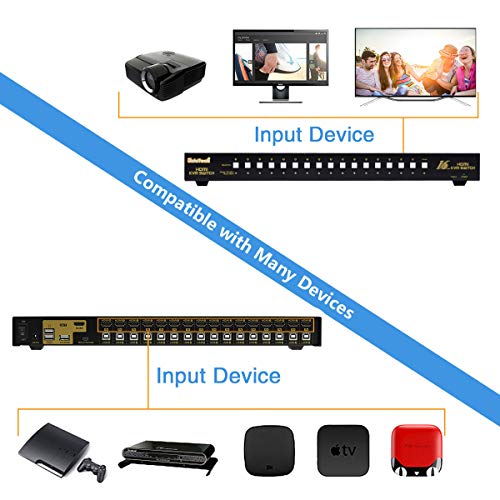
The JideTech 16 Port HDMI KVM Switch empowers professionals to control up to 16 computers from a single keyboard, mouse, and monitor setup. Supporting 4K UHD resolution at 3840x2160@30Hz and hot-pluggable device management, it offers seamless switching via push buttons or keyboard hotkeys. Compatible with Windows, Linux, MacOS9/OSX, and Sun Micro Systems, it features an auto-scan function and LED status indicators, all housed in a durable metal chassis designed for demanding multi-system environments.


| ASIN | B01H1Q2V2K |
| Actuator Type | Push Button |
| Batteries Included | No |
| Batteries Required | No |
| Best Sellers Rank | #1,556,913 in Electronics ( See Top 100 in Electronics ) #582 in KVM Switches |
| Brand | JideTech |
| Circuit Type | 16-way |
| Colour | 16 Port |
| Colour Screen | No |
| Connectivity Protocol | Hdmi |
| Connector Type | hdmi, usb |
| Contact Material | Metal |
| Contact Type | Normally Closed |
| Controller Type | Push Button |
| Customer Reviews | 3.9 3.9 out of 5 stars (149) |
| Date First Available | 22 August 2016 |
| Includes remote | No |
| International Protection Rating | IP54 |
| Item Dimensions LxWxH | 43.9 x 4.1 x 15 Centimeters |
| Item Weight | 2 kg 270 g |
| Item dimensions L x W x H | 43.9 x 4.1 x 15 Centimeters |
| Item model number | 9116H-CA1 |
| Lower Temperature Rating | 32 Degrees Fahrenheit |
| Manufacturer | Shenzhen Gentlen Technology Development Co., Limited |
| Model | 9116H-CA1 |
| Net Quantity | 1.0 Count |
| Number of Items | 1 |
| Number of Ports | 16 |
| Number of Positions | 16 |
| Operating System | linux, windows 2000, windows 98 se, windows me, windows xp |
| Operation Mode | ON-OFF |
| Product Dimensions | 43.94 x 4.06 x 14.99 cm; 2.27 kg |
| Resolution | 1080p |
| Terminal | Screw |
A**O
In the modern era of 4K 60 Hz monitors and fancy programmable keyboards, KVM switches have faced an increasingly recalcitrant set of equipment with narrowing opportunities for compatibility. Nevertheless, to my utter delight I have been able to use the 4-port Jidetech KVM with the following, very difficult, setup (NOTE DISCLAIMERS BELOW): • 2021 M1 Max Macbook Pro 16" • Dell XPS 9310 2-in-1 on a Dell WD19TB Thunderbolt 3 dock • 3840 x 2160 (4K UHD) @ 60 Hz Samsung UN48JS9000 48" TV over HDMI 2.0 • Kinesis Advantage2 keyboard • Two (left + right) Evoluent Vertical Mouse 4 PROVISOS: • The Kinesis and Evoluent USB devices listed above only work when plugged into their own *powered* USB 2.0 hub, and the hub plugged into the front (data) USB-A port on the KVM. I leave the KVM's unpowered keyboard/mouse USB-A ports on the back unused, except when I plug in a standard "dumb" keyboard to use a hotkey, like when I turned off the beeps. • The M1 Macbook Pro only reliably connects to the KVM using a Thunderbolt 3 (not USB-C) dual-HDMI adapter. I use the Sonnet one. I emphasize: NOT USB-C. The internal HDMI port and USB-C HDMI adapters all result in highly variable connections, from blank screens to TV noise to successful connections that don't survive sleep. • The Dell XPS laptop is more tolerant of a simple DP-to-HDMI adapter (presumably off the USB controller), but ... see below for caveats. • The thin Redmere HDMI cables I was using all eventually ended up with flicker/noise/blank screen. The provided HDMI cables are far more reliable. Kinesis has famously said that their Advantage keyboards don't work with the vast majority of KVM switches, and they are correct. Even with the Jidetech the Advantage2 does not work in its back, unpowered, keyboard port. So the fact the Jidetech KVM works with my Advantage2 through a powered hub into the front data USB-A port is a brilliant discovery. Extending your USB devices through a KVM may cause certain devices to end up "too many hops away" from your computer's USB controller. This was a big problem for my Plantronics Savi MG8220 headset and Calisto 7200 speakerphone, which can only withstand being two USB hubs away from the XPS laptop (WD19TB dock -> powered USB 2.0 hub) before causing Windows 10 to throw a warning. I had to plug them into a separate USB 2.0 hub (and thence into the WD19TB dock) so those devices are not part of the KVM switch. Even worse, if you're already pushing the limits of the data bandwidth your controller can handle, adding one more device (like the KVM switch itself) can cause you to exceed that limit. For example, I was hoping to use the WD19TB's own DisplayPort jack (with a DP-to-HDMI adapter), rather than purchase another Thunderbolt 3 HDMI adapter like I have to with the M1 Macbook Pro 16". But I have so many USB devices attached I have to bump off at least one USB device in order to retain enough data bandwidth for the WD19TB's DP port not to cause artifacts and KVM connection delays. So I will be getting a Thunderbolt 3 to HDMI adapter for the WD19TB hub as well. So all-in-all, as with 100% of other KVM switches, the Jidetech KVM is no slot-in affair. But it truly is brilliant that my above setup is switchable at all, and reliably so. For this, never mind the detailed instructions and provided high-quality accessories (like the five superb HDMI 2.0 cables), and the fact that mine is a actually used copy from Amazon Warehouse — 5 stars.
T**O
The product looks solid and made of quality material. It comes with a set of 4 HDMI and 4 USB cables to connect to PCs or laptops. My setup was 2 laptops and 2 desktops and it switches well between all of them. There is a very little delay maybe a second, but I'm fine with that as long as it does the switching job. It has the remote panel to switch between devices, but the switch itself has the 4 buttons on it to be used for that. It also has hot keys and mouse option as well to switch which works great as well. I use the mouse option and one of the images shows the hot key instructions. So far so good. Haven't tried yet connecting a printer to see if it's shared between all devices. I recommend.
B**R
Archaic garbage. Devise will not recognize wired or wireless usb keyboard or mouse. No support option from supplier. Back it goes.
E**U
A small and non-problematic KVM switch that works smoothly. Pros: - Includes latest tech. updates likeHDMI2.0, 60HZ, 4K, Auto EDID, HDCP support. - Having a USB 2.0 Hub on board is a big plus for the multimedia keyboards or multi key mouses. - Included with the package; 4 sets of (This is 2 sets in most of the other brands) HDMI and USB cables and a wired switch button. - No problems with icon placements on desktops when switch back and forth between devices. - Using keyboard shortcuts for switching devices is very easy. You can assign Ctrl, Scroll Lock or Num Lock keys as the master key to use with device numbers. Cons: - Not that a big problem maybe but when I plugged my laptop to the switch over laptop’s docking station, there is a lag between switches. For example, from laptop to Raspberry takes 13-14 seconds and from Raspberry to laptop takes 4 seconds only. If I connect my laptop directly from its HDMI port, it only takes 3-4 seconds when switching to Raspberry. I don’t know if I can do something to overcome this problem and improve switching speed when on docking station. Please shed a light if someone knows. - I’m using a Logitech MX Anywhere 2S mouse. This works very good on PC side with all its shortcut buttons on the left side when you connect it from the USB 2.0 hub on the switch. On Raspberry side, only left, right and scroll wheel works. Shortcut buttons which I assigned the copy-paste transactions doesn’t work. But I’m not sure if this is because of the kvm switch itself or Raspberry operating system. - When switching between PC and Raspberry 4, scroll wheel works on Raspi side BUT only if you use Ctrl+Z (Enter) combination. This shortcut has given on JideTech website for a possible lag problem on Raspberrys but I discovered that it works for re-activating the scroll wheel also. I’m again not sure about what is the source of this problem. Mouse, Switch or Raspberry? But as you can see, all of the cons I mentioned above are manageable things somehow and at the end of the day I’m really happy with my decision. Maybe JideTech can enlighten me for my small problems after reading my review. Thx JideTech.
P**R
This JideTech 41H2 4-port HDMI KVM switch works well and its wired remote switch is very handy-- much simpler and more reliable than weird keyboard hotkey combinations. The version I got came with a full set of HDMI and USB cables (eight total) even though I did not see those listed in the product description. I have only tested up to resolution 1920x1200x60 but that works perfectly. I use a Zio keyboard PS/2-to-USB adapter (for my IBM Model M keyboard) and that works fine when switching. HDMI audio passes through fine (display's audio feature is recognized by all attached computers). Switching delay is minimal-- if an idle computer has gone to sleep it takes a second or two to wake up. The USB hub feature works well but curiously this KVM contains two USB hubs cascaded (you can check from MS-Windows using usbview.exe from the MS Windows SDK) so attaching an external hub (to get more than one USB port for accessories like memory card reader and webcam) yields a stack of three hubs. The limit is five USB hubs stacked, so that seems like no problem, except that the Lenovo Thinkpad dock's USB2.0 ports hang off a hidden extra hub cascaded from the dock's USB3 hub. So plugging the KVM into a Thinkpad dock USB2.0 port puts you at the limit of five stacked hubs. Then if you plug in (to your external hub) one more device which happens to have an internal USB hub it won't work-- until you debug all this as I did, and then plug the KVM into one of the laptop dock's USB3 ports to remove the extra hidden USB2.0 hub in the dock from the stack. I briefly had a problem with one laptop not recognizing EDID. Turning everything off and on again one time "in order" (display->KVM->computer) fixed that (and no problem subsequently despite multiple reboots, undockings, and power-cycles, of monitor and KVM too).
Trustpilot
2 months ago
1 week ago