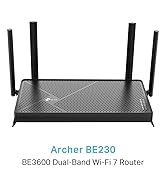
Desertcart purchases this item on your behalf and handles shipping, customs, and support to Greece.
⚡ Upgrade your home network to pro-level speed and security — don’t get left buffering!
The TP-Link Archer AX18 is a Wi-Fi 6 router delivering up to 1.5 Gbps dual-band speeds, enhanced device capacity via OFDMA and MU-MIMO, and strong coverage through beamforming with four antennas. It features WPA3 cybersecurity, easy app-based setup, gigabit Ethernet ports, and built-in VPN support, making it an ideal mid-range router for gaming, streaming, and smart home connectivity.


| ASIN | B0CTD1CTHM |
| Antenna Location | Home, Small Office, Gaming, Streaming |
| Antenna Type | Fixed |
| Best Sellers Rank | 673 in Computers & Accessories ( See Top 100 in Computers & Accessories ) 2 in Routers |
| Box Contents | Archer AX18 |
| Brand | TP-Link |
| Brand Name | TP-Link |
| Colour | black |
| Compatible Devices | Laptop, Personal Computer, Smart Television, Tablet |
| Compatible devices | Laptop, Personal Computer, Smart Television, Tablet |
| Connectivity Protocol | Wi-Fi |
| Connectivity Technology | Wi-Fi |
| Control Method | App |
| Controller Type | App Control |
| Country of Origin | China |
| Coverage | Strong signal strength and wide coverage area |
| Customer Reviews | 4.4 out of 5 stars 8,424 Reviews |
| Data Transfer Rate | 1.5 Gigabits Per Second |
| Frequency | 5 GHz |
| Frequency Band Class | Dual-Band |
| Frequency band class | Dual-Band |
| Has Internet Connectivity | Yes |
| Is Modem Compatible | No |
| LAN Port Bandwidth | 1000 Mbps |
| Manufacturer | TP-Link |
| Manufacturer Part Number | Archer AX18 |
| Maximum Upstream Data Transfer Rate | 1201 Megabits Per Second |
| Model Name | Archer AX18 |
| Model Number | Archer AX18 |
| Model name | Archer AX18 |
| Number of Antennas | 4 |
| Number of Ports | 4 |
| Operating System | RouterOS |
| Other Special Features of the Product | Internet Security |
| Router Firewall Security Level | medium |
| Router Network Type | Wired and Wireless |
| Security Protocol | WPA2-PSK, WPA3-Personal, WPA2-Enterprise, WPA-Enterprise |
| Special feature | Internet Security |
| Unit Count | 1.0 count |
| Wi-Fi Generation | Wi-Fi 6 |
| Wireless Compability | 802.11ax |
| Wireless communication standard | 802.11ax |
J**L
A Solid Midrange Beast That Just Works
I’ve been running the Archer AX55 for a week now, and honestly — it’s been one of the most stress-free upgrades I’ve made in years. Here’s the lowdown: 🛠 Setup Plug it in, open the app, done in under 10 minutes. The TP-Link Tether app is actually decent (rare for router apps, which are usually garbage). You don’t have to be some networking wizard — it’s super intuitive. 📶 Performance The Wi-Fi 6 speeds are excellent. My old router was choking with more than 6–7 devices online; this one easily handles 10+ (laptops, phones, smart TVs, a couple of cameras) without flinching. — 5 GHz band is rock solid — great for streaming, gaming, Zoom calls, whatever. — 2.4 GHz still covers the house for low-bandwidth stuff like smart bulbs. I’ve got about 1,600 sq ft, and it covers the whole space, even spilling into the garden. ⚡ Stability What surprised me most? Stability. I haven’t had to reboot this thing once since installing it. No random disconnects, no weird drops at night. It just sits there and does its job quietly — which is exactly what you want from a router. 🌟 Extras It’s got decent QoS, OFDMA, and WPA3 support if you’re nerdy enough to care. But even if you’re not, it comes preconfigured smart enough for 99% of people. 👎 Any downsides? — No multi-gig WAN/LAN ports. But if you’re not running fiber >1 Gbps, you won’t care. — The UI in the browser could be prettier, but eh — minor gripe.
M**L
Fast, Reliable, and Easy to Set Up – Excellent Value WiFi 6 Router
The TP-Link Archer AX18 has been a brilliant upgrade to my home network. Setup was incredibly straightforward with the TP-Link Tether app—up and running in minutes with no hassle at all. Even if you're not particularly tech-savvy, it's very user-friendly. The speed and stability have been excellent. With multiple devices streaming, gaming, and working from home, it handles everything without breaking a sweat. WiFi 6 really makes a difference in terms of smoother performance and better coverage throughout the house. The gigabit Ethernet ports are great for wired connections, and I really appreciate the added peace of mind from WPA3 security features. It also has built-in VPN support, which is ideal if you're working remotely or just value privacy. For a mid-range router, this punches well above its weight. Reliable, secure, and packed with features—highly recommended if you're looking to modernise your home network without overspending.
K**R
Amazing for VR in student accomodation
I needed to buy a router to play VR over WiFi from my PC, and my student accommodation blocked the protocol needed to stream the data, so I used this router to create my own private LAN on top of the student WiFi which allowed me to play my games. It is incredibly fast with my PC too, and even my phone gets amazing connectivity even through walls with the WiFi 6 that this router provides. The UI is extremely good and allows for lots of customization and advanced settings. Its really easy to set up, even with very specific use-cases such as mine. Also it looks really cool, just saying.
W**F
Good value, Good Performance, Easy to set up.
I used this to replace my ISP provided router. Very happy so far. TL/DR : after about a weeks worth of use it feels like good value, good performance and easy to set up/configure. The router has higher power output than the ISP provided one and uses beam forming connections. This has allowed me to remove my wifi extenders previously required for outside cameras and my EV charger giving me whole home coverage, including parts of the garden. Speed is near the maximum for my broadband contract across the house now too. It plugged directly into the RJ45 wall socket and after about 30 minutes for the ISP to register the new MAC address it just worked. Naming my network was simple when connected directly to the router via a browser and you can also use the TP Tether app if that's your preference. Both UI options are fairly intuitive. You can also configure your VPN directly in the router UI for various providers (Nord and Surfshark being the 2 I can remember) but I haven't tried this yet so can't comment on ease of use or performance. From a looks perspective, it's unobtrusive but I guess that depends on placement and decor as much as the device itself which is all black and has 4 aerials. We have it high up against a dark wall so it's barely visible. There are two things I wish were better. 1) The cable on the power supply unit is only a metre long which makes it difficult to place the router in a suitable place in the home. I bought a 3 quid extension cable to fix that issue. 2) You can't force a device onto a specific band (2.4 or 5Ghz) without creating 2 separate networks. This means that it's possible for some devices to drop to the 2.4 band when you really want them on 5. It hasn't caused an issue yet but as a high usage household it would have been nice to have (especially given that various searches say you can do it). Those 2 points are the reason for the lost star.
P**S
Solved our WiFi problem
We have used Now TV modem/router for a couple of years with two repeaters in our quite large house. The WiFi signal was fine, but as we increased the number of items connected to the router we found that the signal would repeatedly drop out. Alexa would stop, but restart when asked again. Phones, tablets etc would report "no Internet" but restart a few seconds later. Occasionally, catch up TV would fail. Having limited knowledge of these things I learned that I could continue using our supplied modem/router, but switch off the router part and plug in a more powerful router unit. This product was fairly easy to set up and our WiFi now works faultlessly, no signal drop outs. I did think our repeaters may not be needed, but they are to keep the whole house covered. Highly recommend.
C**S
Good kit
Excellent piece of cat very easy to install, unboxed and set up within 15 minutes using the app. Gave me 200 more megabytes of speed compared to the BT Home hub in exactly the same spot. Value for money was very reasonable. Appearance does look a bit futuristic with all the antennas but obviously this is good coverage.
D**C
Great VPN router
Setup was easy, bought for the VPN client needed a software update to access but it works great, signal strength is good
C**Y
Terrible WiFi performance
Really bad performance for me on the radio side with this one. Bought to replace an older TP-Link / Archer C7 which worked well but broke. Using it purely as an AP, bridged to the rest of my LAN. PC connected to one of the Gigabit wired ports gets 960Mbit+ iperf3 throughput from another wired system on the LAN. Over WiFi, either 2.4 or 5GHz, with single connected client speed is approx 20Mbit max. Same on Lenovo laptop running Linux, HP Elitebook running Windows 10 and iPhone 13. These devices all get a few hundred Mbit connected on WiFi to a Fritzbox configured as an AP in another room, and got significantly higher speeds on the older TP-Link device too. I have verified there are no other nearby radio devices on the same channels with vistumbler and also tried a variety of channels and channel widths. Toggled the few available settings such as OFDMA and Airtime Fairness but no effect. User interface on the device and options are lacking, have regressed since the older model I had. I’m sure this chipset should do half-decent speeds, maybe I got a dud unit? But for me the experience has been awful. I'll be throwing this in the bin and possibly smashing it I'm so frustrated. I've 25 years full time experience working with nothing but IP networks so this is not a configuration issue. Perhaps a firmware update would fix but for now it's getting thrown out.
M**N
TOP
Mit einem Glasfaser 600 Anschluss, dem Archer ax73 für 120 € und einem neu angeschafften re900xd für 99€ habe ich nun genau 590 Mbit, mit stabiler Verbindung und 4ms Ping in meinem Büro anliegend. Router selbst steht an eine unvorteilhaften Stelle im Kelleraufgang. Eine Lan-Kabel Verlegung kam aus optischen Gründen nicht in Frage. Trotzdem ist die Situation mit dem Archer ax73 perfekt und kostengünstig gelöst. Ich wählte den Archer ax73 aufgrund der starken WLAN Sendeleistung und den externen Antennen. Vorher hatte ich die 7590+ 1200ax repeater von Fritz. Der Fritz Router sendete nur minderwertig mit WLAN 5 und schaffte ca. 330 Mbit. Der repeater schaffte ebenfalls etwa 320 Mbit aber mit super schleter Stabilität und Ping-Spitzen. Ich tauschte erst den Router mit dem Archer ax73 aus. Resultat guter Router mit hervorragenden WLAN und dann den repeater mit einem re900xd. Ergebnis ist phantastisch. Die Kombination des Archer ax73 und dem re900xd ist perfekt. WLAN Werte sind seitdem perfekt. Knapp 590 Mbit per WLAN am Endgerät anliegend und eine stabile Verbindung ohne Spikes und einem 4ms Ping zum Gerät. Ganz klare Kaufempfehlung für eine günstige Alternative zu Fritz Geräten. Gpt empfohlen mir vorher eine teure 5560 mit einem ax3000 repeater, welche unverhältnismäßig teuer mit 260€ und 160€ gewesen wären. Ebenso empfahl gpt nach dem Kauf des Archer ax73 mit den 3000ax von Fritz zu holen da mein Flaschenhals dann der 1200ax von Fritz war. Wäre ich darauf eingegangen, hätte ich einen Fehler begangen. Kein Mesh und kein dediziertes WLAN backhaul. Dediziertes WLAN backhaul funktioniert nur zwischen Fritz Geräten. Der re900xd für 99€ hat ebenfalls ein optimales dediziertes backhaul welches frei einstellbar ist. Für 120€ für den Archer ax73 und 99€ für den re900xd habe ich nun Glasfaser 600 perfekt bedient. WLAN ist ebenfalls perfekt geworden. Auf die Frage an gpt, wieso gpt ständig Fritz empfiehlt kamen erhellende Antworten. Mehr Marketing, Produkte suggerieren bessere Verbindung, sind aber gleichstarke Alternativen, aus Angst verbundene Sicherheitskäufe an den Markennamen. Keine Frage, Fritz Produkte sind okay und gut aber der Mehrpreis ist immernoch zu hoch. Zumal andere Produkte halb so viel kosten und gleich gut oder sogar besser sind. Der ax73 sendet besser als eine Fritzbox, hat externe Antennen und kostet unter der Hälfte der Fritzbox. Manche bemängeln die Einstellungeb des Archer ax73. Für mich sind die besser und logischer einzustellen als bei einer Fritzbox. Hier habe volle Kontrolle bei den Einstellungen. .ueren qhcrud uzWLAN alw timDecke kced enieund Wände ednaw eleiv snu INach ausgiebigen Tests: 5 Sterne, klare Kaufempfehlung für einen starken WLAN 6 Router. Preis Leistung ist top.iAls repeater empfehle ich absolut den re900xd für eine perfekte Kombination.Es
N**S
Bon produit
Modem puissant , placer dans une maison longue et mur épais. Il fait son travail
M**H
الارسال
جهاز ممتاز وقوي الارسال
O**,
Guzel
Işını hakkıyla yapiyor, telefon ile 730mbps leri gordum, kablo ile 1gbps hızım var. Araya duvarlar girince ise 260mbps civarlarında dolaştı, fiyat performans iyi
A**R
Funkar bra
Funkar bra och var smidigt att ta i bruk.
Trustpilot
1 month ago
1 week ago