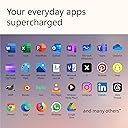
🚀 Elevate your edge with the AI-powered Surface Laptop 2024 — where speed meets style and smarts.
The Microsoft Surface Laptop (2024) is a premium AI-enhanced Windows 11 Copilot+ PC featuring a powerful Snapdragon X Plus 10-core processor, 16GB LPDDR5x RAM, and a vibrant 13.8-inch PixelSense Flow touchscreen. Designed for professionals craving speed, versatility, and all-day battery life up to 20 hours, it offers advanced AI tools like real-time translation, noise cancellation, and intelligent recall. Encased in a sleek, lightweight aluminum body with sustainable materials, this laptop redefines productivity and style for the modern manager.


| ASIN | B0CXL6B4QF |
| Audio Output Type | 1 x Headphone/Microphone Combo Jack (3.5 mm) |
| Audio Recording | Yes |
| Audio features | Omnisonic Speakers with Dolby Atmos |
| Automatic Backup Software Included | 13.8" Touchscreen |
| Battery Cell Type | Lithium Ion |
| Battery Life | 20 Hours |
| Best Sellers Rank | #1,335 in Computers & Accessories ( See Top 100 in Computers & Accessories ) #126 in Traditional Laptop Computers |
| Biometric Security Feature | Face Recognition |
| Bluetooth Version | 5.4 |
| Bluetooth support? | Yes |
| Brand | Microsoft |
| Built-In Media | 39W PSU, Laptop, QSG, Safety & Warranty documents |
| CPU L3 Cache | 42 MB |
| CPU Model | Snapdragon X Plus |
| CPU Model Generation | X Plus |
| CPU Model Number | 1 |
| CPU Model Speed Maximum | 3.6 GHz |
| Cache Memory Installed Size | 42 MB |
| Camera Description | Front |
| Chipset Type | X1P-64-100 |
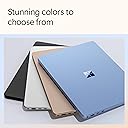
| Color | Black |
| Compatible Devices | External displays with DisplayPort, USB devices, and Bluetooth-enabled devices |
| Connectivity Technology | Wi-Fi, Bluetooth 5.4, USB, USB Type-C, AUX |
| Control Method | Touch |
| Customer Reviews | 4.5 out of 5 stars 89 Reviews |
| Display Resolution Maximum | 2304 x 1536 Pixels |
| Display Technology | PixelSense Flow |
| Display Type | PixelSense |
| Form Factor | Copilot+ PC |
| Global Trade Identification Number | 00196388283163 |
| Graphics Coprocessor | Adreno |
| Graphics Description | Integrated |
| Graphics Ram Type | DDR5 SDRAM |
| Hard Disk Description | SSD |
| Hard Disk Interface | Solid State |
| Hard Disk Size | 512 GB |
| Hard-Drive Size | 512 GB |
| Hardware Interface | USB |
| Has Color Screen | Yes |
| Human-Interface Input | Touchscreen |
| Item Dimensions L x W x Thickness | 11.85"L x 8.67"W x 0.69"Th |
| Item Weight | 3 Pounds |
| Keyboard Description | Built-In Chiclet-Style Keyboard with Backlight |
| Keyboard Layout | QWERTY |
| Lithium-Battery Energy Content | 54.12 Watt Hours |
| Manufacturer | Microsoft |
| Maximum Display Brightness | 600 Nit |
| Memory Slots Available | 1 |
| Microphone Form Factor | Built-In |
| Model Name | Surface Laptop |
| Model Number | ZGM-00037 |
| Model Year | 2024 |
| Native Resolution | 2304 x 1536 |
| Notebook Pointing Device Description | Keyboard and TouchPad |
| Number of Ports | 3 |
| Operating System | Windows 11 Home |
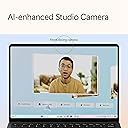
| Other Special Features of the Product | AI-powered Surface Studio Camera, Get relevant answers, ideas, and inspiration from AI-powered Surface Laptop with Copilot in Windows, Snapdragon X Elite and Plus processors, Supercharge your productivity and creativity with 45 trillion operations per second, Ultra-thin chassis, optimized screen space, and less bezel on a 13.8" HDR touchscreen |
| Power Device | 39W AC Adapter |
| Processor Brand | Snapdragon X Plus (10 core) |
| Processor Count | 1 |
| Processor Series | Snapdragon X Plus |
| Processor Speed | 1 |
| RAM Memory Installed | 16 GB |
| RAM Memory Slot Total Count | 1 |
| RAM Memory Technology | LPDDR5x, LPDDR5x, LPDDR5x |
| RAM Type | DDR5 RAM |
| Ram Memory Maximum Size | 16 GB |
| Refresh Rate | 120 Hz |
| Resolution | 2304 x 1536 |
| Screen Finish | Glossy |
| Screen Size | 13.8 Inches |
| Series Number | 37 |
| Speaker Description | Omnisonic Speakers with Dolby Atmos |
| Specific Uses For Product | Business |
| Supported Monitor Maximum Quantity | 1 |
| Total Usb Ports | 3 |
| Touch Screen Type | PixelSense |
| Touchpad Feature | Precision Haptic |
| UPC | 196388283163 |
| Video Output | DisplayPort |
| Video Processor | Qualcomm |
| Voltage | 240 Volts |
| Warranty Description | 1 year manufacturer |
| Warranty Type | Limited |
| Webcam Capability | Yes |
| Wi-Fi Generation | Wi-Fi 7 |
| Wireless Compability | 802.11.be, Bluetooth |
| Wireless Technology | Wi-Fi, Bluetooth 5.4 |
A**S
Top-quality Windows Laptop
This device has a very premium feel and an excellent build quality. It was a necessary upgrade from my previous device, a Surface Laptop 3. Performs all tasks quickly. Took a few restarts to install all updates, but after that it has functioned flawlessly.
D**Y
Perfect and Premium
Perfect ! So slim and best in segment. Everything is perfect , go fir it if you're looking for a Premium working laptop for Working purposes.
M**H
Finally, a proper Macbook Air Competitor
Years ago, I had the original Surface Laptop, and I loved it. It remains one of my favorite laptops of all time. So before I purchased the Surface Laptop 7, I actually had a 14" 2021 Macbook Pro. It was honestly too much laptop for my needs, but the limited port selection on the Macbook Airs ruled them out for me. Of course, my Macbook Pro was better than the Surface Laptop 7 in many ways - the mini-LED screen is just about the best laptop display you can get, full-stop, whereas the Surface's display is good but not great. The speakers on the Macbook were amazing; the Surface's are quite good but can't compete in that regard. However, I don't regret my purchase for one second because the Surface Laptop 7 is really a Macbook Air competitor, and that is where it shines. I compared the Surface and Macbook Air 13" side by side and came away with the following conclusions: -Screen: I don't do any serious photo editing or graphic design. To me, the Surface screen is slightly better. It gets much brighter than the Air and colors seem more accurate. However, the Air has better black levels. The Surface is a touchscreen, but I never use it as I don't like fingerprints on my screens. However, if you want a touchscreen, the Surface is clearly the better option. The Surface also has a 120hz display, whereas the Air is stuck at 60hz. The difference in smoothness when scrolling or using trackpad gestures is very noticeable. The Surface's screen looks much smoother. -Speakers: I can't tell the difference between the two. The Surface's speakers are really good compared to other laptops in this class. The same is true of the Macbook Air. -Ports: I had hoped that by 2024, USB-A would be all but gone, but alas it is not. It was very annoying to have to carry around dongles to use USB-A devices on my Macbook Pro, and now I don't have to! The Air has only two USB-C ports, so clearly the Surface wins here. The Macbook Pro does have HDMI, which is nice, but I just bought a USB-C to HDMI cable that I carry around with me, so I don't need a dongle for that either. -Keyboard: I like that the Macbook Air has more than 3 levels of brightness control, but I slightly prefer the key feel on the Surface. - Trackpad: somehow, the Surface's trackpad is better. I am thrilled that Microsoft finally brought a haptic trackpad to the Surface lineup. It feels more delicate and the tactility is stronger. Macbook trackpads are still among the best in the business, but there is finally a Windows laptop that is comparable in this regard. -Login: hands down, Windows Hello is better than the fingerprint reader. It's so fast that my Surface often logs me that it feels like the laptop was left unlocked. The fingerprint scanner on Macbooks are very good, but they are not as fast, nor as convenient, as Windows Hello. My Macbook Pro could also unlock with my Apple Watch, but that almost always took longer than unlocking with my finger. -Build Quality: This has always been a strong point for Surface devices, and the Surface Laptop 7 doesn't disappoint. The laptop can be opened easily with one hand, and the fit and finish is flawless. The same is true of the Macbook Air. I can't say whether one is better than the other. The Surface is designed to be easier to service, however, and you can actually replace the SSD, which is very nice. Additionally, the black finish on my Surface is more resistant to showing fingerprints than the dark blue on the Macbook Airs, which is a fingerprint magnet. -Performance: After owning an Apple Silicon laptop, I could never go back to using an x86/x64 processor. I used Windows 11 for ARM on my Macbook for two years virtualized in Paralells, so I knew what I was getting into. All of the applications I need work beautifully on the Surface, and it is so darn fast. Of course, there are more powerful processors out there using traditional x64 architecture, but I have never used a Windows laptop that is just so snappy for every day tasks. Office apps open in 1-2 seconds. Firefox, Chrome, and Edge open in less than a second. Using gestures to swipe through apps is super snappy, and the high refresh rate screen makes transitions look so smooth. This is the kind of performance I came to except from my Apple Silicon Macbook, and it's wonderful to finally see Windows operating just as responsively. Overall, the Surface feels like an upgrade over my Macbook Pro, and I personally am fine with the tradeoffs that come with the thinner, smaller, and lighter Surface over the more powerful Macbook Pro. It is an utterly fantastic laptop that, in my opinion, is currently the best thin-and-light laptop in the world.
A**R
Super Quiet, almost fanless, Cool and Fast machine.. what more do you need..
After hearing about the Snapdragon machines, and seeing all the youtube videos, I finally picked this surface laptop. The main choices were between Lenovo Yoga and Surface. But the yoga only has usb-c ports and a shorter battery life due to the (but amazing) OLED display. The missing headphone jack was the deal breaker for me. The SSD is easily upgradeable. so go for the cheaper 256gb and upgrade to the 1TB yourself (see the youtube videos). I also got the ugreen 12 function usb-c dock (Which is also a amazing product), so i can use all my older peripherals with it. Coming to the laptop itself, use it mainly for home/entertainment uses, mostly videos and web browsing, and light programming. WSL is supposed to supported, but i havent tried that yet. The 1.5 aspect ratio of the display, also gives a lot of real estate for programming, and browsing, and is much more usable than the traditional widescreen windows laptops. I haven't heard the fan in my almost 2 weeks of usage. machine stays cool on my lap. Booting and running multiple windows etc, is all quite snappy. Unlike the intel machines where you need to charge after 4-5 hours of usage, I only charge this machine once in maybe 2-3 days, and still get about 4 hours of usage every day.
F**M
Good choice if you are looking for a decent non gaming windows laptop.
Beautifully built, great colors, soft abd smooth keyboard. Battery life OK, not quite as good as advertised. Light weight and fits in smaller bag.
P**T
-
-
C**Z
So far so good
The laptop is pretty good so far. The material seems to be a little on the cheaper side.
S**S
Microsoft's answer to MacBook Air
Overall, this windows laptop is going in the right direction. This is my daily driver and quite happy with it. I'm not stuck to a wall plug on a windows device and that is wonderful in its own right and its silent no fan noise! As a windows user I'm glad to see Microsoft stepping in this direction for pc needs. A light productivity pc and excellent battery life but still enough power when you need it. This handles all your light to medium tasks and does it quite well. Software compatibility I haven't ran into too many issues but there are a few. Blue stacks most notable for me, but to be fair do I really need that on this machine? There are some driver capability issues as well. The most notable is drivers for radio programming cables. The software installs just fine but the driver for the cables was a no go. With that all that being said I wouldn't hesitate in buying another one. If you need total compatibility, get a model without the arm architecture, just remember to bring your charging cable with you!
Trustpilot
2 weeks ago
5 days ago