Buy anything from 5,000+ international stores. One checkout price. No surprise fees. Join 2M+ shoppers on Desertcart.
Desertcart purchases this item on your behalf and handles shipping, customs, and support to Greece.
🎥 Elevate your stream game with NearStream’s ultra-smooth 4K capture!
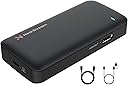
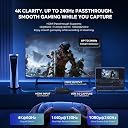
The NearStream CCD10 is a compact USB 3.0 video capture card designed for professional-grade live streaming and gaming. Supporting HDMI input/output up to 4K@60fps and recording at 1080P 60FPS with ultra-low latency, it ensures flawless, lag-free video capture. Compatible across Windows, Mac, and Linux, and with major consoles like PS5, Xbox, and Switch, it offers plug-and-play ease and a built-in 3.5mm audio interface for integrated voice recording.


| ASIN | B0CTMQPT99 |
| AV Output | HDMI |
| Antenna Location | Gameplay Recording, Image Capture, Livestreaming, Video Recording |
| Best Sellers Rank | #30 in Internal TV Tuner & Video Capture Cards |
| Brand | NearStream |
| Built-In Media | CCD10 Capture Card*1, HDMI cable*1, USB cable*1, User Manual *1, Quick Start Guide *1 |
| Compatible Devices | Gaming Console, Personal Computer |
| Customer Reviews | 4.4 4.4 out of 5 stars (371) |
| Hardware Interface | 3.5mm Audio, HDMI, USB 3.0 Type C |
| Item Dimensions | 4.57 x 2.2 x 0.87 inches |
| Item Weight | 76 Grams |
| Manufacturer | NearStream |
| Mfr Part Number | CCD10 |
| Minimum System Requirements | System requirements vary by capture format. For NV12/I420 4K30 on Windows desktop: Intel Core i5-6XXX or above, NVIDIA GeForce GTX 1060 or above, 8GB dual-channel RAM. For NV12/I420 4K30 on Windows laptop: Intel Core i7-7700HQ or above, NVIDIA GeForce GTX 1050 Ti or above, 8GB dual-channel RAM. Supports macOS 10.12 or later. A USB 3.0 port and compatible capture software such as OBS or PotPlayer a… |
| Model Name | CCD10 |
| Model Number | CCD10 |
| Operating System | Windows, Mac, Linux |
| Other Special Features of the Product | 4K@60fps Resolution Support, Ultra-Low Latency, Plug-and-Play Simplicity |
| Platform | Nintendo Switch, Xbox |
| Video Capture Resolution | 1080p |
G**R
Great product
Works exactly how its intended and with good quality. Fast delivery as well.
M**O
Perfect for video capture/Screenshots
Outstanding piece of equipment.
S**N
Great product
It is an very easy to use and it doesn’t overheat like the last capture card I purchased.
A**R
Good Starter Capture Device
I'm using this on a Minisforum V3 SE tablet to capture and stream my gaming rig. Streaming feature worked fine, how ever there is some handicap to your performance between the gaming machine and monitor. I could not reset my resolution on my monitor until after I had configured OBS Studio to some level. And even then it disabled HDR and my AMD Adrenaline APP started popping up every time I right click any where on the desktop. If you're happy with a 60hz monitor this device will work great. I did a four hours run of Diablo IV on Twitch and neither the device get hot, or the tablet throttle due to heat. Audio will not pass through on the HDMI, so you will have to use either the streaming device, or plug your speakers into the output on the capture device.
J**A
Streamers, check this out!
Works well to capture my gameplay!
M**E
UPDATE: It WORKS….
It came faster than expected so I was anxious to connect it to my Panasonic camcorder and computer. The user manual was not a manual at all. The quick start guide has a diagram with brief descriptions. The instructions are brief without guide on troubleshooting which left me clueless so I took to google and YouTube. Once connected , a blue light kept slowly blinking which means not captured. I need the blue light to flash quickly so that captured is enabled. How do I do that!? Therefore I give it 1 star… UPDATE: After posting my initial review, a representative immediately reached out to me in hopes of finding a solution to my problem. Their response was quick and very helpful which resulted in a positive outcome. The NearStream capture card works great and I am glad that I was able to get it working. I had no problems with customer service. They were very knowledgeable and prompt in responding to me. Therefore I have changed my initial review from 1 star to 5 stars and I would recommend this product and company to others…
L**O
Not optimal for stream as suggested.....
I am totally displeased with this piece of hardware. Constantly cut off audio from streams. I would be playing and talking to my viewers and then get told that the game audio is gone. I have to shut down the entire setup and restart it so that the audio can come back on. Also, has a hard time maintaining quality of videos displayed, having massive latency when the viewers are watching the stream. I honestly thought because it would be a better pirchase due to being more money, but research shows that very few Elgato Capture Card owners have little to no complaints on their hardware. Where with the Nearstream, actiallually has issues across the board. Not worth the money. Just stick with an Elgato Capture Card.
S**E
great things come at a price
I needed this. gaming only on tv is nice but this product and at it's value and price, it's more than worth what you pay for. Great sound quality, good color and the amount of devices you can connect to it(via Hdmi) it gives you quality matching some of the expensive ones, able to stream up to 4k, it's easy to use and easy to set up, the heat level is almost non existent, i'm months in without any issues
C**@
Es un poco lío la primera configuración con obs para poder capturar bien la play por tema sonido, etc. Pero cuando consigues cuadrar todo va genial.
L**O
Non posso dire come funziona, a me è arrivata con scatola esterna che indicava il modello da me acquistato, ma all'interno c'era un modello inferiore, sembrano identici a parte un logo con scritto "4K", rimandato indietro.
F**A
Facilissima da usare, offre una qualità video impeccabile a 1080p 60FPS con passthrough 4K60 fluido e senza lag. Perfetta per streaming, gaming o registrazioni. Ottimo rapporto qualità/prezzo, consigliatissima!
A**ー
当方の主な用途はアップスキャン経由の古いゲームの録画で、FHDまでの評価。 エンコーダはOBSを使用。 総評するとトラブルが少なく、動作安定性を求めるならおすすめできます。(下位モデルのCCD10も参照するといいかも) ・画質 FPS:1920x1080で安定した60fps出力を確認。 安物によくある疑似60fps(固定フレームを挟んだ実質30fps)ではない。 映像:パススルーとほぼ同等の画質を確認。 大手品でもエンコード時の輝度調整が雑で色空間・色調補正では治せないものもあるが、 本キャプボは目に付くような白飛び/黒ずみ未発生。 ・パススルー 遅延は見られず良好(ブラインドテストで他キャプボと比較したが差異なし) ・音声入出力 マイク端子はヘッドセットなどの4端子は使用不可(規格仕様)。 ヘッドセット端子は4端子で出力のほか音声入力のミキシングは可能。 どちらも音ズレは発生しないが、HDMI側の音量とマイク入力の音量をバランス調整できないため扱いづらい。 OBS側はマイクの有無にかかわらずカスタム音声のキャプチャで設定する必要あり。 ・ほか安定性 OBSの設定はほぼデフォルトで問題なく、トラブルが少なく非常に良好。 クセのあるキャプボだと、毎回USB挿抜の再起動が必要、フレームレートを指定しないと駒落ちするなどがある。 ・サポート 下記パッケージの問い合わせを行ったが、設計側の実機確認含めて1日程度。 ほか注意事項 ・パッケージにセキュリティシールが貼ってないため、到着時はすぐに現物確認すること ・ガワが下位モデルのCCD10と全く同じである(OS上から見えるデバイス名はCCD30となっていた)
ち**る
Discordなどの画面共有向けに購入。普通に使えます。試しにボードを経由して出力された画面でゲームをしてみましたが、遅延は全く気になりませんでした。
Trustpilot
1 month ago
2 weeks ago