Desertcart purchases this item on your behalf and handles shipping, customs, and support to Greece.
🎬 Elevate your on-camera presence with the Elgato Prompter—where pro eye contact meets effortless control.
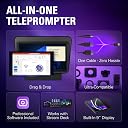
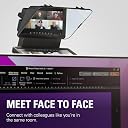
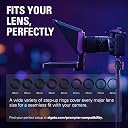
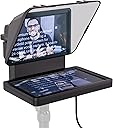
The Elgato Prompter is a compact, professional teleprompter featuring a 9-inch 1024x600 built-in display, USB-C connectivity, and broad camera compatibility including ultra-wide lenses. Designed for seamless drag-and-drop use as a second monitor, it enables natural eye contact during streaming, video conferencing, and presentations. Compatible with Windows and macOS, it offers easy desktop control without third-party apps, making it the #1 choice for creators seeking polished, confident on-camera delivery.
| ASIN | B0CH3P9K1X |
| Antenna Location | Professional use, Streaming, Video conferencing, Teleprompting |
| Best Sellers Rank | #1 in Teleprompters |
| Brand | Elgato |
| Built-In Media | Elgato Prompter |
| Camcorder Type | Webcam |
| Color | Black |
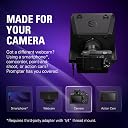
| Compatible Devices | DSLR Cameras, Webcams, Smartphones, Personal Computers, Laptops |
| Connectivity Technology | USB |
| Customer Reviews | 4.4 out of 5 stars 1,392 Reviews |
| Display Resolution Maximum | FHD |
| EU Spare Part Availability Duration | 7 years |
| Effective Video Resolution | 1080 pixels |
| Exposure Control Type | Automatic |
| File Format | MP4 |
| Flash Memory Bus Interface Type | NO/NA |
| Flash Memory Speed Class | V30 |
| Flash Memory Type | Internal flash memory |
| Flash Memory Video Speed Class | V30 |
| Focus Type | Manual Focus |
| Form Factor | Compact |
| Global Trade Identification Number | 00840006669937 |
| Image Aspect Ratio | 16:9 |
| Image stabilization | fake |
| Item Dimensions D x W x H | 11.1"D x 8.82"W x 8.62"H |
| Item Weight | 0.69 kg |
| Lens Type | Wide Angle |
| Manufacturer | Corsair |
| Maximum Focal Length | 27 millimeters |
| Model Name | Elgato Prompter |
| Model Number | 20WAD9901 |
| Number of Batteries | C batteries required. |
| Number of Speakers | 1 |
| Operating System | Proprietary Firmware |
| Photo Sensor Size | 1 pulgada |
| Photo Sensor Technology | CMOS |
| Screen Size | 9 inches |
| Sensor Type | CMOS |
| Shooting Modes | Automatic |
| Special Feature | Drag & Drop Monitor Display |
| Style Name | Prompter |
| Supported Audio Format | AAC, MP3 |
| Supported Image Format | MP4 |
| UPC | 840006669937 |
| Unit Count | 1 Count |
| Video Capture Format | MP4 |
| Video Capture Resolution | 1080p , 720p |
| Video Resolution | 1080p, 720p |
| Warranty Description | 2 Year Manufacturer |
| Water Resistance Level | Not Water Resistant |
| White Balance Settings | Auto |
| Zoom | Digital |
G**T
This changed the way I do video
I've been doing video and podcast work for a while, and I've used traditional teleprompters before. I bought the Elgato Prompter because I wanted something that would integrate cleanly with my computer and camera setup instead of adding another complicated piece of equipment. And once I got everything working, I have to say, this thing is really good. The built-in screen is the big difference. I'm not trying to balance a phone or tablet somewhere behind the glass, and I'm not trying to read a script off another monitor. The script is right where I need it to be, directly in front of the camera. I'm using it with an Elgato Facecam 4K, and the combination is excellent. The camera sits right where it needs to be, and the Prompter lets me actually look into the camera while reading. For interviews, that is going to be especially useful because I can keep my eyes toward the guest/camera instead of constantly looking off to the side at notes. The integration with Elgato's software is another big plus. Once you have everything connected and configured, it feels like part of the production setup rather than some accessory you've bolted onto it. I also added a Stream Deck Neo to the setup, which gives me control over the teleprompter without having to reach over to the computer. Being able to pause and start the script from the desk sounds like a small thing until you're actually recording. Then you realize how useful it is. Now, I do want to be honest about something. My experience with the hardware wasn't perfect. My first Prompter developed a problem where the screen would come on with the Elgato logo and then go black. The Mac wasn't seeing it as a display, and I went through the usual troubleshooting; different ports, cables, software, etc. I eventually had to deal with a replacement. The replacement experience wasn't exactly pretty either. It arrived with some packaging issues and missing/damaged pieces. Amazon and I had a conversation about that one. 😂 Fortunately, I was eventually able to get everything sorted out. But here's the important part: once I had a properly working unit, the Prompter itself has been excellent. And that's why I'm still giving it five stars. I'm not going to pretend my experience was flawless just because I'm reviewing a product I like. It wasn't. But the actual product has become an important part of my video setup, and I would buy it again. If you're creating videos, recording podcasts, doing interviews, or simply want to stop staring at notes off to the side while you're talking to a camera, this is one of those pieces of equipment that can make a surprisingly big difference. It's not cheap at full price, so I'd definitely watch for a sale. But if you can get it at a good price, I think it's worth it. For me, the real test is pretty simple: I have a working Prompter sitting on my desk now, and I use it. That's about as good an endorsement as I can give it.
J**S
Excellent teleprompter.
I am a YouTube content provider, and this teleprompter is without a doubt the best one that I have ever owned. It connects directly to a laptop, which makes it super easy to use. Whatever is on the laptop screen is going to appear on the teleprompter, which makes it very easy to modify whatever is on the screen. I control the teleprompter with a computer mouse, which is very easy to do. You can buy foot pedals to control the teleprompter, but I tried that and found that it didn't work very well. So, I returned the foot pedal and kept the teleprompter. Even though they struck out with the foot pedal, they got it exactly right with the teleprompter. The only thing I would do differently is I would buy the larger teleprompter. When I purchased this one, I didn't know there was a larger model available. If I had known that, I would have gotten the larger one. For me, the screen is just a bit small, but I do work close up, so the teleprompter is really very functional for me. So, the bottom line is that I highly recommend purchasing this product.
M**Z
Elgato Prompter & Stream Deck Plus: The Perfect Video Production Duo
As someone who regularly produces technical demonstration videos, I’ve tested a lot of gear to streamline my workflow. The Elgato Prompter, combined with the Elgato Stream Deck Plus, is by far one of the best setups for at-home video production. This dynamic duo makes it incredibly easy to stay on topic, control your recordings, and maintain a professional on-camera presence—whether you’re filming tutorials, live streaming, or even participating in Zoom calls. Elgato Prompter: A Game-Changer for Video Production The Elgato Prompter delivers everything you’d want in a teleprompter, but with added functionality that makes it stand out. The ability to adjust dialogue speed, reverse and forward text, and seamlessly switch between prompter and display mode makes reading scripts effortless. It’s also compact yet highly effective as a secondary monitor, giving you additional flexibility during video production. One of the most underrated benefits of this prompter is its pseudo eye-contact feature for video calls. If you’re frequently in Zoom meetings, having a script or notes displayed directly in front of the camera makes your presentations feel more natural and engaging. This small detail dramatically improves audience connection, whether you’re streaming, presenting, or teaching remotely. Stream Deck Plus: The Ultimate Control Center Pairing the Elgato Stream Deck Plus with the prompter takes production to another level. The customizable buttons allow you to start and stop recordings, switch modes, and control dialogue playback without touching your keyboard or mouse. Having dedicated physical controls for these actions eliminates unnecessary distractions and makes workflow smoother. For those using OBS, the native integrations are flawless, allowing for easy scene switching and transitions while keeping everything running seamlessly. And for Mac users, the compatibility is rock solid—no glitches, no lag, just instant responsiveness. Final Verdict: A Five-Star Setup The Elgato Prompter and Stream Deck Plus combo is hands-down one of the best investments for anyone serious about video production. Whether you’re a content creator, educator, or someone producing mid-level AV content, this setup makes staying on topic effortless, enhances production quality, and improves audience engagement. The combination of script control, seamless device integration, and multi-functional display features makes this a must-have for at-home creators. ⭐ Rating: 5/5 – Highly Recommended! ⭐
S**E
Great!, will advance text automatically, select that option instead of scrolling speed
This is awesome. The PC set up is much easier than the Mac set up. It did take me a while to get it to work on the Mac, there are several settings that are required in the system settings, privacy settings, these include accessibility, camera, and input monitoring, you need to enable for the device. There is also a display link which is an icon on the upper left of screen, if you click on that it will give you instructions for the settings it requires. Once you have that worked out, it's great. Makes a big difference in my videos.
L**N
Great idea, solid hardware, software unsuitable for enterprise work
I bought this teleprompter to produce professional content in an enterprise setting. Unfortunately the software design is not compatible with that goal. It relies on non-standard drivers for the display to work. Specifically you need special software that "screen shares" requires every screen of the computer it's used with to that program. I was able to make it work on windows with standard drivers distributed by windows. But, on mac you will not get video from this screen unless you install that software. In corporate environments installing software like this is often not possible. Given the permissions requirements I don't feel comfortable running it personally either. Which is a shame. As others have mentioned, this is a great concept, great price point, and in theory perfectly solves the problem I bought it for. But the software is designed in a way that feels like it's selling me other elgato products, but in effect makes what I already bought unfit for purpose.
M**O
A Little Wonky but it Works Well
It'll take a minute to figure out the best placement and use. You can have words scroll with your own camera shot (your face) in the background, so you can monitor your face's placement and get a general view of what's being recorded. The options are fun and super useful. If this is in your budget, get one; you won't be disappointed. They sell privacy covers on Etsy which work well (it's just a flap that covers the whole front of the teleprompter when not being used). The software makes my expensive computer burp and cough, as if a key is stuck. I'll wait for them to fix that I suppose, but you don't have to keep the software running all the time, so it's not a deal breaker. Shame they can't simply install software that doesn't glitch. Good idea, decent execution, a little pricey for what it is. You may also find not all cameras are friendly with this prompter, but I installed a standard Elgato camera which fits perfectly with no "edges showing." If you have time to fiddle, this is fun to fiddle with and potentially rewarding.
M**O
Must have for content creators
If you’re a creator who wants to deliver confident, engaging on-camera performances — whether for livestreams, teaching, sermons, interviews, or scripted videos — the Elgato Prompter with Built-in Screen is a game changer. This isn’t just a teleprompter; it’s a precision tool that elevates your presentation and workflow in every way. Design & Build Quality Right out of the box, the Elgato Prompter feels premium. The materials are solid, the glass is clean and clear, and the build is compact yet sturdy. It mounts easily on DSLR, mirrorless, or cinema cameras and doesn’t add unnecessary bulk to your rig. Built-in Screen = Effortless Confidence What sets this apart from traditional teleprompters is the integrated screen — crisp, bright, and easily readable in a wide range of lighting conditions. You don’t have to rely on a separate monitor or awkward reflector setups. It’s all right there, integrated and optimized. Smooth, Professional Scrolling In practice, the scrolling is smooth and responsive, whether you’re using the Elgato Control Center app or a connected device. You can adjust speed, font size, line spacing, and text color with ease. This flexibility makes it perfect for anything from fast-paced livestream banter to slow, reflective teaching. Ideal for Solo Creators & Teams Alike • Solo creators — No more off-camera cue cards or memory lapses; deliver natural, confident reads every time. • Teams & productions — Makes rehearsals faster and keeps talent focused. • Livestream hosts — Stay on message without looking off-screen. • Church media teams — Read scripture, announcements, or sermons with eye contact and grace. Performance & Reliability Across multiple sessions, the Elgato Prompter performed flawlessly. There were no lag issues, no ghosting, and the read was always smooth — a huge boost to overall production quality. Final Verdict The Elgato Prompter – Teleprompter with Built-in Screen is one of those tools you didn’t know you needed until you use it — and then you never want to go without it again. It’s intuitive, robust, and designed with creators in mind. Whether you’re making YouTube videos, conducting livestreams, or leading in-camera presentations, this prompter will elevate your confidence and polish your delivery. Highly recommended for every serious on-camera creator. 🎤📹✨
G**I
A Great Tool for YouTubers
I purchased the Elgato Prompter to replace my Padcaster Parrot teleprompter (which runs from your phone or tablet). The Elgato is much larger, the font is much more crisp, and it's easier to see. I'm glad I had the Padcaster Parrot first because (1) the Padcaster is easier to set up and use; and (2) I knew which settings I'd need to look for on the Elgato based on my experience with the Padcaster. The software you download to run the Prompter is free to download AND you don't have to create an account with Elgato to download and use that software. The Prompter's software appears to work with any computer and any level of operating system. I have an older Mac which is perfect for running the Prompter. (Since it's an older Mac, the highest level of OS for it is Ventura 13.7.8, which works fine with the Elgato Prompter software.) Fortunately, I had the same set of Lens Mounting Rings from the Padcaster as were sent with the Elgato Prompter. They look identical. But when I attached the Elgato's mounting ring for my 50mm lens to the camera and slipped on the Prompter, the entire ring would come off the lens. Weird! So I attached the Padcaster's mounting ring back onto the 50mm lens (again!), that ring stays in place, and the Elgato fits on it (as it should). There must be something wrong with the same size ring I received from Elgato. To the naked eye, both rings look identical. But one stays on the camera (the one from Padcaster) and the other falls off (the one from Elgato). That said, I removed one star because a few days ago when I set up to film, everything was fine. In fact, it was my second filming in an hour. Halfway through filming, the pace of the teleprompter was suddenly super slow. I hadn't changed the settings. So how did the pace change? I have no idea. After I set everything up after purchasing it, I thought all of my settings were "set". I don't expect those settings to change on their own. But at least one setting did. And I hadn't written down what my preferred settings were, so I had to guess and scramble through the settings, hoping I didn't start sweating profusely and mess up my entire filming episode. I don't like negative surprises. The Prompter is easy to use without the foot pedal (the Elgato Stream Deck Pedal). Nevertheless, I purchased the foot pedal and put off setting it up (too busy!). When I finally did start working with the foot pedal, I found out the hard way that (1) downloading the foot pedal's software requires you to create an account with Elgato; and (2) running the foot pedal's software on a Mac requires a later version of the Mac's OS than Ventura. Surprise! Even after back-&-forth emails with Elgato Support, I cannot use the foot pedal at all.
D**O
Un prompter che fa davvero la differenza
Da tempo cercavo una soluzione pratica per leggere i miei script su YouTube senza dover improvvisare o staccare lo sguardo dalla camera, e devo dire che con l’Elgato Prompter ho trovato l’alleato perfetto. Il prodotto è semplicemente fantastico: solido, compatto e dal design pulito, si integra alla perfezione nella mia postazione. La cosa che mi ha colpito di più è la semplicità d’uso: si collega facilmente e in pochi minuti è già pronto per funzionare. Grazie alla compatibilità con l’app Stream Deck, posso gestire lo scorrimento del testo in modo immediato e fluido, senza distrazioni. La qualità del display è altissima: testi nitidi, leggibili anche con molta luce in stanza, e soprattutto nessun riflesso fastidioso. Finalmente riesco a guardare dritto in camera mantenendo il contatto visivo con chi mi segue, senza sembrare “impacciato” o con lo sguardo perso altrove. In più, è un accessorio versatile: non serve solo per gli script, ma anche per leggere commenti in diretta o prendere appunti al volo durante una registrazione. In sintesi: ✅ Montaggio facile e immediato ✅ Qualità costruttiva eccellente ✅ Testo sempre chiaro e leggibile ✅ Perfetto per YouTube, streaming e contenuti professionali ✅ Prezzo giustificato dall’utilità che offre Onestamente, non potrei più farne a meno: l’Elgato Prompter ha migliorato in modo incredibile la qualità dei miei video e la mia naturalezza davanti alla camera.
O**E
Perfect for reading scrips for Youtube videos!
I got this so i could use it to read my scripts for Youtube. I struggled with memorizing the script when filming, so the Elgato Prompter is perfect for this! I absolutely love the voice sync function, makes reading the text on the screen super easy and natural. It was easy to set up and i also use the Elgato Master Mount for the Prompter and it works great!
N**A
Excellent
Bought this for a friend who runs a consulting company. They are quite happy with it
P**N
Super produit
Super produit. Connecté à un Streaming Deck c’est parfait. Je l’utilise également comme 3 e écran lors de mes streaming. Seul bémol, le formatage du texte est limité, mais il suffit d’importer un paragraphe tout prêt de Word par exemple. En résumé Elgato est une marque sérieuse. On peu déjà le constater lors du déballage. L’installation se fait en quelques secondes et à l’utilisation le prompteur avec la caméra installée dans son emplacement répond totalement aux attentes que l’on peut avoir d’un bon prompteur.
A**.
Hoy, la mejor opción relación calidad-precio del mercado
Si eres creador de contenido o, simplemente, haces vídeos o das clases a distancia, el Prompter es la manera de mejorar la calidad de mis videos y conectar mejor con mi audiencia. Elgato Prompter ha sido una adición fantástica a mi equipo de grabación, y aquí les cuento mi experiencia: Lo que me encanta: - Fluidez en la lectura: Leer un guion mientras miro directamente a la cámara siempre ha sido un desafío. Con Elgato Prompter, puedo mantener un contacto visual natural con la audiencia, lo que hace que mis videos se sientan más personales y atractivos. - Fácil de usar: La aplicación es muy intuitiva. Simplemente, copio y pego mi guion en la aplicación, ajusto la velocidad de desplazamiento y el tamaño del texto, y listo. Además, puedo controlar el prompter de forma remota con mi teléfono o con Elgato Stream Deck, lo que me da mucha flexibilidad durante la grabación. - Compatibilidad: Funciona con mi cámara DSLR, webcam y smartphone. Esto es genial porque puedo usarlo en diferentes situaciones, ya sea grabando videos en mi estudio o haciendo transmisiones en vivo desde mi teléfono. - Portabilidad: Es ligero y compacto, fácil de transportar y montar. Lo he llevado conmigo a varias grabaciones en exteriores y no me ha dado ningún problema. - Integración con otras herramientas: La integración con Elgato Stream Deck es un plus. Puedo configurar botones para iniciar y detener el prompter, ajustar la velocidad de desplazamiento e incluso controlar otras funciones de mi equipo de grabación. Aspectos a mejorar: - Reflejos en la pantalla: En ocasiones, he notado algunos reflejos en la pantalla del prompter, especialmente cuando hay mucha luz. Esto puede dificultar un poco la lectura, pero se soluciona ajustando la posición del prompter o la iluminación. - Precio: No es precisamente barato, pero creo que la inversión vale la pena si te tomas en serio la creación de contenido. Elgato Prompter ha sido una herramienta muy valiosa para mí. Me ha ayudado a mejorar la calidad de mis videos y a conectar mejor con mi audiencia. Si buscas un teleprompter fácil de usar, portátil y compatible con diferentes dispositivos, te lo recomiendo sin dudarlo. Hoy es una de las mejores opciones relación calidad-precio del mercado. -- Si ets creador de contingut o, simplement, fas vídeos o fas classes a distància, el Prompter és la manera de millorar la qualitat dels meus vídeos i connectar millor amb la meva audiència. Elgato Prompter ha estat una addició fantàstica al meu equip d'enregistrament, i aquí els explico la meva experiència: El que m'encanta: - Fluïdesa a la lectura: Llegir un guió mentre miro directament a la càmera sempre ha estat un desafiament. Amb Elgato Prompter, puc mantenir un contacte visual natural amb l'audiència, cosa que fa que els meus vídeos se sentin més personals i atractius. - Fàcil de fer servir: L'aplicació és molt intuïtiva. Simplement, copio i enganxo el meu guió en l'aplicació, ajusto la velocitat de desplaçament i la mida del text, i llest. A més, puc controlar el prompter de forma remota amb el meu telèfon o amb Elgato Stream Deck, cosa que em dóna molta flexibilitat durant l'enregistrament. - Compatibilitat: Funciona amb la meva càmera DSLR, webcam i smartphone. Això és genial perquè puc fer-lo servir en diferents situacions, ja sigui gravant vídeos al meu estudi o fent transmissions en viu des del meu telèfon. - Portabilitat: És lleuger i compacte, fàcil de transportar i muntar. Ho he portat amb mi a diversos enregistraments a exteriors i no m'ha donat cap problema. - Integració amb altres eines: La integració amb Elgato Stream Deck és un plus. Puc configurar botons per iniciar i aturar el prompter, ajustar la velocitat de desplaçament i fins i tot controlar altres funcions del meu equip de gravació. Aspectes a millorar: - Reflexos a la pantalla: De vegades, he notat alguns reflexos a la pantalla del prompter, especialment quan hi ha molta llum. Això pot dificultar una mica la lectura, però se soluciona ajustant la posició del prompter o la il·luminació. - Preu: No és precisament barat, però crec que la inversió val la pena si et prens seriosament la creació de contingut. Elgat Prompter ha estat una eina molt valuosa per a mi. M'ha ajudat a millorar la qualitat dels meus vídeos i connectar millor amb la meva audiència. Si busques un teleprompter fàcil dusar, portàtil i compatible amb diferents dispositius, t'ho recomano sense dubtar-ho. Avui és una de les millors opcions relació qualitat-preu del mercat.
Trustpilot
1 month ago
3 weeks ago