Desertcart purchases this item on your behalf and handles shipping, customs, and support to Greece.
🎮 Elevate your game with zero lag and infinite style!
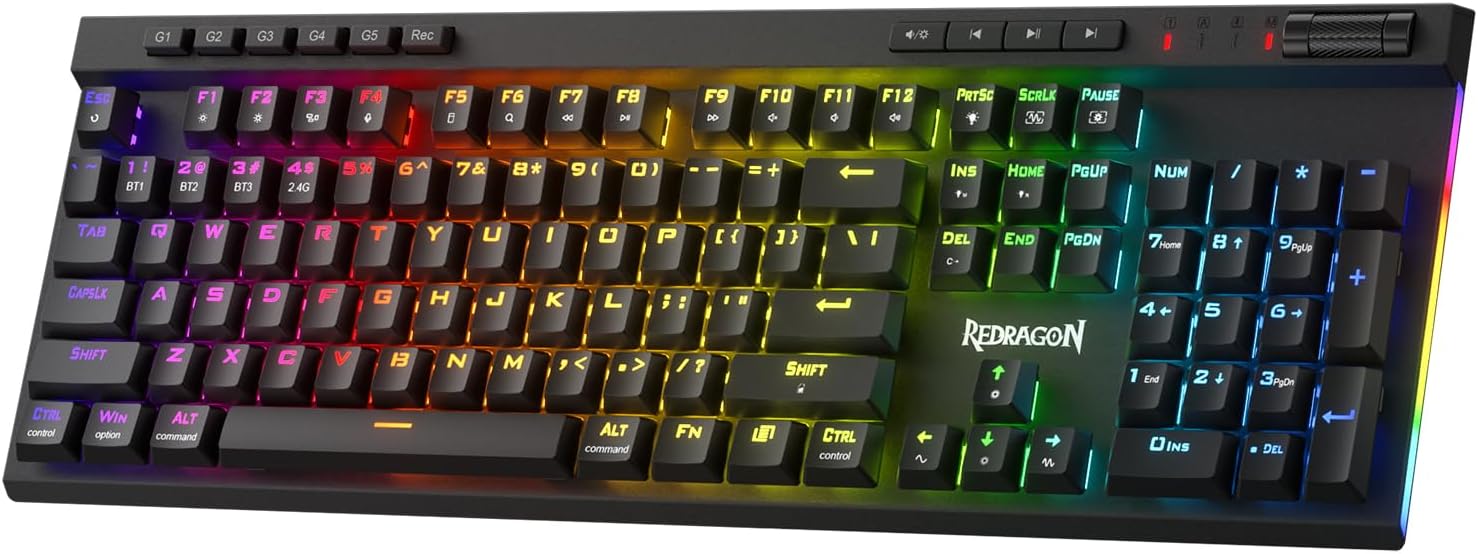
The Redragon K580 PRO is a versatile wireless RGB gaming keyboard featuring tri-mode connectivity (USB-C, Bluetooth, 2.4GHz) with near-wired responsiveness, 5 dedicated macro keys for instant combo recording, and a tactile metal media wheel. Its hot-swappable switch socket supports a wide range of mechanical switches, while full anti-ghosting ensures flawless input during intense gaming sessions. Customizable RGB lighting and optional software deepen personalization, making it a top-tier choice for MMO and MOBA players seeking performance and style.


| ASIN | B0CS68QV83 |
| Additional Features | Ergonomic, Hot-Swappable |
| Antenna Location | Gaming |
| Best Sellers Rank | #367 in Video Games ( See Top 100 in Video Games ) #30 in PC Gaming Keyboards |
| Brand | Redragon |
| Built-In Media | [Keyboard, USB cable, Wireless receiver (if applicable), User manual] |
| Button Quantity | 104 |
| Color | Red Switch |
| Compatible Devices | Gaming Console |
| Compatible Operating System Family | Windows |
| Connectivity Technology | Bluetooth, 2.4Ghz , USB-C |
| Customer Reviews | 4.2 out of 5 stars 611 Reviews |
| Enclosure Material | Plastic |
| Generation | 3rd Generation |
| Hand Orientation | Ambidextrous |
| Keyboard Backlighting Color Support | RGB |
| Keyboard Description | Gaming |
| Keyboard Layout | QWERTY |
| Manufacturer | Redragon |
| Mfr Part Number | 512637707 |
| Model Name | Wireless RGB Gaming Keyboard |
| Model Number | K580 PRO |
| Number of Items | 1 |
| Number of Keys | 104 |
| Number of Packs | 1 |
| Number of Sections | 1 |
| Recommended Uses For Product | Gaming |
| Series Number | 580 |
| Special Feature | Ergonomic, Hot-Swappable |
| Style Name | Gaming |
| Switch Type | Outemu |
| Theme | gaming |
| Unit Count | 1 Count |
| Warranty Description | 1 year |
J**J
Great for a Mac
As a Desktop Mac user, it is hard to find a decent wired backlit mechanical keyboard at a good price. While all USB keyboards a compatible with a Mac, that is not the same thing as having a Mac keyboard layout. Being less expensive than many of the alternatives I found, I decided to give this one a try. I am very pleased with it. It has a pair of switches on the underside. One to switch between 2.4GHz, Bluetooth and off. And another, that is for Mac or Windows configuration. Switched it to Mac and left wireless turned off. Plugged it into my KVM and the was greeted by the macOS keyboard setup wizard. Afterwards, it worked like any normal Mac specific keyboard. Having the Command key next to the space bar for shortcuts like Copy&Paste was a must. No problem there. The extra media keys work great as well. However, they only light up when pressed. As a non-gamer, I did not think I would have much use for the Macro keys. But, I was wrong and set the first one up to do screen captures of the current window. I am very used to the brown switches on my old keyboard. This one has hot swap-able Red Linear switches. It will take a little while to get accustomed to their feel. But, they are comfortable, work great and are quieter. Out of the box, the RGB backlights were setup to perform a Las Vegas Christmas light show. While neat, not something I actually would want to have on a regular basis. Thankfully, it has different lighting modes and color schemes. I set mine to an unchanging near white and I'm happy. It is also possible to assigned each key one of 7 colors. I was able to do all of the things I mentioned above without ever setting up wireless or installing any software. Overall, it seems to be a great keyboard. Did I mention it even has the old school Num Lock, Caps Lock and Scroll Lock LEDs. Plus, it can live as a strictly USB keyboard.
R**C
Great value, has all I want
Nice keyboard. Has all the features needed. Wireless or wired. Nice font on the keys that has good RGB passthru and there isn't too much RGB color bleed between the keys. Volume wheel is always a must for me and this one is metal with a nice click feel to it. You can also change the function of the wheel to change brightness etc. I installed the software and it works well but almost everything can be controlled without software via keyboard inputs. Once you configure the software, your choices can be saved to the board and you can remove the software if you choose. You can easily change the keycaps and switches but I'm liking these pretty well so far. Red linear, good sound and actuation is just perfect for me so far.
R**R
(UPDATED REVIEW) Keyboard is great and costumer support really makes it a 10/5!
They keyboard itself is very solid without being too heavy. The volume nob feels satisfying to use and the Macro is extremely easy to use as well as responsive. This is a must buy if you plan on leaving it for a home office or plan long gaming sessions. If you use their software too you'll have an incredible time customizing it. I personally use it on multiple devices so I stick to the keyboard settings which are also very detailed for the LEDs and Macros. You can also use it while it is charging, so there's no downside to it being wireless! I bought this keyboard about four months ago and had problems with keys giving out and some features. The consumer service was the most kind I've ever had in online shopping by replacing it no questions. This second one has no issues and looks to last much more! I'd recommend it on sale or not simply for a good device and perfect costumer support.
L**A
Good performance for the money
I'm coming here from a Corsair K70 SE edition keyboard where the spacebar switch borked out. Since a replacement would be $200, I'm looking for a much better deal. This keyboard is that. It's fine. I got red linear switches and comparing to my Corsair Cherry MX Speed switches, this keyboard lacks the solid thock sound. This keyboard is quieter than the K70 switches and has no low end. It's all mid and top. So while I prefer my old keyboard's sound, I don't prefer it $200-worth. This keyboard is perfectly fine. Feels solid. I got a good one, with no build issues like reported in some other reviews. Base is solid and heavy, lighting works, volume roller is smooth and tight. It's an excellent value, worth the money. Typing feels nice. Like I said, the red linear switches are pretty quiet, but still feel good and sounds decent.
H**T
Horrible documentation.
Mine came with a folded up paper for documentation. It did not explain per-key functions and other functions. There was no way to make a solid color that did not move. I went online to download the software, and Windows Defender refused to open it up because it deemed it dangerous. At the download site I clicked on “having problems downloading” and it took me to a blank page. I had to hunt online for how to do the advanced features. In one online review the guy was frustrated with the lack of documentation as I was, but his documentation was better than what I had received. It was a miserable experience! It's a shame because the keyboard iteslf had potential. I know you can sometimes get a lemon, but there was no excuse for the shoddy documentation which made it difficult to tell if there was a firmware problem or something you’re just not seeing.
M**Y
Sturdy
This thing is dope and it’s very sturdy, I wish it was brighter but it’s very responsive
A**R
Keyboard itself is great, but wireless performance is awful
At the price point, actually a pretty decent keyboard. Switches are a little wobbly, so I do recommend installing some Akko switches (a brand compatible with the 5 pin layout Redragon uses) in the hotswap sockets if key feel is important to you. It's made of plastic, but compensates by having what feels like a solid aluminum plate beneath the keys, which gives the keyboard a satisfying heft and prevents any serious deck flexing when attempting to bend the keyboard. Battery life is fine, a bit shorter than my other wireless keyboards. I get around 3 days on a charge of all-day work and play, so I may take the keyboard apart and install my own aftermarket battery for a longer cycle, if I can sort out the issue below. My only gripe with this keyboard is its wireless performance. To say it's terrible would be an understatement. It's atrocious. I have my dongle within three feet of the keyboard, and I consistently have to reposition and tweak the angle of my keyboard in order to get consistent reception, otherwise inputs are lost or repeated until the keyboard reconnects. 50% of the time, it works perfectly, but that other 50% makes it virtually unusable. I've wired the keyboard now, and am experiencing no issues. I live in the middle of nowhere. I don't have a 2.4 ghz router (All of my devices are on ethernet or use wifi 7, and I've disabled the 2.4 and 5 ghz bands on my router). There is absolutely nothing that could reasonably be interfering with the connectivity outside of the keyboard itself, so I can't bring myself to give this any higher than 3 stars. If Redragon can't manage to put a functional wireless transmitter or receiver in the box, this keyboard might as well be advertised as wired.
C**A
Excellent Wireless Mechanical Gaming Keyboard With Great Battery Life—Just Two Annoyances
For context, I previously owned the wired Redragon K580 PRO with Brown switches, and I currently use the Blue-switch version at work. I have always liked these keyboards. They include dedicated media keys, a volume roller, built-in RGB lighting, and programmable macros that can be saved directly to the keyboard without keeping software installed. Because of that, buying the wireless version to reduce the number of cables on my desk was an easy decision. I do not regret it. These keyboards offer a lot of features for their price. My biggest complaint is that the volume roller does not work while the keyboard is asleep. I have to press the “-” button on the number pad to wake the keyboard before I can adjust the volume. This is annoying because I frequently change the volume while watching YouTube. I have gotten used to the workaround, but I still consider it a significant design flaw as every other key works in sleep. I immediately replaced the included Red switches with Kailh White Pro switches. These have an actuation force similar to Brown switches but also provide a softer click similar to Blue switches. For me, they offer the best of both worlds. So I cannot fairly review the included Red switches. However, Redragon’s Brown and Blue switches have both been excellent for the price, so I have no reason to think the Red switches would be poor quality. The keyboard does not require software for normal use, but I recommend installing the software at least once. After saving your settings to the keyboard, you do not need to leave the software installed or running. The software allows you to customize the RGB lighting and change the sleep timer. The timer can be set from 1 to 10 minutes and is set to 3 minutes by default. The keyboard enters a deeper standby mode after about 30 minutes. Waking the keyboard is extremely fast. Even after leaving it unused for an entire day, I can sit down and immediately start typing without losing the first few keystrokes. The sleep timer has a major effect on battery life due to RGB lighting, I changed mine to 1 minute. Another downside is the low-battery warning. When the battery reaches approximately 30%, the RGB lighting turns off and the lock indicator lights flash whenever the keyboard wakes up. I wish the software allowed users to change this warning level. I would set it to 10%, because most people will probably charge the keyboard soon after the warning begins anyway. The keyboard includes a high-quality six-foot braided USB-C-to-USB-A cable. Using a powered USB hub, it takes approximately two hours to charge fully from 0% while the keyboard is not being used. When connected by USB, it functions almost exactly like the wired Redragon K580 PRO. The Bluetooth works great, and it has 3 profiles, I use 2 of them, one for my Laptop and one for my tablet and I have never had an issue connecting. Battery Life There was very little detailed battery information available when I purchased this keyboard, so I tested it under several different settings. These results are approximate and will vary depending on usage. The two settings that have the largest effect on battery life are: 1. RGB brightness, which has four brightness levels plus an off setting. 2. The sleep timer, which is set to 3 minutes by default. My RGB setup uses two solid colors without any animated effects. During my first test, I used maximum RGB brightness and the default 3-minute sleep timer. My usage was fairly light: adjusting the volume, entering website addresses, writing YouTube comments, asking AI questions, and doing other basic typing. Under those conditions, the keyboard lasted approximately two weeks before reaching 30% battery. I charged it once the low-battery warning began. For my second test, I changed the sleep timer to 1 minute and lowered the RGB lighting to its minimum brightness. With approximately the same type of usage, the keyboard lasted a full 30 days and still had 70% battery remaining. That is clearly the best setup for everyday use. The lowest RGB brightness still looks good and is bright enough to see in a darker room. Turning RGB off completely should improve the battery life even further. Gaming battery life is naturally much shorter because the keyboard stays awake almost constantly. With minimum RGB brightness, I estimate approximately 35 hours of gaming battery life. With maximum RGB brightness, I estimate approximately 24 hours. That is roughly comparable to the battery life of many wireless controllers. With RGB lighting completely disabled, I believe gaming battery life could potentially be close to twice as long. The RGB lighting is clearly the largest drain on the battery. Final Thoughts This is not a basic Logitech keyboard that can run for two years on a pair of AA batteries. It is a full-size wireless mechanical keyboard with RGB lighting, media controls, macros, and replaceable switches. The volume roller issue and the aggressive 30% battery warning are frustrating, but neither one is a deal-breaker for me. With the sleep timer set to 1 minute and the RGB brightness kept low, the battery life is very good. For the price, this keyboard offers an excellent combination of features, customization, and build quality. I would realistically rate this 4.5 out of 5 stars, but since Amazon does not allow half-star ratings, I rounded up to 5.
M**U
Buena calidad a precio asequible. COMPLETÍSIMO.
Llevo ya varios meses usándolo y va siendo hora de plasmar mis impresiones. En cuanto a la fabricación y acabados, sobresalientes. Buenos materiales, teclas que da gusto pulsar (con su característico sonido), y robustez en el montaje. La conexión inalámbrica no tiene lag, la pulsación se corresponde de manera inmediata con el resultado en pantalla, probado a nivel usuario y en juegos online, tipo LOL (prefiero jugar con mando y soy poco asiduo a este estilo de juegos) no hay ningún retraso, o si lo hay es mínimo, entre pulsar las teclas de dirección o de acción y la respuesta en pantalla. El software propio para controlar la iluminación juega con todas las posibilidades: desde el tipo de iluminación, los colores, o la intensidad de la misma, hasta controlar el tiempo de apagado, algo que yo considero fundamental, ya que la gran mayoría de teclados gaming traen un tiempo de apagado por defecto que, normalmente, no suele ser de más de 1 o 2 minutos, y más si es en teclados inalámbricos, para ahorrar batería. Aquí se lo configuras tú. Punto negativo? La batería. Si no apagas el interruptor del teclado, se consume relativamente rápido. Yo le doy un uso intensivo y aguanta un par de días SIN apagar el interruptor, que no está mal, pero ahí sí flojea comparado con otros inalámbricos gaming que he tenido. La carga es aceptable, no se demora demasiado, aunque no he controlado el tiempo que tarda. Y para consultar cuánto le queda de batería, basta con pulsar dos teclas, y se iluminarán del 1 al 0 para indicarnos a cuánto está. Eso sí, una vez que baja del 7, cae en picado. El resto: teclas programables, control de volumen con un rodillo, gomas antideslizantes y elevadores, son todos puntos positivos. Dicho esto, por el precio que tiene, sabiendo que teclados similares pueden costar entre los 100 y los 200 euros, lo recomiendo totalmente.
K**E
Subliem keyboard
Goed stabiel en niet te groot. Zeer groot nadeel : de software is er niet bijgeleverd en kost veel moeite het op het internet te vinden want bij de fabrikant zeer ingewikkeld en moeilijk te vinden en te downloaden echt jammer. Maar overal is de kwaliteit zeer goed van het keyboard.
D**L
good keyboard
very good product
T**T
Definitely worth the money
It's a very solid, heavy keyboard. I don't know anything about mechanical keyboards or what's good, what's not, how they should sound.. but this one is nice. It's not overly loud, and even though I work from home, the quiet clicking is appealing. I enjoy that it lights up, and the feel of typing is very easy to get used to.. it's an amazing keyboard for the price. Highly recommended.
A**N
Tastiera di alta qualità .
Rbg illuminazione pure laterale un idea stupenda risponde alla comunicazione veloce rumore si sente un po'
Trustpilot
1 day ago
1 month ago