


🎯 Elevate your number pad game—customize, connect, and conquer productivity!
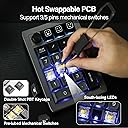
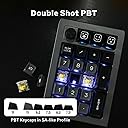
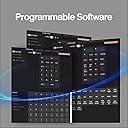
The EPOMAKER EK21 VIA Gasket Number Pad is a versatile, high-performance numeric keypad featuring triple-mode connectivity (Bluetooth 5.0, 2.4GHz wireless, and wired), a 1000mAh battery for long-lasting use, and hot-swappable Gateron Pro Yellow switches. Its ergonomic gasket mount design with Poron foam and IXPE pads ensures comfortable, quiet typing, while the CNC-cut PC plate and aluminum alloy knob provide premium durability and precise control. Fully programmable via VIA software, the EK21 empowers professionals to customize their workflow and boost productivity.







| ASIN | B0CQ1VCGT8 |
| Additional Features | Backlit, Ergonomic, Hot-Swappable |
| Antenna Location | Gaming |
| Best Sellers Rank | #3,362 in Videogames ( See Top 100 in Videogames ) #214 in PC Gaming Keyboards |
| Brand | EPOMAKER |
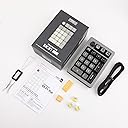
| Built-In Media | EPOMAKER EK21 Mechanical Numeric Keypad, USB-C Cable |
| Button Quantity | 21 |
| Color | Black, Gateron Pro Yellow |
| Compatible Devices | Laptop, PC, Tablet |
| Compatible Operating System Family | Windows |
| Compatible devices | Laptop, PC, Tablet |
| Connectivity Technology | USB-C |
| Connectivity technology | USB-C |
| Customer Reviews | 4.0 out of 5 stars 51 Reviews |
| Enclosure Material | Plastic |
| Hand Orientation | Right |
| Keyboard Backlighting Color Support | RGB |
| Keyboard Description | Compact mechanical keyboard with 21 keys, aluminium knob and programmable keys, connected via Bluetooth/2.4Ghz/USB-C |
| Keyboard Layout | QWERTY |
| Keyboard description | Compact mechanical keyboard with 21 keys, aluminium knob and programmable keys, connected via Bluetooth/2.4Ghz/USB-C Keyboard description Compact mechanical keyboard with 21 keys, aluminium knob and programmable keys, connected via Bluetooth/2.4Ghz/USB-C See more |
| Manufacturer | EPOMAKER |
| Mechanical Keyboard Switch Model | Gateron Pro Yellow |
| Mfr Part Number | EPOMAKER |
| Model Name | EK21 |
| Model Number | EK21 |
| Number of Batteries Required | 1 |
| Number of Keys | 21 |
| Number of Sections | 1 |
| Power Source | Battery Powered |
| Recommended uses for product | Gaming |
| Special features | Backlit, Ergonomic, Hot-Swappable |
| Style Name | Modern |
| Switch Type | Linear |
| Theme | No theme |
| Total USB 2.0 Ports | 1 |
| Unit Count | 1 Count |
| Warranty Description | 1 YEAR WARRANTY |
| Water Resistance Level | Not Water Resistant |
A**I
Good number pad, bad software optimization
For around $15 it's a good deal. The Quality is fair and good for the price. Everything feels alright. The only issue is the software optimization through VIA which is poor. I tried every method I found online and this what made it work for me. The only json profile that worked was the USB V2 Factory version. First, go to settings in VIA app and enable the "Show design app" option. This will unlock the design tab where you will be able to load the json profile for the number pad . Second, in the design tab, you need to enable "Use V3 defenitions (deprecated) option. Then, load the json profile that works with your number pad without errors (like I said earlier mine was USB V2 factory version). This will load the number pad template. Third, this is where it gets annoying, choose configure tab, if it shows it is searching for devices, try the following. Turn "Use V2 Definitions) off and on and see if number pad is showing in configure tab or try disconnect USB and connect again to see if this works. You can also try delete the json profile and load it again while following the previous steps until it works. Once it work, It will show the number pad with the option to configure to your liking. Layer 0 is the default number pad layout. Layer 1 is for Fn key combination. Layer 2 & 3, not familiar what are these for. Since I used the USB V2 factory version the volume knob will be shown as keycaps instead.
B**V
Don’t waste your money!!!
Quality is terrible! LEDs are different! Software doesn’t work! It cannot discover the device. Knob is too tight and inaccurate! Don’t waste your money on products of this manufacturer.
I**N
Great - little bit of a pain to setup
Awesome little number pad, little bit of a pain to get it to work in VIA software, but once its there, its easy to configure - also very easy to add multiple layers for when you want to use it as more of a macropad than a numberpad.
R**N
Good mechanical numpad at a good price
When I bought a TKL keyboard I didn't think I'd miss my numpad so much, this is exactly what I was looking for. Pros- *It feels good to type on and it's pretty sturdy even though the housing is plastic. The big rubber feet are very nice and it doesn't move around on my desk pad at all when I'm using it. *The RGB looks good and there's a decent amount of different modes to choose from. *The Gateron yellow switches are nice but I swapped them out for Gateron Jupiter Bananas to match my Lemokey L3 which was easily done. *Battery life is excellent. I think I've only charged it 2 or 3 times in the few months I've had it and I use it quite often. *Macro keys are definitely nice to have if you're doing programming or data entry. *Easy to program. Even if you're new to VIA it's fairly straightforward to program the macro keys and dial. I believe they are pre-programmed if you don't want to do it yourself but I can't remember what the default shortcuts are. *Metal dial has a good feel when twisting. Cons- *If I were to nitpick my only gripe would be that it sometimes doesn't register my first key press when waking up, a minor inconvenience at best. Overall I'd definitely recommend this keypad if you need one that is fairly inexpensive and works well.
M**R
Great for laptops
This is a great accessory for laptops without a numerical pad - has a retro look Commodore 64. Is a little bulky for transport purposes but ok for me
D**E
Numpad decente
Cumple bien su función. El material de plástica no se ve malo. Los switches y estabilizadora están bien. Genial para tenerlo en el escritorio y usarlo para alguna tarea numérica
N**R
Great Product; Questionable VIA Support
This EpoMaker wireless number pad is a great tool for those that prefer tenkeyless keyboards and those that prefer a "southpaw" numpad option. The included keycaps sound pleasant, the rotating knob is ridged and tactile, and the input lag is quite low. There is quite a lot of flex when pushing downwards, which might bother some people. Since I chose linear switches, I am used to typing with low force and only noticed the flex when intentionally pushing the board downwards. If I could rate the numpad by itself, I would give it 5 stars. However, the software support is where you run into issues... One of the main selling points of this product for me is its VIA support. I have used keyboards that use it for macros and RGB in the past, and normally it is a straightforwards process. Setting up VIA for this EK21 was a royal pain. After downloading the JSON files from EpoMaker's website, VIA would not load the definitions. Even after updating the firmware and trying both VIA's desktop app and the web client, nothing. Finally, after searching online for answers, I stumbled across a reddit thread recommending the use of a "Mongeek" web version of VIA. While it recognizes the EK21 when connected via USB C cable, it still does not work with 2.4 GHz or BT. I have no idea if this is necessary, or if I got one from a bad batch, but at least VIA works. Great numpad if you can put up with finicky VIA support
Trustpilot
2 weeks ago
1 day ago