

Desertcart purchases this item on your behalf and handles shipping, customs, and support to Greece.
⌨️ Elevate your game with the wireless keyboard pros can't stop talking about!
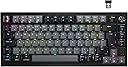
The Corsair K65 PLUS WIRELESS is a compact 75% mechanical keyboard featuring pre-lubricated MLX Red linear switches for smooth, responsive keystrokes. It offers versatile connectivity options including low-latency 2.4GHz wireless with AES encryption, Bluetooth, and USB-C wired mode. With an impressive 266-hour battery life (RGB off), durable PBT dye-sub keycaps, and a multi-function dial for seamless media control, this keyboard is engineered for serious gamers and professionals seeking performance and style across PC, PS5, PS4, and Xbox platforms.


| Antenna Location | Gaming |
| Asin | B0CT8V1CF3 |
| Best Sellers Rank | 943 in PC & Video Games (See Top 100 in PC & Video Games) 75 in PC Gaming Keyboards |
| Box Contents | Keycap Puller, USB Cable |
| Brand Name | Corsair |
| Button Quantity | 82 |
| Colour | Black/Grey |
| Compatible Devices | Gaming Console, Laptop, PC |
| Compatible Operating System Family | Windows |
| Connectivity Technology | Bluetooth, USB-C, Wi-Fi |
| Country Of Origin | China |
| Customer Reviews | 4.4 4.4 out of 5 stars (124) 4.4 out of 5 stars |
| Enclosure Material | Polycarbonate, Silicone |
| Hand Orientation | Ambidextrous |
| Item Dimensions L X W X H | 32L x 13.6W x 3.5H centimetres |
| Item Weight | 0.92 Kilograms |
| Keyboard Backlighting Color Support | RGB |
| Keyboard Description | Mechanical |
| Keyboard Layout | QWERTY |
| Manufacturer | Corsair |
| Manufacturer Part Number | CH-91D401L-UK |
| Mechanical Keyboard Switch Model | corsair_opx |
| Minimum Required Operating System Version | Windows 10 |
| Model Name | K65 PLUS WIRELESS |
| Model Number | CH-91D401L-UK |
| Number Of Batteries | 1 |
| Number Of Items | 1 |
| Number Of Keys | 82 |
| Number Of Packs | 1 |
| Power Source | Battery Powered |
| Product Features | Backlit, Volume Roller |
| Product Warranty | 2 Year Manufacturer |
| Style Name | Linear |
| Switch Type | Linear |
| Theme | Gaming |
| Unit Count | 1.0 count |
| Upc | 840006665588 |
User
Corsair K65 Plus Keyboard - far better than I expected
This year I bought myself an iMac for everyday and business use. I have been using the "magic" keyboard that was bundled with the computer and it did take some getting used to because I've always preferred typing on a traditional keyboard rather than a flat "laptop" style - I even use a separate keyboard for my spare laptop. Whilst the Apple keyboard became ideal for many of the typing projects I (and others) did, I found it left a lot to be desired when it came to typing for long periods and producing many pages of text.I was going to use one of the mechanical keyboards I have on my Windows PC and laptop. I bought these from Amazon at an amazingly low price and they work perfectly - a far cry from the more expensive model I used to use that is now discontinued. However, I didn't fancy having such a low-priced keyboard sitting in front of an expensive iMac - yes, I know, you don't have to say anything :P. This gave me an opportunity to look through the offerings on Amazon and I was amazed by the sheer number of keyboards that came with really good user reviews and seemed to fit my needs.After several days (I don't buy on impulse) this Corsair K65 Plus model appeared in my search. I checked it out with user reviews, the seller description and I went to the Corsair website to read more detail. It seemed to be exactly what I was looking for - and the Linear (quieter) version seemed to be the one to go for. Then I looked at the price! I must have hit on a lucky day because there was a generous price reduction on Amazon and, although this Corsair did not fall into the (much lower) price range I had in mind, and it wasn't remotely like the colour I was looking for (again, yes, I know, you don't have to say anything :P) I finally decided to take the plunge and see what this keyboard was like.Next day delivery - naturally - and nicely boxed. A leaflet of instructions. A cable for charging and using the keyboard wired if necessary. And that was it, absolutely no frills. But I was rather pleased with the keyboard itself. It looked as expensive as it cost and it took me barely a minute to have the machine set up and running on my iMac - there is a switch at the back to select wireless, wired or bluetooth. Then came the typing test... and I was delighted. This machine completely keeps up with my (fast) typing speed (touch-type at almost 100 wpm) with no errors, no skipped keys, no missed spaces, with just enough clicky sound to know I am typing but definitely no loud enough to disturb anyone else nearby. I mention that short list because they are the very things Apple's magic keyboard fail. Straight away I was impressed and I wanted to type - and keep typing.The layout is marked as UK, and a glance at the seller's pictures will show you that the @ key and the " key are in the "correct" position for the UK. However, there is no UK English option on the iMac, only American English which means those two important (for me) keys are in reversed places - as likely many new keyboard owners have found. This is not a failing from Corsair, this is a failing from Apple designers who have forgotten that American English is not the only version in the world! Fortunately, I have actually become used to those two keys being in the wrong place from a couple of months using the magic keyboard.There is an app called ICue that can be downloaded to accompany this Corsair keyboard and allow users to make changes. Downloading the app is easy, installing it was a right pain! Again, I am sure this was the iMac's fault. It was easy for me to change the position of the " key back to shift 2 but there was no separate @ key... to cut a long story short, I sued the app to ensure the keyboard was fully updated and then just left things as they were. That being said, I am sure gamers will appreciate the opportunity to change keypresses and add macros - I have no need of this but, looking at the app, it is quite a straightforward matter. As I've said, I am not marking the Corsair board down for being advertised as UK layout because the fault clearly lies with the iMac.I've been using this keyboard now for about a week and I have to say that I am enjoying every minute of typing. There is no strain in the fingers or wrists, the key presses are precise, and using the keyboard for many hours every day, I still have 85% battery power left from charging it fully (the one thing Apple did right was give a decent widget). Also, to recharge the keyboard, you simply need to plug in the cable and can carry on typing (you might need to flick the switch at the rear to the central point, so turning off bluetooth and wirless, but once charging begins you can flick it back).A final point - this keyboard is set to go into sleep mode after 15 minutes of not being used. This is actually a great idea since it ensures battery power isn't wasted unnecessarily. This period can be changed using the ICue app - I changed it to 10 minutes but one thing you must remember is, once the keyboard is in sleep mode you must first press a key and wait a second for it to wake up properly. No issue with that at all.All in all, I've forgotten how much this keyboard cost me. I am so pleased with its performance and functionality that price no longer matters. If the day comes in the future when I need to replace this, I would certainly hope that an identical (or updated) keyboard would be available. I've left a 5 star review based on many hours of use daily over the last week. Perhaps a week isn't long enough to really assess the longevity but I know Corsair is an excellent brand and I have high hopes this board will give me great use for a long time to come. If you are looking for a new keyboard I really would recommend you check this one out. And, if you are desperate to have a separate keypad, well, Amazon sells a large selection of separate keypads that you can simply plug in when you need to use them.
User
Great for gaming and general typing
I thought I would treat myself to a new keyboard having been using the same one for the past 10+ years, I opted for the Corsair K65 Plus Wireless 75% keyboard, and I have to say, it has exceeded my expectations!First off, the design is sleek and compact, which is perfect for my desk setup. I love that it’s 75% layout; it saves space without sacrificing functionality. The build quality feels solid, and the keycaps have a nice texture that’s comfortable to type on.The wireless feature is a game-changer! I was a bit worried about latency, but I’ve had zero issues—no lag at all. I can move my keyboard around freely, and it still feels responsive. Plus, the battery life is impressive; I can go days without needing to charge it, even with the RGB lighting on.Speaking of RGB, the lighting effects are stunning! There are so many customization options through the Corsair iCUE software. I love being able to sync the colours with my other Corsair devices, and the effects really bring my gaming setup to life.Whether I’m typing up a report or getting into a heated gaming session, this keyboard performs wonderfully. The Cherry MX switches (I went with red) feel great—smooth and clicky with just the right amount of resistance. My typing speed has actually improved since switching to this keyboard!I can’t recommend the Corsair K65 Plus enough. It’s stylish, functional, and just feels great to use. If you’re looking for a compact wireless keyboard that doesn’t compromise on performance, this is definitely the one to go for!
User
Great Keyboard
Bought this keyboard after using a larger cheaper which was too big.Firstly Pro's -Keys are very satisfying and typing is quick for myself. Took a little getting used to however I enjoy the feel.Key board is obviously high quality, plenty of weigh, good ergonomics. Even things like the charging cable is good.ICUE (Corsair Software) is great. Change colour, shortcuts... Everything you want it has.Cons - This is likely me being picky.The lights in the keyboard aren't too bright - My other keyboard which was cheaper had very bright lights.(Now granted this is a wireless keyboard so maybe that is the reason for dimmer lights but would be cool to have an option to brighter lights)If im being extremely picky then maybe the battery life could be a bit better (Lights go off once key board is low on battery, meaning 50% of the time I dont have the lighting).However in summary - I paid £114 for this keyboard. Is it worth it?If you want a smaller wireless keyboard which is obviously made well with good customisability then this is a great keyboard.All in all good job Corsair, happy customer.
User
Day One
A really sturdy 75% sized keyboard. Easy to install, plugged in the 2.4ghz dongle and connected straight away with no interference or lag so far. The keycaps are sturdy and have a nice muted sound, but a little disappointed that there is no RGB shine through on the key caps with the linear model (see update at the end of review). The linear switches are smooth with no tactile bump or click, which makes typing near silent. Not swapped any of the switches out yet, but the board is fully hot swappable should you want different key switches.. The keyboard uses icue to configure , but beware. When in wireless mode RGB lighting profiles are predefined and cannot be be customised. Per key RGB lighting is possible when in wired mode, just not saved to the keyboard. Switching back into wireless mode reverts the lighting back to one of the presets.Overall a great little wireless keyboard from Corsair with a few minor QoL issues. So far so goodUpdate: buying any sort of RGB shine through or pudding caps which support full UK iso layout for this keyboard is a pain, which is a shame. This does limit the customisable nature of the keyboard.
User
Beautiful keyboard but temperamental
UPDATE:My disappointment is immeasurabe. The keyboard kept having issues with the escape and delete key flashing. I followed corsairs instructions to reset the keyboard, then the RGB lighting stopped working entirely. I have had to return it sadly, and got a Logitech g915 TKL, and the quality and feel is nowhere near as good as the Corsair, but at least it works properly.This keyboard is beautiful, it’s extremely sturdy, heavy and is a dream to use.It’s very premium and classy and the signal is strong and stable in 2.4ghzI have just ONE issue. The keycaps don’t pass the lighting through the numbers an letters so you can’t see what keys you’re pressing when playing in the dark! It’s fine for the most part, but when you’ve taken your hands away and you need to reset your position it’s a little awkward to know where you are.I had to swap my keycaps for some steelseries, and they are inferior in every way and make the keyboard look really ugly in daylight light, so it’s really annoying that corsair decided to design it this way, genuinely ridiculous. Other than this it’s a top tier gaming keyboard that gives the nicest typing experience I’ve ever had.
User
Best 75% keyboard. Not worth £164.94.
There are so many good points and so few bad that I'll start with the bad:-I bought this at £109.99. The current price of £164.94 is funny. It would not feel good at all to pay an extra £55 for this board! Especially since,-The keycaps are not translucent. A new set costs around £20 on amazon.(I swapped 98% of the keys with my old razer blackwidow 2014, the difference is insane especially with the softwares ability to use the lights on your keyboard react to music. The lights are brilliant and can be turned down, but they look great.)-Battery life advertised is for bluetooth wireless. Its alright and you can still have fun in games, but it might cost you. Bluetooth is about 125hz polling rate (button response time to pc). the 2.4ghz dongle is what makes it a gaming keyboard but the battery life will go right down from a full charge after about 2 days with lights and 3 days without.-The comma button has stopped working unless I am running iCue software on the pc. I've tried resetting and other fixes but its an issue. I don't care about running iCue so it's not a problem for me to bother returning it.+Feel of board is strong (plastic but I like it as it's lighter for using wirelessly on thighs).+Typing good+Lights good+Very good layoutIts the best 75% keyboard just overpriced and let down by no translucent keycaps, minor bugs. The battery life remains neutral I think it's great just would prefer not to charge so often.
User
Amazing
Best keyboard I've owned. I've owned several Razer keyboards along with a Corsair K65 TKL years ago and this is by far the most premium feeling one that I've used. Perfect size and has freed up a lot more mouse room after switching from a full sized keyboard with macros. The lubed switches make for a smooth typing and gaming experience and give it a premium feel. I do recommend.[UPDATE]I have recently purchased this keyboard again for a second time and upon opening the box, the windows key and space bar were not intact on the keyboard. They were floating around the box. Not sure how this happened, must be due to careless transit upon delivery. The keyboard seems to be working fine with no visual signs of damage. I have noticed that the keys don't feel as smooth as they did on my other keyboard, however I had that for about 7 months so I'm going to put that down to them being broken in on my other keyboard.I do still recommend purchasing this keyboard if you can get it on offer (£99.99) rather than the £149.99 base price.
User
Awesome
Awesome
User
Decepcionante.
A bateria não dura 30min nem com os leds desligados (Em carregamento durante o dia inteiro) nunca chega no estado de 100% carregado.
Trustpilot
1 week ago
3 weeks ago