


Desertcart purchases this item on your behalf and handles shipping, customs, and support to Greece.
desertcart.com: GMKtec K12 Gaming Mini PC Oculink AMD Ryzen 7 H 255 (Upgraded 8745HS) 32GB DDR5 RAM 512GB SSD, Desktop Computer Radeon 780M Graphics, 3X M.2 2280 Storage Expansion, Dual NIC 2.5G, HDMI 2.1, USB4 : Electronics Review: Great deal, but mine came with a used SSD - Pros: - Small - Powerful (8 Zen4 cores, 16 logical CPUs, Radeon 780M graphics, HX power spec) - (Relatively) low power consumption from being a laptop CPU (Though the HX is not as efficient as the U version) - Comes with a good amount of good quality RAM from a name brand - 2x 2.5G nics - USB4 port (haven't tested it out yet, other reviewers had issues) - Good cooling - Quiet at idle (YMMV) Cons: - Came with a moderately used Lexar SSD - Windows 11 (wiping that put even more write cycles on the SSD) - A U power spec option or BIOS support for lowering TDP would have been nice for lower power consumption - No SATA support - Ethernet controllers are Realtek, not Intel - Wifi also not Intel This is just an initial review, but out of the box I noticed that the 1TB SSD that was included in this GMKtek K6 mini PC had logged about 86 hours of usage in SMART, as well as over 8TB written and 7TB read on this 1TB Lexar SSD. That seems like a lot more than initial imaging and burn-in to me. Over 8 full write cycles for every memory cell will have an impact on the SSD's lifespan. I am only using the included SSD as a supplement to my main SSD, so it's not a big issue, but buyer beware! Also, the SSD did come with an extra heatsink pre-installed. That may improve the longevity of the disk enough to compensate for a lot of the usage. I removed it from the included drive and installed it on my 3rd-party drive instead since I use that one more. Overall, this system seems to work well. I wiped Windows 11 and am using proxmox on it. The Ryzen 7840 CPU is really great for my purposes as a VM server / AI host. In July 2024 I got this for $509. With the 32Gigs of ram and a 1TB SSD that is functioning, at least, it's a really amazing deal. Similar machines from other manufacturers cost hundreds more without the RAM or SSDs, so I'm not going to complain too loudly. In fact, I think it's a great deal from desertcart and GMKtec. Time will tell how well this machine holds up, but the construction seems solid, the cooling seems to be well-designed for this form factor with a fan for the CPU being pretty standard, but a second fan for cooling all the other components is a nice addition that you don't see in some competitors. I will update this review with any developments. Review: (K12 - Ryzen 7 H 255) Great value, exceptional hardware and connectivity - This is specifically for the K12 with the Ryzen 7 H 255. Honestly, not a bad deal. The CPU is pretty good for its class, and has very acceptable integrated graphics. The H 255 is seemingly only sold to the chinese market, has no real documentation officially (as of the time of writing), and is essentially a recycled die from better chips that didn't meet the cut so to speak (at least as far as I can find), but I don't see any of those as a real problem; die recycling is perfectly fine if it actually works and is stable, and AMD is usually pretty good at the latter... and it makes me feel a little better that AMD can save something that would otherwise end up being e-waste. Despite the borderline unofficial nature of the CPU, I have not experienced any performance issues, instability, or crashes of any kind after a few weeks. Note that I updated the BIOS and microcode immediately after receiving the unit, and I suggest everyone do the same. The unit itself is from GMKtec, which is a chinese company. However, there were some (good) surprises in the box that tells me they actually cared about the end user experience, though possibly only just enough to make sure that the average joe blow didn't immediately return it because they got pissed off at something that would honestly be Microsoft's fault (eg. the horrendous OOBE for Windows). I choose to believe they actually care though, and somewhat reinforcing that, my email to them was answered the next day (I'll get to what the contents of that was later). The specs of the unit, aside from the CPU which is pretty good itself, are actually darn incredible. OCuLink is a quasi-rare connector, but an *extremely* welcome one! That significantly improves the unit's lifespan and enables mostly modern gaming, provided you genuinely do the research into how to use it (remember, don't plug or unplug it when the PC is on!), though it can already handle light-medium gaming with just the integrated graphics. Though I have not tried the OCuLink port yet, I have no reason to believe it doesn't work or anything like that. USB4 is also extremely welcome, and I can confirm that it not only works, but it follows best practices of how to implement the protocol. Since the port does do PCIe tunneling, it should work with all Thunderbolt 4 appliances out of the box. GMKtec could have taken the cheap way out and omitted this detail, but they did not. Absolutely incredible to have both of these available. There are also, seemingly (I have not opened the unit up yet, no reason to), three M.2 slots, one at Gen4x4 and two at Gen4x2, which is perfectly fine in terms of speed and great in terms of how many slots they offer. I cannot think of any other mini PC with this level of overall connectivity. You lose out on some external USB connectors that would otherwise be present, but USB4 seriously more than makes up for it. The dual 2.5G LAN ports are just the whipped cream on top of all this. Though, not all can be as good. There is no S3 power state support in the firmware, so you're stuck with shutting down the computer, hibernating it, or relying on Microsoft's absolutely abysmal "implementation" of sleep in the form of modern standby (S0). This was confirmed in my aforementioned email to GMKtec's support. Oh well, I have the whipped cream but miss out on the cherry. This may be an oversight on GMKtec's part, but it may also be difficulty getting S3 implemented with OCuLink. Don't know exactly how that works. I'm tempted to knock a star off for this, since S3 is a very, very nice power state to have available, but it's something I'm personally not terribly concerned about, especially with everything else so good. Please, if you're reading this GMKtec, add it in a BIOS update! Would love to see it! There may also be an issue with the TPM, specifically in regards to when the firmware tells the OS to initiate S0 sleep (eg. from the power button short pressed). In such an event, when the computer resumes from S0 the TPM will either fail or lock up. This may be an issue with Windows, or with the TPM, or with just my unit, and it requires a reboot to clear it up. Either way, my way around it is to leave the unit turned on or to just shut it down, but again it's not a concern for me personally, and YMMV. Overall, I would recommend this unit. Though I have not opened it to inspect the internals, nor tested the OCuLink connector yet, I see great value in this unit, and I imagine I will keep it around for a very long time, getting significant usage out of it. I would give it 4.5 stars if that were possible, but for desertcart I will leave it at 5.








| ASIN | B0FK2BLV7J |
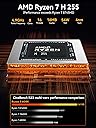
| Additional Features | Dual Large Cooling Quiet Fans with RGB Lighting. (Able to turn off the lighting with Fan Mode button)., Dual NIC 2.5GbE Ethernet, Dual 3.5mm CTIA Ports (Front and Rear), GAMING PC using AMD Radeon 780M iGPU, Oculink Port (Rear Port), HDMI 2.1, DP Quad Display 4K/8K Video Ports, Triple M.2 2280 Slot Expansion. Each Slot 8TB Max. (Total 24TB) |
| Aspect Ratio | 16:9 |
| Best Sellers Rank | #1,294 in Computers & Accessories ( See Top 100 in Computers & Accessories ) #21 in Mini Computers |
| Brand | GMKtec |
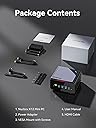
| Built-In Media | GMKtec Nucbox K12 AMD Ryzen 7 H 255 Mini PC Computer, HDMI Cable, Power Supply & Cable, User Manual, VESA Mount with Screws |
| CPU Model | AMD Ryzen 7 |
| CPU Model Number | AMD Ryzen 7 H 255 |
| CPU Speed | 4.9 GHz |
| Cache Memory Installed Size | 32 GB |
| Cache Size | 32 GB |
| Color | Gunmetal(K12) |
| Compatible Devices | Headphone, Keyboard, Monitor, Mouse, Television |
| Connectivity Technology | Bluetooth, Ethernet, HDMI, USB, Wi-Fi |
| Cooling Method | Air |
| Customer Reviews | 4.5 out of 5 stars 1,005 Reviews |
| Display Resolution Maximum | 7680x4320 |
| Display Type | External Display |
| Graphics Card Description | Integrated |
| Graphics Card Interface | Integrated |
| Graphics Card Ram | 32 GB |
| Graphics Coprocessor | AMD Radeon 780M 2600 MHz |
| Graphics Description | Integrated |
| Graphics Ram Type | VRAM |
| Hard Disk Description | PCIe 4.0 M.2 2280 SSD Triple Slots Max.24TB |
| Hard Disk Interface | PCIE x 16 |
| Hardware Interface | 3.5mm Audio, 802.11 ac/b/g/n, Bluetooth 5, Ethernet, HDMI, PCIE x 16, USB Type C |
| Human-Interface Input | Buttons, Keyboard, Microphone, Mouse |
| Item Dimensions | 7 x 7 x 5 inches |
| Keyboard Layout | QWERTY |
| Manufacturer | Shenzhenshi Jimokekejiyouxiangongsi |
| Memory Clock Speed | 5600 MHz |
| Memory Speed | 5600 mt_s |
| Memory Storage Capacity | 32 GB |
| Model Name | K12 |
| Model Number | K12 |
| Model Year | 2025 |
| Native Resolution | 7680 x 4320 |
| Number of Component Outputs | 4 |
| Operating System | Windows 11 Pro |
| Personal Computer Design Type | Mini PC |
| Power Consumption | 54 watts |
| Power Plug Type | Type B - 3 pin (North American) |
| Processor Brand | AMD |
| Processor Count | 8 |
| Processor Series | AMD Ryzen 7 |
| Processor Socket | TSMC 4nm FinFET |
| Processor Speed | 4.9 GHz |
| RAM Memory Installed | 32 GB |
| RAM Memory Technology | DDR5 5600MT/S |
| RAM Type | DDR5 RAM |
| Ram Memory Maximum Size | 96 GB |
| Resolution | 7680×4320 |
| Screen Size | 75 |
| Specific Uses For Product | Everyday Use, Gaming, Video Editing |
| Style Name | R7 H255 |
| Total Number of HDMI Ports | 1 |
| Total Usb Ports | 6 |
| Unit Count | 1 Count |
| Video Output | HDMI 2.1, DisplayPort 1.4, USB4 |
| Video Output Interface | DisplayPort, HDMI, Type-C, USB4 |
| Video Processor | AMD |
| Warranty Description | 1 year warranty |
| Wireless Compability | 2.4 GHz Radio Frequency, 5 GHz Radio Frequency, 5.8 GHz Radio Frequency, 802.11ax, Bluetooth |
| Wireless Network Technology | Bluetooth, Wi-Fi |
| Wireless Technology | Bluetooth, Wi-Fi |
R**R
Great deal, but mine came with a used SSD
Pros: - Small - Powerful (8 Zen4 cores, 16 logical CPUs, Radeon 780M graphics, HX power spec) - (Relatively) low power consumption from being a laptop CPU (Though the HX is not as efficient as the U version) - Comes with a good amount of good quality RAM from a name brand - 2x 2.5G nics - USB4 port (haven't tested it out yet, other reviewers had issues) - Good cooling - Quiet at idle (YMMV) Cons: - Came with a moderately used Lexar SSD - Windows 11 (wiping that put even more write cycles on the SSD) - A U power spec option or BIOS support for lowering TDP would have been nice for lower power consumption - No SATA support - Ethernet controllers are Realtek, not Intel - Wifi also not Intel This is just an initial review, but out of the box I noticed that the 1TB SSD that was included in this GMKtek K6 mini PC had logged about 86 hours of usage in SMART, as well as over 8TB written and 7TB read on this 1TB Lexar SSD. That seems like a lot more than initial imaging and burn-in to me. Over 8 full write cycles for every memory cell will have an impact on the SSD's lifespan. I am only using the included SSD as a supplement to my main SSD, so it's not a big issue, but buyer beware! Also, the SSD did come with an extra heatsink pre-installed. That may improve the longevity of the disk enough to compensate for a lot of the usage. I removed it from the included drive and installed it on my 3rd-party drive instead since I use that one more. Overall, this system seems to work well. I wiped Windows 11 and am using proxmox on it. The Ryzen 7840 CPU is really great for my purposes as a VM server / AI host. In July 2024 I got this for $509. With the 32Gigs of ram and a 1TB SSD that is functioning, at least, it's a really amazing deal. Similar machines from other manufacturers cost hundreds more without the RAM or SSDs, so I'm not going to complain too loudly. In fact, I think it's a great deal from Amazon and GMKtec. Time will tell how well this machine holds up, but the construction seems solid, the cooling seems to be well-designed for this form factor with a fan for the CPU being pretty standard, but a second fan for cooling all the other components is a nice addition that you don't see in some competitors. I will update this review with any developments.
K**E
(K12 - Ryzen 7 H 255) Great value, exceptional hardware and connectivity
This is specifically for the K12 with the Ryzen 7 H 255. Honestly, not a bad deal. The CPU is pretty good for its class, and has very acceptable integrated graphics. The H 255 is seemingly only sold to the chinese market, has no real documentation officially (as of the time of writing), and is essentially a recycled die from better chips that didn't meet the cut so to speak (at least as far as I can find), but I don't see any of those as a real problem; die recycling is perfectly fine if it actually works and is stable, and AMD is usually pretty good at the latter... and it makes me feel a little better that AMD can save something that would otherwise end up being e-waste. Despite the borderline unofficial nature of the CPU, I have not experienced any performance issues, instability, or crashes of any kind after a few weeks. Note that I updated the BIOS and microcode immediately after receiving the unit, and I suggest everyone do the same. The unit itself is from GMKtec, which is a chinese company. However, there were some (good) surprises in the box that tells me they actually cared about the end user experience, though possibly only just enough to make sure that the average joe blow didn't immediately return it because they got pissed off at something that would honestly be Microsoft's fault (eg. the horrendous OOBE for Windows). I choose to believe they actually care though, and somewhat reinforcing that, my email to them was answered the next day (I'll get to what the contents of that was later). The specs of the unit, aside from the CPU which is pretty good itself, are actually darn incredible. OCuLink is a quasi-rare connector, but an *extremely* welcome one! That significantly improves the unit's lifespan and enables mostly modern gaming, provided you genuinely do the research into how to use it (remember, don't plug or unplug it when the PC is on!), though it can already handle light-medium gaming with just the integrated graphics. Though I have not tried the OCuLink port yet, I have no reason to believe it doesn't work or anything like that. USB4 is also extremely welcome, and I can confirm that it not only works, but it follows best practices of how to implement the protocol. Since the port does do PCIe tunneling, it should work with all Thunderbolt 4 appliances out of the box. GMKtec could have taken the cheap way out and omitted this detail, but they did not. Absolutely incredible to have both of these available. There are also, seemingly (I have not opened the unit up yet, no reason to), three M.2 slots, one at Gen4x4 and two at Gen4x2, which is perfectly fine in terms of speed and great in terms of how many slots they offer. I cannot think of any other mini PC with this level of overall connectivity. You lose out on some external USB connectors that would otherwise be present, but USB4 seriously more than makes up for it. The dual 2.5G LAN ports are just the whipped cream on top of all this. Though, not all can be as good. There is no S3 power state support in the firmware, so you're stuck with shutting down the computer, hibernating it, or relying on Microsoft's absolutely abysmal "implementation" of sleep in the form of modern standby (S0). This was confirmed in my aforementioned email to GMKtec's support. Oh well, I have the whipped cream but miss out on the cherry. This may be an oversight on GMKtec's part, but it may also be difficulty getting S3 implemented with OCuLink. Don't know exactly how that works. I'm tempted to knock a star off for this, since S3 is a very, very nice power state to have available, but it's something I'm personally not terribly concerned about, especially with everything else so good. Please, if you're reading this GMKtec, add it in a BIOS update! Would love to see it! There may also be an issue with the TPM, specifically in regards to when the firmware tells the OS to initiate S0 sleep (eg. from the power button short pressed). In such an event, when the computer resumes from S0 the TPM will either fail or lock up. This may be an issue with Windows, or with the TPM, or with just my unit, and it requires a reboot to clear it up. Either way, my way around it is to leave the unit turned on or to just shut it down, but again it's not a concern for me personally, and YMMV. Overall, I would recommend this unit. Though I have not opened it to inspect the internals, nor tested the OCuLink connector yet, I see great value in this unit, and I imagine I will keep it around for a very long time, getting significant usage out of it. I would give it 4.5 stars if that were possible, but for Amazon I will leave it at 5.
C**R
Good performanc in a small footprint
We were looking for a family gaming PC that was small, low cost, and good enough to run most of today's PC games. This computer arrived the day after we ordered it. It was preinstalled with Win11 and was quickly set up and activated. It was a fresh standard Win11 install. All hardware matched the product page. No viruses, malware, or bloatware detected. The setup process was quick. We plugged it directly into our TV with the provided HDMI cable. We connected a wireless keyboard and mouse and were able to use our existing game controllers (8BitDo, Nintendo Switch, old Google Stadia controller). This computer is much faster than we expected. For gaming, we installed Steam and EPIC. The controllers work great with Steam. There are a ton of free games from both services. The 1TB hard drive allows quite a few games to be installed. This computer was intended for gaming and some light video editing. So far it's been constantly used for gaming, but we plan to test out some video editing tools, which we expect will work well based on gaming performance. All in all, this is a great little computer. We can easily move it between rooms. Some games can be a little laggy when using the highest resolution settings on our 4K UHD TV, but adjusting the resolution down a bit fixes that problem without a noticeable difference in quality. In summary this is a phenomenal computer for the cost and size (portability). Great for gaming and also a nice little Win11 PC.
B**L
Good mini pc for the money.
I've had a Intel NUC with a Core i5 for a little over 6 years but it was starting to show it's age a bit. One of the ram slots died, it would not boot if I had any ram installed in the second slot. The CPU fan was also wearing out; 3rd party options that I tried were less than stellar. So after dealing with those issues for a little over a year, I decided it was time for a replacement. It was a good pc but it's time had come. Wanted to stay with a small form-factor pc for various reasons. After checking out other options that are available, I settled on this NucBox K6 from GMKtec. It has a Ryzen 7 7840HS cpu, 32 GB of DDR5 ram and 1 TB NVME drive. I added a spare 1TB NVME drive I had to double my storage as well. Small footprint, supports 3 monitors, option to upgrade/replace components as needed with 2 user-serviceable slots for both m.2 drives ram. It's also fairly easy to take it completely apart for cleaning the CPU fan. The auxiliary case fan is a standard 40mm x 10mm pc fan; that will be simple to replace when/if the fan dies. Ticks all the boxes for me. After working with this for over a month, I've had no issues. There was no extra bloatware installed out of the box that I could find. Windows 11 has been running just fine with updates on. I do a little bit of everything with this computer: I've ripped several hundred DVDs and Blurays (with an external Bluray drive and MakeMKV) re-coding said rips with Handbrake for our media server. Some video editing with CapCut. Some light gaming. FreeCAD for designs for my 3d printer. Photoshop. Inkscape. This computer runs circles around my old IntelNUC. All that said, one thing I don't like about this computer is that there is only one USB C port on the front. The USB C port is what is used for the 3rd monitor hookup. I did not want a cable sticking out of the front for this, so I took it upon myself to address this issue. I designed a new top to replace the top from the factory. It houses a short USB C extension cable with a panel mount jack for ease of installation in the new upper housing. Works great. I can have everything plugged in to the back with minimal excess on the front. The extension plug is also loose enough in the new extended lid to unplug and move aside if I need to plug something in to the USB C port without having to take the new housing apart. I didn't print it with the best settings and it wound up being a little bit taller than I'd like but works for my needs now. I saw another review complaining that the AMD Ryzen 7 PRO 6850H is not running at the speed listed. The listing on Amazon states 4.7ghz, and his is showing it running at 3.2ghz. The speed listed on the Amazon listing is the turbo speed. If you check AMDs website on the CPU you'll see it's normal speed listed at 3.2ghz and it turbos up to 4.2ghz. This CPU is running at spec per AMDs webpage. That is not the CPU that came with mine but I wanted to share that info to avoid confusion. The CPU in mine runs to AMDs specs with no issue. Very happy with my purchase, I hope to get many years of use out of this.
M**T
Powerful little machine, but finicky with egpu. Great support.
This is a great mini PC for the price. By itself it can be used as a small but powerful office or development machine, or even for light gaming. However, when you throw in an eGPU it readily opens up alerting you to do much heavier lifts, like video editing or regular gaming. The only I don't give it 5 stars is that despite it having a USB 4 port, I was unable to use my Razer Core X with the device. Nothing I could do wroth get it detected. I reached out to support abs they were very helpful. I exchanged emails with Julian, who was very knowledgeable and walked me through several rounds of trouble shooting. In the end we determined something about the Razer Core X and the USB4 implementation on this device is incompatible. I was able to get my hands on a different eGPU - and AD-GP1. This eGPU worked perfectly. It was simply plug and play since the AMD drivers were already installed.
W**1
GMKtec K12 Gaming Mini PC: A C&C Generals Fan's Compact Powerhouse
As a PC enthusiast since the dial-up era, I’ve built my share of rigs to fuel epic Command & Conquer: Generals and Zero Hour sessions. I’m not chasing high-end FPS titles—give me base-building and Shockwave tank rushes at 60fps any day. The GMKtec K12 Gaming Mini PC, with its AMD Ryzen 7 8745HS, 32GB DDR5, 512GB SSD, and Radeon 780M graphics, has become my go-to for strategy gaming and everyday tasks. Here’s why this tiny titan earns my nod. This thing is small—think hardcover book size—yet it’s a beast. Setup was a breeze; Windows 11 installed without a hitch, dodging Microsoft’s TPM 2.0 roadblocks. I went local user mode for privacy, and it just worked—no workarounds needed. The K12’s quiet operation is a standout; even during intense Zero Hour GLA campaigns, the fans barely hum. It’s a far cry from the roaring towers of my past, perfect for late-night gaming without disturbing the house. Performance? Stellar. The Ryzen 7 and 32GB DDR5 chew through Generals and Zero Hour at 1080p, delivering silky-smooth battles and fast load times thanks to the NVMe SSD. The Radeon 780M handles particle-heavy Scud Storm effects flawlessly. I’ve also dabbled in Age of Empires II Definitive Edition—high settings, no lag. Multitasking is effortless, with browser tabs and Discord running alongside game sessions. Three M.2 slots and dual 2.5G NICs scream future-proofing, though I’d grab a USB hub for extra peripherals. Downsides? The port selection (HDMI 2.1, USB4, etc.) is solid, but heavy peripheral users might need a dock. Thermals are great, but place it in a well-ventilated spot for marathon sessions. At roughly $500, it’s a steal for the power. For C&C fans like me who want a compact, quiet rig that crushes strategy games without the hassle, the K12 is a winner. Five Stars—ready to command and conquer.
D**E
POWERFUL FOR GAMING/AUDIO PRODUCTION
So much more powerful then I expected, plays Overwatch and some AAA games extremely well! I use this for music production aswell and its perfectly capable. Able to run multiple tracks with heavy vsts, not many clipping and lesser latency then expected. Few things to know before buying: -Led on the top of the system doesnt turn off, couldn't find anything on how to - fans gets a little loud, i would place it on the back of your desk otherwise perfectly capable pc, strong hardware, worth it 100%
N**L
A great mini pc
Absolutely love it,its powerful enough to play games a lot of games, i had emulators from PS3 to Switch working on it along with a some high end gaming at lower setting, but paired with an AMD 7600M XT egpu, it can handle most games at 1080p 60fps. It's compact and quiet with 2 big fans to keep it cool. Highly recommend if you want something cheaper and smaller that a desktop
M**L
Leistungsstarker Mini-PC
Ich nutze den GMKtec Mini PC mit Ryzen 5 6600H unter Windows 11 und bin bisher sehr zufrieden. Das System läuft bei mir äußerst stabil und zuverlässig mit 2 Bildschirmen. Auch im täglichen Einsatz gab es bislang keinerlei Abstürze oder andere Probleme. Besonders positiv überrascht hat mich die Leistung: Neben Windows 11 auf dem Host-System betreibe ich zusätzlich eine Hyper-V-VM mit Windows 11, die parallel läuft. Selbst dabei arbeitet der Mini-PC flüssig und ohne erkennbare Leistungseinbußen. Ein kleiner Kritikpunkt ist die Treiberinstallation nach einer Neuinstallation von Windows. Einige Treiber werden nicht automatisch erkannt und müssen manuell von der Herstellerseite heruntergeladen werden. Die Navigation auf der Webseite ist etwas unübersichtlich und die Suche nach den passenden Treibern könnte einfacher sein. Positiv ist jedoch, dass der Hersteller auf seiner Webseite auch ein komplettes Windows-Installationsimage inklusive aller benötigten Treiber bereitstellt. Damit lässt sich das System bei Bedarf problemlos neu aufsetzen. Fazit: Ein leistungsstarker, kompakter und stabiler Mini-PC mit sehr gutem Preis-Leistungs-Verhältnis. Insgesamt eine klare Kaufempfehlung.
D**L
Competente e compacto
Este mini PC tem funcionado muito bem neste um mês que tenho usado ele. Comprei por 4.500, preço bem mais baixo do que as opções com o processador 8845HS. O processador AMD Ryzen 7 7840HS é competente e praticamente idêntico ao 8845HS, com 8 cores rápidos, e não esquenta demais (temperatura máxima permitida é 100°C, não passa de 85°C em uso pesado aqui), devido ao bom sistema de esfriamento. Alguns compradores reclamam do barulho dos ventiladores internos (tem dois, um pequeno em cima e um maior embaixo), mas a minha unidade é bem silenciosa. Está rodando uns programas para mim que usam 50% do processador e cerca de 73°C o dia todo, todo dia (24/7). A placa de vídeo é a 780M, a mesma do 8845HS, e é bastante potente para uma placa integrada, suportando bem jogos médios e alguns pesados com configurações mais modestas. A BIOS dessa máquina permite alterar a quantidade de memória separada para a placa integrada. O SSD de 1TB é rápido, os 32GB de memória são suficientes para minha utilização. Vem com o Windows completo instalado e funciona bem nos meus testes, mas uso com Linux e tem sido estável. A única reclamação que tenho, que é um pequeno detalhe, é que o sistema não informa a velocidade de rotação (RPM) dos ventiladores, os softwares que mostram esse dado não suportam o sensor instalado. Atualizarei esta avaliação quando tiver mais dados sobre durabilidade.
Ü**İ
FP Ötesi performans canavarı
Harika bir bilgisayar ofisimde kullanıyorum aynı markadan 3. ütünüm.
Y**O
Oculink connection
Excelente, necesitaba una PC con con Xion Oculink para conectar una GPU externa y mi vieja PC no tenía ni USB 4.0, esta PC tiene lo que necesitaba.
A**R
GOOD PRODUCT, GOOD SELLER...THANKS
IT WOULD BE NICE IF THERE WERE WIDER UPGRADE OPTIONS.
Trustpilot
3 days ago
1 week ago