Desertcart purchases this item on your behalf and handles shipping, customs, and support to Greece.
🖼️ Elevate your memories—because your story deserves the spotlight.
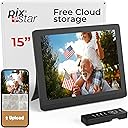
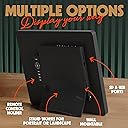
The PixStar 15-inch Large Digital Frame combines a stunning IPS HD display with free unlimited cloud storage and WiFi connectivity, enabling seamless photo and video sharing via email or app. Designed for effortless setup and use, it supports multiple syncing options and offline viewing with internal storage. Bonus features like a motion sensor, web radio, weather updates, and calendar integration make it a smart, all-in-one digital frame perfect for staying connected across generations.


| ASIN | B00MTWDG6W |
| Aspect Ratio | 16:9 |
| Best Sellers Rank | #46 in Digital Picture Frames |
| Brand | Pix Star |
| Built-In Media | Frame, AC adapter, user guide |
| Color | Black |
| Compatible Devices | iPhone, Android |
| Connectivity Technology | Wi-Fi |
| Control Method | App |
| Customer Reviews | 4.6 out of 5 stars 8,716 Reviews |
| Display Size | 15 inches |
| Frame Material | Plastic |
| Global Trade Identification Number | 04897025955110 |
| Item Dimensions L x W | 11"L x 15"W |
| Item Weight | 3.3 pounds |
| Manufacturer | Pix-Star |
| Manufacturer Part Number | PXT515WR04 |
| Memory Storage Capacity | 8 GB |
| Model Number | PXT515WR08 |
| Power Source | Corded Electric |
| Resolution | 1080p |
| Screen Size | 15 inches |
| Touchscreen | Buttons |
| Unit Count | 1 Count |
| Warranty Description | 2 Year Limited Warranty |
C**J
Amazing! Best Digital Frame...We've Bought 4 So Far...
All of this review applies to the 15" Pixstar digital frame. We originally purchased the 10" and found it unimpressive. The 15" inch is phenomenal, though. Very functional, easy to set up, easy to use or even have non-tech grandparents use. Beautiful display. We bought this for: 1) Grown son who moved across the country, and we weren't hearing from him often enough. After he received the frame which we had loaded with 24,000+ awesome photos, we were top of the mind and are still getting frequent phone calls from him. Really great for helping us stay connected. 2) For our own family to help our kids form identity (preteens and teens) with perspective of so much of the good they've had in life. Teens tend to have a narrow focus and can get stuck in "Woe is Me" and feel isolated. We and our kids adore watching this frame and will just stand in front of it, watching the slideshow. The siblings' closeness to each other increased from recalling happy memories they've shared. 3) For *not* tech-savvy grandparents in their 70's who have wifi access but prefer not to have devices running on it. We at first got the Nix 8" Digital Frame ( https://www.amazon.com/gp/product/B07VCCK198/ref=ppx_yo_dt_b_search_asin_title?ie=UTF8&th=1 ), but we were so unimpressed. Upgraded and spent the extra money for this one because the viewing experience is so superior, it's easier to see from across the room, and it has the options for (any memory amount of) SD card or USB, downloads around 32,000 photos (varies depending on quality/how many mb your photos are) and stores them in the frame, so the user doesn't have to use the internet to see photos. It also connects via the internet to online albums such as Google Photos and other photo share apps. That feature is really neat and works well. Our grandparents/parents really liked the frame. 4) Recently bought another one for our grown daughter who moved out, to help her feel connected to her family. Each frame gets registered when you plug it in with it's own email address and account. You can sync all the accounts you have for various frames in one group account and control all of the frames from the one account - changing which album plays, which kind of slideshow, etc. We use both the individual accounts and the group account to control a frame, depending on our what we want. If you want it to really play ALL the photos stored in the frame, make sure you select under "My Frame Configuration" then "Slide show configuration" then under "Playing Mode" select "NORMAL" then "Sorting Mode" select "RANDOM." If you do it with the other configurations, it tends to seem stuck on certain scenes/photos in your library and not play all of them. The above configurations seemed to work and let us see a constantly changing selections of photos. We hope they keep updating the frame and making them because we'll be buying more for other family members. Highly recommend!
J**A
Not perfect but there is a lot to like, biggest plus is it's own email address!!
**UPDATE** They fixed the problem, I can now change the configuration via their website on my Macbook or iPhone without having to use the frame's remote control. There actually is a lot to like, the picture quality is good, it has its own internal storage so it works when not connected to wifi, and it's easy for others to add pictures to, just email pics to the frame's own email address . The menus are a little cumbersome but that's true with most tech devices and after a week it's gotten easier to do what we want to do. I wish they made a 12" model but I'm upping it to 5 stars. **Original review** - My biggest issue is that I can't change the configuration of the frame with my computer, I have to go to the frame and use the remote control or buttons on the frame itself. I've contacted their customer service, they said it should work and I should do a reset. The reset didn't fix it, we've tried two different computers and different web browsers and the "save" button just doesn't work. I got back to them and it's been several days and no reply, fwiw, my laptop is a MacBook and there's a new OS, some tech depts don't work well with Apple. Still debating on whether to keep it or not.
C**S
Excellent Frame - Easy to Use
I wanted to get a WiFi digital frame for my parents and did a lot of research including reading many customer reviews of different options. The PixStar frame was highly rated on Tom's Guide and I've found that source to be a good one in the past so I went with it and I am so happy. Here are some things I love: *The frame is super easy to set up and operate - I set it up at my house on my WiFi and tested it out before sending it to my parents and it worked great. I was able to easily switch it to their WiFi when I went to visit. That being said, my parents are not all that tech savvy, so I had to do the setup. I did try to walk them through connecting to the WiFi over a phone conversation but that was very difficult and did not work very well. To me it was not hard - but it may seem hard to those who are not used to working with things like that. *The frame has an option to just "Play All" and automatically receive making it so my parents do not have to do anything but sit and enjoy. When pictures come, they just show up! My parents love being able to see the pictures and have new ones to look at without having to touch anything. *I can control the frame remotely from my computer even though I live miles away. *It is easy to send pictures through an e-mail attachment or the PixStar app on my phone. *It looks nice and the pictures come through looking good. Some things to consider: *Size. I got the 10" frame and it works well. It is a nice size for a desk but I thought the picture display area would be a little bigger. The next size up, though seems quite big. We can see the pictures fine on the 10-inch but if you want clarity from across the room for people with limited eyesight then a larger frame might be better. They are happy with the size because it isn't too big and they can see it. My observation though is that if there's room for a larger size where they want to put it then maybe go up. *The weather option only shows if the user selects it and plays Web Albums. I could not get it to show in the Play All mode. My parents would have had to go and select it from the menu on Web Albums. So, we do not use the weather. *This frame has A LOT of other options! It has music, games, calendar, etc. I have not used any of those because really my parents just want to see the pictures so that is all we use on it but it works well for that. *Videos may or may not play. I haven't really tried it. There seem to be some options, but we've only done pictures. I sent a picture from my phone that had been taken in bursts and it came through as a movie and the frame played the first shot then put a message saying it couldn't play the video. So I converted the first shot to a JPEG and it was fine. I don't know what it would do with an actual video. We haven't tried that yet. Overall I am very pleased with this frame and so are my parents. They spend hours watching it and it is so enjoyable for them and comforting for me to know they like to watch it. I love being able to send up-to-date pictures and have them just show up. It may take up to 5 minutes sometimes, but it is pretty quick. I hope this review is helpful for anyone looking to purchase a WiFi digital frame.
R**A
SUPERIOR CUSTOMER SERVICE
This is an update/addition to my review of November 2022. As I mentioned in my initial review I did a large amount of research prior to purchasing the Pix-Star 10 inch frame. The frame not only answered all of my requirements, it worked perfectly for almost the entire 1st year. I could not have been more satisfied (I also purchased a 2nd unit as a gift). Recently, a problem developed regarding the motion sensor. I contacted Pix-Star's Customer Support and they recommended a couple of actions which initially corrected the issue but ultimately the problem continued. After about four weeks of trying I advised Pix-Star that none of the fixes worked and the motion detector remained inoperable. They immediately advised me they were sending a new, replacement frame and I received it within a few days. They responded quickly, efficiently, and totally to my satisfaction. They provided a level of Superior Customer Service seldom displayed today. I am providing this added review because they not only deserve it but also for peace of mind for those of you who may be hesitant in making this purchase. Here's my bottom line. It is a great product with all of the bells and whistles I required backed up by a reputable firm providing outstanding customer service. I did a lot of research on a good amount of photo frames from various firms. Assuming similar quality my primary needs were: 1. motion detector 2. ability to use a usb stick 3.load photos via internet 4. auto resizing of photos I decided to go with Pix-Star and what a good decision! The frame itself is basic and looks fine. The most important feature for me (along with those listed above) is how do my photos look when displayed. Let me tell you - in one word FANTASTIC. They look great. For those of you shopping for one of these for the first time (like me) here are some suggestions. When you first get it you will want to load it with current photos. That's why I wanted the ability to use a USB stick. I loaded almost 225 photos immediately. I don't know how long that would have taken via the internet. All I did was go to my PC , down loaded the photos to a USB, and then uploaded from the USB to the frame. Uploading took about 1 minute. The internet is fine for uploading a few photos when you like, but starting off with a large amount may be time consuming. Doing it this way also allowed me to "polish" my selections using Photoshop so they looked exactly the way I wanted. I also was able to resize most of my photos to 8 X 6 (frame display size) so there was no distortion or cropping. I am particular with my photos. This frame provides a lot of flexibility, it is fairly easy to understand, and overall does a great job. It isn't cheap - but it is worth the dollars it cost.
J**I
Excellent features, and very nice picture quality.
This is a really nice frame, with great features. We bought the frame because of its size and features. While we were not really interested in the WiFi capabilities, they do come in handy, especially when you take those one or two pictures with your phone that you want to have on the frame immediately. Simply snap the pictures and email them directly to the frame! Pretty cool. Setup was really easy. Perhaps the intuitiveness of the setup menu could be improved, but it really is NOT that difficult. I was up and running with WiFi emailing pictures to the frame within 15 minutes. I have read recent and past reviews, and like all items being reviewed, and especially with 600+ reviews, the reviews are all over the map, from extreme to extreme. So, let me give you my view, having had several picture frames come and go, from Sony to Alturatec to Photomate. PROS 1) Great features. Our specific draw to this frame was the ability for random slideshows. With 3000+ photos currently on the frame, it was important that there be a random draw of photos. Other frames always start from the "beginning", wherever the frame choses that to be. VERY few other frames have this feature. Also, the slideshow picks up where it left off at each power up. 2) The two turn automatic ON/Off cycles is very nice. So, you can set a time period for the morning, then another for the evening. Or, you can just choose 1 time period, or no time period. 3) Picture quality. While other reviews complained about the "washed out" pictures quality, I am here to tell you that ALL frames are about the same. If you find your pictures appear to be washed out, reduce the brightness. I have our frame set at 10% and it is fine. Contrast is a problem with all frames I have ever owned. It would be very simple for the manufactures to put in a contrast control. I am not sure why they don't. I have also found that for good quality pictures with great native contrast, the frame does a nice job reproducing that quality. So, while the frame may have a contrast issue, I would suggest that the quality of the original picture also takes some of the blame. And since most of us are not professional photographers, I would suggest that most of our pictures will be a reduced quality anyway. So don't blame the frame? CON 1) Contrast. While I think the pictures are just fine, as good as my Sony frame I have at work, a contrast control would be nice so that the contrast could be adjusted at brighter settings. Since the frame cost around $200, I think this feature should be included. But it appears that over the air updates are available, so maybe they will add this feature. One final comment. We looked for several months for the right frame. This frame really stands out in turns of features and quality. I really don't think you will be dissappointed with this frame. I hope this review helps.
D**E
MUCH BETTER THAN EXPECTED
I bought this frame for my dad's 90th birthday. I did quite a bit of research before deciding on this frame. I read all the recent reviews that had 3 or 4 stars so I could learn about the pitfalls of each. I wrote down some of the issues other people had. In the end -- even though others said it had problems -- this frame best suited my needs. I received this photo frame today. I spent about 5-10 minutes setting it up and 30 minutes testing everything. Before I get into the meat of this review, I first want to say the 15 inch screen is HUGE. I might have bought the smaller one if I'd seen them in person. BUT, my dad will LOVE this size and he'll feel very special. DETAILED REVIEW: I suspect that even the recent reviews were written about an older version. Following is my experience. - NEW PHOTOS BY EMAIL: I adjusted the settings to show the newest/recent photos first. (One review said new pics went to the end of the cycle.) - UPLOADING MULTIPLE PIX: I uploaded several photos at a time, both by photomail AND directly from my PC. (One review said only one pic at a time.) - USER INTERFACE: The user interface on the frame (accessed with the remote) AND on the user interface on the website are both intuitive, well organized, and function well. (One review said it was an old user interface. If it's "old" it's still easy, and understandable.) - STABILITY: I could leave the photos to upload (on one tab of my browser) and come here (on another tab) to start writing the review. (One review warned not to leave the screen until a process is done.) - PHOTO QUALITY: I'm a amatuer photographer and picky about the photo quality. But this is for my dad. The photos are NOT from professionals, but from family and friends. So, the quality of the photos is just fine for everyday viewing. (One person said the photo quality was "so-so". It is by professional standards. Again, my dad and other family members are not looking for professional photos -- they want to see their grandchildren happily playing in the sandbox.) - BRIGHTNESS: I did notice that I prefer the brightness to be on the lowest setting. The pics appear washed out a bit if the screen was brighter. There are several settings for brightness. (FYI, the only weird thing I have run across is that the Brightness is on the "Auto ON/OFF" menu. - SWITCHING WIFI: I was concerned that the user interface might be clumsy, making it difficult for my dad to switch to his wifi when I ship the frame to him. (I'm in CA. He's in OK.) I now have no worries. It's just like any device; there's a list of wifi signals, you choose one and enter the password. Done. *** OVERALL: I'm actually quite impressed. I expected FAR MORE weirdness and glitches. I've already sent the frame's email address to a few people. I'm excited to send such a well designed product to my dad.
S**H
Tried several frames and this the best by far...
I had a very old digital frame that stopped working a few months ago, since then we have been trying several frames to replace it. I can't believe that most of them are such low quality. The first one we purchased had a horrible interface, useless manual and did not take the configuration, I set it to turn on at 8am and off at 10pm and did not work. It stayed on until manually turned off and stayed off until manually turned on. We purchased another one that seemed to work but after a month the touch screen (only way to configure it) went bad and started changing the configuration by itself, could not apply warranty because I lost the receipt (should have bought it from Amazon). I purchased a third one that seemed flimsy and cheap and also came with useless instructions so I returned it. All these 3 frames on the lower rage of the price (between $60 and $80). I was about to quit when I found this frame that seemed better, some bad reviews but In my opinion not about major issues. Was not sure because price was significantly higher than most digital frames but at the end I decided to try it...I'm glad I did it!!! This frame seems solid and good quality, instructions are clear and cover all options on the menu. Remote control is one of the best I ever seen for a device like this and works like a charm. Configuration is easy (even without the manual) and works as expected. I tested it with pictures from my DLNA server, from the SD card and from internal memory and everything worked fine. It turns on and off according to the configuration and has several options for picture display, I'm currently using collage of 5 photos which looks really nice (may look better on the 15 inch frame). It also has some features I will probably never use like games, alerts, and online radio stations but they are good to have in case ever needed. I highly recommend this frame if you have the budget, it is totally worth the price, I will just need to test the longevity, I just hope it does not break in a month.
P**Y
The website makes it worth it
Pixar is the best that’s the only one that I have found that has a website that will hold all your photographs. Makes it so much easier to load them to the picture frame on my computer rather than transferring everything to USB and then the frame. Their website allows you to set up different albums and either play all the albums or just the ones you want and does not charge any storage fee
E**A
Atendimento de expectativas
Amei o produto. Envio fotos, videos do instagram, facebook .... facilmente. Excelente. Recomendo.
N**L
Ottimo acquisto
Comprato com regalo per mia nonna ed è stato molto apprezzato, con SD ho potuto inserire moltissime foto, e tramite l'upload via email ho permesso ai vari parenti di poter dare il loro contributo. L'accesso da remoto mi permette di controllare i contenuti. L'utilizzo è semplicissimo , impostato per funzionar ein modo automatico e con un telecomando semplice da usare. La configurazione è stata un po' laboriosa ma non troppo complessa. L'unico limite è il caso di alimentazione che non permette un uso appeso a parete ma solo in appoggio su un piano.
B**B
This is my second unit only problem is it is not sold with NZ or Au plug
On one display we email family photos and on other travel photos from cloud Both systems work great
C**N
cadre photos
Déçue, problèmes au niveau des formats autorisés. Manque une batterie interne
D**E
Storie
Perfetta per rivedere le proprie foto
Trustpilot
2 weeks ago
1 month ago