Desertcart purchases this item on your behalf and handles shipping, customs, and support to Greece.
๐ง Elevate your audio gameโditch the noise, keep the clarity!
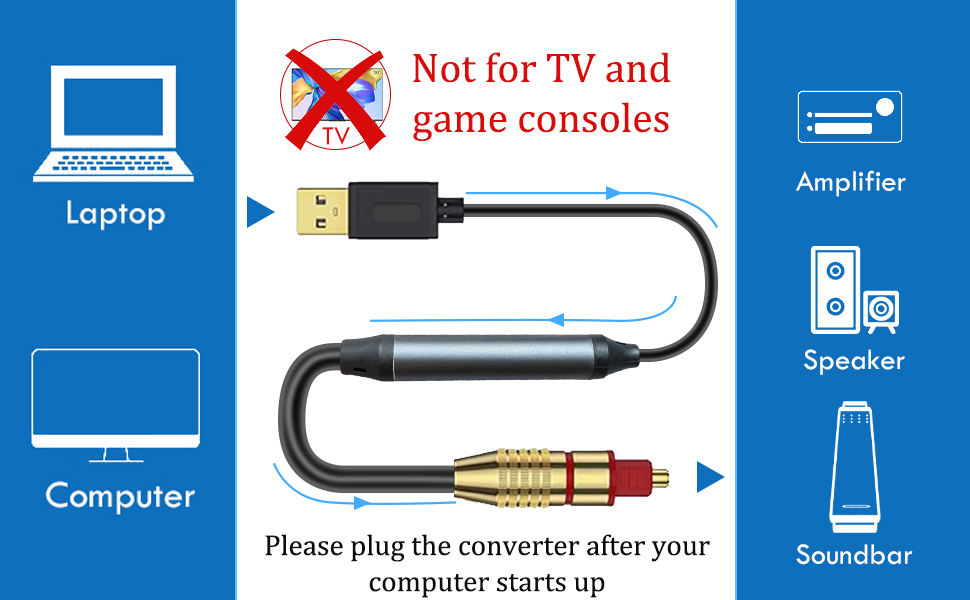
The Tackston USB to Optical SPDIF Toslink Audio Adapter converts USB Type A audio signals into high-fidelity optical output at 24-bit/96KHz, enabling seamless connection from computers and laptops to digital sound systems without drivers or external power. Ideal for professionals seeking pristine stereo sound with minimal setup, it supports Windows, MacOS, and Linux but is limited to stereo output and is not compatible with TVs or gaming consoles.


| ASIN | B0CGVK3MC1 |
| Audio Output Mode | Digital |
| Best Sellers Rank | #103,151 in Electronics ( See Top 100 in Electronics ) #191 in Digital-Analog Converters |
| Brand | Tackston |
| Brand Name | Tackston |
| Compatible Devices | Laptop, Computer |
| Customer Reviews | 4.2 out of 5 stars 210 Reviews |
| Interface | USB, Optical TOSLINK |
| Interface Type | USB, Optical TOSLINK |
| Item Highlight | Works on Windows & MacOS Systems, One-way from USB to Optical, Not for TV, Not Support 5.1 Surround Sound, No Driver Required |
| Item Weight | 0.15 kg |
| Manufacturer | Tackston |
| Model | USB to Optical 1.5M |
| Number of Channels | 2 |
| Number of Items | 1 |
| Number of Packs | 1 |
| Number of Pins | 4 |
| Part Number | USB to Optical 1.5M |
| Unit Count | 1 Count |
H**Y
Works exactly as it should...just make sure it's what you are looking for depending upon your setup
I was given a BOSE SOLO 5 soundbar from a friend. It sat in a box for nearly 6 months because this version is not AIRPLAY compatible and nearly every other audio device in my house is. It has Bluetooth, but that technology really only accepts a single connection vs AIRPLAY which will allow all compatible speakers to connect at the same time in different rooms with individual volume control and delay free audio transmission. Fast forward 6 months after a move and I start looking for some new PC speakers for my office. I had an old pair of DELL speakers with a small bass box and 2 desktop speakers that I think I've had for at least 15 years. They've worked well, but had developed an annoying hum whenever the power was turned on. I decided the BOSE SOLO 5 soundbar would be perfect for the office since it's a single connection and I'm very familiar with BOSE quality and sound since I have a 5.1.2 ATMOS BOSE surround sound setup in my living room. The BOSE SOLO 5 has 3 audio connections available: 1) A standard 1/8" headphone jack 2) A single RCA connection (the old red, white & yellow push in connectors which used to be on every TV & 3) An optical audio input. Of those 3 options, only the optical audio is truly a digital connection. I decided I wanted to use that connection directly to my PC for the best audio signal available. However, my PC motherboard doesn't have an optical audio out port on it. So, I did a quick search on Amazon and found this USB-A (standard flat USB connection) to an optical audio connector. My plan was to plug the USB port into the PC and the optical audio into the soundbar for all my PC audio. I ordered the cable and it was going to be several days before it arrived. In the meantime, I connected a standard 1/8th headphone jack cable to the PC audio output and into the same input on the soundbar. It worked perfectly and sounded great. When the optical audio cable arrived, I swapped out the cables and everything worked exactly as it was designed. The PC immediately recognized the USB audio device was connected and I was able to switch to that audio source by clicking the speaker icon at the bottom of the screen (within Windows), and selecting the USB AUDIO device from the provided list. Unfortunately, the way optical audio is configured on a PC, it was not the ideal setup for me (and I will get into the technical specifics below). Before I do, let me reiterate that this cable does EXACTLY what it's designed to do. It feels solid in your hand, the connections are secure and it 100% converts your digital USB-A connection to a digital optical audio connection that your receiver, soundbar or other audio device will accept and play. It's also reasonably priced for the quality and functionality, so for all those reasons, this cable is getting a 5-star review. Now, on to the reason I won't actually be using it. As I stated earlier, my desire was to get a digital audio signal to my soundbar. When I connected this cable to my PC and the soundbar, the volume controls on my PC (including my multi-media audio controls on my keyboard) become useless. Unlike a standard 1/8" headphone jack connection plugged into your computer, this optical audio setup only uses the audio source as your volume control. One would think that since the computer is your audio source for the optical audio, it would work just like any other connection. But that's not exactly true. The audio source on a PC is whatever is actually playing the audio. For example, to test my audio connection, I played music through Spotify on my PC. Spotify is an installed program and has it's own volume controls built into the player (as do most video & music players on a computer). So, Spotify is playing music and I'm very happy with the sound quality of the soundbar. But when I press the mute button on the keyboard (acknowledged by the PC with an "X" through the speaker icon in Windows) the music continues to play. The volume slider of the computer does not affect the soundbar volume in any way. The only way to adjust the volume of the soundbar is to adjust the Spotify volume slider within the program, or use the soundbar remote to change the volume up or down. As a PC speaker, my plan was to set the soundbar level (via soundbar remote) to roughly 75%, then use my PC audio controls to adjust daily volume (including the mute functionality) whenever I wanted. Since the volume controls don't change any volume with the optical audio into the soundbar, even the normal Windows chimes (new email notifications, window prompts, etc...) would come through at whatever volume the soundbar was set to...in this case very loudly. Not having full PC volume control was a deal breaker for me. As much as I love knowing I'm getting the best digital audio quality, this specific adapter technology is setup such that it is not conducive for a normal computer setup, unless you wanted to ONLY control your volume for a specific app or through the soundbar remote. If you are using your computer as a home theater setup, none of this would be an issue for you since you would probably plan to control your movie audio via the soundbar/receiver remote anyway. For my specific PC audio setup, it's just not what I wanted and have gone back to the 1/8" headphone jack connection for full audio control via my multi-media keyboard buttons. I do not know without testing it, if a built-in optical audio port on a PC motherboard, or a separate optical audio PCI card physically installed on your PC, would function the way I was hoping for or not. All I know for sure is, this adapter does not. Hope that helps someone looking to do the same thing.
A**D
Works great on PS5 with soundbar
Writing this almost immediately after getting it hooked up and will certainly update this review should it fail on me in the long run. Needed this after getting a new PS5 with monitor setup and realizing that Sony, being as outdated as they are, was lacking adequate audio options on this console as well. (No dedicated audio port on a console is ridiculous.) The only real option they want you to use is to hook it up to a TV and then from there reroute the audio to wherever you want. With a monitor that is not an option. My soundbar is a SAMSUNG B-Series Soundbar HW B400F with only optical, HDMI, and USB. PS5 only has one HDMI, and my monitor only has digital audio out and the conversion options for that to optical suck. I tried USB to USB but my soundbar didn't recognize it. My only option left was to find a USB to optical cable and this one worked. On PlayStation there is typically an issue with USB audio which is that the volume will be incredibly low. Experienced this first hand on my PS4. Was worried it would be the same here, and at least for me and my setup this is not the case. I am so so so so happy about this. No audio delay either. Audio quality is fantastic and as immersive as you'd hope. If I just described your exact situation, this is seemingly your best option (and a perfectly good one).
H**P
Works with Samsung Odyssey G8 (G80SD) OLED monitor
Works perfectly with my Tizen OS Samsung Odyssey G80SD OLED monitor. I simply plugged it into one of the available USB ports on the back of the monitor and switched the sound output on the monitor to USB and plugged the optical end into my Ultimea B30 Pro compact soundbar and it works flawlessly. Sound quality is perfect, no distortion or any noise. Super easy to install and use. The adapter looks and feels high quality. Really happy with the purchase.
J**S
Does as Expected for My Mac Setup
I purchased the Bose smart soundbar to use with my Mac but was surprised that it did not possess an AUX jack to plug in from the computer. It did have the optical port but my Mac doesn't have that so I needed an alternative. I was surprised to see that there are USB to optical cables and was happy to find this one so I purchased it. Upon arrival and installation it did not work. But as explained in the product description, it will not accept the volume control from the source so I needed to use the remote for my soundbar. So after swapping usb ports and tinkering with a few things, I grabbed the Bose remote and hit the volume up button and VOILA! I had sound. It works great. ;) I have game consoles connected to my Mac and have really bad audio lag with the wireless Bose so this fixed that and made me a happy customer. The only downer is not being able to control the volume from the source and needing to with the Bose remote. But it's a minor inconvenience.
E**N
Buzzing sound after 8-10 minutes
Initially the adapter worked fine, but after using it for 8 to 10 minutes a loud buzzing sound is heard in the audio. This buzz varies in volume and tone based on the music being played. The buzz then fades out, but appears again and again. When I temporarily unplug the adapter from the USB jack it sounds fine for a while, but the buzzing appears again after 8 to 10 minutes. Unplugging apparently resets the adapter until the problem appears later. Unacceptable. I'll be returning it. I'm using the adapter with Windows 10 with the Rockville RDAC5. I have tried various music played from WinAmp and YouTube and both exhibit this buzzing noise after a while. I've also tried different USB ports (3.1 and 2.0) which all exhibit the same problem. I've tried the RDAC5 with the optical output from a TV and that works fine, so the problem is clearly in the adapter. The package insert instructs setting the sound to "USB SPDIF Adapter" on Windows, but that isn't available. Instead the Windows 10 device shows as "Speakers (USB AUDIO DAC)". The Windows 10 volume slider has no effect. The audio is at maximum volume and must be controlled by the attached optical device (in my case Klipsch 2.1 speakers).
N**R
It does what it is supposed to do
Be aware that max output for this product is 16bit x 48
W**L
It does what it says!
This was purchased to play digital audio files from an external HDD through a computer to a receiver. I tested it with three laptops - Ubuntu, Linux Mint, and Windows 10. The device was recognized by all three laptops without the need for drivers. I use Rhythm Box for the Linux platforms and used Windows Media Player & VLC on the Windows laptop, and they all worked perfectly. For the price, it can't be beat. Keep in mind it's just for stereo, and it sounds great. Truly a plug and play option.
D**J
Excellent Quality - Easy to Use
Connects my laptop to my receiver with optical input. Perfect match. Laptop detected cable and sent audio to cable with no issues. The sound output is excellent. Not audiophile quality but close enough for a good digital conversion to optical. Highly recommend for my purpose.
E**A
Funcionรณ a la primera
Funciona a la primera sin necesidad de alimentar externamente el dispositivo, la consola lo alimenta lo que hace que su instalaciรณn sea mรกs limpia
A**S
Bewertung des Kabels
Phantastischer Sound mit dem neuen Kabel. Hat sich wirklich gelohnt
P**T
Works great
This works as advertised. Highly recommended.
A**R
Perfect for PS5
Works perfect with PS5, PC shows 16bit/48kHz maximum though. Which is fine for PS5 because USB audio is limited to 16bit/48kHz anyways, just keep in mind.
C**F
funktioniert an ps5
Hab mir das Kabel bestellt weil die Ps5 kein optisch Eingang hat ,und es funktioniert wunderbar klare Kaufempfehlung
Trustpilot
1 month ago
1 month ago