Desertcart purchases this item on your behalf and handles shipping, customs, and support to Greece.
๐ฎ Elevate your game setupโdock, charge, and dominate in 4K glory!
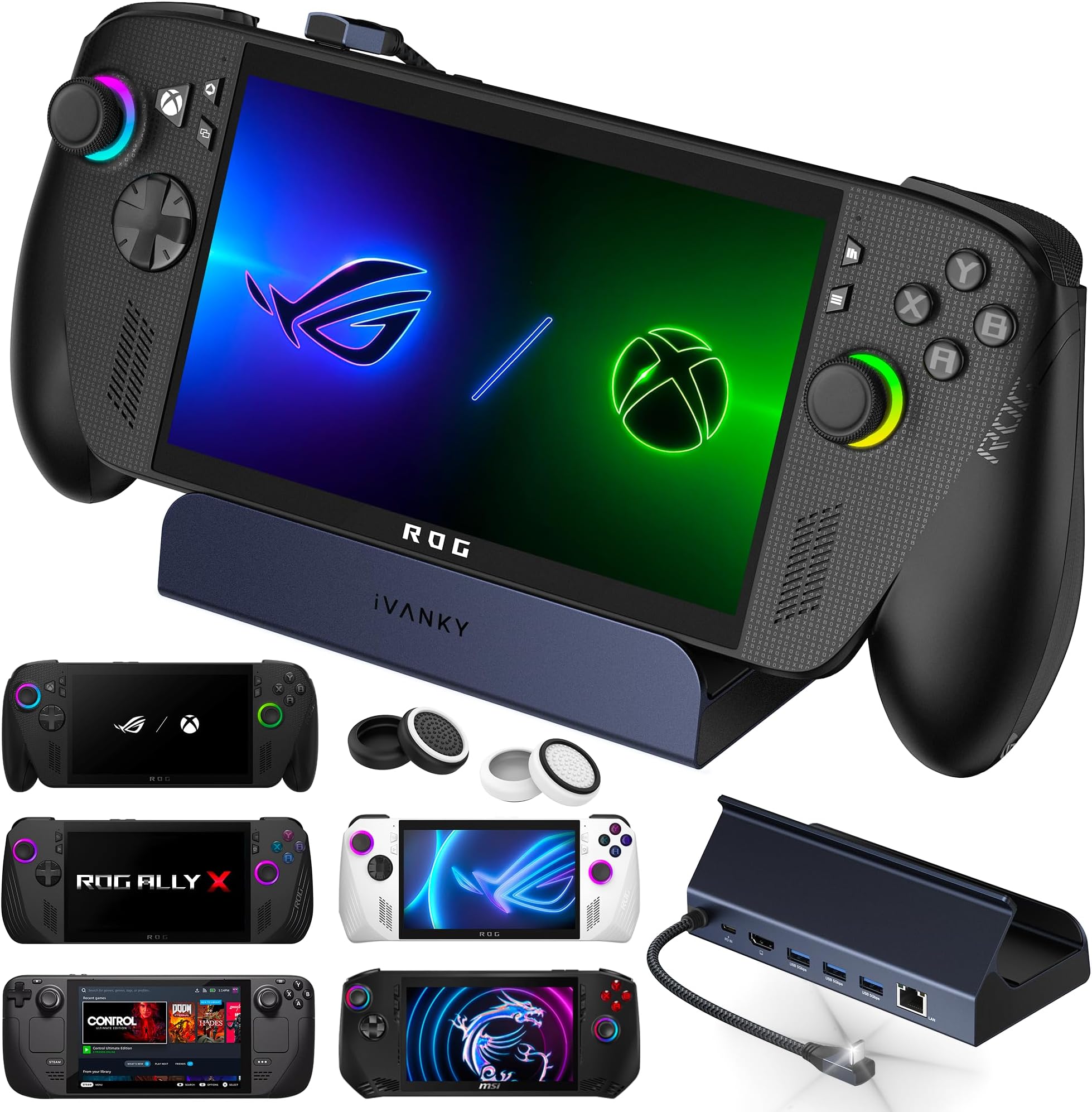
The iVANKY 4K@144Hz Docking Station is a premium 8-in-1 hub optimized for ROG Ally and similar Type-C gaming devices, delivering ultra-high-definition 4K visuals at 144Hz via HDMI 2.1, stable 1Gbps Ethernet, multiple USB 3.0 ports, and up to 100W fast charging. Designed for seamless plug-and-play use, it transforms handheld consoles into powerful desktop setups with robust build quality and a 24-month warranty for dependable performance.


| ASIN | B0CKR4K5Y4 |
| Best Sellers Rank | 3,323 in Computers & Accessories ( See Top 100 in Computers & Accessories ) 23 in Docking Stations |
| Brand | IVANKY |
| Brand Name | IVANKY |
| Colour | Blue Gray |
| Compatible Devices | Asus ROG Ally, Valve Steam Deck, Lenovo Legion Go, iPad(2018 and later), Other Type-c Gaming Console |
| Compatible devices | Asus ROG Ally, Valve Steam Deck, Lenovo Legion Go, iPad(2018 and later), Other Type-c Gaming Console |
| Customer Reviews | 4.5 out of 5 stars 1,633 Reviews |
| Hardware Interface | USB 3.0 |
| Hardware interface | USB 3.0 |
| Item Highlight | 8-in-1 Steam Deck Dock, ROG Alloy/Valve Stream Deck OLED/MSI Claw Hub, HDMI 2.1, 1Gbps Ethernet, 3*USB-A 3.0, 100W Charge |
| Manufacturer | iVANKY |
| Model Number | VCA23 |
| Number of Items | 1 |
| Number of Ports | 6 |
| Number of ports | 6 |
| Product Warranty | 12-Month Warranty |
| Total HDMI Port | 1 |
| Total USB Ports | 4 |
| Total USB ports | 4 |
| Wattage | 100 |
O**N
Did exactly what I wanted it to do
The iVANKY 4K@144Hz ROG Ally Dock has been an absolutely fantastic accessory and has worked flawlessly from day one. The build quality feels premium, sturdy, and clearly designed with handheld gamers in mind. Itโs compact enough to fit neatly into my setup while still offering all the ports and connectivity I could need. Video output is excellentโrunning 4K at 144Hz looks incredibly smooth and sharp, whether gaming, browsing, or using the ROG Ally as a desktop replacement. Connection stability has been rock solid, with no dropouts, flickering, or connection issues. What really impressed me was how reliable it was when I used it to install SteamOS on my ROG Ally. The dock handled everything perfectlyโUSB devices, external storage, display output, and network connectivity all worked exactly as they should, making the whole installation process smooth and hassle-free. It genuinely turned the Ally into a proper mini PC setup. Charging passthrough works great, the ports are well laid out, and everything just feels plug-and-play. Overall, this is a high-quality dock that delivers excellent performance, reliability, and versatility. If you own a ROG Ally, this is easily a 5-star accessory and highly recommended.
D**6
Great replacement dock
Bought this as a replacement after my Legion dock died after only about a month. So far Iโm really impressed with the iVANKY dock. It was easy to set up and worked straight away with my handheld and monitor. The 4K 144Hz support is a nice bonus and everything feels solid and well made. The extra ports are useful too, especially when using it as a proper desktop setup. Hopefully this one lasts a lot longer, but so far itโs been a great replacement and Iโm very happy with it.
K**G
Perfect for Legion Go S.
I bought this dock to use with my Lenovo Legion Go S Z2E and straight out of the box it works perfectly. I use the 65 watt charger that came with my Legion to plug into the dock and the dock itself then allows my Legion to sit nicely in position while its being charged or used. Apart from the port to plug your charger into, there are an additional 3 USB type A ports to plug in peripherals and also an HDMI 2.1 port for monitor connection and an ethernet port should you want to connect to your network wired. I currently use two of the USB ports for a mouse and keyboard and I have also used the HDMI port to hook up to my monitor. In use, the streamlined nature of the Steam OS on the Legion make this a very easy plug-and-play solution. As soon as I power up my device, it connects straight away to my monitor. Things are even better when you go into desktop mode as the OS knows that you are docked and it immediately treats the screen of the Legion as an extended desktop screen! The only thing that I have had to set up 'manually' was the audio output as in docked mode the audio defaulted to the Legions speakers rather than the HDMI audio from my monitor. Overall a highly recommended solution for docking your Legion Go S, especially if you wish to take full advantage of the desktop mode offered by Steam OS.
A**R
Plenty of games and great controllers and very easy to set up
Had all the games i liked and the controllers are very good im very happy with it theres so many games and its got my favourite game on lynx which ive wamted for years
R**.
Itโs good
Does the trick. Well made.
S**M
Some USB-PD related issues, but overall functional with the right supply. A good purchase.
This dock is pretty plug and play and feels well made with plenty of IO ports, but there are some important caveats when I tried it with an ROG Ally: When used with a Dell Laptop 130W USB-C supply, it charges the battery, allowing for 30W Turbo mode. When used with the OEM ROG Ally 65W supply, it charges the battery, allowing for 30W Turbo mode. When used with an Anker A1383 65W Power Bank, it charges the battery, allowing for 30W Turbo mode. When used with an Anker 317 100W USB-C supply, it seems to succeed but slowly discharges the battery, while still allowing 30W Turbo mode for some reason. It gives no warning like you see when you use an inadequate supply (the i over the battery indicator in Armory Crate). I'm unsure of why the USB-PD arbitration results in some chargers failing to deliver the required power, but it seems to be an issue of compatibility between the firmware of the supply and the dock itself, as the Anker 317 is capable of charging an ROG Ally directly without issue when there's no dock in the middle. It's also not a matter of overall power, as the 65W capable power bank was able to run the Ally in 30W Turbo while also charging through the dock. This product works, provided you have the right charger (it does work with the stock ROG Ally 65W supply).
M**D
Recommended
Does everything as advertised. My MSI Claw 8 ai+ fits perfectly.
J**D
Power supply issues (Resolved) :)
Updated review: I cannot fault the customer service, they have been amazing. After having one that went faulty with power input issues they contacted me wishing to send out a new one. Brilliant customer service. 5*
P**E
Produit non adaptรฉ ร un rog xbox ally X + chargeur problรฉmatique
Produit non adaptรฉ au ROG XBOX Ally X, la version xbox avec ses poignรฉes plus imposantes pose un sรฉrieux problรจme, le dock ne retient pas le ROG. Qui plus est, le chargeur achetรฉ avec, n'est pas exclusif au territoire franรงais et l'adaptateur fourni pour l'embout de la prise ne permet pas la charge. Donc cela fait quand mรชme beaucoup, ร รฉviter pour un ROG ally XBOX + une prise pas destinรฉe au marchรฉ franรงais, je ne saurais que trop conseiller de prendre un chargeur sans adaptateur, donc ne pas prendre de chargeur chez eux. Le service commercial iVANKY a รฉtรฉ trรจs "classe", ces derniers m'ont remboursรฉ les 7 โฌ pour l'embout d'adaptateur au courant europรฉen, et ce, alors que je ne leur demandais rien, preuve s'il en est, de leur sรฉrieux. Concernant la problรฉmatique de maintien de la rog xbox ally X, vous devrez utiliser le support carton fourni avec (mรชme si ce n'est pas idรฉal, notez que le problรจme ne concerne que la version xbox). Note mise ร jour.
A**H
The Type C angle is annoying
The docking station type C connector to the handheld sometimes stuck and the angle is very annoying when you try to connect or disconnect the station.
R**O
Simple install and good quality
Works well with my steamdeck. Hdmi not included. Highly recommend, the quality is great
H**A
Great dock for Asus Rog Ally
Its a great dock, good build quality, has ethernet, hdmi and 3 USB-A ports alongside power delivery port which are good enough for attaching additional gamepads, mouse/keyboards to operate Asus Rog Ally as a full desktop pc. Its just plug and play and offers good sturdy stand for rog ally. I got it for around Rs. 5650 with card offers on sale and for this price or around 6k I think its worth it. I am able to use Turbo 30W mode of rog ally on this using rog ally's adapter but a adapter upto 100W could also be used with this (this doesn't come with any power adapter). Also, I have a 150Mbps connection and using the lan cable I am able to see it using full bandwidth.. I have also tried copying files using Lan from another computer to this and I am able to see 100MB + (Megabytes) per second data transfer speed which is great.
R**D
Display problems in just a couple of months
Lasted less than a year. In approx 5 months it started giving connection problems while randomly using it, the display will disconnect and connect every 10 minutes or so, extremely annoying and extremely dissatisfied. Yeah sure when it doesn't do it, it is a fantastic product, many usb ports, a god ethernet port too. I keep using it as a usb hub and it has been almost a year but the important part which is the docking hdmi is having problems and it doesn't feel good. EDIT: After doing my initial 1 star review I got a message from support where they address my issue and even get a replacement unit. Honestly I didn't expect any of that, so they were better than expected. Thanks again for everything.
Trustpilot
2 weeks ago
2 weeks ago