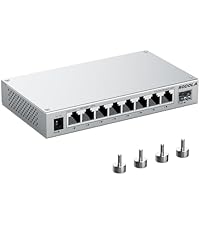
🚀 Elevate your network game with silent, smart, multi-gig power!
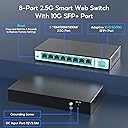
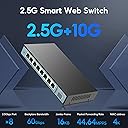
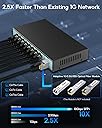
The SODOLA 9 Port 2.5Gb Smart Web Ethernet Switch delivers 8x 2.5G RJ45 ports plus a 10G SFP slot, enabling blazing-fast multi-gigabit connectivity. Its fanless metal design ensures silent, durable operation while advanced features like Link Aggregation, VLAN, QoS, and IGMP support provide professional-grade network management through a user-friendly web interface. Perfect for upgrading home labs or small business networks, it offers seamless compatibility with modern 2.5G devices and a robust 60Gbps switching capacity to handle heavy data loads with zero latency.


| ASIN | B0CFQKYDRM |
| Best Sellers Rank | #1,229 in Computer Networking Switches |
| Brand | Sodola |
| Built-In Media | User Manual, 9 Port 2.5G Managed Ethernet Switch, 1 Power Cord |
| Case Material Type | Metal |
| Color | Black |
| Compatible Devices | 2.5G NAS, Wifi 6 AP, Wifi 6 Router, 2.5G Gaming PC, 4K Video |
| Customer Reviews | 4.2 out of 5 stars 239 Reviews |
| Data Transfer Rate | 2500 Megabytes Per Second |
| Included Components | User Manual, 9 Port 2.5G Managed Ethernet Switch, 1 Power Cord |
| Interface | RJ45, SFP |
| Item Dimensions L x W x H | 7.48"L x 3.94"W x 1.1"H |
| Item Weight | 0.66 Kilograms |
| Manufacturer | Shenzhen hongyavision Technology Co.,Ltd. |
| Mfr Part Number | 8X2.5G+10G SFP(Managed) |
| Model Number | 8*2.5G+10G SFP(Managed) |
| Number of Layers | 2 |
| Number of Ports | 9 |
| Platform | Not Machine Specific |
| Product Dimensions | 7.48"L x 3.94"W x 1.1"H |
| Switch Type | Easy Web Managed Switch |
| Warranty Description | 1 Year |
S**D
Great cheap switches. Few problems quickly fixed.
Purchased 3x of these switches, from SOLDA to upgrade my home network. I got 2x 6 port with 2 SFP+ and one of the 8 port with 1 SFP+. I have most 2.5G RJ45 ports with cat5e on 2.5G and 1G. One of the switches tied into existing network that uses using 2x SFP+. It runs super cool compared to any other SFP switch I own. Overall the price is an excellent value saving me hundreds of dollars over name brand (for managed 2.5G switches). I have an existing Unifi network and didn't want to spend $200 more per 2.5G Unifi switch or wire in additional networking into my home. Speed: Iperf test TCP with 2 devices with 9k MTU on different ports in parallel for 30 seconds. 2.44Gb/s on one device, 2.46Gb/s on the other. UDP iperf tests showed 0% packet loss, 0.007ms jitter. Features: I am using the following features. All work well with minimal issues. VLANs tagged, native (PVID), and untagged. Jumbo frames at 9k. IGMP Snooping. 3x port LACP Trunk. RSTP with one SODOLA switch as root worked great and without any issues. QOS on Ports. Issues I faced: 1. Admin interface was at 192.168.2.1 and I am under a different subnet. I first plugged it into my PC and setup DHCP and then moved it into desired room. One thing the interface doesn't tell you is you have to go to Tools -> Save to store settings when power cycles. Lost settings a few times before realizing it. 2. My network doesn't have loops, but it went down multiple times during setup. What I found is that STP or RSTP must be enabled. 3. Don't send ICMPs to the switch. I sent 9k ICMPs to test jumbo frames and every time it crashes the management interface and has to be power cycled. All issues were very minor with workarounds.
K**S
Great little managed switch
Picked up this switch as I'm upgrading my homelab to 2.5G network. One of the things I needed to do was to create different vlans using Opnsense to separate my lab from the rest of the network as I'm running a lot of multicast video. Good news: - It works, and its fast I'm able to transfer full line rate - Makes almost no noise - Dosent seem to have a large power draw Meh news: The UI is very simple but setting up a vlan is a little trick you need to configure 2 parts. Lets say your vlan is vlan50 be sure to assign your untagged port to the vlan in Configuration > Vlan > 802.1Q Vlan. The next step which took me forever to figure out is ALSO go in to Configuration > Vlan > 802.1Q VlD and add the same ports to match the VID. Or else you'll never get the port on the vlan. Some obscure googling on a random comment lead me to find this solution. Posting it here for the next person, hope it saves sometime. overall besides the issue which has a solution, its a great price for a managed switch that works great at 2.5G (havent tested 10G but I have no reason to think it doesnt work well)
I**E
Very impressive managed Switch
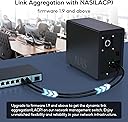
Edit: As of late Oct 2024, the switches have performed wonderfully. It logged 2 bad packets coming from a device on port #5 (whatever device that might be, I don't really care) out of multiple terabytes of transferred data. One thing I did note is when the switch is on DHCP, it works great, then after a few months you go back and find it offline. So where did it go? Back to 192.168.2.1, it's default. Easy fix, simply take it off DHCP and assign it a static and ensure you SAVE it which is on a different page. Just wanted to let you all know. Still very happy. EDIT: As of Feb 2024, the switches have been passing a humongous amount of traffic while running flawlessly. According to the switches internal monitoring log there are NO bad packets sent or received on any port since installed in early Dec 2023. I recently had an intermittent issue where a cable leading to the router wasn't fully plugged in (somehow) so I received many Port #1 is down event messages in my router. Is a switch port going bad? I was lifting the switch up to read a non-existent serial number off the bottom label and noticed the router to switch RJ45 connection light extinguish. After I reseating the cable, the light returned and all was well thereafter. In a nutshell, no problems from the switch, even after hundreds of TB's of transferred data. I would ask that you don't buy this switch though. I've now bought a total of 4 and would like the units to be in stock for my clients when I need them, and if you guys buy them out, what am I going to do? :-) All kidding aside, Do what you have to do. NOTE: After reading quite a few negative comments, I've come to the conclusion based on their content that those reviews are not refering to the same Soldola switches. There are NO fans in this unit. Some people returned the units because upon power loss it reverted to factory settings. I address and solve this very minor issue below. I've edited this review only because I'm back here to buy another two units. I really should buy ten of them at once, maybe next time. Lastly, firmware. The units ship with firmware version 1.7, but I have somehow acquired version 1.9, which adds a couple options in some section. If you want version 1.9, give me a shout at tech-so-easy-AT-Outlook-com and I'll help you out (remove all dashes). Have a great day guys. --------------------------------Original comment-------------------------------------------------------- Bought two 2.5g 9 port managed Sodola switches (SL-SWTGW218AS), the ninth port being the backplane 10g SFP+ port. All other ports being 2.5g standard ethernet RJ45 jacks. From a professional installer of networking, $99 for each 9 port 2.5g managed switch didn't leave me much confidence, that is until they arrived, plugged in and started working their high speed magic. Random notes: The switch is clad with a metal exterior and two underside nail slots to hang the unit. A flathead nail or a really flat headed screw is about all it will accept without drilling. No side mount screw holes to attach ears for rack use, but it'll sit quite happily on a shelf for you. I stacked both atop each other with some full length velcro to keep them together and to provide some air flow between, then inserted the shortest length SFP+ copper cable I could find (ASIN: B09F6DJQ12) in both 10G joy ports. The switches co-joined in an instant. Note that the switches default to 192.168.2.1 which you can change or allow your DHCP router/server to address, but you must save the configuration on a different page or it will default to factory after power loss. No real problem but just a heads up. User name and password to web management is on a label underneath. Honestly, I expected some glitches, some snafus, some of something bad, but it never arrived. Everything worked as expected and despite the austere web management interface, it does hold a lot of options. In my case, I wanted to aggregate (trunk) two ports at the switch and trunk two ports on my NAS to receive a 2Gbps transfer rate. The switch functions for that is easy, choose configuration, trunk group, choose two ports and hit Add. It supports both 802.1Q Vlan (tagged/untagged/no member) and 802.1Q VID for your port setup, can even lock out certain types of frames per port. Also supports QoS options per each port. One feature I like to turn OFF is Spanning Tree Protocol, other wise called Loop in the switch and it features STP options I've never seen in a budget switch, like Path Cost, Priority, P2P, Edge, etc, for those real business use cases. IGMP snooping is there and so is Port based mirroring and Port isolation. And there are even more options, probably the most option packed budget switch I've ever encountered. The manual is a single page fold out with really nothing but technical data lists. If you already know what you are doing it's really not an issue. If you don't know what you are doing, there is always "reset". Lastly, performance. On a 5ghz wireless computer trying to copy a 96GB single file to the NAS on my old gigabit setup took 2.5 hours. On the exact same setup with the two new switches and port trunking, reduced the full delivery to 30 minutes and 40 seconds, and that is on WIRELESS 802.11ac. Imagine if I had a 2.5g wired network card. There are no fans and no noise on the units I bought. The front yellow lights are quite bright but my basement doesn't care. You might opt for black electrical tape. It uses a 12v plug in adapter for power with a cord length of maybe 3 to 4 ft? Sorry for the scattered review this time. Hope this helps someone take the plunge.
F**S
Great except Lacks documentation for the less technical
Found none of the negative comments about this switch to be true. Uplink works fine as link to another switch. No guarantees made about connecting to NAS or other general purpose computing device. This is industry default assumption - unless Synology or similar vendor makes specific promises (currently promises usually limited to specific NAS and switch models). Uplink designation traditionally signaled that compromises to Ethernet/IP standards were made to streamline high -speed switch to switch backbone (no collision detection, etc). Web interface? Follows industry standard. Check label on bottom for default IP, User, password. Reset if used/return item. Also connect by direct cable only - no WiFi. Must set computer with web browser temporarily to similar IP on same subnet (change last number - use default submask )-- No DHCP provided/accept by default. 10G speed? Remember that is raw capacity. Similar to raw (unformatted) disk capacity vs formatted. Ethernet has variable collision delays and mandatory space between packets. Typically network segments (VLAN) with 2+ active ports and unrestricted broadcasts only reach 70-80% of raw speed.
B**N
Failed Just Like the MokerLink, Now Only Works in Unmanaged Mode
I had high hopes for the SODOLA 9-Port 2.5Gb Smart Web Ethernet Switch (1x10G SFP + 8x2.5G ports). It worked great at first, good throughput, easy web management, and stable PoE delivery. But just like the MokerLink switch I tried before, it eventually failed. It lost all configuration and now only operates in unmanaged mode. Even worse, it randomly drops packets, making it unreliable for any serious use. I contacted support and got little to no help, no firmware fix, no proper troubleshooting, and no RMA option. It’s a shame because the hardware design looks solid, but clearly, the firmware and quality control aren’t there. If you need something dependable, avoid this one and go with a reputable brand. It’s not worth the hassle or the downtime.
L**Y
Great low cost managed switch.
The web UI is very simplistic, but I haven’t found another switch with the capability of this one at the low cost. I got a few of these and connected them using 10GB Ethernet with the sfp port as the back haul. It works great and I have had no issues over several months.
R**B
Was an affordable managed switch, software could need a little work, died after 2 years use
edit: after 2 years the first switch has died (I purchased two), after power cycling the device it never came back. Did a pinhole reset but all the 2.5G ports have all died and only the 10G port on it still works. Before it died the web UI dissapeared, rebooting the switch and it never came back again. The web ui has also dissapeared from the second switch so I'm going to have to replace that ASAP too as power cycling may do the same. This is a really nice affordable managed switch with a 10gb port that is actually fanless and runs very cool. I purchased it from New Zealand, knowing I would need to get my own power brick (as it ships with a US one). I had one lying around that was 12v 2amp, so it isn't particularly hard to find one, and it worked. The switch is not setup for DHCP by default and is preconfigured for a specific IP address, but you can change it. This is where things went a little strange, I had difficulty applying the new IP address and it holding, or changing from DHCP on to off. It kept resetting back to the old setting. Eventually I figured it out though. It's a bit finnicky. Try Firefox instead of Chrome, I had more luck with Firefox. The software is very early 2000's likes with iframes, I can't believe people still use those. But it does work. I couldn't figure out where to get firmware updates from, but I did find out this is also sold as the brand "Horaco".
S**0
Great little 2.5Gb Managed switch
Been installed and running for several months. No errors and no packet issues for wired devices. Very fast transfers between systems that are connected to each other on this switch and no lack of speed when transferring to another switch. I did try to use the sfp port and it appeared to work but all managment was locked up with it connected to another switch. Now I don't know if it was because of this switch or the other one so im not reducing its rating on something I can't prove is wrong because as far as I know the other switch was a used one and it could of had issues with it's sfp ports.
P**U
It works, also with 1/2.5/5/10Gb SFP+ transceiver
Quite good features for the price. Small issues with the interface, wich is basic and some functionalities are not very well implemented: - Port 9/SFP+ cannot be disabled reliably (gets re-enabled after reboot sometimes, could not figure it out nut I don't care as I'm using it) - SFP+ port connected speed always shows 10G, no matter what speed the multi-speed SFP transceiver connects at (might be the transceiver fault, but I do not care enough to investigate further) - MAC address search page is unstable until you upgrade to last FW version - you must configure an IP gateway - why ??? - you cannot have static IP with DHCP fallback - more complex VLAN configurations might get you stuck - remember if you use a PVID on a port you cannot delete that VLAN, even if no port is configured for it - makes sense but is cumbersome - traffic/port statistics are minimal - there is no SSH or Telnet, CLI - you have to remember to save the configuration changes, there is no notification on non-saved changes LEDs are very bright and you cannot disable them, that would have been nice. Power plug connector is flimsy and on other side than all ports and LEDs - impractical All in all, at this price, it is still a good switch for home or very small business. Only used it for a few days, I have some bad Ethernet packets on a few ports; I enabled EEE, that might be causing those errors; but no major issue for now. Quite happy with the product, I will probably buy one or 2 more to move everything in house to 2.5G with 10G backbone. Email to <Sodola-Networking at outlook.com> to ask for latest firmware, they respond quite fast.
L**.
Ottimo prodotto
Lo switch SODOLA 9 porte 2.5G si presenta come una soluzione di networking di fascia superiore, offrendo una potente connettività a 2.5 gigabit al secondo per ogni porta oltre ad una porta SFP+ 10 Gb. Questo dispositivo si è dimostrato una risorsa preziosa per ottimizzare la mia rete domestica o professionale, fornendo una piattaforma affidabile e ad alte prestazioni. La compatibilità con lo standard IEEE 802.3bz per la velocità di trasmissione dati 2.5GBase-T rappresenta un vantaggio significativo, permettendo il supporto di dispositivi abilitati a questa velocità senza compromettere la compatibilità con standard precedenti come il Gigabit Ethernet. La gestione intelligente del traffico attraverso funzionalità quali il Quality of Service (QoS) e il VLAN tagging ha consentito una distribuzione ottimale della larghezza di banda, prioritizzando il traffico critico e garantendo una fluida comunicazione tra i dispositivi con necessità diverse. La configurazione avanzata e flessibile ha permesso la personalizzazione delle impostazioni di rete, inclusa la segmentazione della LAN per migliorare la sicurezza e l'efficienza nella gestione dei dati. Inoltre, l'interfaccia utente intuitiva ha reso agevole la gestione delle opzioni di configurazione anche per gli utenti meno esperti. La costruzione robusta dello switch, con un design che favorisce il raffreddamento e una dissipazione efficiente del calore, ha contribuito alla sua affidabilità nel mantenere alte prestazioni anche in condizioni di carico di lavoro elevate. In conclusione, lo switch SODOLA 9 porte 2.5G si distingue come una soluzione di rete avanzata, offrendo prestazioni di trasmissione dati elevate, una gestione flessibile e una robusta affidabilità, il tutto con una configurazione avanzata che soddisferà le esigenze degli utenti più tecnici e esigenti.
S**E
Excellent Switch 2.5G Managé
J'ai acheté ce Switch il y a quelques semaines maintenant et je dois dire que je suis très satisfait. Je l'ai acheté car mon NAS est en 2.5G et mes PC aussi. Le Switch est passif, de bonne qualité en aluminium il ne chauffe pas beaucoup et pourtant j'ai 6 sur 8 ports de connectés en permanence. Il est arrivé avec la version 1.7 d'octobre 23 qui est stable, je n'ai eu aucun soucis de configuration ni de fonctionnement. J'ai configuré 3 VLAN et cela fonctionne parfaitement avec mon LAN et mes caméras. je n'ai eu aucune pertes de paquets depuis qu'il est installé. Je n'utilise pas l’agrégation pour mon NAS, en 2.5G cela suffit pour nos besoins. Le menu est simple mais fonctionnel, pas de chichi toutes les fonctions sont disponibles. Je vais du coup en prendre un 2e afin de les raccorder avec une liaison SFP. Excellent rapport qualité prix, je recommande!
G**Y
Great features and value
Great way to upgrade your network at value, its even got a 10sfp+ port !
H**E
A switch delivers on it's promises at a good price.
It does the job and it delivers on it's promises at least the ones i've tested. I have 1.6Gbit internet so I'm never going to get that with 1Gbit switches. I have my router connected via a DAC cable on the SFP+ port and it detected it as 10Gbit which it is. I have my NAS and my Laptop connected on the 2.5Gbit ports and both are detected as 2.5Gbit just fine. I also have WiFi 7 at home and the access points have 2.5Gbit LAN ports so of course if I wanted to get over 1Gbit over wifi I would need a 2.5Gbit switch. I saw this one and I wondered, at this price what's the catch? It's managed and it has 8 2.5Gbit ports and a 10Gbit SFP+ so why so cheap? But it works! I get full internet speed, and full 2.5Gbit between my NAS and my desktop or laptop so I'm very happy. It doesn't make any noise at all since there's no fan. The only downside is no matter what I try I cannot get it to change the management IP. Either DHCP or statically assigning one it won't work on that IP and remains on the default 192.168.2.1 IP. That's quite annoying but I can live with it since I rarely ever change the config on my switches and If I really need to I'll just manually configure an IP to do it. So yeah, quite happy. I thought it probably would have too many compromises at this price point but now I think the other manufacturers are just ripping us off with their switches costing hundreds. If I need another 2.5Gbit switch, i'll get another one of these. It manages to talk just fine to my Zyxel switch at 10Gbit over the SFP+ port and the VLANs work too. Positives: Really does do 2.5Gbit on each port Accepted every SFP module I put in it so far DAC cable worked fine too Price is good Low power consumption (seems to be about 11-15W) Does VLANs and aggregation just fine Cons: Management IP doesn't want to change Web interface is http only and a bit basic
Trustpilot
1 week ago
2 weeks ago