


Desertcart purchases this item on your behalf and handles shipping, customs, and support to Greece.
๐ Elevate your workspace with powerhouse printing that keeps pace with your hustle!
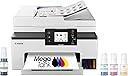
The Canon MegaTank MAXIFY GX2020 is a compact all-in-one inkjet printer designed for hybrid professionals who demand high-quality, cost-efficient printing. Featuring a refillable tank system that delivers up to 3,000 black and color pages per ink set, dual-band wireless connectivity, a 35-sheet automatic document feeder, and a user-friendly 2.7-inch touchscreen, it streamlines print, copy, scan, and fax tasks with duplex printing and versatile media support. Backed by a 3-year warranty, itโs the smart choice for home and office productivity.


| ASIN | B0CHLHDHRT |
| Additional Printer Functions | All In One |
| B&W Pages per Minute | 15 |
| Best Sellers Rank | #8,868 in Office Products ( See Top 100 in Office Products ) #122 in Computer Printers |
| Brand | Canon |
| Built-In Media | Documentation & Power Cord, Fax Modular Cable, MAXIFY GX2020, MAXIFY GX2020 Wireless MegaTank Small Office All-in-One Printer, Set Up Ink Bottles (GI-25: BK, C, M, Y) |
| Color | White |
| Color Depth | 24 bpp |
| Color Pages per Minute | 10 |
| Compatible Cartridge | GI-25 Pigment-Based Ink Bottles (Cyan, Magenta, Yellow, Black) |
| Compatible Devices | PC |
| Connectivity Technology | USB, Wi-Fiยฎ (Wireless LAN, 2.4/5 GHz, IIEEE 802.11b/g/n/a/ac), Wired LAN 100BASE-TX / 10BASE-T |
| Control Method | Touch |
| Controller Type | Touch Screen |
| Customer Reviews | 3.9 out of 5 stars 860 Reviews |
| Display Type | LCD |
| Duplex | Automatic |
| Global Trade Identification Number | 00013803359497 |
| Hardware Interface | USB |
| Ink Color | Cyan, Magenta, Yellow, Black |
| Item Dimensions D x W x H | 14.8"D x 15"W x 8.9"H |
| Item Type Name | Inkjet Printer |
| Item Weight | 17.8 pounds |
| Manufacturer | Canon |
| Maximum Copy Resolution Black and White | 1200 x 2400 dpi |
| Maximum Copy Resolution Color | 1200 x 2400 dpi |
| Maximum Copy Speed Black and White | 14 pages_per_minute |
| Maximum Media Size | 8 x 10 inch |
| Maximum Print Resolution Black and White | 1200 x 2400 dpi |
| Maximum Sheet Capacity | 250 |
| Maximum print Resolution Color | Up to 600 x 1200 dpi |
| Model Name | MAXIFY GX2020 |
| Model Number | 6171C002 |
| Model Series | Canon MegaTank MAXIFY |
| Number of Drivers | 1 |
| Number of Trays | 2 |
| Other Special Features of the Product | Auto Document Feeder, Energy Star, Touch Screen |
| Output sheet capacity | 250 |
| Paper Size | Cassette: LTR, A5, B5, A4, 4" x 6", 5" x 7", 7" x 10", 8" x 10" Custom Size: 3.5โ - 8.5โ / Length: 5.0โ x 14.0โ |
| Power Consumption | 22 watts |
| Print media | Envelopes, Glossy photo paper, High-resolution paper, Paper (plain) |
| Printer Connectivity Type | USB, Wi-Fiยฎ (Wireless LAN, 2.4/5 GHz, IIEEE 802.11b/g/n/a/ac), Wired LAN 100BASE-TX / 10BASE-T |
| Printer Output Type | Color |
| Printer Type | Inkjet |
| Printing Technology | Inkjet |
| Resolution | 600 x 1200 dpi |
| Scanner Type | Flatbed |
| Special Feature | Auto Document Feeder , Energy Star, Touch Screen |
| Specific Uses For Product | Multi-Purpose |
| Total Usb Ports | 1 |
| UPC | 013803359503 |
| Unit Count | 1 Count |
| Warranty Description | 3 year |
| Warranty Type | Limited |
| Wattage | 22 watts |
D**E
We love it!
Great picture quality, I really like the ink bottle system, but I can't testify to savings in ink yet. The auto sheet feeder works well; it copies and scans very well. The software set up easily and the networking too. I really like the software interface. I was pleasantly surprised as being used to the crap I get from my old printer. It scans in high res. and prints very nice too. It's a good buy for the money.
L**B
Ink hog really bad
I absolutely love this but it seems to be an ink hog itโs still new weโve only printed about 10 pages is pushing it and we are down two black inks near empty and I mean shake it add water to get it all kind of low just showing on the bottom edge and all other colors are not printing right shows sign of no ink but we havenโt been prompted to buy more yet the first prints were amazing but what I love about it is it actually works Iโve tried every brand this is my first canon anything but it came highly recommended I just wish these companies would stop with never enough ink full ink prints beautifully then it starts looking ink less printing it is super easy to set up and use no connectivity problems itโs WiFi itโs built Durability, color quality is perfect while you get it. No paper jams the features Iโm not at all techy Iโm 57 and missing the old home phone and dial up modem this was so easy for me to set up it has a lot of features I just donโt know what Iโm doing anymore. I havenโt figured out if it has a grey scale option I would choose that. But again I am technically retarded in the truest sense of the word. Crazy easy connectivity like I said I set it up it was that easy
S**E
I don't recommend this printer
I cannot express how much I do not like this printer. And note that, the only reason why it gets one โญ instead of none is because #1, we can't and #2 it does print black and white documents well and at a decent pace. I did research on photo printers and this one came up time and time again as a good quailty printer. For plain documents with no images, sure. But for it to boast that it does great photo printing, it absolutely does not. This printer is a terrible photo or image printer. And yes, I checked the types of paper that are compatible with it. Let me tell you why I dislike it so much... -Images are blurry and dull. (I tried the Canon print app, the Canon create app, just plain printing from the open photo, and from Publisher. The last was the best, but still not great.) - EVERY SINGLE TIME you load the paper, you have to select the paper size. For 8 1/2 X 11, standard size paper, you just have to click that setting each and every time. But outside of that, different names for the sizes without explanation are a hassle to figure out, and then when you're printing you have to select the size that you put in the paper tray. It doesn't seem complicated , extra yes, but complicated you wouldn't think so... until for instance you put 5x7 envelope paper in the tray and you choose the setting envelope (not D10), and then when you try to print on said envelope it won't print. Why?! why!? If the printer thinks that what you're printing isn't the same as what you put in the tray based on the settings, it won't print. So even though I put the envelopes in the tray, and I set it to envelopes, and then I tried to print envelopes, they still wouldn't print regardless of what app I used. I had this with several things I tried to print that we're not envelopes, and for the record, there are only two envelope settings. I tried printing on eight and a half by 11 cardstock and it wouldn't print because I didn't select the right option (but note, weight options aren't clear or specified), but heavyweight paper and cardstock weren't options on the printer so I couldn't get them to print and you can't choose plain paper for everything because that won't print either. You can't use plain paper and try to print photos because that won't print! It makes no sense! -Most of the paper settings aren't American standard, several of them are Japanese specific paper settings and sizes, that even though I looked them up, I still couldn't figure out how to make the printer print. I tried the Canon FAQs and help site, and it was not as helpful as they thought it would be. There were a few okay features: - The starter ink is a lot. More than an entire fill for each color. -It does print regular B&W documents well and pretty quickly. -After you connect the first device for wireless printing, it's really easy to connect other devices. Those were worth the 1 star. I would never recommend this printer to anyone. I don't even want to keep it myself. Even though I got a deal, it's not a deal if it doesn't do what you need it to.
B**N
Highly recommended Canon Maxify GX2020
I have done a lot of research on ink tank printers and landed on the Canon Maxify GX2020. I was so tired of replacing my HP cartridges that never seemed to last. Also HP doesnโt allow off brand cartridges to be used so goodbye HP. After using for several weeks, I couldnโt be more happier with my purchase. The set up was extremely easy on my Mac computers. Once I downloaded the app on my iPhone, that was also a seamless process to hook up. Printing from my computer or from my iPhone phone via WiFi is extremely efficient. The tray holds over 250 sheets of paper, and you can print scan and fax from the computer. Iโve been printing for several weeks and havenโt even noticed the ink level go down. The printer is quiet and is much faster than most ancient printers. I have not had a single paper jam and not have any problems since I started using it. The printer and color quality seems very good. I would highly recommend this printer as a reasonable priced ink tank printer.
G**R
Not great with cardstock UPDATED REVIEW
Updated January 2025: After using the printer for 6 months, I have discovered that if you print on card stock one side at a time instead of duplex, it doesnโt come out with the curl. We printed over 100 Christmas cards and they came out fine this way. Print quality is decent. After 6 months of use and printing hundreds of pages, most in color, the ink levels are down by only about 1/3! The printer is loud and makes odd noises but seems to be working fine. Overall rating 4 stars. End of update. I purchased this printer to replace my years-old Canon MX922 (best printer ever!). I specifically bought the new GX2020 to handle cardstock, since I print on it frequently. Every piece of cardstock I have printed on has come out with a very pronounced curl, which does not resolve even after drying. In addition, when printing on cardstock, I recommend using the standard print setting, not the high quality. When printing cardstock in high quality, there are many streaks and smudges on the card. Printing cardstock with standard print setting yields acceptable results, although still with the curl. The other functions of the GX2020 work well and give great results when printing on plain paper. Text and images are sharp and colors are very good. Two-sided printing works well also. Scanning and copying are easy and give good results. Two-sided scanning takes a little work, but is not too bad. Photo printing on glossy paper was adequate but not great. The liquid ink seems like it will be a great money saver compared to individual ink tanks like the MX922 used. The associated app for printing and scanning from a phone works well on my spouse's Android. It did not work on the iPhone but I can print using Apple print, so I deleted the app. Overall, I'd give the printer a 4 star rating for everyday printing, although I am disappointed that the main purpose I bought it for is not satisfactory which is why I am giving it 3 stars.
R**D
Setup was easy!
So far so good. Set up was a breeze...just follow the start guide that comes with it. I've only printed a few pages and used the scanner so far. Everything works like it should. I do wish it came with an actual owners manual. You have to go to Canon's website to view it...you already have to go to it to download the program to finish set up anyways. Printing is a little slower than expected, not much difference in the Canon Pixama I already have. The ink bottles are much cheaper than the ink jet cartridges and I would say you will get many more prints from each replacement pack. I'll update my review once I really get going with it. But set-up for me was easy and pretty straight forward. Once you power up the printer, follow the setup prompts on the color touch screen. You do get what looks like inkjet cartridges with this printer...they are in fact the print heads that instal just like ink cartridges, dont forget to remove the orange tape from the print heads before installing. There is about a 12 min self alignment process the printer does during setup. Printing wirelessly from both my laptop and phone has been spot on with no issues. There is a user replaceable "maintnance cartridge". This is basically a catch tank for excess ink during printing. I went with Canon megatank over an Epsom Ecotank only because I'm familiar with Canons print functions and software. So far, I'd recommend the Canon Megatank printer.
O**T
Could not love this printer more!
Bought this printer nearly a year ago for my 90-year-old mother who prints the internet everyday. She's a little demanding of a printer. She needs decent speed, she needs good quality printing, and she needs high capacity paper cassettes and high capacity print tanks. She also needs a large colored LED screen. She needs all these things because arthritis has robbed her of dexterity, she can't see those small black on dark gray screens (neither can I), She doesn't want to mess with constantly trying to get the wireless connection back up. She needs to just be able to print from her laptop in her house and have it actually work. Of course if she can't get her printer to work she's forced to call me and I get to go over to her house and try to straighten it out. She hates to do that of course so she tries to change the ink or whatever on her own and sometimes that breaks the cheap junk printers that everybody seems to make these days. Not having to change out the ink cartridges and put paper constantly into a tiny cassette solves these problems. This printer is expensive but it has paid for itself it in just my time savings. Much more importantly, she's happy! This printer is well made especially compared to most of what you can buy today. The setup was easy. I have had to set up a lot of harder to set up printers, especially HPs, on her network. And it has so far stayed set up which is great.
F**R
It does NOT SCAN LEGAL!! Otherwise good printer
I made the mistake of assuming that because this printer supports legal-size printing, it would also scan legal-size documents. It does not. That limitation should have been made much more obvious in the product description. Since this information was buriedโand Iโm still trying to find where it was disclosedโI canโt rate the printer any higher. Otherwise, it performs as advertised. Print speed is good, and the print quality is very good. For comparison, I previously owned an HP OfficeJet, which I actually preferred. However, HPโs refusal to allow the use of third-party ink cartridges made it too expensive to keep. One advantage of this Canon is that it accepts compatible third-party ink. That said, the Canon does not feel as durable or as well-built as the HP, and I would not recommend it for a busy office environment. For light home use, however, it performs well.
N**Y
It works
Setup was easy. So far so good
E**Y
Great and easy to use
Amazing, love that you can physically see the liquid ink levels
J**L
IT WORKS VERY WELL, great price
This printer is packed well! Pulling the printer out of the box is smooth and easy. Inside is the manual, couple with other items, the cord, the telephone connection and ground wire. The setup is so easy by following the direction on the printer screen. The setup direction was user friendly including the wifi setup. One feature I was very impressed with, while the printer is off. You can send a printing request, it turns itself on and prints the requested info.
P**H
Decent Printer.
The printer works great, with print quality, especially photo printing, not the best.
D**R
Nice printer !
The printer does his job where good .
Trustpilot
3 weeks ago
3 weeks ago