

Desertcart purchases this item on your behalf and handles shipping, customs, and support to Greece.
🚀 Elevate your workspace with the ultimate 18-port Thunderbolt 4 powerhouse!
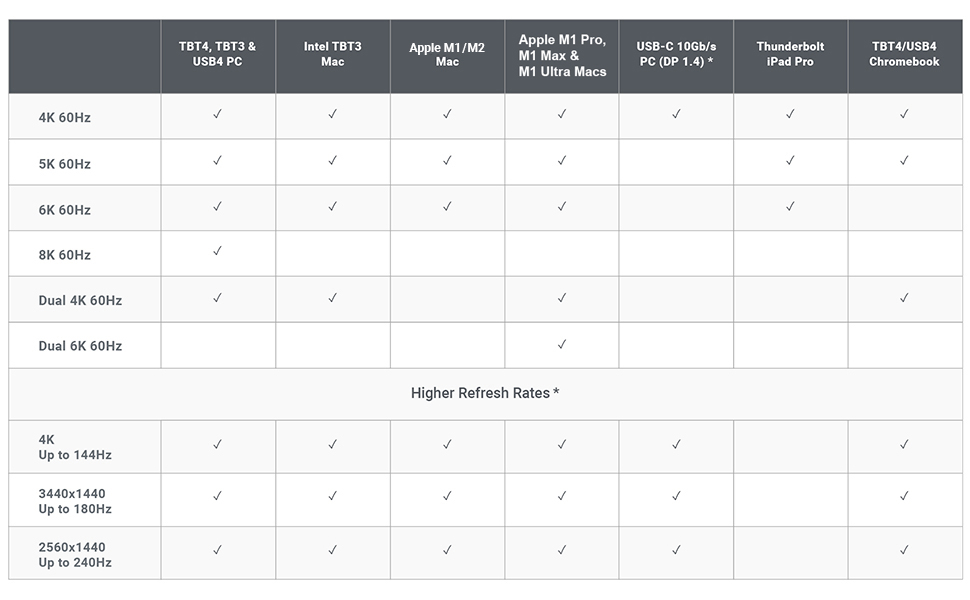
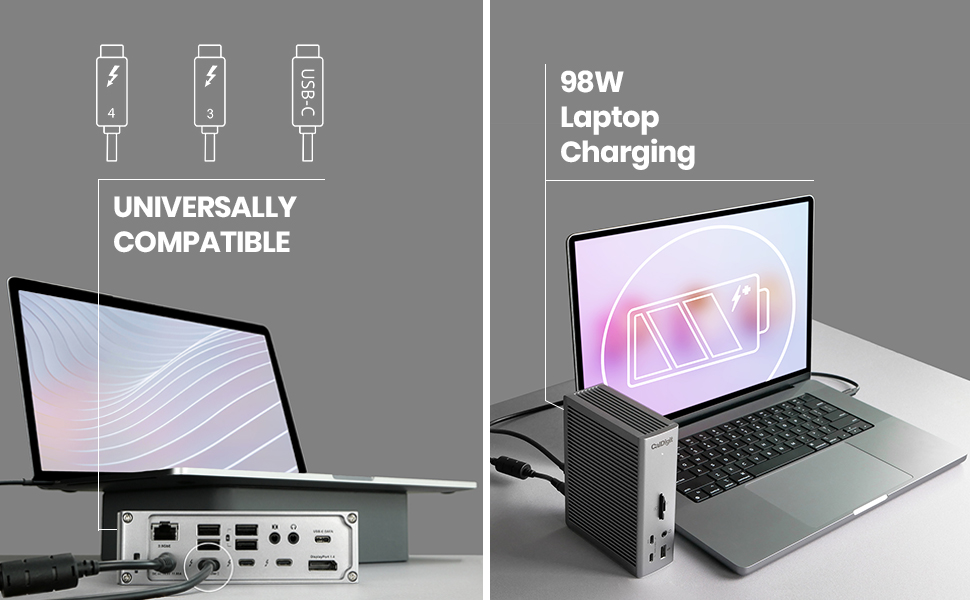
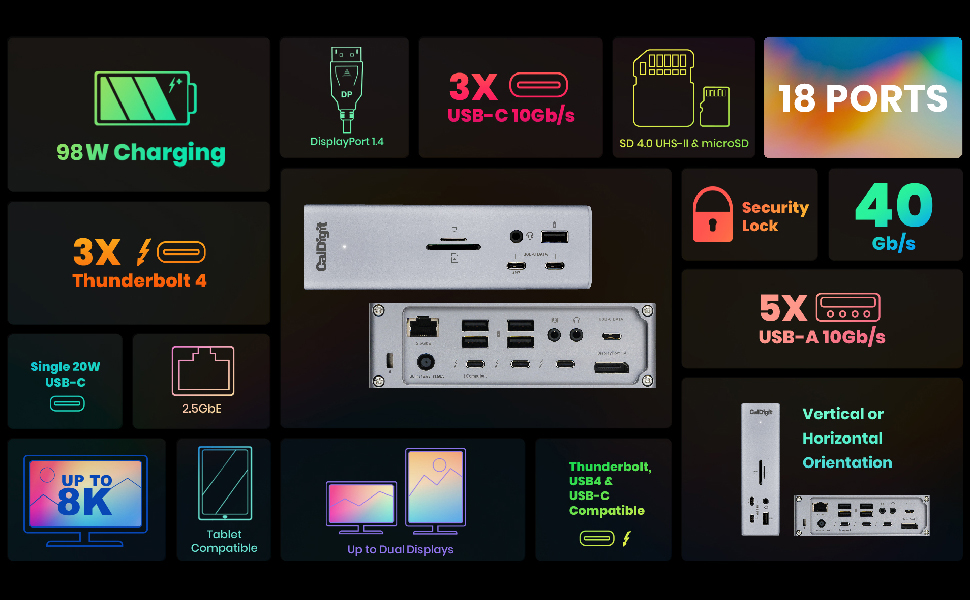
The CalDigit TS4 Thunderbolt 4 Dock is a premium 18-port docking station delivering blazing 98W charging, ultra-fast 2.5GbE networking, and support for single 8K or dual 6K displays. Compatible across Mac, Windows, and Chrome OS, it’s engineered for professionals who demand seamless connectivity and power in one sleek, space-gray hub.



| Asin | B09GK8LBWS |
| Best Sellers Rank | #10,634 in Computers (See Top 100 in Computers) #51 in Laptop Docking Stations |
| Brand | CalDigit |
| Color | Space Gray |
| Compatible Devices | Dell Latitude 7370, MacBook Air, MacBook Pro |
| Customer Reviews | 4.2 4.2 out of 5 stars (1,674) 4.2 out of 5 stars |
| Hardware Interface | Thunderbolt, Thunderbolt 4, USB 3.0 Type C, USB 3.1 Type A, USB 3.1 Type C, USB 3.2 Gen 2×2, USB Type C |
| Item Dimensions L X W X H | 11.3L x 4.2W x 14.1H centimeters |
| Item Type Name | Thunderbolt 4 Docking Station |
| Item Weight | 1.41 Pounds |
| Manufacturer | CalDigit |
| Mfr Part Number | TS4-US 500971 |
| Minimum Required Operating System Version | Mac OS 10.12 Sierra, Windows 10 |
| Model Number | TS4-US 500971 |
| Number Of Items | 1 |
| Number Of Packs | 1 |
| Number Of Ports | 18 |
| Total Usb Ports | 3 |
| Unit Count | 1 Count |
| Wattage | 230 |
User
fake prodact
the box is for the ts4 , and the item inside is the older model ts 3 !!!
User
La mejor decisión de compra
Excelente producto, real mente el costo es alto pero vale la pena la inversión, muy funcional, el único detalle que yo le veo es que solo tiene 2 puertos usb c de 10 gb, me hubiera gustado que todos los puertos usb c fuera de alta velocidad 10 gb, pero muy satisfecho
User
Robust and Reasonable
The TS4 arrived earlier than exepected and as was said in other reviews this is.solid piece of electrical equipment. Took all of 5 minutes to setup and get working, downloaded the software from the internet and has worked flawlessly since. I have the Macpro Desktop that should be able to handle a 4k monitor, 2 30 inch Cinema on Dual dvi and one HDMI with 1920x1080.. The Macpro can’t handle the load so I thought I would try hooking the 2 30inch Apple cinemas with dual DVI conveters/USBs and voila it’s cooking with gas.The MacPro had the 4k monitor and HDMI outputs and functions perfectly with the TS4 running the Apple cinemas. Couldn’t for the life of me get the HDMI out[it to function on the Mac-ro after the recent upgrade and change of the display function, OWC used ti be my go to for Mac products, CalDigit is now.Cheers Cliff
User
Absolute lifesaver
Love it!!!! Makes plugging in my MIDI keyboard, Ableton Push 2, 2x monitors, keyboard, mouse, and 4TB SSD into my MacBook Pro so easy. Because it has its own power supply, it doesn't drain the laptop battery or overload the ports. Having all these high-demand machines connected to a stable power source completely eliminates random disconnects, glitches, and hardware crashes. Absolute lifesaver for my studio setup!
User
One of the Best docks you can buy!
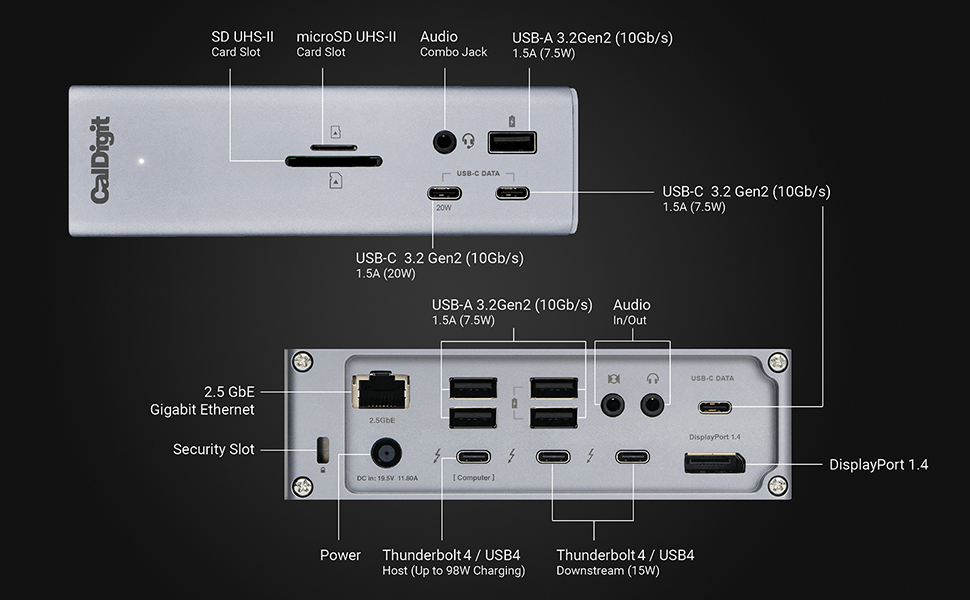
I’m what is known as a Power User. First let me tell you what I’ve hooked this up to. I recently bought an HP Windows 11 - 17” Laptop. It has 64 Gig of Ram and a 4 TB SSD drive. It comes with 2 USB C Thunderbolt 4 ports (40 Gig). One of them is used for charging the Laptop. It also comes with 3 USB A Ports (10 Gig). Unfortunately it doesn’t come with an Ethernet Port.I bought this incredible Dock for its Ethernet Port and all the other Ports that come with it. It has 3 Thunderbolt 4 (40 Gig) Ports. I use one for charging the Laptop and the other 2 I can use for a lot of other things like copying large SSD Chips etc. it also comes with another 3 USB C Ports (10 Gig each) and 5 USB A Ports (10 Gig each). I can hook up everything I always wanted to this baby!Some people complain that when copying large amounts of data it doesn’t work well. Thats because the people are trying to copy too much at a time and the Chip they are copying to gets overheated. If you copy the correct way you’ll have no problems. I only copy 200 to 300 Gig at a time and then wait awhile for the Chip to cool down before I copy more.Some people complain that their Dock burns out in so many months or a year or so. Thats because they load the Dock with way too many things being used at the same time. Just because it has up to 18 plug-ins doesn’t mean you can use a lot of them always at the same time and not expect the Dock to overheat and eventually burn out. Look at the Specs. It says it can charge up to 98 Watts for your Laptop. The Dock is rated at 240 Watts. In real life it’s only going to be about 200 or so Watts Maximum. So while charging your Laptop you have about 100 Watts left to use for other things that you can plug into the Dock. If the Total of what you are plugging into the Dock goes above 200 or so Watts, then the Dock will start overheating and eventually it will burn out. Common sense right?I’ve bought a few docks in the past that I wasn’t satisfied with. Although this Dock is very pricey it’s worth every cent if you want your Computer to be able to have all the Ports you’ll ever need. It’s almost future proof and is the best one I’ll found so far that is powerful enough to allow you to do anything with your set up! Read the Specs and see if you can find any other Dock that comes close to it!I highly recommend this unit. And btw, if for some reason you get a bad one, just remember that no matter what you buy you could get something once in a blue moon that doesn’t work. Nothing is perfect. When thousands of a product is made there is always going to be a few duds. Simply ask for a working unit from the company. Don’t cry and say “mine was dead on arrival and I will never buy from them again!”. That sounds like a very stupid person saying things like that.Make sure if you use USB C Cables for the Thunderbolt Ports that they are Thunderbolt 4 or 3 Cables rated for 100 to 240 Watts. Anything less and you might as well forget using them as they really won’t work the way they should (up to 40 Gig read and write)If you use USB A Cables, make sure they are at least 3.2 Gen. 2 to get the max out of this Dock (up to 10 Gig read and write). If you use USB C Cables then use Thunderbolt 4 or 3 to get the most out of the Dock (Thunderbolt cables are backwards compatible with all versions of USB C). However you can use any cables you want if you don’t care about using this Dock at its best. But if that’s the case then why bother buying it in the first place!Also remember that those fast speeds also depend on how fast your Computer or Laptop is (and whatever you are plugging into the USB A or USB C or Thunderbolt Ports). If you have an old or slow piece of garbage computer or Laptop, don’t expect this Dock to be able to do miracles.If you want a really great Dock that can do just about everything (see its Specs) then this is the Dock for you!
User
احذر قد لايناسبك
يحتر جدا حرارة عالية تقطيع في تشغيل الفيديو بجودة4K
Trustpilot
2 days ago
2 weeks ago