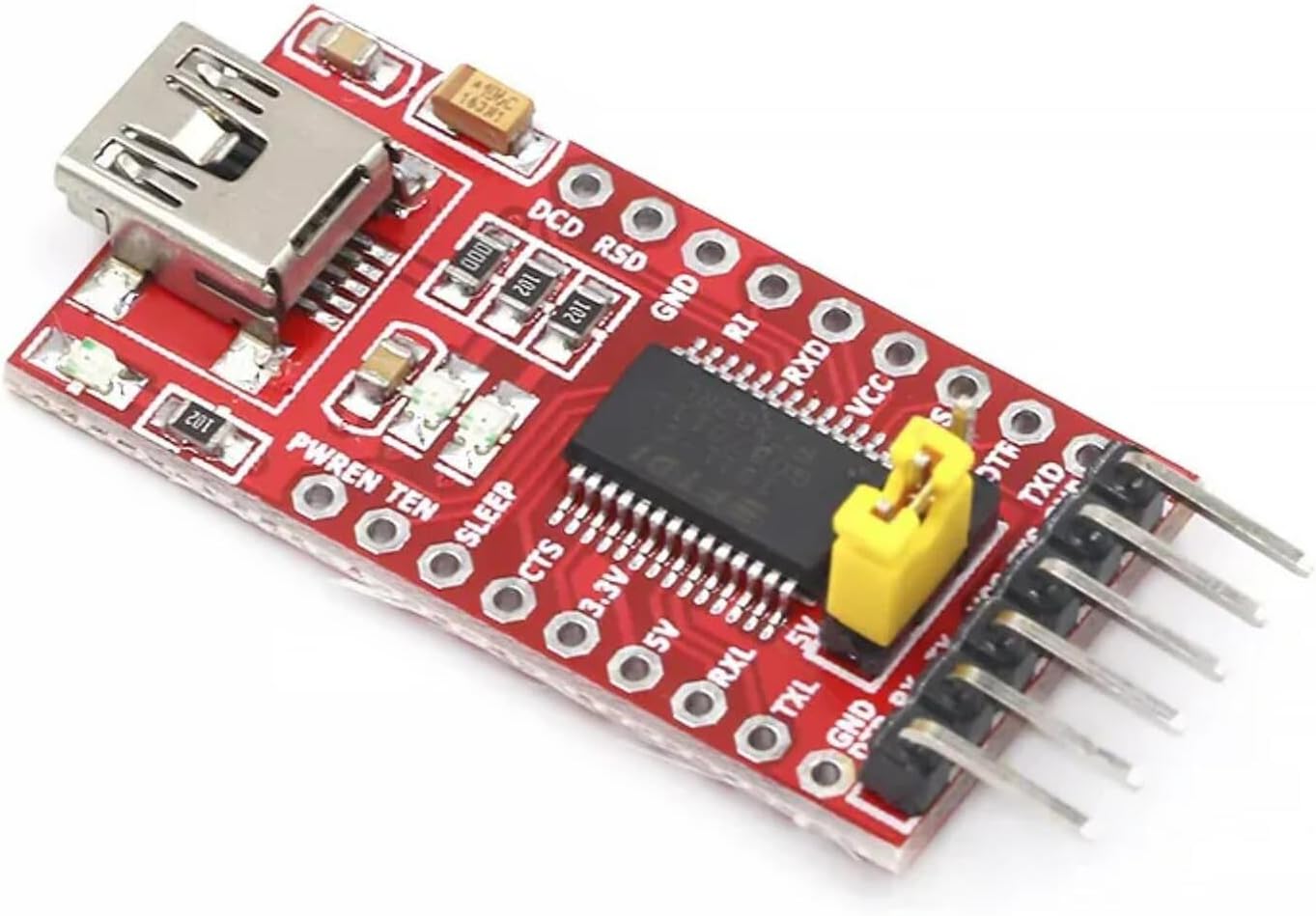
🔗 Connect Like a Pro: The Mini USB-TTL Adapter That Powers Your Projects Effortlessly
The HiLetgo FT232RL Mini USB to TTL Serial Converter Adapter Module is a compact, lightweight device designed for reliable USB to serial communication. Featuring the FT232RL chipset, it supports a flexible voltage range of 3.3V to 5.5V and is compatible with Windows 95 through Windows 7 (32/64-bit). Ideal for programming microcontrollers and automotive ECU tuning, it boasts a strong 4.5-star rating and is a top choice for professionals seeking dependable serial connectivity.
| ASIN | B00IJXZQ7C |
| Best Sellers Rank | #30 in Serial Adapters |
| Brand | HiLetgo |
| Color | Red |
| Compatible Devices | Laptop, Desktop |
| Connector Type | Mini USB |
| Current Rating | 500 Milliamps |
| Customer Reviews | 4.5 4.5 out of 5 stars (1,219) |
| Input Voltage | 5.5 Volts |
| Item Dimensions | 6 x 0.5 x 4 inches |
| Item Weight | 0.01 Kilograms |
| Manufacturer | HiLetgo |
| Model Number | 3-01-0661-1 |
| Number of Items | 1 |
| Number of Ports | 1 |
| Package Quantity | 1 |
| Power Plug Type | No Plug |
| Specific Uses For Product | personal |
| UPC | 509049833148 |
| Unit Count | 1.0 Count |
J**N
Works like a charm!
Works like it should. Used it to program an atmega1284p without any trouble! In fact, it worked so quickly without problems that I thought it wasn’t working!
S**F
Works well for GM 1.5 ecu's
Used this for gm obd 1.5 computer and it worked well. It connected to the car, programmed tunes and was a good price. If you are doing car stuff be sure to have a solid connection between the computer to device to car and set everything on a solid platform if you program. I wiggled my laptop on my lap while programming and bricked a ECU with tunercats. But I trust this device to tune with and will be installing it hard wired to my connections to my obd 1.5 gm ecu's.
Y**Z
Funciona bien para proyectos electrónicos y programación de placas tipo Arduino. Es fácil de usar y permite trabajar tanto con 3.3V como 5V, lo cual es muy práctico. La conexión es estable y cumple su función sin problemas. Lo único a tener en cuenta es que puede requerir instalar drivers dependiendo del equipo, pero una vez configurado trabaja correctamente. Buena opción por el precio.
D**.
Not all FT232RL Functions Supported
For the price, this is a very nice FT232RL-like USB-to-Serial converter board. I like that it breaks out all of the pins to solder pads to make it easy to integrate into projects and connect things as needed. For basic communications, it does a decent job. I remove a star, however, because it doesn't support all FT232RL functions. I know it's not a genuine FT232RL chip, and I really appreciate the seller disclosing that in the product description and on their website. So I wasn't expecting a "perfect" FT232RL clone. However, what is missing is a detailed description about the differences between this clone and the real FT232RL chip. I needed an adapter that could support Tx/Rx signal inversion to communicate with a single-wire half-duplex FrSky S.port -- something that the real FT232RL chips can do. I was able to use the ft232r_prog tool on Linux to read the EEPROM settings from this board, and the settings read out just fine and reported reasonable values for how it was configured. However, it refused to accept the setting changes to invert the Tx/Rx signals and it would simply switch those settings back to defaults. Those were the only two options I needed to change, so I didn't spend a lot of time trying all of the other option combinations to see what it would accept and what it wouldn't. I assume some of the options, perhaps LED settings or something, might be supported. But, I had no choice for my project except to switch to a board with a real FT232RL chip (a SparkFun board to be exact) and it worked just fine with Tx/Rx inversion, albeit at nearly three times the price. I do like this board and will keep it for other projects that don't require special configuration. For basic communication, I recommend it as a cheap alternative. But, be aware if you need to reconfigure this chip, it doesn't support all FT232RL options that the real FT232RL supports. And they don't tell you exactly what features it supports and what it doesn't. Also, if you are on Windows, the FTDI device drivers might render this board inoperative by changing its USB VID/PID values so Windows won't load the device driver for it. I use Linux, though, and had no problems using this board, except for the special configuration options that it doesn't support.
R**R
Works great
These work great. This is the second one I've bought.
T**S
Used it to mod my car's infotainment center.
I used this to hack my '17 Yaris iA's infotainment center (which is identical to what is in a Scion iA and Mazda3, I believe.) It worked as well as any debugger. A couple dupont jumpers into the appropriate harness, a gator clip to the fins of a heatsink for ground, fired up PuTTY, stuck a stock firmware update image on a USB drive alongside the mod patches/program and ran the update in the car. I watched in the console window as it did it's thing, leaving me with a root shell afterward to run the patches and mods. And now I can mirror my phone, enable touch while driving, turn my car into a WiFi hotspot, play video files on the screen, use custom interface themes/backgrounds/animations, and a whole plethora of neat features. Not bad for <$10 and an afternoon of effort. Lately, I've been getting more into STM32 microcontrollers to make DIY music instruments (Teensy, Daisy Seed, Arduino), so I think this debugger might be relevant there as well and get a second life. I keep it with the cheap STLink V2 clone in my tools, and a coil of 6" dupont jumpers in case the kit is ever needed.
G**U
It does work!
It could be faked FTDI chip as others claimed. But, to be fair, it does work for its purpose. I used it to flash several ESP8266 based SonOff devices many times. There are two things I learned in the process though I would like to share: 1) This chip could output 3.3v or 5v. It is on 5v when I got it. You can switch to 3.3v using the jumper close to the output pins. If you are flashing ESP8266 devices like me, make sure you switch to 3.3v first! 2) Make sure the USB cable you use to connect this to your computer is a data cable, not a charging only cable. This was the reason it did not work for me at first.
R**O
Excelente
T**N
this worked well for my to flash a custom firmware on my SONOFF zigbee-router to enable it to connect to Home Assistant without using WiFi.
D**N
Good
A**S
good
V**P
Seller not responding , this item is different from what displayed . It not works on computer .either it is faulty or replaced item sent to me. Driver not install properly .i just request to replace or change the item with what is shown in advertisement on Amazon, i reviewed my star from 2 to 4. Besides it's not as shown in ad, but after many attempt ,it worked and I programmed my transciever.
Trustpilot
3 weeks ago
1 month ago